1. ആമുഖം
The TRIGKEY S5 Mini PC is a compact and powerful desktop computer designed for various tasks, from daily computing to demanding applications. Featuring an AMD Ryzen 5 5560U processor, it offers efficient performance and supports Ultra HD 4K@60Hz dual display output. This manual provides essential information for setting up, operating, maintaining, and troubleshooting your Mini PC.
പ്രധാന സവിശേഷതകൾ:
- High-speed AMD Ryzen 5 5560U Processor (up to 4.0 GHz)
- Ultra HD 4K@60Hz Dual Display Output
- Support for WiFi 6 and Bluetooth 5.2
- Expandable RAM and Storage (M.2 NVMe SSD + 2.5" HDD/SSD)

ചിത്രം 1.1: മുൻഭാഗം view of the TRIGKEY S5 Mini PC.
2. പാക്കേജ് ഉള്ളടക്കം
Please check the package contents carefully. If any items are missing or damaged, contact TRIGKEY customer support.
- TRIGKEY S5 മിനി പിസി
- ഉപയോക്തൃ മാനുവൽ
- മതിൽ ഘടിപ്പിച്ച ബ്രാക്കറ്റ്
- HDMI കേബിളുകൾ
- Power adapter (with regional plug type)
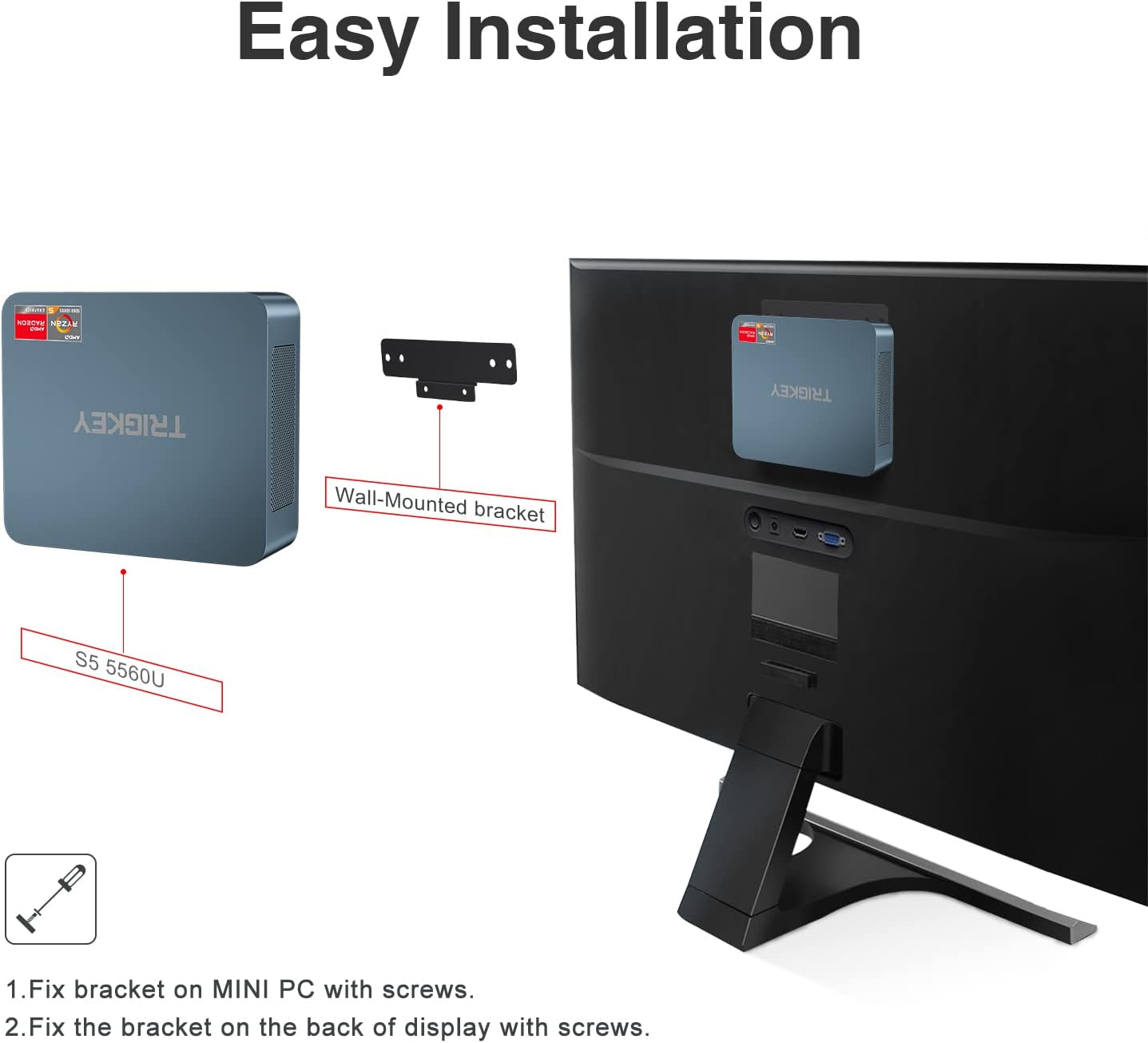
Image 2.1: Included accessories for the TRIGKEY S5 Mini PC.
3. ഉൽപ്പന്നം കഴിഞ്ഞുview
The TRIGKEY S5 Mini PC features a range of ports for versatile connectivity and compact dimensions for easy placement.
3.1. പോർട്ട് ലേഔട്ട്

Image 3.1: Front and rear port layout of the TRIGKEY S5 Mini PC.
- ഫ്രണ്ട് പാനൽ:
- CLR CMOS Button: Used to clear CMOS settings.
- യുഎസ്ബി 3.2 ജെൻ 2 പോർട്ടുകൾ: Two high-speed USB ports for connecting peripherals.
- ടൈപ്പ്-സി പോർട്ട്: One USB Type-C port for data transfer.
- ഇയർഫോൺ ജാക്ക്: For audio output.
- പവർ ബട്ടൺ: To turn the device on or off.
- പിൻ പാനൽ:
- ലാൻ പോർട്ട് (1000Mbps): വയർഡ് നെറ്റ്വർക്ക് കണക്ഷനായി.
- USB 2.0 പോർട്ട്: One USB port for connecting peripherals.
- HDMI Ports (4K HD): Two HDMI ports for connecting displays, supporting up to 4K@60Hz resolution.
- DC ഇൻപുട്ട്: For connecting the power adapter.
3.2. Dimensions and Connectivity
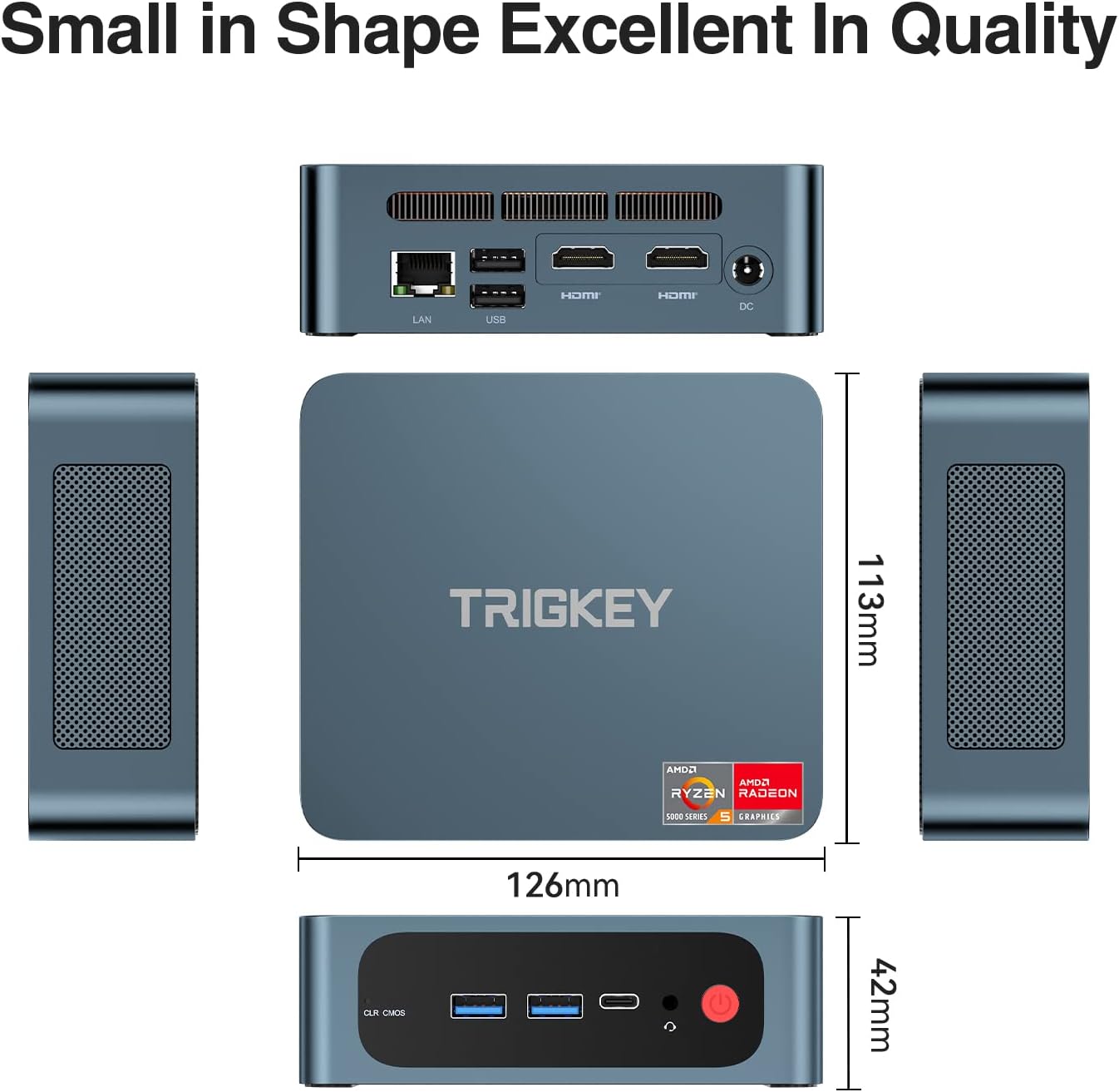
Image 3.2: Physical dimensions and wireless connectivity features.
The Mini PC measures approximately 12.6 x 21.3 x 5.7 centimeters. It supports WiFi 6 for faster and more reliable wireless network connections, and Bluetooth 5.2 for connecting wireless peripherals with lower latency.
4. സജ്ജീകരണം
Follow these steps to set up your TRIGKEY S5 Mini PC:
- പെരിഫറലുകൾ ബന്ധിപ്പിക്കുക: Connect your monitor(s) to the HDMI ports, keyboard, mouse, and other USB devices to the available USB ports.
- പവർ കണക്റ്റുചെയ്യുക: Plug the power adapter into the DC input port on the Mini PC, then connect the adapter to a power outlet.
- പവർ ഓൺ: Press the power button on the front panel to start the Mini PC.
- Initial Operating System Setup: Upon first startup, follow the on-screen instructions to complete the operating system setup (e.g., Windows 11).
4.1. വാൾ മൗണ്ടിംഗ് (ഓപ്ഷണൽ)
The Mini PC can be mounted on the back of a monitor or other suitable surface using the included bracket.
- Attach the wall-mounted bracket to the Mini PC with screws.
- Fix the bracket to the back of your display or a suitable surface with screws.

Image 4.1: Installation of the Mini PC using the wall-mounted bracket.
5. പ്രവർത്തന നിർദ്ദേശങ്ങൾ
5.1. മൾട്ടി-ഡിസ്പ്ലേ സജ്ജീകരണം
The Mini PC supports dual display output at 4K@60Hz. Connect up to two monitors using the HDMI ports. Navigate to your operating system's display settings to configure extended or duplicated displays for enhanced productivity.

Image 5.1: Dual monitor setup with the TRIGKEY S5 Mini PC.
5.2. നെറ്റ്വർക്ക് കണക്റ്റിവിറ്റി
- വയർഡ് കണക്ഷൻ: Connect an Ethernet cable to the LAN port for a stable wired network connection.
- വയർലെസ് കണക്ഷൻ: The Mini PC supports WiFi 6 for high-speed wireless internet access. Connect to your preferred Wi-Fi network through the operating system settings.
5.3. പിന്തുണയ്ക്കുന്ന ഓപ്പറേറ്റിംഗ് സിസ്റ്റങ്ങൾ
The Mini PC is compatible with various operating systems, including Windows 10 Pro, Windows 11, and Linux, allowing for flexible usage based on your preferences.
5.4. വിപുലമായ പ്രവർത്തനങ്ങൾ
The Mini PC supports practical functions such as Wake-on-Power, Wake-on-LAN, RTC Wake Settings, and PXE Boot, catering to diverse daily needs.

Image 5.2: Various usage scenarios for the Mini PC.
6. പരിപാലനവും നവീകരണങ്ങളും
The TRIGKEY S5 Mini PC is designed for easy maintenance and upgrades to enhance its performance and storage capacity.
6.1. RAM Upgrade
The Mini PC supports up to 64GB DDR4 3200MHz RAM in a dual-channel configuration. To upgrade, carefully open the chassis, locate the RAM slots, and install compatible memory modules. Ensure proper handling and static discharge precautions.

Image 6.1: DDR4 RAM modules compatible with the Mini PC.
6.2. സംഭരണ വിപുലീകരണം
The device comes equipped with an M.2 NVMe SSD, offering fast storage performance. It also supports adding a 2.5-inch SSD or HDD for expanded storage, up to 2TB. This allows for significant storage capacity for your fileകളും ആപ്ലിക്കേഷനുകളും.

Image 6.2: Illustration of DDR4 RAM and M.2 NVMe SSD components.
6.3. ഡ്രൈവർ ഇൻസ്റ്റാളേഷൻ
If drivers are not automatically detected by the operating system, refer to the official TRIGKEY website for the latest driver downloads and installation instructions.
7. പ്രശ്നപരിഹാരം
This section addresses common issues you might encounter with your Mini PC.
- ഡിസ്പ്ലേ ഔട്ട്പുട്ട് ഇല്ല:
- Ensure all display cables (HDMI) are securely connected to both the Mini PC and the monitor.
- മോണിറ്റർ ഓൺ ചെയ്തിട്ടുണ്ടെന്നും ശരിയായ ഇൻപുട്ട് ഉറവിടത്തിലേക്ക് സജ്ജീകരിച്ചിട്ടുണ്ടെന്നും ഉറപ്പാക്കുക.
- Try connecting to a different monitor or using a different HDMI cable.
- പവർ ഇല്ല:
- Check if the power adapter is correctly connected to both the Mini PC and the power outlet.
- പവർ ഔട്ട്ലെറ്റ് പ്രവർത്തനക്ഷമമാണെന്ന് ഉറപ്പാക്കുക.
- സിസ്റ്റം മന്ദഗതിയിലാക്കൽ:
- പശ്ചാത്തലത്തിൽ പ്രവർത്തിക്കുന്ന അനാവശ്യ ആപ്ലിക്കേഷനുകൾ അടയ്ക്കുക.
- Check for background processes consuming high resources using Task Manager (Windows) or System Monitor (Linux).
- Consider upgrading RAM or ensuring sufficient free storage space on the SSD.
- ഡ്രൈവർ പ്രശ്നങ്ങൾ: If a device is not recognized or functioning correctly, download and install the latest drivers from the TRIGKEY support webസൈറ്റ്.
- CMOS റീസെറ്റ്: If experiencing boot issues or incorrect BIOS settings, press the CLR CMOS button on the front panel (usually requires a paperclip or similar thin object to activate).
8 സ്പെസിഫിക്കേഷനുകൾ
| ഫീച്ചർ | സ്പെസിഫിക്കേഷൻ |
|---|---|
| ബ്രാൻഡ് | ട്രിക്കി |
| മോഡൽ നമ്പർ | 5560U |
| പരമ്പര | സ്പീഡ് എസ് 5 |
| ഓപ്പറേറ്റിംഗ് സിസ്റ്റം | OS (Windows 11 compatible) |
| ഹാർഡ്വെയർ പ്ലാറ്റ്ഫോം | PC |
| പ്രോസസ്സർ ബ്രാൻഡ് | എഎംഡി |
| പ്രോസസ്സർ തരം | റൈസൺ 5 5560U |
| പ്രോസസ്സർ വേഗത | 2.3 GHz (Turbo up to 4.0 GHz) |
| കോറുകളുടെ എണ്ണം | 6 |
| റാം | 8 ജിബി ഡിഡിആർ 4 (64 ജിബി വരെ വികസിപ്പിക്കാം) |
| ഹാർഡ് ഡ്രൈവ് വലിപ്പം | 500 GB M.2 NVMe SSD (Expandable to 2 TB with 2.5" SSD/HDD) |
| ഹാർഡ് ഡ്രൈവ് ഇൻ്റർഫേസ് | എസ്എസ്ഡി |
| സ്ക്രീൻ റെസല്യൂഷൻ | 3840 x 2160 (4K) |
| ഗ്രാഫിക്സ് ചിപ്സെറ്റ് ബ്രാൻഡ് | എഎംഡി |
| ഗ്രാഫിക്സ് കാർഡ് വിവരണം | സംയോജിപ്പിച്ചത് |
| ജിപിയു | Radeon RX Vega 10 Graphics |
| കണക്റ്റിവിറ്റി തരം | Bluetooth, Wi-Fi (WiFi 6) |
| ഹാർഡ്വെയർ ഇന്റർഫേസ് | HDMI, USB, Ethernet, DisplayPort, Type-C |
| HDMI പോർട്ടുകളുടെ എണ്ണം | 2 |
| USB 3.0 പോർട്ടുകളുടെ എണ്ണം | 4 |
| USB 2.0 പോർട്ടുകളുടെ എണ്ണം | 1 |
| ഉൽപ്പന്ന അളവുകൾ (L x W x H) | 12.6 x 21.3 x 5.7 സെൻ്റീമീറ്റർ |
| ഉൽപ്പന്നത്തിൻ്റെ പ്രത്യേക ഉപയോഗങ്ങൾ | Gaming, Multimedia, Personal |
| സ്പെയർ പാർട്സ് ലഭ്യത | വിവരങ്ങൾ ലഭ്യമല്ല |
| വരെ ഗ്യാരണ്ടീഡ് സോഫ്റ്റ്വെയർ അപ്ഡേറ്റുകൾ | വിവരങ്ങൾ ലഭ്യമല്ല |
9. വാറൻ്റിയും പിന്തുണയും
TRIGKEY is committed to providing excellent customer service and support for your Mini PC.
- വാറൻ്റി: The product comes with a one-year warranty from the date of purchase.
- മടങ്ങുന്നു: A 30-day free return policy is available.
- സാങ്കേതിക സഹായം: Lifetime technical support is provided for your TRIGKEY S5 Mini PC.
- കസ്റ്റമർ സർവീസ്: 7x24 hour customer service is available to assist you with any inquiries or issues.
- ബന്ധപ്പെടുക: For support, please visit the official TRIGKEY website or contact customer service via email. Refer to the product packaging or official webനിർദ്ദിഷ്ട കോൺടാക്റ്റ് വിശദാംശങ്ങൾക്കായി സൈറ്റ്.


