1. ആമുഖം
The STRONG LEAP-S1+ Android TV Box transforms your television into a smart TV, providing direct access to the Google Play Store. Running on the latest Android 10, this Google-certified device offers a vast array of applications, games, and streaming services. Enjoy your favorite content from platforms like Netflix, YouTube, Prime Video, and Disney+. The LEAP-S1+ supports 4K UHD resolution, H.265 decoding, dual-band Wi-Fi 5, and built-in Chromecast functionality. Its integrated Google Assistant allows for voice control of playback, searching for shows, and answering queries. Connectivity options include 2 USB ports (1 x 3.0, 1 x 2.0), Bluetooth 4.2, a Micro SD card slot, HDMI, and Ethernet, ensuring a comprehensive and user-friendly TV experience.

Image: The STRONG Leap-S1+ Android TV Box and its accompanying remote control, showcasing the sleek design of both components.
2. പാക്കേജ് ഉള്ളടക്കം
പാക്കേജിലെ ഉള്ളടക്കങ്ങൾ ശ്രദ്ധാപൂർവ്വം പരിശോധിക്കുക. എന്തെങ്കിലും ഇനങ്ങൾ നഷ്ടപ്പെട്ടാലോ കേടുപാടുകൾ സംഭവിച്ചാലോ, നിങ്ങളുടെ റീട്ടെയിലറെ ബന്ധപ്പെടുക.
- STRONG LEAP-S1+ Android TV Box
- Bluetooth Remote Control (requires 2 AAA batteries, often included)
- പവർ അഡാപ്റ്റർ
- HDMI കേബിൾ
- ദ്രുത ആരംഭ ഗൈഡ്

Image: An illustration showing the contents of the STRONG Leap-S1+ package, including the TV box, Bluetooth remote control, power adapter, and HDMI cable.
3. പ്രാരംഭ സജ്ജീകരണം
Follow these steps to set up your STRONG LEAP-S1+ Android TV Box:
- ടിവിയിലേക്ക് കണക്റ്റ് ചെയ്യുക: Connect one end of the HDMI cable to the HDMI OUT port on the LEAP-S1+ box and the other end to an available HDMI IN port on your television.
- പവർ ബന്ധിപ്പിക്കുക: Plug the power adapter into the DC IN port on the LEAP-S1+ box, then plug the adapter into a wall outlet.
- പവർ ഓൺ: The device should power on automatically. If not, press the Power button on the remote control or the device.
- പ്രാരംഭ കോൺഫിഗറേഷൻ: പ്രാരംഭ സജ്ജീകരണം പൂർത്തിയാക്കാൻ സ്ക്രീനിലെ നിർദ്ദേശങ്ങൾ പാലിക്കുക, അതിൽ ഇവ ഉൾപ്പെടുന്നു:
- Pairing the Bluetooth remote control.
- നിങ്ങളുടെ ഭാഷ തിരഞ്ഞെടുക്കുന്നു.
- Connecting to your Wi-Fi network or Ethernet.
- നിങ്ങളുടെ Google അക്കൗണ്ട് ഉപയോഗിച്ച് സൈൻ ഇൻ ചെയ്യുന്നു.
- Installing essential apps.
- നെറ്റ്വർക്ക് കണക്ഷൻ: For optimal performance, connect the device to your home network. You can use Wi-Fi (supports 2.4GHz and 5GHz) or an Ethernet cable for a wired connection.

Image: Visual representation of the STRONG Leap-S1+ supporting both 2.4GHz and 5GHz Wi-Fi bands for stable internet connectivity.
4. പ്രവർത്തന നിർദ്ദേശങ്ങൾ
4.1. ആൻഡ്രോയിഡ് ടിവി നാവിഗേറ്റ് ചെയ്യുക
The Android TV interface is designed for easy navigation. Use the directional pad on your remote to move between apps, content, and settings.
- ഹോം സ്ക്രീൻ: Displays recommended content, installed apps, and input sources.
- അപ്ലിക്കേഷനുകൾ: നിങ്ങളുടെ ഇൻസ്റ്റാൾ ചെയ്ത എല്ലാ ആപ്ലിക്കേഷനുകളും ആക്സസ് ചെയ്യുക.
- ക്രമീകരണങ്ങൾ: നെറ്റ്വർക്ക്, ഡിസ്പ്ലേ, ശബ്ദം, അക്കൗണ്ടുകൾ, ഉപകരണ മുൻഗണനകൾ എന്നിവ കോൺഫിഗർ ചെയ്യുക.

Image: A screenshot of the Android TV home screen, showing various streaming apps and content recommendations, as seen on the STRONG Leap-S1+.
4.2. Google അസിസ്റ്റന്റ് ഉപയോഗിക്കുന്നു
The remote control features a dedicated Google Assistant button. Press and hold this button to activate voice commands.
- Search Content: Say "Find action movies" or "Play The Crown."
- പ്ലേബാക്ക് നിയന്ത്രിക്കുക: Say "Pause," "Resume," "Fast forward 30 seconds."
- Open Apps: Say "Open Netflix" or "Launch YouTube."
- Get Information: Ask "What's the weather?" or "Tell me about the Eiffel Tower."

Image: The remote control with an overlay indicating the Google Voice Assistant functionality, demonstrating how to use voice commands to control the TV box.
4.3. സ്ട്രീമിംഗ് സേവനങ്ങൾ
The LEAP-S1+ comes with pre-installed apps for popular streaming services and allows you to download more from the Google Play Store.
- Netflix, Prime Video, Disney+, YouTube: Access these services directly using the dedicated buttons on the remote or by selecting their apps.
- ഗൂഗിൾ പ്ലേ സ്റ്റോർ: Download thousands of additional apps, games, and content.
- Chromecast ബിൽറ്റ്-ഇൻ: Cast content from your compatible smartphone, tablet, or computer directly to your TV via the LEAP-S1+.

Image: The STRONG Leap-S1+ box and remote, surrounded by logos of supported streaming services and features like Netflix, YouTube, Zattoo, Google Play, Prime Video, Disney+, Dolby Atmos, Dolby Audio, 4K Ultra HD, Chromecast built-in, and Google Assistant.

Image: A collage of various streaming service logos and movie/TV show thumbnails, illustrating the vast content library available through the Android TV platform on the LEAP-S1+.
5. കണക്റ്റിവിറ്റിയും പോർട്ടുകളും
The STRONG LEAP-S1+ offers a variety of ports for connecting external devices and ensuring robust network connectivity.
- HDMI ഔട്ട്പുട്ട്: നിങ്ങളുടെ ടിവിയിലേക്കോ ഡിസ്പ്ലേയിലേക്കോ കണക്റ്റുചെയ്യുന്നതിന്.
- യുഎസ്ബി 3.0 പോർട്ട്: High-speed data transfer for external storage devices.
- യുഎസ്ബി 2.0 പോർട്ട്: For connecting peripherals like keyboards, mice, or additional storage.
- മൈക്രോ എസ്ഡി കാർഡ് സ്ലോട്ട്: Expand storage for apps and media.
- ഇഥർനെറ്റ് (LAN) പോർട്ട്: For a stable wired internet connection (10/100 Mbps).
- ഡിജിറ്റൽ ഓഡിയോ ഔട്ട്പുട്ട് (ഒപ്റ്റിക്കൽ): ബാഹ്യ ഓഡിയോ സിസ്റ്റങ്ങളിലേക്കോ സൗണ്ട്ബാറുകളിലേക്കോ ബന്ധിപ്പിക്കുന്നതിന്.
- ഓഡിയോ/വീഡിയോ ഔട്ട്പുട്ട്: For older TVs using analog connections.
- IR (Infrared) Port: For external IR receiver.
- പവർ ബട്ടൺ: ഉപകരണം ഓൺ/ഓഫ് ചെയ്യാൻ.
- പവർ അഡാപ്റ്റർ ഇൻപുട്ട്: വൈദ്യുതി വിതരണം ബന്ധിപ്പിക്കുന്നതിന്.
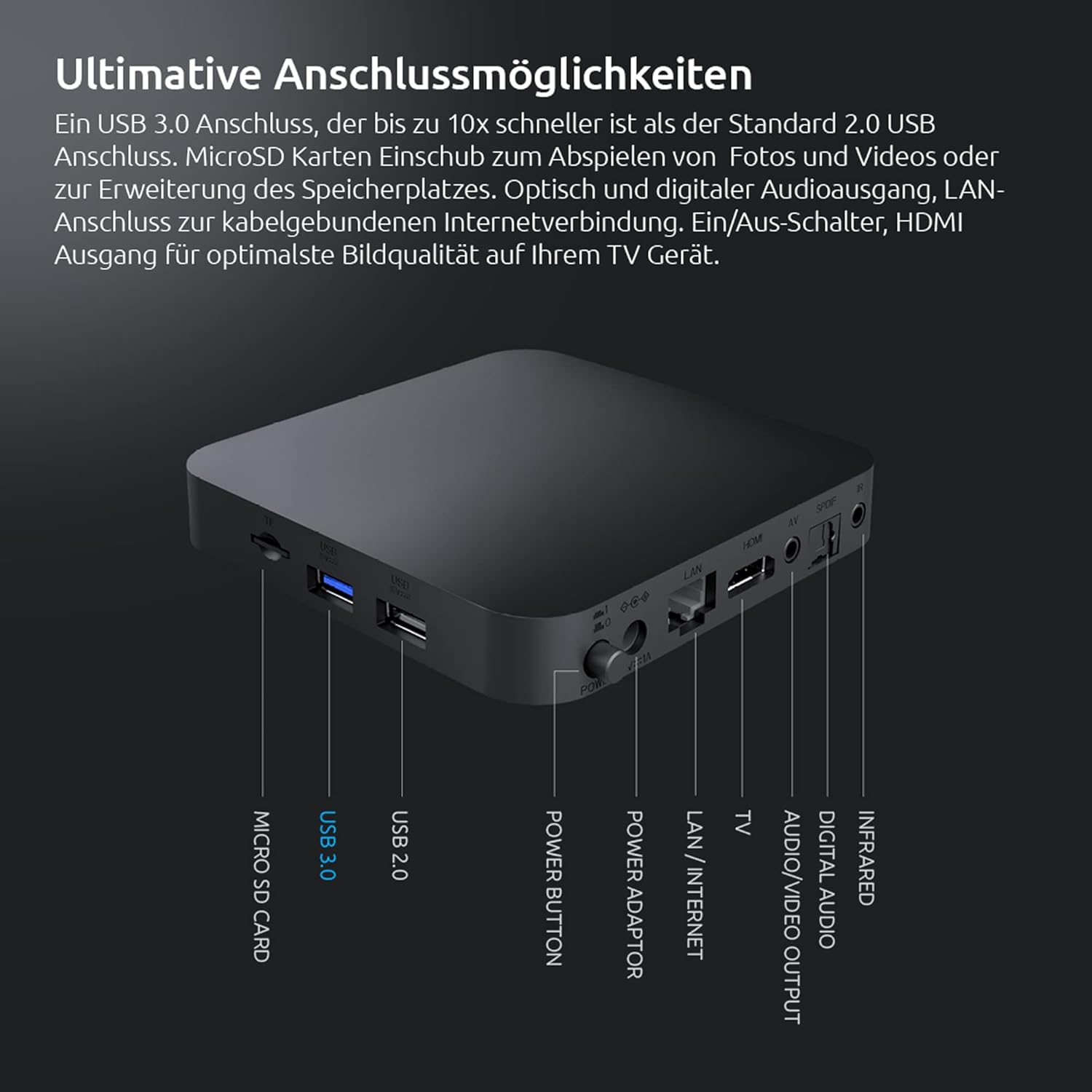
Image: A detailed diagram of the rear and side ports on the STRONG Leap-S1+ Android TV Box, labeling Micro SD Card, USB 3.0, USB 2.0, Power Button, Power Adaptor, LAN/Internet, TV (A/V), Digital Audio, Infrared, and HDMI ports.
6 സാങ്കേതിക സവിശേഷതകൾ
| ഫീച്ചർ | സ്പെസിഫിക്കേഷൻ |
|---|---|
| മോഡലിൻ്റെ പേര് | Leap-S1+ |
| ബ്രാൻഡ് | ശക്തമായ |
| ഓപ്പറേറ്റിംഗ് സിസ്റ്റം | ആൻഡ്രോയിഡ് ടിവി 10.0 |
| റെസലൂഷൻ | 4K UHD (3840 x 2160 pixels) with HDR10 |
| പ്രോസസ്സർ | Quad Core Cortex-A53 (1.8 GHz) |
| മെമ്മറി | DDR4 റാം |
| ആന്തരിക സംഭരണം | Expandable via Micro SD card |
| Wi-Fi കണക്റ്റിവിറ്റി | Dual-band Wi-Fi 5 (2.4GHz & 5GHz) |
| ബ്ലൂടൂത്ത് | ബ്ലൂടൂത്ത് 4.2 |
| USB പോർട്ടുകൾ | 1 x യുഎസ്ബി 3.0, 1 x യുഎസ്ബി 2.0 |
| വീഡിയോ ഡീകോഡിംഗ് | H.265 |
| പ്രത്യേക സവിശേഷതകൾ | Chromecast Built-in, Google Voice Assistant, Netflix, Prime Video, YouTube, Disney+ support |

Image: A visual representation of the powerful Quad-Core A53 1.8 GHz processor, highlighting the internal hardware that ensures smooth performance for the STRONG Leap-S1+.
7. പ്രശ്നപരിഹാരം
If you encounter issues with your STRONG LEAP-S1+ Android TV Box, try the following solutions:
- ശക്തിയില്ല:
- പവർ അഡാപ്റ്റർ ഉപകരണത്തിലേക്കും പ്രവർത്തിക്കുന്ന ഒരു പവർ ഔട്ട്ലെറ്റിലേക്കും സുരക്ഷിതമായി ബന്ധിപ്പിച്ചിട്ടുണ്ടെന്ന് ഉറപ്പാക്കുക.
- മറ്റൊരു പവർ ഔട്ട്ലെറ്റ് പരീക്ഷിക്കുക.
- ചിത്രം/ശബ്ദം ഇല്ല:
- Check HDMI cable connections at both the TV box and the TV.
- നിങ്ങളുടെ ടിവി ശരിയായ HDMI ഇൻപുട്ട് ഉറവിടത്തിലേക്ക് സജ്ജീകരിച്ചിട്ടുണ്ടെന്ന് ഉറപ്പാക്കുക.
- Restart the TV box by unplugging it for 10 seconds and plugging it back in.
- Check TV volume and audio settings.
- റിമോട്ട് കൺട്രോൾ പ്രതികരിക്കുന്നില്ല:
- റിമോട്ട് കൺട്രോളിൽ ബാറ്ററികൾ മാറ്റിസ്ഥാപിക്കുക.
- Ensure there are no obstructions between the remote and the TV box.
- Re-pair the Bluetooth remote control if necessary (refer to initial setup or device settings).
- നെറ്റ്വർക്ക് കണക്ഷൻ പ്രശ്നങ്ങൾ:
- For Wi-Fi, check your router and ensure it's broadcasting. Try restarting your router.
- If using Ethernet, ensure the cable is securely connected to both the box and your router.
- Go to Network settings on the device and try reconnecting or forgetting and re-adding the network.
- ആപ്പ് മരവിപ്പിക്കൽ/ക്രാഷിംഗ്:
- ആപ്പ് അടച്ച് വീണ്ടും തുറക്കുക.
- ക്രമീകരണങ്ങൾ > ആപ്പുകൾ എന്നതിൽ ആപ്പിന്റെ കാഷെയും ഡാറ്റയും മായ്ക്കുക.
- ഗൂഗിൾ പ്ലേ സ്റ്റോറിൽ നിന്ന് ഏറ്റവും പുതിയ പതിപ്പിലേക്ക് ആപ്പ് അപ്ഡേറ്റ് ചെയ്തിട്ടുണ്ടെന്ന് ഉറപ്പാക്കുക.
8. പരിചരണവും പരിപാലനവും
To ensure the longevity and optimal performance of your STRONG LEAP-S1+ Android TV Box, follow these care guidelines:
- വൃത്തിയാക്കൽ: Use a soft, dry, lint-free cloth to clean the device. Do not use liquid cleaners or aerosols.
- പ്ലേസ്മെൻ്റ്: Place the device on a stable, flat surface with adequate ventilation. Avoid placing it in direct sunlight, near heat sources, or in humid environments.
- വെൻ്റിലേഷൻ: Do not block any ventilation openings. Proper airflow prevents overheating.
- ഉപയോഗത്തിലില്ലാത്തപ്പോൾ പവർ ഓഫ്: If you plan not to use the device for an extended period, it is advisable to unplug it from the power outlet.
- സോഫ്റ്റ്വെയർ അപ്ഡേറ്റുകൾ: Regularly check for and install software updates to ensure the device has the latest features and security patches.
9. വാറൻ്റിയും പിന്തുണയും
Information regarding specific warranty terms and conditions for the STRONG LEAP-S1+ Android TV Box is typically provided with your purchase documentation or can be found on the official STRONG webസൈറ്റ്.
For technical support, product registration, or further assistance, please refer to the contact information provided by STRONG in your product packaging or visit their official support channels.
Note: Specific warranty duration and support contact details are not available in this manual. Please consult your product's official documentation.


