1. ആമുഖം
The Hidizs AP80 Pro-X is a portable high-resolution digital audio player (DAP) designed for audiophiles seeking exceptional sound quality on the go. Featuring dual ESS9219C DAC chips and support for various lossless audio formats, it delivers a rich and immersive listening experience. This manual provides comprehensive instructions for setting up, operating, maintaining, and troubleshooting your AP80 Pro-X.
2. ഉൽപ്പന്നം കഴിഞ്ഞുview
Familiarize yourself with the components and features of your Hidizs AP80 Pro-X.

Figure 2.1: Hidizs AP80 Pro-X MP3 Player (Blue variant)
This image displays the Hidizs AP80 Pro-X MP3 player, showcasing its compact design and the user interface on the screen. The device is presented in a vibrant blue color, highlighting its sleek form factor and the prominent volume knob on the side.
പ്രധാന സവിശേഷതകൾ:
- Dual ESS9219C DAC Chips: For high-fidelity audio processing.
- Precise FPGA Chip (HBC3000): Ensures native DSD 64/128/256 support.
- MQA 8X Unfold: Supports Master Quality Authenticated files.
- ബൈഡയറക്ഷണൽ ബ്ലൂടൂത്ത് 4.2: With CSR APT-X and Sony LDAC support.
- 2.45" Samsung IPS HD Touchscreen: For intuitive navigation.
- 3.5mm and 2.5mm Outputs: Versatile headphone connectivity.
- മൾട്ടി-ഫങ്ഷണൽ: Includes step counter and e-book reader capabilities.
- നീണ്ട കാത്തിരിപ്പ് സമയം: 40 ദിവസം വരെ.
3. സജ്ജീകരണം
3.1 അൺബോക്സിംഗും പ്രാരംഭ പരിശോധനയും
Upon receiving your AP80 Pro-X, carefully open the packaging and inspect all contents. The box should include:
- Hidizs AP80 Pro-X MP3 Player
- ഉപയോക്തൃ മാനുവൽ
- വാറൻ്റി കാർഡ്
- Screen Protector (x2)
- Type-C to Type-C OTG Cable
- ടൈപ്പ്-സി കേബിൾ
3.2 ഉപകരണം ചാർജ് ചെയ്യുന്നു
Before first use, fully charge the AP80 Pro-X. Connect the provided Type-C cable to the device's Type-C port and the other end to a USB power adapter (not included) or a computer's USB port. The charging indicator will show the charging status. A full charge typically takes about 1 hour.
3.3 ഒരു മൈക്രോ എസ്ഡി കാർഡ് ചേർക്കുന്നു
The AP80 Pro-X does not have internal storage for music files. A Micro SD card (up to 512GB, 1TB confirmed by users) is required. Locate the Micro SD card slot on the side of the device. Gently insert the Micro SD card until it clicks into place. To remove, push the card in slightly until it springs out.

Figure 3.1: Expandable Storage for Endless Music
This image illustrates the Hidizs AP80 Pro-X with a Micro SD card, emphasizing its expandable storage capability up to 512GB. The visual highlights how users can easily insert a Micro SD card to store a vast music library.
3.4 സംഗീതം കൈമാറൽ Files
Connect the AP80 Pro-X to your computer using the provided Type-C cable. The device will appear as a removable storage drive. Drag and drop your music files (e.g., FLAC, WAV, MP3, DSD, MQA) onto the Micro SD card. After transferring, safely eject the device from your computer. On the AP80 Pro-X, navigate to the settings and select "Update Database" to scan for new music files.
4. പ്രവർത്തന നിർദ്ദേശങ്ങൾ
4.1 പവർ ഓൺ/ഓഫ്
To power on, press and hold the power button (usually the volume knob) until the screen lights up. To power off, press and hold the power button until the power-off options appear, then select "Power Off".
Video 4.1: HIDIZS AP80 PRO-X Music Player Appearance Display
This video provides a visual tour of the Hidizs AP80 Pro-X music player, showcasing its design, physical buttons, and various ports. It highlights the device's compact size and premium build quality from multiple angles, including the volume knob, Micro SD card slot, and audio output jacks.
4.2 ഇന്റർഫേസ് നാവിഗേറ്റ് ചെയ്യൽ
The AP80 Pro-X features a 2.45-inch Samsung IPS HD touchscreen for navigation. You can also use the physical buttons and the ALPS volume wheel for control.
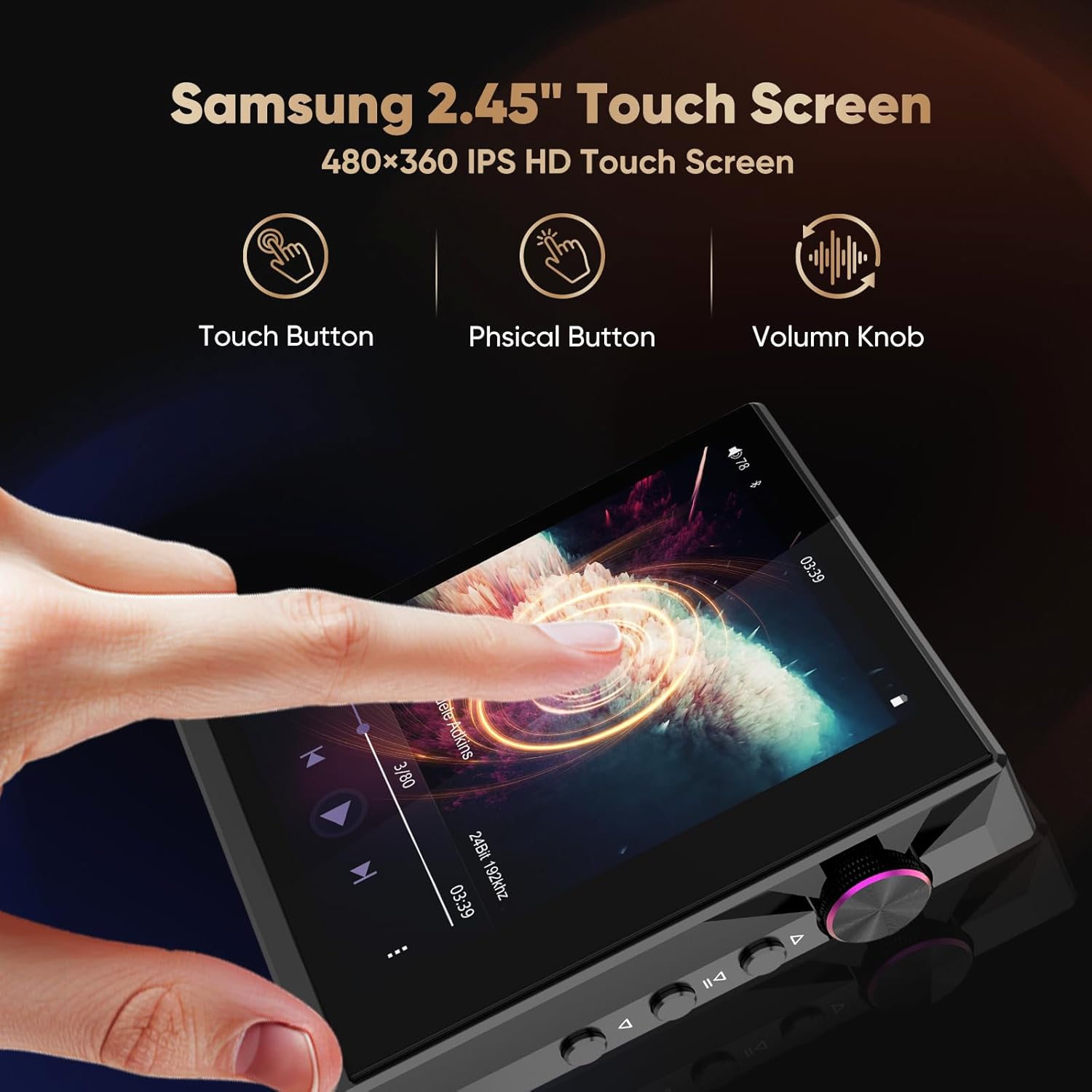
Figure 4.2: Samsung 2.45" Touch Screen and Controls
This image demonstrates the interactive elements of the Hidizs AP80 Pro-X, including its 2.45-inch Samsung IPS HD touch screen, physical buttons for playback control, and the precise volume knob. It illustrates how users can interact with the device for seamless operation.
4.3 സംഗീതം പ്ലേ ചെയ്യുന്നു
From the main menu, select the "Player" icon. You can browse your music library by artist, album, genre, or folder. Tap on a song to play it. Use the physical playback buttons (Previous, Play/Pause, Next) or the on-screen controls.

Figure 4.3: Supported Wide AudioFile ഫോർമാറ്റ്
This image highlights the extensive range of audio file formats supported by the Hidizs AP80 Pro-X, including DSD, WAV, FLAC, MP3, WMA, AIFF, OGG, AAC, and MQA. It visually confirms the player's versatility in handling various high-resolution and standard audio formats.
4.4 ബ്ലൂടൂത്ത് കണക്റ്റിവിറ്റി
The AP80 Pro-X supports bidirectional Bluetooth 4.2 with CSR APT-X and Sony LDAC. This allows it to act as a Bluetooth audio source (connecting to headphones/speakers) or a Bluetooth DAC AMP (receiving audio from a smartphone/PC).
- Connecting to Bluetooth Headphones/Speakers: Go to Bluetooth settings, enable Bluetooth, and scan for devices. Select your device to pair.
- Using as a Bluetooth DAC AMP: Enable Bluetooth on your smartphone/PC and pair with the AP80 Pro-X. Select the AP80 Pro-X as the audio output device on your source.

Figure 4.4: Two-way 4.2 Bluetooth Connectivity
This image illustrates the two-way Bluetooth 4.2 capabilities of the Hidizs AP80 Pro-X, showing its ability to connect to smartphones, Bluetooth headphones, in-car Bluetooth stereos, and Bluetooth speakers. It highlights the support for HiBy UAT, Sony LDAC, and CSR APT-X for high-quality wireless audio transmission.
4.5 USB DAC പ്രവർത്തനം
The AP80 Pro-X can function as an external DAC AMP for your computer or smartphone, enhancing audio quality. Connect the device to your computer (macOS 10.7+, Windows XP/7/8/10+) or smartphone (iPad OS, Android) using the Type-C cable. Select the AP80 Pro-X as the audio output device in your system settings.

Figure 4.5: Bidirectional USB DAC
This image demonstrates the Hidizs AP80 Pro-X connected to both a smartphone and a laptop via USB, illustrating its bidirectional USB DAC functionality. It shows how the device can enhance audio quality for mobile and PC devices, providing noise-free performance with its own battery power.
4.6 Other Functions (Step Counter, E-book)
The AP80 Pro-X includes additional features accessible from the main menu:
- സ്റ്റെപ്പ് കൗണ്ടർ: Track your daily steps and activity.
- ഇ-ബുക്ക് റീഡർ: Read e-books directly on the device's screen.

Figure 4.6: Multi-function Meets Your Usage Scenarios
This image highlights the multi-functional capabilities of the Hidizs AP80 Pro-X, specifically showcasing its built-in step counter and e-book reader features. It visually represents how the device can serve various user needs beyond just music playback.
5. പരിപാലനം
5.1 വൃത്തിയാക്കൽ
To clean the device, use a soft, dry, lint-free cloth. For stubborn smudges, slightly dampen the cloth with water. Avoid using harsh chemicals, abrasive cleaners, or solvents, as these can damage the screen and finish.
5.2 സംഭരണം
When not in use for extended periods, store the AP80 Pro-X in a cool, dry place away from direct sunlight and extreme temperatures. It is recommended to charge the device to about 50% before long-term storage to preserve battery health.
5.3 Screen Protection
The device comes with two screen protectors. Apply one to protect the screen from scratches and smudges. Replace it if it becomes worn or damaged.
6. പ്രശ്നപരിഹാരം
6.1 പൊതുവായ പ്രശ്നങ്ങളും പരിഹാരങ്ങളും
| ഇഷ്യൂ | സാധ്യമായ കാരണം | പരിഹാരം |
|---|---|---|
| ഉപകരണം പവർ ഓണാക്കുന്നില്ല. | ബാറ്ററി കുറവാണ്; ഉപകരണം ഫ്രീസുചെയ്തു. | കുറഞ്ഞത് 15 മിനിറ്റെങ്കിലും ഉപകരണം ചാർജ് ചെയ്യുക. പവർ ബട്ടൺ 10-15 സെക്കൻഡ് അമർത്തിപ്പിടിച്ച് നിർബന്ധിതമായി റീബൂട്ട് ചെയ്യുക. |
| സംഗീതം കണ്ടെത്താൻ കഴിയുന്നില്ല files. | Micro SD card not inserted correctly; database not updated. | Ensure the Micro SD card is properly inserted. Go to settings and select "Update Database". |
| ബ്ലൂടൂത്ത് കണക്ഷൻ പ്രശ്നങ്ങൾ. | Device not in pairing mode; interference. | Ensure Bluetooth is enabled on both devices and the AP80 Pro-X is in pairing mode. Move closer to the connected device and away from potential interference sources. |
| മോശം ശബ്ദ നിലവാരം. | Low-quality audio files; incorrect settings. | Ensure you are using high-resolution audio files. Check EQ settings and MSEB tuning in the device settings. Ensure headphones are properly connected. |
If the issue persists, please refer to the official Hidizs support resources or contact customer service.
7 സ്പെസിഫിക്കേഷനുകൾ
| ഫീച്ചർ | വിശദാംശങ്ങൾ |
|---|---|
| മോഡലിൻ്റെ പേര് | AP80 PRO-X |
| ഉൽപ്പന്ന അളവുകൾ | 2.41 x 2.15 x 0.54 ഇഞ്ച് |
| ഇനത്തിൻ്റെ ഭാരം | 2.54 ഔൺസ് |
| ഡിഎസി ചിപ്പുകൾ | Dual ESS9219C |
| FPGA Chip | HBC3000 |
| സ്ക്രീൻ വലിപ്പം | 2.45 Inches (Samsung IPS HD Touchscreen) |
| കണക്റ്റിവിറ്റി ടെക്നോളജി | Bluetooth 4.2 (Bi-directional, CSR APT-X, Sony LDAC), USB Port, Mobile Phone USB Decode |
| മെമ്മറി സ്റ്റോറേജ് കപ്പാസിറ്റി | Supports Micro SD up to 512 GB (1TB confirmed by users) |
| ബാറ്ററി | 1 ലിഥിയം പോളിമർ ബാറ്ററി (ഉൾപ്പെടുത്തിയിരിക്കുന്നു) |
| സ്റ്റാൻഡ്ബൈ സമയം | 40 ദിവസം വരെ |
| Sustainable Use Time (PO) | 8-11 മണിക്കൂർ |
| Sustainable Use Time (BAL) | 6-8 മണിക്കൂർ |
| പിന്തുണയ്ക്കുന്ന ഓഡിയോ ഫോർമാറ്റുകൾ | MQA 8X, LDAC, apt-X, AAC, USB DAC, DSD256 (DSF/DFF), WAV, FLAC, MP3, WMA, AIFF, OGG |
| അനുയോജ്യമായ ഓപ്പറേറ്റിംഗ് സിസ്റ്റങ്ങൾ | macOS 10.7+, iPad OS, Windows XP/7/8/10, or newer |
8. വാറൻ്റിയും പിന്തുണയും
8.1 വാറൻ്റി വിവരങ്ങൾ
Your Hidizs AP80 Pro-X MP3 Player is covered by a manufacturer's warranty. Please refer to the included Warranty Card for specific terms, conditions, and duration of the warranty. Keep your proof of purchase for warranty claims.
8.2 ഉപഭോക്തൃ പിന്തുണ
For technical assistance, troubleshooting beyond this manual, or warranty inquiries, please contact Hidizs customer support. You can find contact information on the official Hidizs website or the Warranty Card.
Visit the official Hidizs Store for more information: Hidizs Official Store


