ഉൽപ്പന്നം കഴിഞ്ഞുview
The ONVIAN 115dB Bike Alarm with Remote is a versatile anti-theft system designed for bicycles, ebikes, motorcycles, scooters, and cars. This innovative device combines a powerful alarm with a convenient remote control, offering enhanced security and ease of use. It features adjustable volume levels, sensitivity settings, and a car search function, making it an essential accessory for protecting your vehicle.

Image: The ONVIAN 115dB Bike Alarm unit, its remote control, and the included USB charging cables. The alarm unit is shown mounted on a pole, indicating its installation method.
Key features include a 115dB alarm for effective deterrence, IPX5 waterproof rating for durability in various weather conditions, and a rechargeable 400mAh lithium battery for the main unit. The remote control operates on a 12V/27A battery and provides a control distance of 30-50 meters. This system is designed for easy installation and offers a robust solution against theft.
സജ്ജീകരണവും ഇൻസ്റ്റാളേഷനും
പ്രധാന യൂണിറ്റ് ചാർജ് ചെയ്യുന്നു
Before first use, ensure the main alarm unit is fully charged. Connect the provided 2A USB charging cable to the alarm unit's USB port and a compatible adapter (5V/2A) or power bank. A full charge typically takes about 3 hours. The power indicator lights will show the charging status.
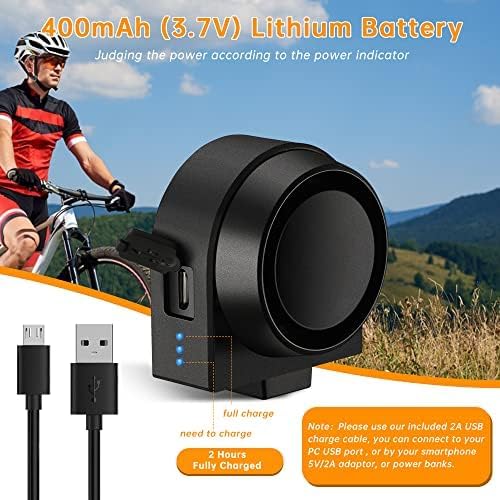
Image: Close-up of the ONVIAN Bike Alarm unit showing the USB charging port and blue LED power indicator lights, with charging cables.
റിമോട്ട് കൺട്രോൾ ഇൻസ്റ്റാൾ ചെയ്യുന്നു
- Fix the remote's bracket with a tie in a position that is easy to reach with your left and right thumbs on your handlebar.
- Place the remote into the fixed bracket.
- To remove the remote, press and hold the bottom snap position of the bracket.
പ്രധാന യൂണിറ്റ് ഇൻസ്റ്റാൾ ചെയ്യുന്നു
- Secure and tie down the bracket for the main unit using cable ties. Cut off any excess tie.
- Insert the main unit into the fixing bracket.
- Tighten the screw. When you need to charge or replace the battery, simply loosen the screw in an anticlockwise direction to remove the main unit.
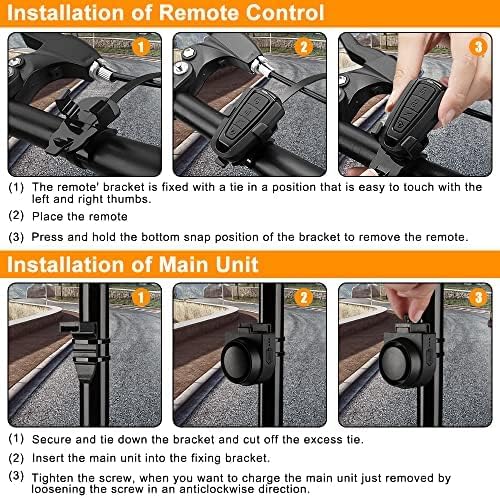
Image: Step-by-step visual guide for installing both the remote control on a handlebar and the main alarm unit on a bike frame using ties and a bracket.
പ്രവർത്തന നിർദ്ദേശങ്ങൾ
വിദൂര നിയന്ത്രണ പ്രവർത്തനങ്ങൾ

Image: Diagram of the remote control highlighting its four buttons: Arm, Disarm, Volume Adjust, and Ringtone.
- Arm Button (Lock icon): Short press to arm the alarm. The main unit will sound "Do-Re-Mi" to confirm it has entered the arming state.
- Disarm Button (Unlock icon): In the arming state, short press to disarm the alarm. The main unit will sound "Mi-re-do" to confirm it has been disarmed.
- Volume Adjust Button (Lightning bolt icon): Used to adjust the alarm volume.
- Ringtone Button (Bell icon): Used for the car search function.
Arming and Disarming the Alarm
To activate the anti-theft system, simply press the ഭുജം button on the remote. The alarm will emit a confirmation sound. Once armed, any significant vibration or movement of the protected vehicle will trigger the loud 115dB alarm. To deactivate, press the നിരായുധമാക്കുക ബട്ടൺ.

Image: A person attempting to cut a bike lock, with the ONVIAN alarm unit visible on the bike, illustrating its anti-theft function and 115dB alert.
വോളിയം ലെവലുകൾ ക്രമീകരിക്കുന്നു
The alarm features 3 adjustable volume levels (high, medium, low) up to a maximum of 115dB. To adjust the volume, press and hold the വോളിയം ക്രമീകരിക്കുക button on the remote until the remote LED light lights up again. Then, press the വോളിയം ക്രമീകരിക്കുക button repeatedly to cycle through the volume levels. The alarm will give a "Bi" prompt for each adjustment.

Image: A cyclist with a graphic illustrating the three adjustable volume levels (high, medium, low) for the ONVIAN bike alarm.
സംവേദനക്ഷമത ക്രമീകരിക്കുന്നു
The alarm has 3 levels of sensitivity (high, medium, low) to prevent accidental triggers. To adjust the sensitivity, press and hold the വോളിയം ക്രമീകരിക്കുക button on the remote until the remote LED light lights up again. The alarm will then have a "Bi" sound. Press the വോളിയം ക്രമീകരിക്കുക button again to cycle through the sensitivity levels (BiBiBi for high, BiBi for medium, Bi for low).
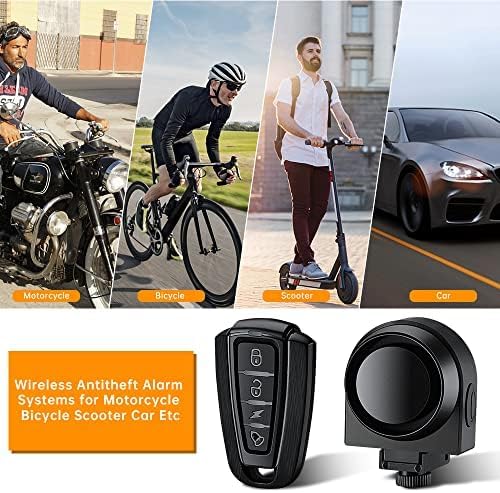
Image: A cyclist with a graphic illustrating the three adjustable sensitivity levels (BiBiBi for high, BiBi for medium, Bi for low) for the ONVIAN bike alarm.
Car Search Function
In disarming mode, short press the റിംഗ്ടോൺ button (bell icon) on the remote to activate the car search function. This will cause the alarm to sound, helping you locate your vehicle in crowded parking areas.
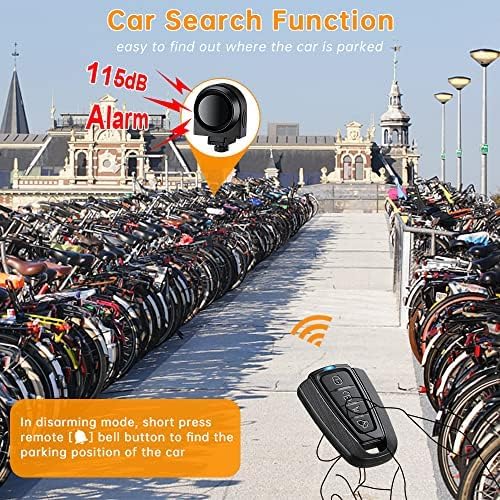
Image: An illustration of the ONVIAN bike alarm and remote control in a crowded bike parking area, demonstrating the "Car Search Function" with sound waves emanating from the alarm.
മെയിൻ്റനൻസ്
ബാറ്ററി വിവരങ്ങളും മാറ്റിസ്ഥാപിക്കലും
The main alarm unit contains a 400mAh (3.7V) lithium-ion battery. It is recommended to charge the unit regularly, especially if it will be stored for a long period, to ensure optimal battery life. The remote control uses a 12V/27A battery. If the remote cannot control the main unit, replace its battery and then re-match the alarm panel with the remote if necessary.
ജല പ്രതിരോധം
The alarm unit has an IPX5 waterproof rating, meaning it is protected against low-pressure water jets from any direction. While it can withstand rain and snow, it should not be submerged in water.
വൃത്തിയാക്കൽ
Clean the alarm unit and remote with a soft, dry cloth. Avoid using abrasive cleaners or solvents that could damage the device.
ട്രബിൾഷൂട്ടിംഗ്
This section addresses common issues you might encounter with your ONVIAN Bike Alarm.

Image: A Q&A section providing solutions to common issues such as alarm sensitivity, remote control connectivity, charging speed, low battery indication, and remote pairing.
- എന്തുകൊണ്ടാണ് അലാറം സെൻസിറ്റീവ് അല്ലാത്തത്?
After setting the alarm, do not immediately move or touch the bike. Wait for 5 seconds and listen for a "dil" sound, which indicates it has entered alarm mode. Ensure sensitivity settings are adjusted as desired.
- Why am I unable to control the main unit by remote?
Check if both the main unit and the remote control have sufficient battery power. If not, charge the main unit or replace the remote control's battery, then re-match if necessary.
- Why is the main unit not charging, or charging slowly?
Use the original 2A USB charging cable provided. Ensure the micro USB plug is fully connected. If you see the light on the side of the main unit flashing, it indicates charging is in progress.
- When does it need to be charged? How is low battery power indicated?
When you press the remote and hear two "biu biu" sounds after the normal warning tone, it means the battery power is low and requires charging. Reduced remote distance and weaker alarm sound are also indicators of low battery.
- How to cancel pairing with the main unit if the remote is lost? How to pair a new remote?
To prevent theft if your remote is lost, in non-alarm mode, long press the function button on the main unit for 7 seconds. You will hear a long "di" sound, and the lost remote will no longer control the unit. To pair a new remote, long press the function button for 3 seconds. After a short "di" sound, press any button on the new remote twice. It will be successfully paired.
സ്പെസിഫിക്കേഷനുകൾ
| ഫീച്ചർ | വിശദാംശങ്ങൾ |
|---|---|
| ബ്രാൻഡ് | Onvian |
| മോഡൽ നമ്പർ | CA0328 (A2) |
| നിർമ്മാതാവ് | ഓൺവിയാൻ |
| ശബ്ദ നില | 115 dB (പരമാവധി) |
| Main Unit Battery | 400mAh (3.7V) Lithium Ion (Rechargeable) |
| റിമോട്ട് കൺട്രോൾ ബാറ്ററി | 12V/27A |
| റിമോട്ട് കൺട്രോൾ ദൂരം | ഏകദേശം 30-50 മീറ്റർ |
| വാട്ടർപ്രൂഫ് റേറ്റിംഗ് | IPX5 |
| ഉൽപ്പന്ന അളവുകൾ | 14 x 11 x 4.7 സെ.മീ |
| ഇനത്തിൻ്റെ ഭാരം | 66 ഗ്രാം |
| മൗണ്ടിംഗ് തരം | Handlebar Mount (for remote), Cable Tie Mount (for main unit) |
| ആദ്യം ലഭ്യമായ തീയതി | ജനുവരി 12, 2022 |
വാറൻ്റിയും പിന്തുണയും
വാറൻ്റി വിവരങ്ങൾ
Specific warranty details for the ONVIAN 115dB Bike Alarm are not provided in this manual. Please refer to the product packaging or the official Onvian webഏറ്റവും കാലികമായ വാറൻ്റി വിവരങ്ങൾക്കായുള്ള സൈറ്റ്.
ഉപഭോക്തൃ പിന്തുണ
For any questions, technical assistance, or support regarding your ONVIAN Bike Alarm, please contact Onvian customer support through their official channels. You can typically find contact information on the product packaging, the seller's page on the retail platform, or the official Onvian brand webസൈറ്റ്.
സന്ദർശിക്കുക Onvian Store on Amazon കൂടുതൽ വിവരങ്ങൾക്കും പിന്തുണാ ഉറവിടങ്ങൾക്കും.


