1. ആമുഖവും അവസാനവുംview
The Raymarine Element 7 HV is a 7-inch chart plotter designed for marine navigation and fishfinding. It integrates advanced CHIRP Sonar, HyperVision technology, Wi-Fi connectivity, and GPS capabilities. This unit provides a high-visibility, sunlight-viewable display for clear data presentation in various marine conditions. The fast quad-core processor ensures quick chart redraws and smooth 3D rendering, enhancing the user experience. Dedicated keypad controls simplify operation, and an oversized waypoint key allows for easy marking of important locations.

ചിത്രം 1.1: The Raymarine Element 7 HV Chart Plotter, showcasing its display and keypad controls.
2 സുരക്ഷാ വിവരങ്ങൾ
- Always ensure the unit is securely mounted to prevent dislodgement during vessel movement.
- Disconnect power before performing any installation, maintenance, or troubleshooting procedures.
- Avoid exposing the unit to extreme temperatures or direct sunlight for prolonged periods when not in use.
- Do not attempt to open the unit's casing; this will void the warranty and may cause damage.
- Ensure all electrical connections are properly sealed and protected from water ingress.
- This product contains chemicals known to the State of California to cause cancer and birth defects or other reproductive harm. Handle with care and wash hands after contact.
3. പാക്കേജ് ഉള്ളടക്കം
പാക്കേജിൽ എല്ലാ ഘടകങ്ങളും ഉണ്ടെന്ന് ഉറപ്പാക്കുക:
- Element 7 HV Display Unit
- Mounting Bracket (Bail with swivel)
- പവർ കേബിൾ
- Documentation Pack (including this manual)
- LightHouse North America Chart Card (pre-loaded or included separately)
- മൌണ്ടിംഗ് ഹാർഡ്വെയർ
കുറിപ്പ്: This specific model (E70532-00-102) does അല്ല include a transducer. A compatible transducer must be purchased separately for sonar functionality.
4. സജ്ജീകരണവും ഇൻസ്റ്റാളേഷനും
4.1 മൗണ്ടിംഗ് ഓപ്ഷനുകൾ
The Element 7 HV supports two primary mounting methods:
- Bail with Swivel Mount: This method uses the included bracket, allowing for angle adjustment.
- ഫ്ലഷ് മൗണ്ട്: For a more integrated look, the unit can be flush-mounted into a panel. This requires cutting an opening and using appropriate flush mount hardware (sold separately).
4.2 പവർ കണക്ഷൻ
Connect the supplied power cable to a 12V DC power source on your vessel. Ensure proper polarity (red to positive, black to negative) and use an appropriately rated fuse or circuit breaker for protection. Refer to the wiring diagram in the full installation guide for detailed instructions.

ചിത്രം 4.1: പിൻഭാഗം view of the Element 7 HV, illustrating the power and transducer connection ports.
4.3 Transducer Connection (Optional)
If you have purchased a compatible HyperVision transducer, connect it to the designated port on the rear of the Element 7 HV unit. Ensure the connection is secure and waterproof.
5. പ്രവർത്തന നിർദ്ദേശങ്ങൾ
5.1 Initial Power-On and Setup Wizard
Upon first power-on, the unit will guide you through an initial setup wizard. This includes language selection, time zone, and basic unit configuration. Follow the on-screen prompts.
5.2 Keypad Controls
The Element 7 HV features a dedicated keypad for intuitive control:
- പവർ ബട്ടൺ: Press and hold to power on/off. Short press for quick menu access.
- ദിശാസൂചന പാഡ് (ഡി-പാഡ്): Navigate menus and pan charts.
- ശരി ബട്ടൺ: തിരഞ്ഞെടുക്കലുകൾ സ്ഥിരീകരിക്കുക.
- ബാക്ക്/മെനു ബട്ടൺ: Go back in menus or access main menu.
- Waypoint (WPT) Button: Quickly mark a waypoint at your current location.
- ഹോം ബട്ടണ്: ഹോം സ്ക്രീനിലേക്ക് മടങ്ങുക.
- പ്ലസ് (+) / മൈനസ് (-) ബട്ടണുകൾ: Zoom in/out on charts, adjust sonar gain.
5.3 ഉപയോക്തൃ ഇന്റർഫേസ് നാവിഗേറ്റ് ചെയ്യൽ
The home screen provides access to various applications such as Chart, Fishfinder, and Dashboard. Use the D-Pad to highlight an application and press OK to open it.

ചിത്രം 5.1: The Element 7 HV home screen, displaying various application icons for navigation, sonar, and system settings.
5.4 Chart Plotter Functions
The Element 7 HV comes with pre-loaded LightHouse North America Charts. Navigate the chart by panning with the D-Pad and zooming with the +/- buttons. Create and manage waypoints, routes, and tracks for efficient navigation.

ചിത്രം 5.2: A detailed chart view on the Element 7 HV, showing depth contours and vessel position.
5.5 Sonar Functions (CHIRP and HyperVision)
The unit supports standard CHIRP sonar for general fishfinding and HyperVision for super-high resolution sonar imagery. HyperVision operates at 1.2 megahertz, providing detailed views of underwater structures and fish. Access sonar views from the home screen. Adjust gain, range, and frequency settings as needed for optimal performance.

ചിത്രം 5.3: A HyperVision sonar display on the Element 7 HV, showing detailed underwater structure.
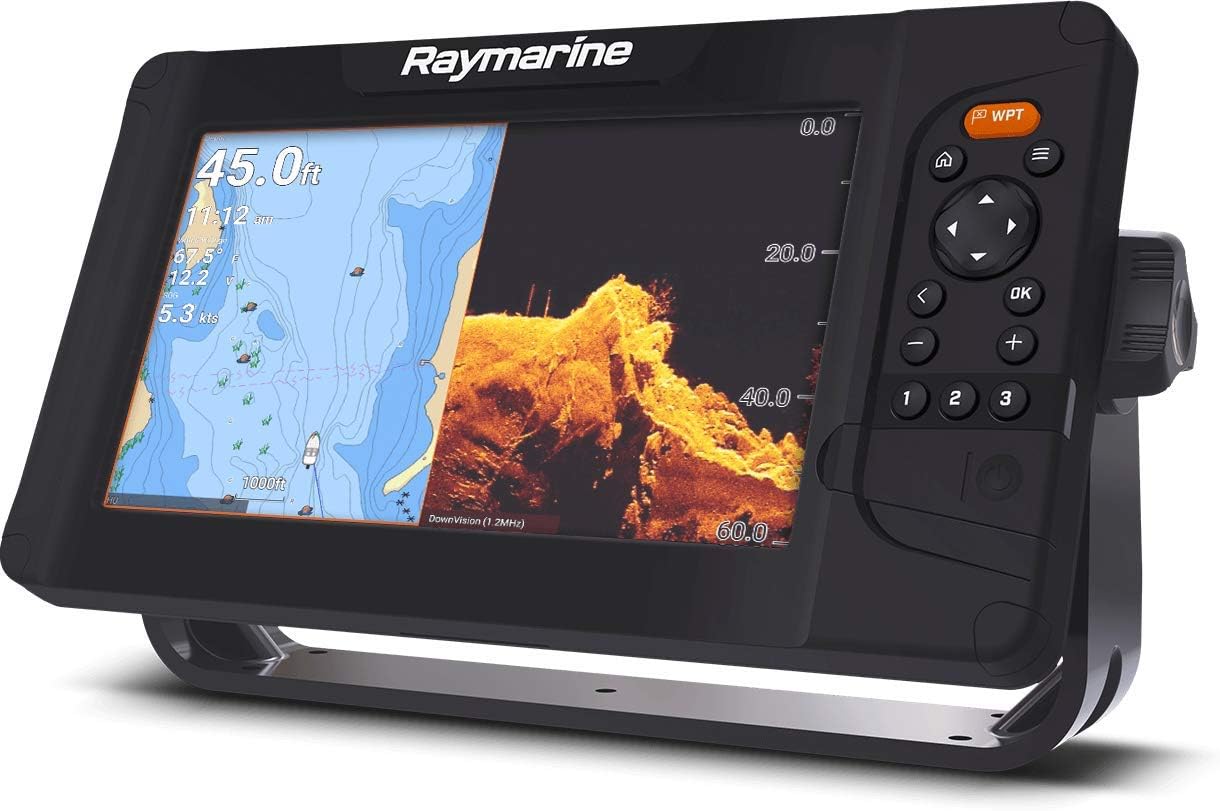
ചിത്രം 5.4: A split-screen view on the Element 7 HV, combining chart navigation with a DownVision sonar display.
5.6 വൈ-ഫൈ കണക്റ്റിവിറ്റി
The integrated Wi-Fi allows for connection to mobile devices via the Raymarine Link app. This enables viewing and control of the Element 7 HV from your smartphone or tablet, as well as software updates.

ചിത്രം 5.5: The Element 7 HV installed on a boat, demonstrating its high-visibility display in an outdoor marine environment.
6. പരിപാലനം
- വൃത്തിയാക്കൽ: ഒരു സോഫ്റ്റ്, ഡി ക്ലീനർ ഉപയോഗിച്ച് ഡിസ്പ്ലേ വൃത്തിയാക്കുക.amp cloth. Avoid abrasive cleaners or solvents. For stubborn marks, use a mild soap solution.
- സോഫ്റ്റ്വെയർ അപ്ഡേറ്റുകൾ: Regularly check for and install software updates via Wi-Fi or by downloading from the Raymarine website to an SD card. Updates provide new features and performance improvements.
- കേബിൾ പരിശോധന: തേയ്മാനം, നാശനഷ്ടം അല്ലെങ്കിൽ കേടുപാടുകൾ എന്നിവയുടെ ലക്ഷണങ്ങൾക്കായി എല്ലാ കേബിളുകളും കണക്ഷനുകളും ഇടയ്ക്കിടെ പരിശോധിക്കുക.
7. പ്രശ്നപരിഹാരം
| പ്രശ്നം | സാധ്യമായ കാരണം | പരിഹാരം |
|---|---|---|
| യൂണിറ്റ് പവർ ഓണാക്കുന്നില്ല | വൈദ്യുതിയില്ല, തെറ്റായ വയറിംഗ്, ഫ്യൂസ് പൊട്ടിപ്പോയി | Check power cable connection, verify fuse, ensure correct polarity. |
| No GPS position | Poor satellite reception, unit not acquiring satellites | വ്യക്തമാണെന്ന് ഉറപ്പാക്കുക view of the sky, allow time for satellite acquisition. |
| No sonar image | ട്രാൻസ്ഡ്യൂസർ ബന്ധിപ്പിച്ചിട്ടില്ല, തകരാറുള്ള ട്രാൻസ്ഡ്യൂസർ, ട്രാൻസ്ഡ്യൂസറിന് കീഴിൽ വായു കുമിളകൾ | Check transducer connection, ensure transducer is clean and properly submerged. |
| ഡിസ്പ്ലേ മങ്ങിയതോ വായിക്കാൻ കഴിയാത്തതോ ആണ് | Brightness setting too low, direct sunlight glare | Adjust display brightness in settings, reposition unit or use a sun cover. |
8 സ്പെസിഫിക്കേഷനുകൾ
| ഫീച്ചർ | സ്പെസിഫിക്കേഷൻ |
|---|---|
| മോഡലിൻ്റെ പേര് | E70532-00-102 |
| സ്ക്രീൻ വലിപ്പം | 7 ഇഞ്ച് |
| ഡിസ്പ്ലേ തരം | എൽസിഡി |
| കണക്റ്റിവിറ്റി ടെക്നോളജി | വൈഫൈ |
| മാപ്പ് തരം | North America (LightHouse Charts) |
| Sonar Technology | CHIRP Sonar, HyperVision (1.2 MHz) |
| ഹ്യൂമൻ ഇന്റർഫേസ് ഇൻപുട്ട് | കീപാഡ് |
| ഇനത്തിൻ്റെ ഭാരം | 3 പൗണ്ട് |
| ഇനത്തിന്റെ അളവുകൾ (LxWxH) | 2.4 x 9.3 x 5.3 ഇഞ്ച് |
| മൗണ്ടിംഗ് തരം | Bail with swivel, Flush |
| പ്രോസസ്സർ | Fast quad-core |
9. വാറൻ്റിയും പിന്തുണയും
9.1 നിർമ്മാതാവിന്റെ വാറന്റി
The Raymarine Element 7 HV is covered by a manufacturer's warranty. For specific details regarding warranty duration, coverage, and terms, please refer to the warranty card included with your product or visit the official Raymarine webസൈറ്റ്. വാറന്റി ക്ലെയിമുകൾക്കായി നിങ്ങളുടെ വാങ്ങലിന്റെ തെളിവ് സൂക്ഷിക്കുക.
9.2 സാങ്കേതിക പിന്തുണ
For technical assistance, troubleshooting beyond this manual, or service inquiries, please contact Raymarine customer support. Visit the official Raymarine webസൈറ്റ് (www.raymarine.com) for contact information, FAQs, and additional resources.


