ആമുഖം
This user manual provides detailed instructions for the installation, operation, and maintenance of your LAMTTO C300 3-Channel Dash Camera. Please read this manual thoroughly before using the device to ensure proper functionality and safety.

Image: The LAMTTO C300 3-Channel Dash Camera, showing its main unit, a separate rear camera, and a 64GB SD card. The main unit features a front-facing lens and an interior-facing lens.
പാക്കേജ് ഉള്ളടക്കം
പാക്കേജിൽ എല്ലാ ഘടകങ്ങളും ഉണ്ടെന്ന് ഉറപ്പാക്കുക:
- Triple-way Dash Camera (Main Unit)
- സക്ഷൻ കപ്പ് മ .ണ്ട്
- Backup Camera (Rear Camera)
- Crowbar (for cable routing)
- കാർ ചാർജർ
- മിനി യുഎസ്ബി കേബിൾ
- കേബിൾ Clamps
- Screws and Adhesive (for rear camera mounting)
- ഉപയോക്തൃ മാനുവൽ (ഈ പ്രമാണം)
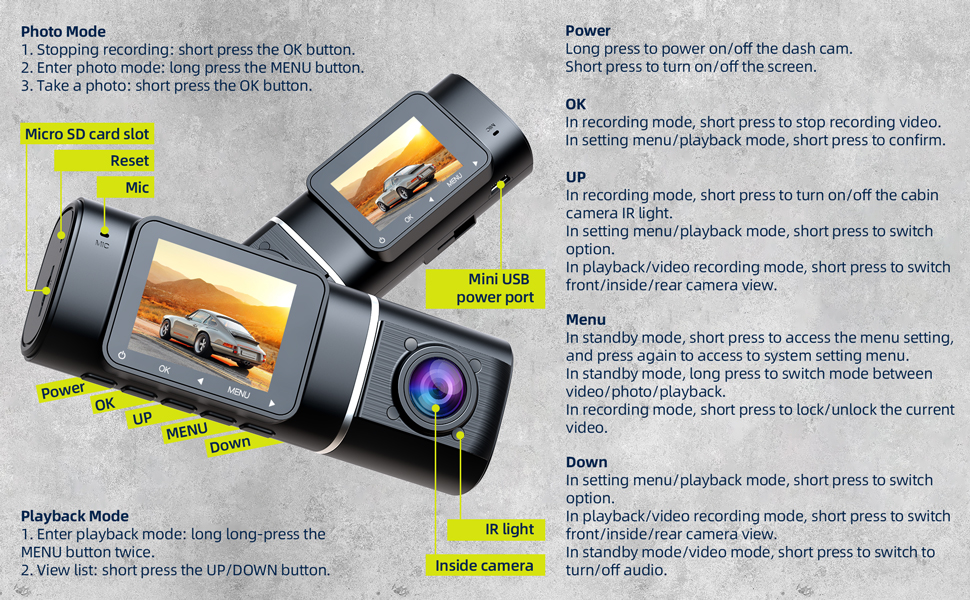
Image: An illustration detailing the components included with the LAMTTO C300 dash camera, alongside a diagram demonstrating the wiring for the front, interior, and rear cameras within a vehicle.
സജ്ജീകരണവും ഇൻസ്റ്റാളേഷനും
1. പ്രാരംഭ തയ്യാറെടുപ്പ്
- SD കാർഡ് ഫോർമാറ്റിംഗ്: Before first use, insert a Class 10, U3 or higher speed Micro-SD card (not included, but 64GB is mentioned in product title, so assume it's included or recommended) into the dash camera. Format the SD card using the camera's settings menu.
- ഊർജ്ജ സ്രോതസ്സ്: The internal battery is primarily for parking monitoring. For continuous operation, connect the dash camera to your vehicle's power supply using the provided car charger. If parking monitoring is desired when the car is off, an external power bank may be required.
- പ്രീ-ഇൻസ്റ്റലേഷൻ ടെസ്റ്റ്: Before permanent installation, connect the dash cam to the original cigarette lighter power source to verify that all three cameras (front, interior, rear) power on and record correctly.
2. Mounting the Dash Camera
The main dash camera unit is designed to be compact and can be installed behind the rearview നിങ്ങളുടെ കണ്ണുകളെ തടസ്സപ്പെടുത്താതിരിക്കാൻ കണ്ണാടി view.
- Attach the suction cup mount to the main dash camera unit.
- Clean the chosen area on your windshield, preferably behind the rearview mirror, to ensure a secure suction.
- വിൻഡ്ഷീൽഡിന് നേരെ സക്ഷൻ കപ്പ് ദൃഡമായി അമർത്തി ലോക്കിംഗ് മെക്കാനിസത്തിൽ ഏർപ്പെടുക.
- Adjust the camera angle to ensure the front lens captures the road ahead clearly.

Image: A hand demonstrating the installation of the LAMTTO C300 dash camera onto a car's windshield using its suction cup mount.
3. പിൻ ക്യാമറ ബന്ധിപ്പിക്കുന്നു
- Route the rear camera cable from the main dash camera unit to the rear of your vehicle. Use the provided crowbar to tuck the cable neatly along the headliner and pillar trim.
- Mount the rear camera on the rear windshield or near the license plate using the provided screws or adhesive. Ensure the camera has a clear view നിങ്ങളുടെ വാഹനത്തിന് പിന്നിലെ പ്രദേശം.
- Connect the rear camera cable to the "AV-IN" port on the main dash camera unit.
ഓപ്പറേഷൻ
Device Controls and Ports

Image: A detailed diagram illustrating the various buttons, ports, and features of the LAMTTO C300 dash camera, including Power, OK, UP, MENU, Down buttons, Micro SD card slot, Reset, Mic, Mini USB power port, IR light, and Inside camera.
- പവർ ബട്ടൺ:
- Long press to power on/off the dash cam.
- സ്ക്രീൻ ഓൺ/ഓഫ് ചെയ്യാൻ ഷോർട്ട് പ്രസ്സ് ചെയ്യുക.
- ശരി ബട്ടൺ:
- In recording mode, short press to stop recording video.
- In setting menu/playback mode, short press to confirm selection.
- To take a photo, short press the OK button in photo mode.
- UP ബട്ടൺ:
- In recording mode, short press to turn on/off the cabin camera IR light.
- In setting menu/playback mode, short press to switch option.
- In playback/video recording mode, short press to switch front/inside/rear camera view.
- മെനു ബട്ടൺ:
- In standby mode, short press to access the menu setting, and press again to access system setting menu.
- In standby mode, long press to switch mode between video/photo/playback.
- In recording mode, short press to lock/unlock the current video.
- താഴേക്കുള്ള ബട്ടൺ:
- In setting menu/playback mode, short press to switch option.
- In playback/video recording mode, short press to switch front/inside/rear camera view.
- In standby mode/video mode, short press to turn off/on audio recording.
- മൈക്രോ എസ്ഡി കാർഡ് സ്ലോട്ട്: നിങ്ങളുടെ മൈക്രോ എസ്ഡി കാർഡ് ഇവിടെ ചേർക്കുക.
- റീസെറ്റ് ബട്ടൺ: Use a thin object to press the reset button if the device becomes unresponsive.
- മിനി യുഎസ്ബി പവർ പോർട്ട്: Connect the car charger here for power.
Recording Modes and Features
- Three-Channel Recording: The C300 simultaneously records video from the front (170° wide-angle), interior (150° wide-angle), and rear (150° wide-angle) cameras, providing comprehensive coverage around your vehicle. All cameras record in 1080P resolution.
- ലൂപ്പ് റെക്കോർഡിംഗ്: When the memory card is full, the dash camera automatically overwrites the oldest unlocked video files with new recordings, ensuring continuous recording. A 32GB SD card typically supports about 6 hours of recording.
- Accident Video Lock (G-Sensor): Equipped with a built-in gravitational acceleration sensor, the dash cam automatically detects sudden braking or collisions. In such events, the current video segment is locked and protected from being overwritten, serving as crucial evidence.

Image: A visual representation of the accident video lock feature, showing a padlock icon superimposed on a scene of a minor car collision, indicating video protection.
- Parking Monitoring & Motion Detection: In motion detection mode, the dash cam enters standby. It will automatically wake up and begin recording if the front camera detects movement. If an impact or collision is detected while the car is off, the dash cam will automatically turn on and record from all three cameras.

Image: A red car enclosed within a transparent bubble, with "24H" prominently displayed, symbolizing the 24-hour parking monitoring feature of the dash camera.
- Infrared (IR) Night Vision & WDR: The interior camera features 4 infrared lights for clear recording in low-light conditions, ensuring details like road signs and license plates are visible at night. Wide Dynamic Range (WDR) technology enhances video clarity in varying light conditions.

Image: A split image demonstrating the effectiveness of infrared night vision, with the top half showing a car interior in normal lighting and the bottom half showing the same interior clearly visible in darkness due to IR illumination.
മെയിൻ്റനൻസ്
- SD കാർഡ് പരിപാലനം: Regularly format your Micro SD card (e.g., once a month) to maintain optimal recording performance and prevent data corruption.
- വൃത്തിയാക്കൽ: ക്യാമറ ലെൻസുകളും ഉപകരണ ബോഡിയും വൃത്തിയാക്കാൻ മൃദുവായതും ഉണങ്ങിയതുമായ തുണി ഉപയോഗിക്കുക. അബ്രാസീവ് ക്ലീനറുകളോ ലായകങ്ങളോ ഉപയോഗിക്കുന്നത് ഒഴിവാക്കുക.
- താപനില പരിഗണനകൾ: The operating temperature range for the dash camera is -4°F to 122°F (-20°C to 50°C). Avoid exposing the camera to direct sunlight for extended periods, especially in hot climates. If parking in direct sun, consider adjusting the camera's position or removing it to prevent screen damage.
ട്രബിൾഷൂട്ടിംഗ്
| പ്രശ്നം | പരിഹാരം |
|---|---|
| Device is frozen or unresponsive. | Press the "OK" button to pause recording, then press the "MENU" button to access settings. If still unresponsive, use a thin object to press the Reset button. |
| Dash cam does not power on or turns off immediately. | Ensure the dash cam is properly connected to the car charger. The internal battery has limited capacity and is primarily for parking monitoring, not continuous operation. Verify the car charger is working. |
| Settings revert to default after turning off the car. | This indicates the internal battery may be depleted or faulty. Ensure the dash cam is always connected to a reliable power source when in use. Contact customer service if the issue persists. |
| വീഡിയോ നിലവാരം മോശമാണ് അല്ലെങ്കിൽ മങ്ങിയതാണ്. | Clean the camera lenses. Ensure the protective film has been removed from the lenses. Check if the camera is within its optimal operating temperature range. |
| SD card error or recording stops. | Ensure you are using a Class 10, U3 or higher speed Micro-SD card. Format the SD card regularly. If the issue persists, try a different compatible SD card. |
സ്പെസിഫിക്കേഷനുകൾ
| ഫീച്ചർ | വിശദാംശങ്ങൾ |
|---|---|
| മോഡലിൻ്റെ പേര് | C300 |
| ഉൽപ്പന്ന അളവുകൾ | 1.37 x 4.33 x 1.57 ഇഞ്ച് |
| ഇനത്തിൻ്റെ ഭാരം | 1.15 പൗണ്ട് |
| വീഡിയോ ക്യാപ്ചർ റെസല്യൂഷൻ | 1080p (Front, Interior, Rear) |
| ഫ്രണ്ട് ക്യാമറ ആംഗിൾ | 170° |
| Interior Camera Angle | 150° |
| പിൻ ക്യാമറ ആംഗിൾ | 150° |
| പ്രത്യേക സവിശേഷതകൾ | IR Night Vision, Parking Monitor, Motion Detection, Accident Lock (G-Sensor), Loop Recording |
| കണക്റ്റിവിറ്റി ടെക്നോളജി | USB |
| മൗണ്ടിംഗ് തരം | സക്ഷൻ മൗണ്ട് |
| നിയന്ത്രണ രീതി | Touch (referring to button presses on device) |
| ബാറ്ററി | 1 Lithium Polymer battery (internal, small capacity for parking monitor) |
| നിറം | കറുപ്പ് |
| നിർമ്മാതാവ് | ലാംട്ടോ |
വാറൻ്റിയും ഉപഭോക്തൃ പിന്തുണയും
LAMTTO provides comprehensive support for its products:
- ആജീവനാന്ത വാറൻ്റി: The product comes with a lifetime warranty.
- സ്വതന്ത്ര വിനിമയം: Free exchange is available within the first 3 months of purchase.
- 24/7 സാങ്കേതിക പിന്തുണ: 7 days a week, 24 hours a day technical support is available to assist with any queries or issues.
For assistance, please contact LAMTTO customer service. Refer to the product packaging or official LAMTTO webബന്ധപ്പെടാനുള്ള വിശദാംശങ്ങൾക്കുള്ള സൈറ്റ്.

Image: An illustration summarizing LAMTTO's customer support commitments, including 24-hour response, 90-day return/exchange policy, and lifetime after-sale service.


