1. ആമുഖം
This manual provides instructions for the YAOHUIMI Replacement Remote Control, designed for use with various Fujitsu AC Air Conditioner models. This remote control offers essential functions for managing your air conditioning unit.
പ്രധാന കുറിപ്പ്:
This is a replacement remote control and is not a universal remote. Please verify compatibility with your specific Fujitsu air conditioner model or original remote control model before use. Refer to the compatibility list below.
1.1 അനുയോജ്യത
This remote control is compatible with a wide range of Fujitsu AC Air Conditioner models and remote control models, including but not limited to:
- Fujitsu AC Models: ASYG07KETA, ASYG07KETA-B, ASYG09KETA, ASYG09KETA-B, ASYG12KETA, ASYG12KETA-B, ASYG14KETA, ASYG14KETA-B, ASHG14KGTA, ASYG12KMTA, and many others listed in the product description.
- Original Remote Control Models: AR-RED1U, AR-REF1U, AR-REG1U, AR-REM1U, AR-REY1U, AR-REA1E, AR-REA2E, AR-REB1E, AR-REB2E, AR-REF1E, AR-REF2E, AR-REF3E, AR-REF4E, AR-REJ1E, AR-REM1E, AR-REM2E, AR-REM3E, AR-REM4E, AR-REM5E, AR-REM6E, AR-REM7E, AR-REW1E, AR-REW2E, AR-REW3E, AR-REW4E.
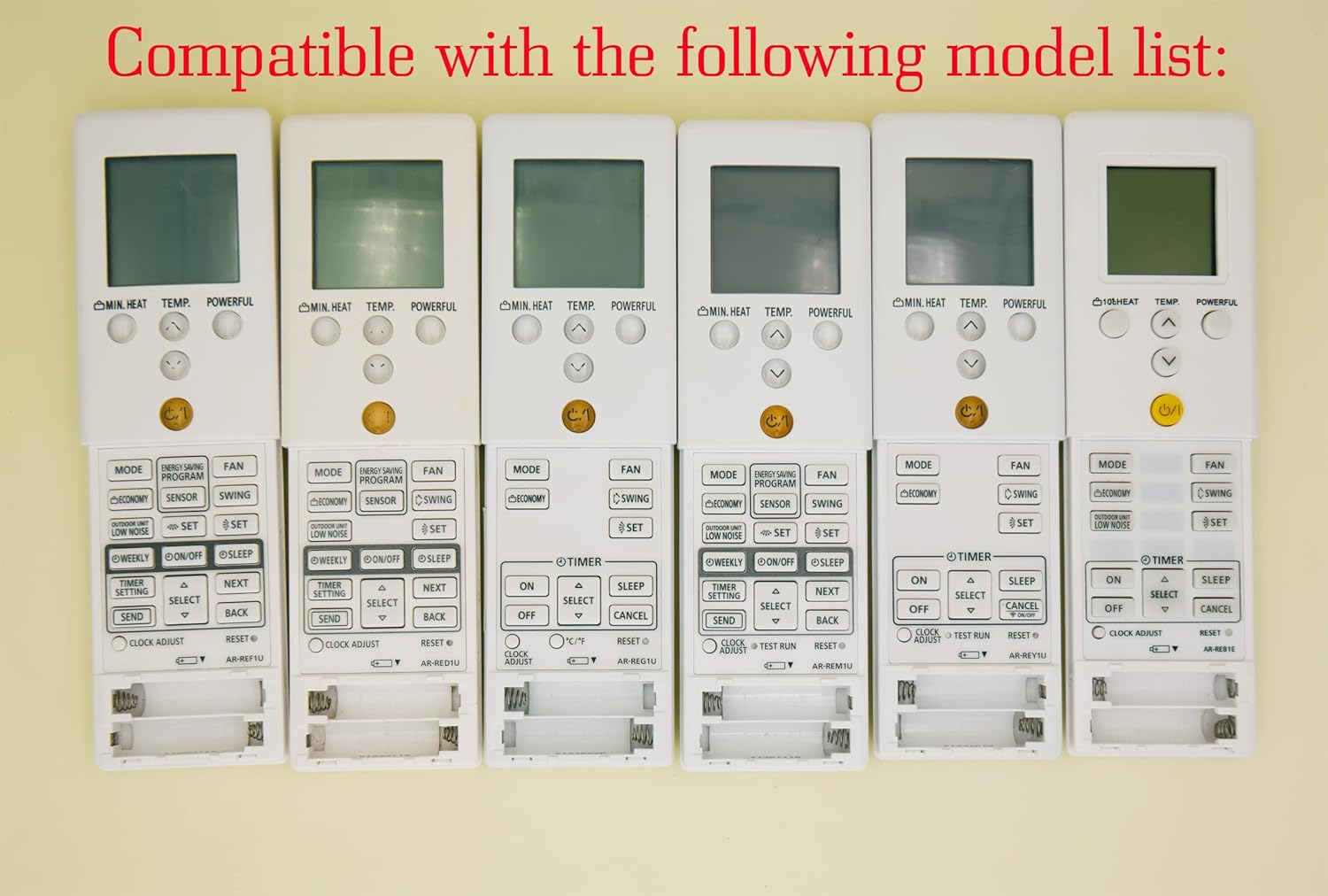
Image 1.1: Various compatible remote control models.
2. സജ്ജീകരണം
2.1 ബാറ്ററി ഇൻസ്റ്റാളേഷൻ
To begin using your remote control, you must install batteries. The remote requires two AAA batteries (not included).
- റിമോട്ട് കൺട്രോളിൻ്റെ പിൻഭാഗത്ത് ബാറ്ററി കമ്പാർട്ട്മെൻ്റ് കവർ കണ്ടെത്തുക.
- കമ്പാർട്ട്മെന്റ് തുറക്കാൻ കവർ താഴേക്ക് സ്ലൈഡ് ചെയ്യുക അല്ലെങ്കിൽ ലാച്ച് (ഉണ്ടെങ്കിൽ) അമർത്തുക.
- കമ്പാർട്ടുമെന്റിനുള്ളിലെ അടയാളപ്പെടുത്തലുകളുമായി പോസിറ്റീവ് (+), നെഗറ്റീവ് (-) ടെർമിനലുകൾ ശരിയായി വിന്യസിക്കുന്നുണ്ടെന്ന് ഉറപ്പാക്കാൻ രണ്ട് AAA ബാറ്ററികൾ ഇടുക.
- സുരക്ഷിതമായി ക്ലിക്ക് ചെയ്യുന്നതുവരെ ബാറ്ററി കമ്പാർട്ട്മെന്റ് കവർ തിരികെ സ്ഥലത്തേക്ക് സ്ലൈഡ് ചെയ്യുക.
ജാഗ്രത:
- പഴയതും പുതിയതുമായ ബാറ്ററികൾ മിക്സ് ചെയ്യരുത്.
- ആൽക്കലൈൻ, സ്റ്റാൻഡേർഡ് (കാർബൺ-സിങ്ക്), അല്ലെങ്കിൽ റീചാർജ് ചെയ്യാവുന്ന (നിക്കൽ-കാഡ്മിയം) ബാറ്ററികൾ മിക്സ് ചെയ്യരുത്.
- ചോർച്ച തടയാൻ റിമോട്ട് കൺട്രോൾ ദീർഘനേരം ഉപയോഗിക്കുന്നില്ലെങ്കിൽ ബാറ്ററികൾ നീക്കം ചെയ്യുക.

ചിത്രം 2.1: പിൻഭാഗം view ബാറ്ററി കമ്പാർട്ടുമെന്റുള്ള റിമോട്ട് കൺട്രോളിന്റെ.
3. പ്രവർത്തന നിർദ്ദേശങ്ങൾ
നിങ്ങളുടെ മാറ്റിസ്ഥാപിക്കൽ റിമോട്ട് കൺട്രോളിലെ ബട്ടണുകളുടെ പ്രവർത്തനങ്ങളെക്കുറിച്ച് ഈ വിഭാഗം വിശദമാക്കുന്നു.

ചിത്രം 3.1: കഴിഞ്ഞുview of the remote control buttons.
3.1 അടിസ്ഥാന പ്രവർത്തനങ്ങൾ
- Power Button (⑁/⑀): Press to turn the air conditioner ON or OFF. This button is typically yellow and located centrally.
- മോഡ് ബട്ടൺ: Cycles through operating modes such as AUTO, COOL, DRY, FAN, and HEAT.
- TEMP. Buttons (▲/▼): Adjusts the desired temperature setting. Press ▲ to increase and ▼ to decrease the temperature.
- ഫാൻ ബട്ടൺ: ഫാൻ വേഗത ക്രമീകരിക്കുന്നു (ഉദാ. ഓട്ടോ, ലോ, മീഡിയം, ഹൈ).
- സ്വിംഗ് ബട്ടൺ: Activates or deactivates the air swing function, which moves the air outlet louvers.

ചിത്രം 3.2: വിശദമായത് view റിമോട്ട് കൺട്രോൾ ബട്ടണുകളുടെ.
3.2 വിപുലമായ പ്രവർത്തനങ്ങൾ
- MIN. HEAT Button: Activates a minimum heat setting, often used to prevent freezing in unoccupied rooms.
- ശക്തമായ ബട്ടൺ: Engages a powerful operation mode for rapid cooling or heating.
- ENERGY SAVING PROGRAM Button: Activates a pre-set energy-saving mode.
- സെൻസർ ബട്ടൺ: May activate a temperature sensor function within the remote itself.
- ECONOMY Button: Engages an economic operation mode to reduce power consumption.
- OUTDOOR UNIT LOW NOISE Button: ഔട്ട്ഡോർ യൂണിറ്റിന്റെ ശബ്ദ നില കുറയ്ക്കുന്നു.
- WEEKLY Button: Accesses weekly timer settings.
- ON/OFF Button (Timer): Sets the ON/OFF timer for scheduled operation.
- സ്ലീപ്പ് ബട്ടൺ: Activates sleep mode, which adjusts temperature gradually for comfortable sleep.
- TIMER SETTING Button: Used to configure various timer functions.
- SELECT (▲/▼) Button: Used for navigating and selecting options within timer or program settings.
- അയയ്ക്കുക ബട്ടൺ: Confirms and sends timer or program settings to the AC unit.
- ബാക്ക് ബട്ടൺ: Returns to the previous menu or cancels a setting.
- ക്ലോക്ക് അഡ്ജസ്റ്റ് ബട്ടൺ: റിമോട്ടിന്റെ ഡിസ്പ്ലേയിൽ നിലവിലെ സമയം സജ്ജമാക്കാൻ ഉപയോഗിക്കുന്നു.
- റീസെറ്റ് ബട്ടൺ: Resets the remote control to its factory default settings.
3.3 ഡിസ്പ്ലേ സവിശേഷതകൾ
- പച്ച ബാക്ക്ലൈറ്റ്: The remote control features a green backlight for easy visibility and operation in low-light conditions or at night.
- ഫാരൻഹീറ്റ്, സെൽഷ്യസ് ഡിസ്പ്ലേ: The remote can display temperature in both Fahrenheit (℉) and Celsius (℃). Use the ℃/℉ button to toggle between the two units.

Image 3.3: Green backlight and Fahrenheit/Celsius display toggle.
4. പരിപാലനം
4.1 റിമോട്ട് കൺട്രോൾ വൃത്തിയാക്കൽ
റിമോട്ട് കൺട്രോളിന്റെ രൂപഭാവവും പ്രവർത്തനക്ഷമതയും നിലനിർത്താൻ:
- മൃദുവായതും ഉണങ്ങിയതുമായ തുണി ഉപയോഗിച്ച് ഉപരിതലം തുടയ്ക്കുക.
- ദുശ്ശാഠ്യമുള്ള അഴുക്കിന്, ലഘുവായി ഡിampതുണിയിൽ വെള്ളവും നേരിയ ഡിറ്റർജന്റും ചേർത്ത് തുടയ്ക്കുക, എന്നിട്ട് ഉടൻ ഉണക്കുക.
- Do not use abrasive cleaners, alcohol, or chemical solvents, as these can damage the remote's finish or internal components.
4.2 ബാറ്ററി മാറ്റിസ്ഥാപിക്കൽ
Replace the batteries when the remote's display becomes dim or if the remote becomes unresponsive. Typically, batteries should be replaced every 6-12 months, depending on usage. Follow the battery installation steps in Section 2.1.
5. പ്രശ്നപരിഹാരം
- റിമോട്ട് പ്രതികരിക്കുന്നില്ല:
- ബാറ്ററികൾ ശരിയായി ഇൻസ്റ്റാൾ ചെയ്തിട്ടുണ്ടോ എന്നും ആവശ്യത്തിന് ചാർജ് ഉണ്ടോ എന്നും പരിശോധിക്കുക. ആവശ്യമെങ്കിൽ മാറ്റിസ്ഥാപിക്കുക.
- റിമോട്ട് കൺട്രോളിനും എയർ കണ്ടീഷണറിന്റെ റിസീവറിനും ഇടയിൽ തടസ്സങ്ങളൊന്നുമില്ലെന്ന് ഉറപ്പാക്കുക.
- നിങ്ങൾ എയർ കണ്ടീഷണറിന്റെ ഫലപ്രദമായ പ്രവർത്തന പരിധിക്കുള്ളിലാണെന്ന് ഉറപ്പാക്കുക.
- Incorrect temperature display (Fahrenheit/Celsius):
- Press the ℃/℉ button on the remote control to toggle between Fahrenheit and Celsius display modes.
- Remote functions are erratic:
- Try resetting the remote control by removing the batteries for a few minutes, then reinserting them.
- If the issue persists, replace the batteries with new ones.
6 സ്പെസിഫിക്കേഷനുകൾ
| ഫീച്ചർ | വിവരണം |
|---|---|
| ബ്രാൻഡ് | YAOHUIMI |
| മോഡൽ നമ്പർ | A420220127-8IN1-18 സ്പെസിഫിക്കേഷനുകൾ |
| കണക്റ്റിവിറ്റി ടെക്നോളജി | ഇൻഫ്രാറെഡ് |
| പ്രത്യേക ഫീച്ചർ | Replacement Remote (Not Universal) |
| അനുയോജ്യമായ ഉപകരണങ്ങൾ | Fujitsu AC Air Conditioners (various models, see Section 1.1) |
| പവർ ഉറവിടം | 2 x AAA ബാറ്ററികൾ (ഉൾപ്പെടുത്തിയിട്ടില്ല) |
7. വാറൻ്റിയും പിന്തുണയും
വാറന്റി വിവരങ്ങൾക്കോ സാങ്കേതിക പിന്തുണയ്ക്കോ, നിങ്ങളുടെ വാങ്ങലിനൊപ്പം നൽകിയിരിക്കുന്ന ഡോക്യുമെന്റേഷൻ പരിശോധിക്കുകയോ വിൽപ്പനക്കാരനെ നേരിട്ട് ബന്ധപ്പെടുകയോ ചെയ്യുക. വാങ്ങിയതിന്റെ തെളിവായി നിങ്ങളുടെ വാങ്ങൽ രസീത് സൂക്ഷിക്കുക.


