1. ആമുഖം
This manual provides essential information for the safe and effective operation, maintenance, and troubleshooting of your TOTAL TR111226 12mm 2200W Router. Please read this manual thoroughly before using the tool to ensure proper handling and to prevent injury or damage.
The TOTAL TR111226 Router is a powerful tool designed for shaping and cutting wood. It features a premium 2200W motor, variable speed control, and an impact-resistant plastic base, making it suitable for various woodworking applications including manual straight cuts, guide cutting, and handle cutting.
2. സുരക്ഷാ നിർദ്ദേശങ്ങൾ
മുന്നറിയിപ്പ്: തീ, വൈദ്യുതാഘാതം, വ്യക്തിപരമായ പരിക്കുകൾ എന്നിവയ്ക്കുള്ള സാധ്യത കുറയ്ക്കുന്നതിന് എല്ലായ്പ്പോഴും അടിസ്ഥാന സുരക്ഷാ മുൻകരുതലുകൾ പാലിക്കുക.
- വർക്ക് ഏരിയ സുരക്ഷ: നിങ്ങളുടെ ജോലിസ്ഥലം വൃത്തിയുള്ളതും നല്ല വെളിച്ചമുള്ളതുമായി സൂക്ഷിക്കുക. അലങ്കോലമായതോ ഇരുണ്ടതോ ആയ സ്ഥലങ്ങൾ അപകടങ്ങൾ ക്ഷണിച്ചുവരുത്തുന്നു. കത്തുന്ന ദ്രാവകങ്ങൾ, വാതകങ്ങൾ അല്ലെങ്കിൽ പൊടി എന്നിവയുടെ സാന്നിധ്യം പോലുള്ള സ്ഫോടനാത്മകമായ അന്തരീക്ഷത്തിൽ വൈദ്യുതി ഉപകരണങ്ങൾ പ്രവർത്തിപ്പിക്കരുത്.
- ഇലക്ട്രിക്കൽ സുരക്ഷ: Power tool plugs must match the outlet. Never modify the plug in any way. Do not expose power tools to rain or wet conditions. Avoid body contact with earthed or grounded surfaces.
- വ്യക്തിഗത സുരക്ഷ: Always wear eye protection, dust mask, non-skid safety shoes, and hearing protection when operating the router. Dress properly; avoid loose clothing or jewelry.
- ഉപകരണ ഉപയോഗവും പരിചരണവും: പവർ ടൂൾ നിർബന്ധിച്ച് ഉപയോഗിക്കരുത്. നിങ്ങളുടെ ആപ്ലിക്കേഷന് അനുയോജ്യമായ പവർ ടൂൾ ഉപയോഗിക്കുക. എന്തെങ്കിലും ക്രമീകരണങ്ങൾ നടത്തുന്നതിനോ, ആക്സസറികൾ മാറ്റുന്നതിനോ, പവർ ടൂളുകൾ സൂക്ഷിക്കുന്നതിനോ മുമ്പ് പവർ സ്രോതസ്സിൽ നിന്ന് പ്ലഗ് വിച്ഛേദിക്കുക.
- പരിപാലനം: പവർ ടൂളുകൾ പരിപാലിക്കുക. ചലിക്കുന്ന ഭാഗങ്ങളുടെ തെറ്റായ ക്രമീകരണം അല്ലെങ്കിൽ ബൈൻഡിംഗ്, ഭാഗങ്ങളുടെ പൊട്ടൽ, പവർ ടൂളിന്റെ പ്രവർത്തനത്തെ ബാധിക്കുന്ന മറ്റേതെങ്കിലും അവസ്ഥ എന്നിവ പരിശോധിക്കുക.
3. ഉൽപ്പന്ന ഘടകങ്ങൾ
Familiarize yourself with the main components of your TOTAL TR111226 Router:
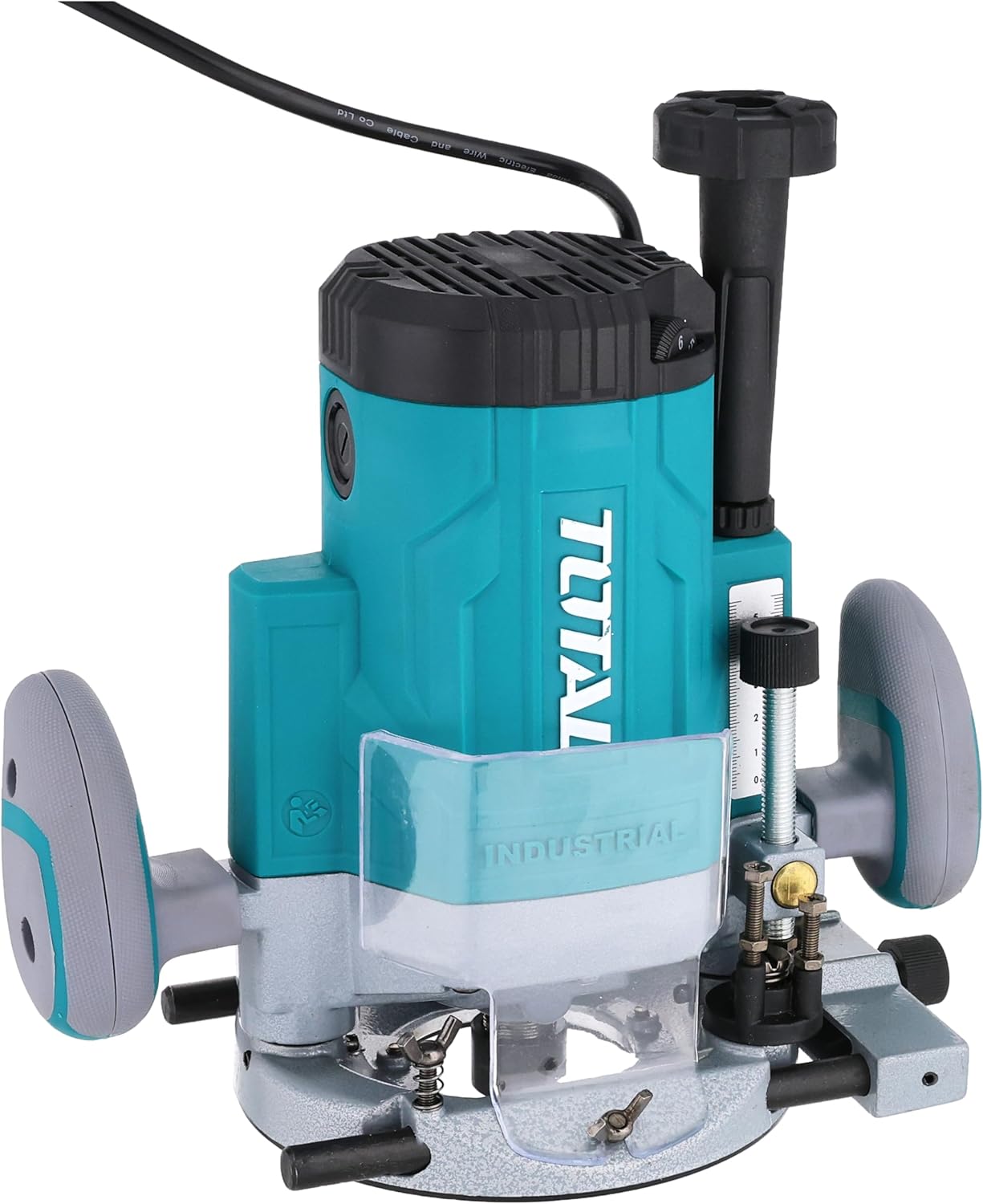
ചിത്രം 3.1: ഫ്രണ്ട് view of the TOTAL TR111226 Router, showing the main body, handles, and base. This image highlights the overall design and primary components of the tool.

ചിത്രം 3.2: ക്ലോസ് അപ്പ് view of the router's depth adjustment mechanism. This shows the threaded rod and locking knob used to precisely set the cutting depth.

ചിത്രം 3.3: പിൻഭാഗം view of the router, displaying the power cord entry point and the product's identification label with technical specifications.
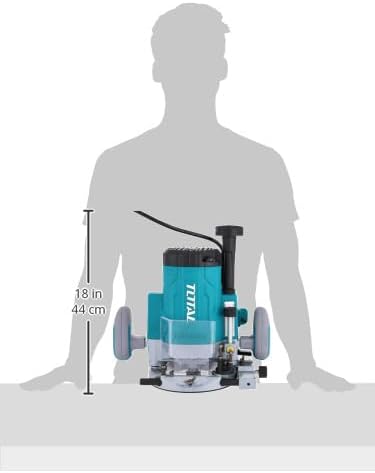
ചിത്രം 3.4: Image illustrating the approximate dimensions of the router, providing a visual reference for its size relative to a person.
4. സജ്ജീകരണം
4.1 അൺപാക്കിംഗ്
Carefully remove the router and all accessories from the packaging. Inspect the tool for any signs of damage during transit. Retain the packaging for future storage or transport.
4.2 ബിറ്റ് ഇൻസ്റ്റാളേഷൻ
- പവർ സ്രോതസ്സിൽ നിന്ന് റൂട്ടർ അൺപ്ലഗ് ചെയ്തിട്ടുണ്ടെന്ന് ഉറപ്പാക്കുക.
- നൽകിയിരിക്കുന്ന റെഞ്ച് ഉപയോഗിച്ച് കോളറ്റ് നട്ട് അഴിക്കുക.
- Insert the desired router bit into the collet, ensuring it is seated fully but not bottomed out.
- Tighten the collet nut firmly with the wrench. Do not overtighten.
4.3 ആഴ ക്രമീകരണം
The router features a precise depth adjustment mechanism:
- Place the router on a flat surface with the desired bit installed.
- ഡെപ്ത് ലോക്ക് നോബ് അഴിക്കുക.
- Lower the motor until the bit touches the surface.
- Adjust the depth fine-tuning knob or scale to achieve the desired cutting depth.
- Tighten the depth lock knob securely to prevent movement during operation.
4.4 പവറുമായി ബന്ധിപ്പിക്കുന്നു
Ensure the router's power switch is in the OFF position before plugging it into a suitable power outlet. The router operates on a corded electric power source.
5. പ്രവർത്തന നിർദ്ദേശങ്ങൾ
5.1 അടിസ്ഥാന പ്രവർത്തനം
- Hold the router firmly with both hands on the handles.
- വർക്ക്പീസ് സുരക്ഷിതമാണെന്ന് ഉറപ്പാക്കുകamped.
- Press the lock-off switch (if present) and then the power switch to start the motor. Allow the motor to reach full speed before engaging the workpiece.
- Slowly lower the router bit into the workpiece, guiding the tool smoothly along the desired path.
- To stop, release the power switch. Wait for the bit to come to a complete stop before lifting the router from the workpiece.
5.2 വേരിയബിൾ സ്പീഡ് കൺട്രോൾ
The router features variable speed settings to match the bit and material. Adjust the speed dial or control to the appropriate setting before starting the cut. Lower speeds are generally used for larger bits, harder materials, or when more control is needed. Higher speeds are suitable for smaller bits and softer materials.
5.3 കട്ടിംഗ് ടെക്നിക്കുകൾ
- നേരായ മുറിവുകൾ: Use a straight edge guide or fence to ensure accurate straight cuts.
- Guide Cutting: For curved or intricate cuts, use appropriate templates and guide bushings.
- Edge Profiling: For decorative edges, select the appropriate profiling bit and make multiple shallow passes if necessary.
6. പരിപാലനം
പതിവ് അറ്റകുറ്റപ്പണികൾ നിങ്ങളുടെ റൂട്ടറിന്റെ ദീർഘായുസ്സും മികച്ച പ്രകടനവും ഉറപ്പാക്കുന്നു.
6.1 വൃത്തിയാക്കൽ
- വൃത്തിയാക്കുന്നതിന് മുമ്പ് എല്ലായ്പ്പോഴും ഉപകരണം അൺപ്ലഗ് ചെയ്യുക.
- Clean the router regularly with a soft, damp തുണി. കഠിനമായ രാസവസ്തുക്കളോ ഉരച്ചിലുകളുള്ള ക്ലീനറുകളോ ഉപയോഗിക്കരുത്.
- Use compressed air to clear dust and debris from the motor vents and collet area.
6.2 ബിറ്റ് കെയർ
- Keep router bits sharp and clean. Dull bits can cause kickback and poor cut quality.
- Store bits in a protective case to prevent damage to the cutting edges.
6.3 സംഭരണം
When not in use, store the router in a dry, secure place out of reach of children. Protect it from direct sunlight and extreme temperatures.
7. പ്രശ്നപരിഹാരം
നിങ്ങളുടെ റൂട്ടറിൽ നിങ്ങൾ നേരിട്ടേക്കാവുന്ന സാധാരണ പ്രശ്നങ്ങൾ ഈ വിഭാഗം അഭിസംബോധന ചെയ്യുന്നു.
| പ്രശ്നം | സാധ്യമായ കാരണം | പരിഹാരം |
|---|---|---|
| റൂട്ടർ ആരംഭിക്കുന്നില്ല | വൈദ്യുതി വിതരണം ഇല്ല പവർ സ്വിച്ച് ഓഫ് Lock-off switch not engaged | പവർ ഔട്ട്ലെറ്റും കേബിളും പരിശോധിക്കുക പവർ സ്വിച്ച് ഓണാക്കുക Engage lock-off switch before pressing power switch |
| മോശം മുറിക്കൽ / കത്തുന്ന മരം | മുഷിഞ്ഞ ബിറ്റ് Incorrect feed rate തെറ്റായ വേഗത ക്രമീകരണം | Replace or sharpen bit Adjust feed rate (slower for harder materials) Adjust speed setting (lower for larger bits/harder materials) |
| അമിതമായ വൈബ്രേഷൻ | Loose bit Damaged bit മോട്ടോർ അസന്തുലിതാവസ്ഥ | Ensure bit is securely tightened Replace damaged bit Contact customer support if motor imbalance persists |
| Depth adjustment slips | Depth lock knob not tightened മെക്കാനിസത്തിലെ അവശിഷ്ടങ്ങൾ | Tighten depth lock knob firmly Clean depth adjustment mechanism |
If you encounter problems not listed here or if solutions do not resolve the issue, please contact TOTAL customer support.
8 സ്പെസിഫിക്കേഷനുകൾ
Key technical specifications for the TOTAL TR111226 Router:
| ഫീച്ചർ | സ്പെസിഫിക്കേഷൻ |
|---|---|
| മോഡൽ നമ്പർ | TR111226 |
| പവർ ഉറവിടം | കോർഡഡ് ഇലക്ട്രിക് |
| പവർ ഇൻപുട്ട് | 2200W |
| കോളറ്റ് വലിപ്പം | 12 മി.മീ |
| ഇനത്തിൻ്റെ ഭാരം | 4 കി.ഗ്രാം (8.818 പൗണ്ട്) |
| ഉൽപ്പന്ന അളവുകൾ | 10 x 20 x 37 സെ.മീ |
| അടിസ്ഥാന തരം | പരിഹരിച്ചു |
| മെറ്റീരിയൽ | പ്ലാസ്റ്റിക്, മരം |
| കുതിരശക്തി | 3 എച്ച്പി |
9. വാറൻ്റിയും പിന്തുണയും
TOTAL products are manufactured to high-quality standards. For information regarding the standard product warranty, please refer to the warranty card included with your purchase or visit the official TOTAL website. Extended warranty options may also be available from third-party providers.
For technical support, spare parts, or service inquiries, please contact TOTAL customer service through their official channels. Always provide your product model number (TR111226) and serial number when seeking support.


