1. ആമുഖം
The Yealink SIP-T43U IP Phone is a professional communication device designed for business environments. This 12-line IP phone features a 3.7-inch graphical display, dual USB ports, and supports the EXP43 expansion module. It incorporates Yealink Optima HD Voice technology and the Opus wideband codec for clear audio. The T43U series offers enhanced responsiveness and flexibility for various communication needs.
2. ഉൽപ്പന്നം കഴിഞ്ഞുview
The Yealink SIP-T43U IP Phone is designed for ease of use and robust performance. Below are key visual references and descriptions of the device.

ചിത്രം 1: ഒന്നിലധികം views of the Yealink SIP-T43U IP Phone.

ചിത്രം 2: മുൻഭാഗം view of the SIP-T43U IP Phone, highlighting the 3.7-inch graphical display and dual keypad.
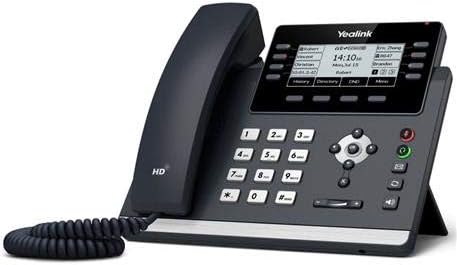
ചിത്രം 3: കോണാകൃതിയിലുള്ളത് view of the SIP-T43U IP Phone, illustrating its ergonomic design and adjustable stand.

ചിത്രം 4: വശം view of the SIP-T43U IP Phone, detailing the various connection ports on the rear.
3. സജ്ജീകരണം
3.1 പായ്ക്ക് അൺപാക്ക് ചെയ്യലും ഘടക പരിശോധനയും
സജ്ജീകരിക്കുന്നതിന് മുമ്പ്, എല്ലാ ഘടകങ്ങളും ഉണ്ടെന്ന് ഉറപ്പാക്കുക:
- Yealink SIP-T43U IP Phone unit
- ഹാൻഡ്സെറ്റും ഹാൻഡ്സെറ്റ് ചരടും
- ഇഥർനെറ്റ് കേബിൾ
- ഡെസ്ക് സ്റ്റാൻഡ്
- ക്വിക്ക് സ്റ്റാർട്ട് ഗൈഡ് (ഉൾപ്പെടുത്തിയിട്ടുണ്ടെങ്കിൽ)
- Power adapter (if not using PoE, sold separately)
3.2 ഫോൺ ബന്ധിപ്പിക്കുന്നു
- Connect the handset to the handset port on the phone using the coiled cord.
- Connect the LAN port of the phone to your network switch or router using the Ethernet cable. The phone supports Power over Ethernet (PoE), eliminating the need for a separate power adapter if your network supports PoE.
- If PoE is not available, connect a compatible power adapter (sold separately) to the power port on the phone and then to an electrical outlet.
- (Optional) Connect your computer to the PC port on the phone using another Ethernet cable to share the network connection.
3.3 Assembling the Desk Stand
Attach the desk stand to the back of the phone. The stand offers two adjustable angles for optimal viewഇംഗും ഉപയോഗവും.
3.4 വാൾ മൗണ്ടിംഗ് (ഓപ്ഷണൽ)
The SIP-T43U is wall-mountable. A wall mount bracket is sold separately. Refer to the wall mount kit instructions for installation.
4. പ്രവർത്തന നിർദ്ദേശങ്ങൾ
4.1 അടിസ്ഥാന കോൾ പ്രവർത്തനങ്ങൾ
- ഒരു കോൾ ചെയ്യുന്നു: Pick up the handset or press the Speaker button, then dial the number and press the Dial soft key or #.
- ഒരു കോളിന് മറുപടി നൽകുന്നു: Pick up the handset or press the Speaker button.
- ഒരു കോൾ അവസാനിപ്പിക്കുന്നു: ഹാൻഡ്സെറ്റ് ഹാംഗ് അപ്പ് ചെയ്യുക അല്ലെങ്കിൽ എൻഡ് കോൾ സോഫ്റ്റ് കീ അമർത്തുക.
- പിടിക്കുക: During a call, press the Hold soft key. Press Resume to retrieve the call.
- കൈമാറ്റം: During a call, press the Transfer soft key, dial the new number, and press Transfer again.
- നിശബ്ദമാക്കുക: Press the Mute button to mute or unmute your microphone.
4.2 Using the Display and Soft Keys
The 3.7-inch graphical display shows call information, menu options, and status indicators. The soft keys below the display change functionality based on the phone's current state, providing context-sensitive options.
4.3 SIP Accounts
The SIP-T43U supports up to 12 SIP accounts. These accounts are typically configured by your system administrator. Each account can be assigned to a line key on the phone.
4.4 കോൺഫറൻസ് കോളുകൾ
The phone supports 8-way conference calls. To initiate a conference call, establish a call with the first party, then press the Conference soft key, dial the next party, and press Conference again to join them to the call.
5. വിപുലമായ സവിശേഷതകൾ
5.1 Dual USB Ports
The SIP-T43U is equipped with dual USB ports, allowing for enhanced functionality and connectivity. These ports support various USB devices simultaneously:
- USB Headsets: ഹാൻഡ്സ് ഫ്രീ ആശയവിനിമയത്തിന്.
- Wi-Fi Dongles (WF40/WF50, sold separately): To connect the phone to a wireless network.
- Bluetooth Dongles (BT40/BT41, sold separately): To connect Bluetooth headsets or other Bluetooth devices.
- USB Recording Devices: For call recording.
5.2 EXP43 Expansion Module Support
The phone supports the EXP43 color-screen expansion module (sold separately) to extend the number of programmable keys. When connected to a T43U, the EXP43 module's interface automatically switches to grayscale mode for a unified appearance.
5.3 Optima HD Voice and Acoustic Shield Technology
The SIP-T43U features Yealink Optima HD Voice technology and the Opus wideband codec, delivering superior audio quality. The integrated Acoustic Shield Technology effectively eliminates background noise, ensuring distraction-free and crystal-clear voice communications.
5.4 Fast Boot-Up and Dual System Images
The T43U series boasts a faster response speed, booting up in approximately 30 seconds. This is particularly beneficial for large-scale deployments or maintenance. The phones are equipped with dual system images, providing a robust and secure upgrade process. If an upgrade fails, the phone can revert to the original system image, preventing device bricking.
5.5 Unified Firmware
The T4U series utilizes a unified firmware across various models (T42U, T43U, T46U, T48U). This simplifies management and maintenance for administrators, as a single firmware version can be applied to multiple phone types.
വീഡിയോ: കഴിഞ്ഞുview of the Yealink T4U Series IP Phones, highlighting features like dual USB ports, Acoustic Shield Technology, EXP43 compatibility, fast boot-up, and unified firmware.
6. പരിപാലനം
6.1 വൃത്തിയാക്കൽ
Regularly clean the phone with a soft, dry cloth. Avoid using abrasive cleaners or solvents that may damage the surface or electronic components.
6.2 ഫേംവെയർ അപ്ഡേറ്റുകൾ
Periodically check for and apply firmware updates provided by Yealink or your service provider. Firmware updates can introduce new features, improve performance, and enhance security. The dual system image design ensures a safe update process.
7. പ്രശ്നപരിഹാരം
7.1 വൈദ്യുതിയില്ല
- Ensure the Ethernet cable is securely connected to the LAN port and the network switch (if using PoE).
- If using a power adapter, verify it is correctly plugged into the phone and a working electrical outlet.
7.2 No Dial Tone
- Check that the handset cord is securely connected to both the handset and the phone.
- നെറ്റ്വർക്ക് കണക്റ്റിവിറ്റി പരിശോധിക്കുക.
- Contact your system administrator to confirm SIP account registration status.
7.3 മോശം ഓഡിയോ നിലവാരം
- Check network connection stability.
- ഹാൻഡ്സെറ്റ് അല്ലെങ്കിൽ ഹെഡ്സെറ്റ് ശരിയായി ബന്ധിപ്പിച്ചിട്ടുണ്ടെന്ന് ഉറപ്പാക്കുക.
- If using a headset, try adjusting its volume or replacing it.
7.4 പൊതു പ്രശ്നങ്ങൾ
For persistent issues, try restarting the phone by disconnecting and reconnecting the power source. If problems continue, consult your system administrator or Yealink support.
8 സ്പെസിഫിക്കേഷനുകൾ
| ഫീച്ചർ | വിവരണം |
|---|---|
| പ്രദർശിപ്പിക്കുക | 3.7-inch 360×160-pixel graphical LCD with backlight |
| SIP അക്കൗണ്ടുകൾ | 12 വരെ |
| USB പോർട്ടുകൾ | ഡ്യുവൽ USB 2.0 പോർട്ടുകൾ |
| ഇഥർനെറ്റ് പോർട്ടുകൾ | Dual-Port Gigabit Ethernet |
| PoE പിന്തുണ | 802.3af പവർ ഓവർ ഇഥർനെറ്റ് |
| ഓഡിയോ സവിശേഷതകൾ | Yealink Optima HD Voice, Opus codec, Acoustic Shield Technology |
| അനുയോജ്യമായ ഉപകരണങ്ങൾ | USB headsets, Wi-Fi adapters (WF40/WF50), Bluetooth adapters (BT40/BT41), EXP43 expansion modules, USB recording devices |
| കോൺഫറൻസ് കോൾ | 8-വഴി |
| നിൽക്കുക | Adjustable with 2 angles, wall-mountable (kit sold separately) |
| മെറ്റീരിയൽ | പ്ലാസ്റ്റിക് |
| ഡയലർ തരം | ഇരട്ട കീപാഡ് |
| ഉത്തരം നൽകുന്ന സിസ്റ്റം തരം | ഡിജിറ്റൽ |
| ഇനത്തിൻ്റെ ഭാരം | 20 പൗണ്ട് (5 പായ്ക്കിന്) |
9. വാറൻ്റിയും പിന്തുണയും
For warranty information, technical support, or service inquiries, please refer to the documentation provided with your purchase or contact your vendor or Yealink's official support channels. Keep your purchase receipt and product serial number handy for assistance.


