1. ആമുഖം
നിങ്ങളുടെ MACHINIST H61 LGA 1155 മൈക്രോ ATX മദർബോർഡിന്റെ (മോഡൽ H61M-S1) ഇൻസ്റ്റാളേഷൻ, പ്രവർത്തനം, പരിപാലനം എന്നിവയ്ക്കുള്ള വിശദമായ നിർദ്ദേശങ്ങൾ ഈ മാനുവൽ നൽകുന്നു. ശരിയായ സജ്ജീകരണവും പ്രവർത്തനക്ഷമതയും ഉറപ്പാക്കാൻ ഇൻസ്റ്റാളേഷനുമായി മുന്നോട്ട് പോകുന്നതിന് മുമ്പ് ദയവായി ഈ മാനുവൽ നന്നായി വായിക്കുക.

ചിത്രം 1.1: MACHINIST H61 LGA 1155 മദർബോർഡും അതിന്റെ റീട്ടെയിൽ പാക്കേജിംഗും.
2. ഉൽപ്പന്നം കഴിഞ്ഞുview
MACHINIST H61 LGA 1155 മദർബോർഡ്, ഇന്റലിന്റെ രണ്ടാം തലമുറ, മൂന്നാം തലമുറ പ്രോസസ്സറുകളെ പിന്തുണയ്ക്കുന്നതിനാണ് രൂപകൽപ്പന ചെയ്തിരിക്കുന്നത്, വിശ്വസനീയമായ കമ്പ്യൂട്ടിംഗ് അനുഭവത്തിന് അവശ്യ സവിശേഷതകൾ വാഗ്ദാനം ചെയ്യുന്നു.
2.1 പ്രധാന സവിശേഷതകൾ
- ഇന്റൽ എൽജിഎ 1155 സോക്കറ്റ്: ഇന്റൽ കോർ i3/i5/i7 രണ്ടാം തലമുറ അല്ലെങ്കിൽ മൂന്നാം തലമുറ പ്രോസസ്സറുകളെയും, സിയോൺ E3 v2, പെന്റിയം, സെലറോൺ സീരീസ് പ്രോസസ്സറുകളെയും പിന്തുണയ്ക്കുന്നു.
- മെച്ചപ്പെടുത്തിയ പവർ സപ്ലൈ: 3+1 ഫേസ് പവർ സപ്ലൈ ഡിസൈൻ, 24+4പിൻ ഡിസി പവർ സപ്ലൈ സ്ലോട്ട്, സ്ഥിരതയുള്ള പവർ ഡെലിവറിക്ക് 4-ലെയർ പിസിബി മെറ്റീരിയൽ എന്നിവ ഇതിൽ ഉൾപ്പെടുന്നു.
- DDR3 മെമ്മറി പിന്തുണ: 1066/1333/1600MHz ഫ്രീക്വൻസികളിൽ 2x8GB DDR3 മെമ്മറി വരെ പിന്തുണയ്ക്കുന്ന ഡ്യുവൽ-ചാനൽ നോൺ-ഇസിസി മെമ്മറി സ്ലോട്ടുകൾ.
- ഹൈ-ഡെഫനിഷൻ വീഡിയോ ഔട്ട്പുട്ട്: HDMI, VGA ഇന്റർഫേസുകളുമായി പൊരുത്തപ്പെടുന്നു, 4K, 1080P ഇന്റഗ്രേറ്റഡ് ഡിസ്പ്ലേ എന്നിവയെ പിന്തുണയ്ക്കുന്നു. സമർപ്പിത ഗ്രാഫിക്സ് കാർഡുകൾക്കായി ഒരു PCIe 2.0 X16 സ്ലോട്ട് ഉൾപ്പെടുന്നു.
- ഒന്നിലധികം വിപുലീകരണ ഇന്റർഫേസുകൾ: 1x PCIe 2.0 X16 സ്ലോട്ട്, 1x PCIe X1 സ്ലോട്ട്, 4x SATA 2.0 ഇന്റർഫേസുകൾ, 7x USB 2.0 ഇന്റർഫേസുകൾ (6 പിൻഭാഗം, 1 മുൻഭാഗം), 1x USB 3.0 ഇന്റർഫേസ് (മുൻഭാഗം) എന്നിവ ഉൾപ്പെടുന്നു.
- സംയോജിത നെറ്റ്വർക്കിംഗും ഓഡിയോയും: ഓൺബോർഡ് 100M LAN നെറ്റ്വർക്ക് ഇന്റർഫേസും 5.1-ചാനൽ ഓഡിയോ ഇന്റർഫേസും.

ചിത്രം 2.1: കഴിഞ്ഞുview H61-S1 മദർബോർഡിലെ പ്രധാന സവിശേഷതകൾ, USB 3.0, 100M LAN, ഹീറ്റ് സിങ്ക്, സോളിഡ് കപ്പാസിറ്ററുകൾ എന്നിവ എടുത്തുകാണിക്കുന്നു.
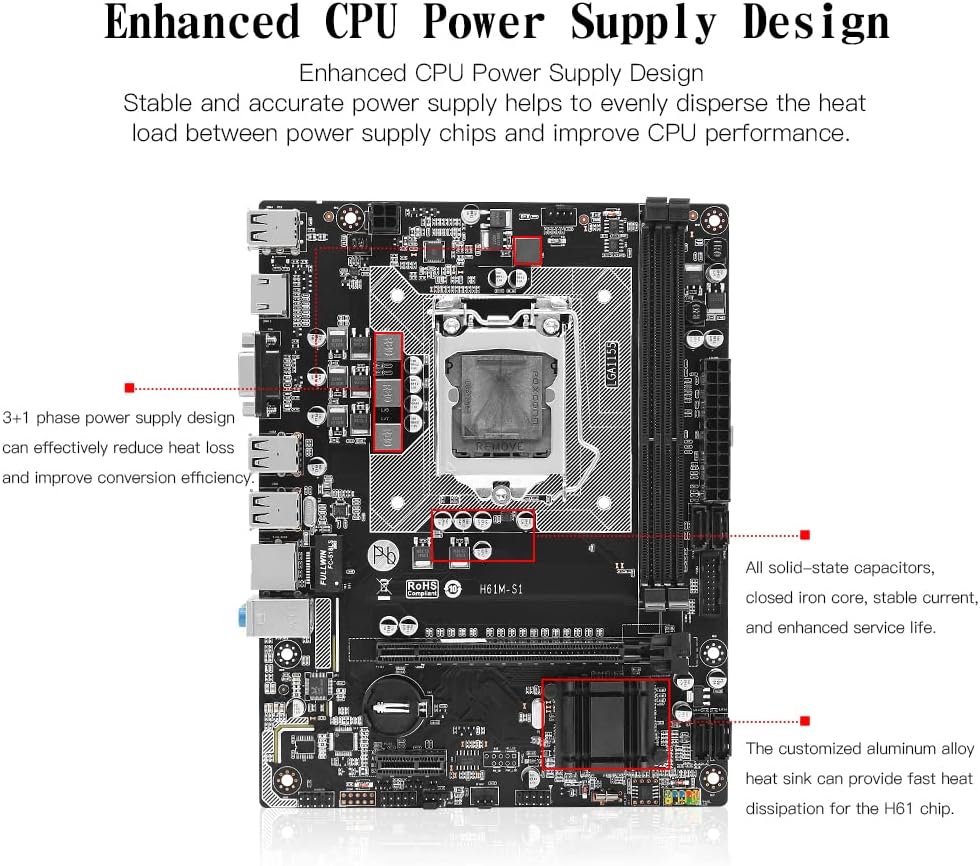
ചിത്രം 2.2: സ്ഥിരതയുള്ള പവർ ഡെലിവറിക്ക് വേണ്ടി 3+1 ഫേസുകളും സോളിഡ്-സ്റ്റേറ്റ് കപ്പാസിറ്ററുകളും ഉള്ള മെച്ചപ്പെടുത്തിയ സിപിയു പവർ സപ്ലൈ ഡിസൈൻ.
3. സജ്ജീകരണവും ഇൻസ്റ്റാളേഷനും
നിങ്ങളുടെ മദർബോർഡും അതിന്റെ ഘടകങ്ങളും ഇൻസ്റ്റാൾ ചെയ്യുന്നതിന് ഈ ഘട്ടങ്ങൾ ശ്രദ്ധാപൂർവ്വം പാലിക്കുക.
3.1 സിപിയു ഇൻസ്റ്റലേഷൻ
സിപിയു സ്ഥാപിക്കുന്നതിന് മുമ്പ് സിപിയു സോക്കറ്റ് ലിവർ തുറന്നിട്ടുണ്ടെന്ന് ഉറപ്പാക്കുക. സോക്കറ്റിന്റെ നോട്ടുകളുമായി സിപിയു ശരിയായി വിന്യസിക്കുക.

ചിത്രം 3.1: ഇന്റൽ 2nd/3rd Gen പ്രോസസ്സറുകൾക്കായി രൂപകൽപ്പന ചെയ്ത LGA 1155 CPU സോക്കറ്റ്.
- വയർ ബക്കിൾ കൈകൊണ്ട് അമർത്തി മുകളിലേക്ക് ഉയർത്തുക. സിപിയു ഇൻസ്റ്റാൾ ചെയ്യുന്നതിന് മുമ്പ് കറുത്ത കവർ നീക്കം ചെയ്യരുത്.
- മദർബോർഡ് ബേസിൽ മൂന്ന് ബയണറ്റുകളുണ്ട്, സിപിയുവിൽ തന്നെ മൂന്ന് ബയണറ്റുകളുണ്ട്. അവയെ ഓരോന്നായി വിന്യസിക്കുക, തുടർന്ന് സിപിയു സോക്കറ്റിൽ സൌമ്യമായി സ്ഥാപിക്കുക.
- മുകളിലേക്ക് ഉയർത്തിയ വയർ ബക്കിൾ താഴ്ത്തുക. കറുത്ത കവർ യാന്ത്രികമായി പോപ്പ് അപ്പ് ചെയ്യും. CPU ഇൻസ്റ്റാൾ ചെയ്യുന്നതിന് മുമ്പ് കറുത്ത കവർ നീക്കം ചെയ്യരുതെന്ന് ഓർമ്മിക്കുക.
- സിപിയു മുകളിലെ കവർ തുറക്കരുത്. കോറുമായി ബന്ധപ്പെടാൻ സിപിയു പിന്നുകളിൽ തൊടരുത്. മദർബോർഡ് ഇന്റർഫേസ് പിന്നുകളിൽ തൊടരുത്.

ചിത്രം 3.2: സിപിയു ഇൻസ്റ്റാളേഷനുള്ള ഘട്ടം ഘട്ടമായുള്ള ഗൈഡ്.
3.2 മെമ്മറി ഇൻസ്റ്റലേഷൻ
മദർബോർഡിൽ ഡ്യുവൽ-ചാനൽ DDR3 മെമ്മറി സ്ലോട്ടുകൾ ഉണ്ട്. മെമ്മറി മൊഡ്യൂളുകൾ സ്ലോട്ടുകളുമായി വിന്യസിച്ച് ക്ലിപ്പുകൾ ലോക്ക് ആകുന്നതുവരെ അമർത്തി ഇൻസ്റ്റാൾ ചെയ്യുക.

ചിത്രം 3.3: DDR3 നോൺ-ഇസിസി മെമ്മറി സ്ലോട്ടുകൾ, 2x8GB വരെ പിന്തുണയ്ക്കുന്നു.
3.3 പെരിഫറലുകളും പവറും ബന്ധിപ്പിക്കുന്നു
പവർ സപ്ലൈ കേബിളുകൾ, സ്റ്റോറേജ് ഉപകരണങ്ങൾ, മറ്റ് പെരിഫറലുകൾ എന്നിവ മദർബോർഡിലെ ഉചിതമായ പോർട്ടുകളിലേക്ക് ബന്ധിപ്പിക്കുക.

ചിത്രം 3.4: ലേബൽ ചെയ്ത പോർട്ടുകളും കണക്ടറുകളും ഉള്ള മദർബോർഡ് ലേഔട്ട്.
- പവർ കണക്ടറുകൾ: നിങ്ങളുടെ പവർ സപ്ലൈ യൂണിറ്റിൽ നിന്ന് 24-പിൻ ATX പവർ കണക്ടറും 4-പിൻ CPU പവർ കണക്ടറും ബന്ധിപ്പിക്കുക.
- SATA പോർട്ടുകൾ: ലഭ്യമായ SATA പോർട്ടുകളിലേക്ക് SATA 2.0 ഉപകരണങ്ങൾ (HDD-കൾ, SSD-കൾ) ബന്ധിപ്പിക്കുക.
- വിപുലീകരണ സ്ലോട്ടുകൾ: PCIe 2.0 X16 സ്ലോട്ടിൽ ഗ്രാഫിക്സ് കാർഡുകളും PCIe X1 സ്ലോട്ടിൽ മറ്റ് എക്സ്പാൻഷൻ കാർഡുകളും ഇൻസ്റ്റാൾ ചെയ്യുക.
- ഫ്രണ്ട് പാനൽ കണക്ടറുകൾ: മദർബോർഡ് മാനുവൽ അനുസരിച്ച് നിങ്ങളുടെ കേസിന്റെ ഫ്രണ്ട് പാനൽ യുഎസ്ബി, ഓഡിയോ, പവർ, റീസെറ്റ് ഹെഡറുകൾ എന്നിവ ബന്ധിപ്പിക്കുക.
- പിൻ I/O പോർട്ടുകൾ: യുഎസ്ബി ഉപകരണങ്ങൾ, ഡിസ്പ്ലേ കേബിളുകൾ (HDMI/VGA), ഇതർനെറ്റ് കേബിൾ, ഓഡിയോ ഉപകരണങ്ങൾ എന്നിവ പിൻ പാനൽ പോർട്ടുകളിലേക്ക് ബന്ധിപ്പിക്കുക.

ചിത്രം 3.5: വിവിധ കണക്റ്റിവിറ്റി ഓപ്ഷനുകളുള്ള പിൻ I/O പാനൽ.
4. പ്രവർത്തന നിർദ്ദേശങ്ങൾ
വിജയകരമായ ഹാർഡ്വെയർ ഇൻസ്റ്റാളേഷന് ശേഷം, ഓപ്പറേറ്റിംഗ് സിസ്റ്റവും ഡ്രൈവറും ഇൻസ്റ്റാളുചെയ്യുന്നത് തുടരുക.
4.1 ഡ്രൈവർ ഇൻസ്റ്റലേഷൻ
മികച്ച പ്രകടനത്തിന്, നിങ്ങളുടെ മദർബോർഡ് ഘടകങ്ങൾക്ക് ആവശ്യമായ ഡ്രൈവറുകൾ ഇൻസ്റ്റാൾ ചെയ്യുക. ഏറ്റവും ആവശ്യമായ ഡ്രൈവറുകൾ പലപ്പോഴും യാന്ത്രികമായി ഇൻസ്റ്റാൾ ചെയ്യുന്ന വിൻഡോസ് 10 ഉപയോഗിക്കുന്നതാണ് ഉത്തമം. ഡ്രൈവർ ഇൻസ്റ്റാളേഷൻ ആവശ്യമാണെങ്കിൽ, ഡ്രൈവറുകൾ സാധാരണയായി നിർമ്മാതാവിന്റെ webസൈറ്റ് അല്ലെങ്കിൽ ഒരു ഡ്രൈവർ ഡിസ്കിൽ ഉൾപ്പെടുത്തിയിട്ടുണ്ട് (നൽകിയിട്ടുണ്ടെങ്കിൽ).
4.2 ഇന്റഗ്രേറ്റഡ് ഗ്രാഫിക്സ് പിന്തുണ
HDMI, VGA ഇന്റർഫേസുകൾ വഴിയുള്ള ഇന്റഗ്രേറ്റഡ് ഗ്രാഫിക്സിനെ മദർബോർഡ് പിന്തുണയ്ക്കുന്നു. ചില ഇന്റൽ സിയോൺ E3 V1, V2 സീരീസ് സിപിയുകളിൽ, പ്രത്യേകിച്ച് "5" സഫിക്സ് ഇല്ലാത്തതോ "F" സഫിക്സ് ഉള്ളതോ (ഉദാ: E3-1230, i7-xxxxF), ഇന്റഗ്രേറ്റഡ് ഗ്രാഫിക്സ് ഇല്ലെന്നും ഒരു പ്രത്യേക ഗ്രാഫിക്സ് കാർഡ് ആവശ്യമാണെന്നും ശ്രദ്ധിക്കുക.

ചിത്രം 4.1: ഹൈ-ഡെഫനിഷൻ വീഡിയോ ഔട്ട്പുട്ടിനുള്ള HDMI, VGA പോർട്ടുകൾ.
5. പരിപാലനം
നിങ്ങളുടെ മദർബോർഡിന്റെ ദീർഘായുസ്സും സ്ഥിരതയുള്ള പ്രവർത്തനവും ഉറപ്പാക്കാൻ, ഇനിപ്പറയുന്ന പരിപാലന നുറുങ്ങുകൾ പരിഗണിക്കുക:
- കമ്പ്യൂട്ടർ കേസ് പൊടിയില്ലാതെ വൃത്തിയായി സൂക്ഷിക്കുക. പൊടി അടിഞ്ഞുകൂടുന്നത് അമിതമായി ചൂടാകുന്നതിനും ഘടകങ്ങൾ തകരാറിലാകുന്നതിനും കാരണമാകും.
- കേബിളുകൾ ശരിയായി കൈകാര്യം ചെയ്തും ഉചിതമായ കൂളിംഗ് സൊല്യൂഷനുകൾ ഉപയോഗിച്ചും കമ്പ്യൂട്ടർ കേസിനുള്ളിൽ മതിയായ വായുസഞ്ചാരം ഉറപ്പാക്കുക.
- നിർമ്മാതാവിന്റെ അപ്ഡേറ്റ് ചെയ്ത ഡ്രൈവറുകളും BIOS പതിപ്പുകളും പതിവായി പരിശോധിച്ച് ഇൻസ്റ്റാൾ ചെയ്യുക. webസ്ഥിരതയും പ്രകടനവും മെച്ചപ്പെടുത്തുന്നതിനുള്ള സൈറ്റ്.
- മദർബോർഡ് ഉയർന്ന താപനിലയിലോ ഈർപ്പത്തിലോ ആയിരിക്കുന്നത് ഒഴിവാക്കുക.
6. പ്രശ്നപരിഹാരം
പൊതുവായ പ്രശ്നങ്ങൾക്കുള്ള പൊതുവായ മാർഗ്ഗനിർദ്ദേശം ഈ വിഭാഗം നൽകുന്നു. പ്രത്യേക പ്രശ്നങ്ങൾക്ക്, നിർമ്മാതാവിന്റെ പിന്തുണാ ഉറവിടങ്ങൾ പരിശോധിക്കുക.
6.1 ഡിസ്പ്ലേ ഔട്ട്പുട്ട് ഇല്ല
- മോണിറ്റർ മദർബോർഡിന്റെ വീഡിയോ ഔട്ട്പുട്ടുമായി (HDMI/VGA) അല്ലെങ്കിൽ ഒരു പ്രത്യേക ഗ്രാഫിക്സ് കാർഡുമായി ശരിയായി ബന്ധിപ്പിച്ചിട്ടുണ്ടോയെന്ന് പരിശോധിക്കുക.
- നിങ്ങൾ ഒരു പ്രത്യേക ഗ്രാഫിക്സ് കാർഡ് ഉപയോഗിക്കുന്നില്ലെങ്കിൽ, നിങ്ങളുടെ സിപിയുവിൽ ഇന്റഗ്രേറ്റഡ് ഗ്രാഫിക്സ് ഉണ്ടെന്ന് ഉറപ്പാക്കുക. ചില Xeon E3, Core iX-F സീരീസ് സിപിയുകളിൽ ഇന്റഗ്രേറ്റഡ് ഗ്രാഫിക്സ് ഇല്ല.
- എല്ലാ പവർ കേബിളുകളും (24-പിൻ ATX, 4-പിൻ CPU, ഗ്രാഫിക്സ് കാർഡ് PCIe പവർ) സുരക്ഷിതമായി ബന്ധിപ്പിച്ചിട്ടുണ്ടോയെന്ന് പരിശോധിക്കുക.
- റാം മൊഡ്യൂളുകളും ഗ്രാഫിക്സ് കാർഡും (ഇൻസ്റ്റാൾ ചെയ്തിട്ടുണ്ടെങ്കിൽ) വീണ്ടും ഇൻസ്റ്റാൾ ചെയ്യുക.
6.2 യുഎസ്ബി പോർട്ടുകൾ പ്രവർത്തിക്കുന്നില്ല.
- യുഎസ്ബി ഉപകരണങ്ങൾ പോർട്ടുകളുമായി ശരിയായി ബന്ധിപ്പിച്ചിട്ടുണ്ടെന്ന് ഉറപ്പാക്കുക.
- USB ഡ്രൈവറുകൾ ശരിയായി ഇൻസ്റ്റാൾ ചെയ്തിട്ടുണ്ടോ എന്ന് പരിശോധിക്കുക. വിൻഡോസ് 10 സാധാരണയായി ഇത് യാന്ത്രികമായി കൈകാര്യം ചെയ്യുന്നു, പക്ഷേ ചില സന്ദർഭങ്ങളിൽ മാനുവൽ ഇൻസ്റ്റാളേഷൻ ആവശ്യമായി വന്നേക്കാം.
- ഉപകരണ പരാജയം ഒഴിവാക്കാൻ മറ്റൊരു കമ്പ്യൂട്ടറിൽ USB ഉപകരണങ്ങൾ പരിശോധിക്കുക.
- വ്യത്യസ്ത യുഎസ്ബി പോർട്ടുകളിലേക്ക് ഉപകരണങ്ങൾ ബന്ധിപ്പിക്കാൻ ശ്രമിക്കുക (പിൻവശത്തെ I/O, ഫ്രണ്ട് പാനൽ എന്നിവ).
6.3 സിസ്റ്റം അസ്ഥിരത അല്ലെങ്കിൽ ക്രമരഹിതമായ പുനരാരംഭങ്ങൾ
- എല്ലാ ഘടകങ്ങളും (സിപിയു, റാം, ഗ്രാഫിക്സ് കാർഡ്) ശരിയായി സ്ഥാപിച്ചിട്ടുണ്ടെന്ന് ഉറപ്പാക്കുക.
- അമിതമായി ചൂടാകുന്നത് തടയാൻ സിപിയു, കേസ് താപനിലകൾ പരിശോധിക്കുക.
- നിങ്ങളുടെ പവർ സപ്ലൈ യൂണിറ്റ് (പിഎസ്യു) എല്ലാ ഘടകങ്ങൾക്കും മതിയായതും സ്ഥിരതയുള്ളതുമായ പവർ നൽകുന്നുണ്ടെന്ന് ഉറപ്പാക്കുക.
- റാം പിശകുകൾ പരിശോധിക്കാൻ മെമ്മറി ഡയഗ്നോസ്റ്റിക് ഉപകരണങ്ങൾ പ്രവർത്തിപ്പിക്കുക.
7 സ്പെസിഫിക്കേഷനുകൾ
| ഫീച്ചർ | സ്പെസിഫിക്കേഷൻ |
|---|---|
| ബ്രാൻഡ് | മെഷീനിസ്റ്റ് |
| മോഡൽ നമ്പർ | H61M-S1 ന്റെ സവിശേഷതകൾ |
| സിപിയു സോക്കറ്റ് | LGA 1155 |
| അനുയോജ്യമായ പ്രോസസ്സറുകൾ | ഇന്റൽ കോർ i3/i5/i7 (രണ്ടാം/മൂന്നാം തലമുറ), സിയോൺ E3 V2, പെന്റിയം, സെലറോൺ |
| ചിപ്സെറ്റ് തരം | H61 |
| റാം മെമ്മറി ടെക്നോളജി | DDR3 (നോൺ-ഇസിസി) |
| മെമ്മറി സ്ലോട്ടുകൾ | 2 (ഡ്യുവൽ-ചാനൽ) |
| പരമാവധി മെമ്മറി ശേഷി | 16 ജിബി (2x8 ജിബി) |
| പിന്തുണയ്ക്കുന്ന മെമ്മറി ഫ്രീക്വൻസികൾ | 1066/1333/1600MHz |
| പിസിഐഇ 2.0 എക്സ്16 സ്ലോട്ട് | 1 |
| പിസിഐഇ എക്സ്1 സ്ലോട്ട് | 1 |
| SATA 2.0 ഇന്റർഫേസുകൾ | 4 |
| യുഎസ്ബി 2.0 ഇന്റർഫേസുകൾ | 7 (6 പിൻഭാഗം, 1 മുൻവശത്തെ തലക്കെട്ട്) |
| യുഎസ്ബി 3.0 ഇന്റർഫേസുകൾ | 1 (മുൻവശത്തെ തലക്കെട്ട്) |
| വീഡിയോ ഔട്ട്പുട്ട് | HDMI, VGA (അനുയോജ്യമായ CPU ഉള്ള 4K/1080P പിന്തുണയ്ക്കുന്നു) |
| ലാൻ | 100M ഇഥർനെറ്റ് |
| ഓഡിയോ | 5.1 ചാനൽ |
| ഫോം ഫാക്ടർ | മൈക്രോ എടിഎക്സ് |
| ഉൽപ്പന്ന അളവുകൾ | 8.66 x 6.69 x 1.5 ഇഞ്ച് |
| ഇനത്തിൻ്റെ ഭാരം | 1.39 പൗണ്ട് |
8. പാക്കേജ് ഉള്ളടക്കം
ഉൽപ്പന്ന പാക്കേജിൽ ഇനിപ്പറയുന്ന ഇനങ്ങൾ ഉൾപ്പെടുത്തിയിട്ടുണ്ട്:
- 1x MACHINIST H61 മദർബോർഡ് (മോഡൽ H61M-S1)
- 1x SATA കേബിൾ
- 1x I/O ബാഫിൾ
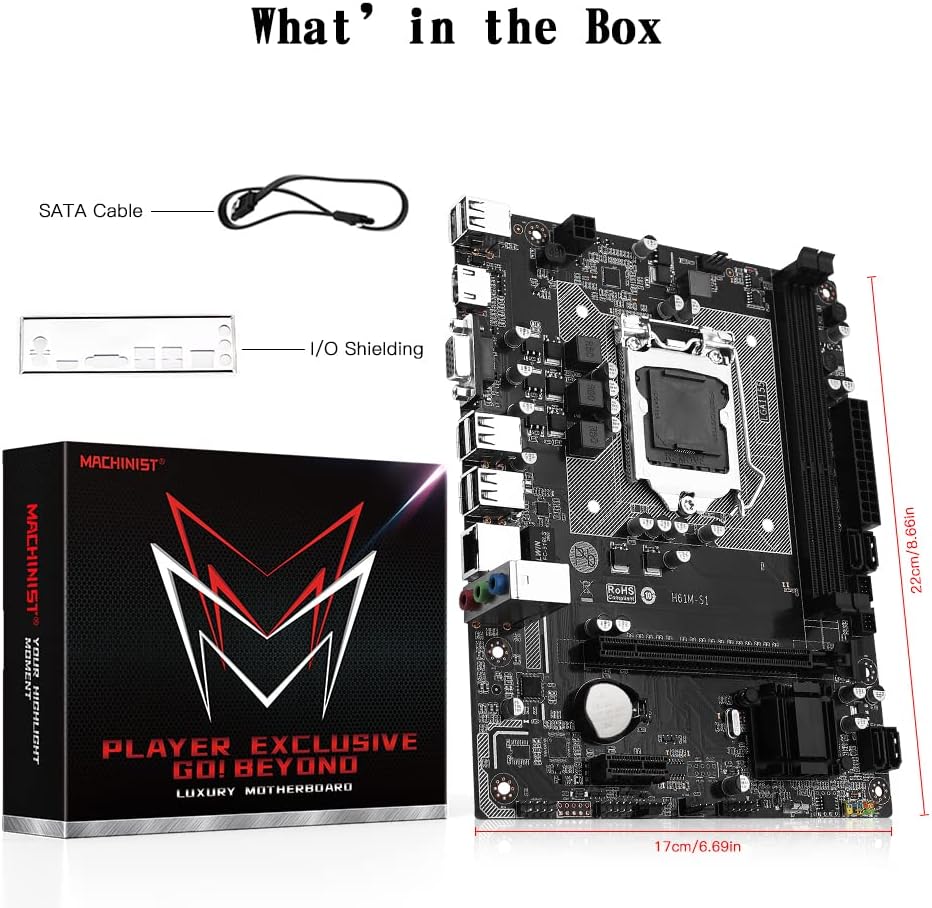
ചിത്രം 8.1: ഉൾപ്പെടുത്തിയ ആക്സസറികൾ: SATA കേബിളും I/O ഷീൽഡിംഗും.
9. വാറൻ്റിയും പിന്തുണയും
വാറന്റി വിവരങ്ങൾക്കും സാങ്കേതിക പിന്തുണയ്ക്കും, ദയവായി ഔദ്യോഗിക MACHINIST കാണുക. webസൈറ്റിൽ ബന്ധപ്പെടുക അല്ലെങ്കിൽ നിങ്ങളുടെ റീട്ടെയിലറെ ബന്ധപ്പെടുക. വാറന്റി ക്ലെയിമുകൾക്കായി നിങ്ങളുടെ വാങ്ങൽ രസീത് സൂക്ഷിക്കുക.


