ആമുഖം
Thank you for choosing the HyperGear Vibe Bluetooth Wireless Headphones. These headphones are designed to provide a superior audio experience with advanced features for comfort and convenience. This manual will guide you through the setup, operation, and maintenance of your new headphones.

Image: HyperGear Vibe Bluetooth Wireless Headphones in white, highlighting its sleek design and packaging.
സുരക്ഷാ വിവരങ്ങൾ
ഈ ഉൽപ്പന്നം ഉപയോഗിക്കുന്നതിന് മുമ്പ് ദയവായി എല്ലാ സുരക്ഷാ മുന്നറിയിപ്പുകളും നിർദ്ദേശങ്ങളും ശ്രദ്ധാപൂർവ്വം വായിക്കുക. ഭാവി റഫറൻസിനായി ഈ മാനുവൽ സൂക്ഷിക്കുക.
- ഹെഡ്ഫോണുകൾ തീവ്രമായ താപനിലയിലോ, ഈർപ്പത്തിലോ, ദ്രാവകങ്ങളിലോ ഏൽപ്പിക്കരുത്.
- ഹെഡ്ഫോണുകൾ താഴെയിടുകയോ ശക്തമായ ആഘാതങ്ങൾക്ക് വിധേയമാക്കുകയോ ചെയ്യുന്നത് ഒഴിവാക്കുക.
- ഹെഡ്ഫോണുകൾ വേർപെടുത്താനോ പരിഷ്ക്കരിക്കാനോ ശ്രമിക്കരുത്. ഇത് വാറന്റി അസാധുവാക്കും.
- Clean the headphones with a soft, dry cloth only.
- ഉയർന്ന ശബ്ദത്തിൽ ദീർഘനേരം കേൾക്കുന്നത് കേൾവിക്ക് കേടുപാടുകൾ വരുത്തിയേക്കാം. സുരക്ഷിതമായ തലത്തിലേക്ക് ശബ്ദം ക്രമീകരിക്കുക.
ബോക്സിൽ എന്താണുള്ളത്
നിങ്ങളുടെ പാക്കേജിൽ ഇനിപ്പറയുന്ന എല്ലാ ഇനങ്ങളും ഉൾപ്പെടുത്തിയിട്ടുണ്ടെന്ന് ഉറപ്പാക്കുക:
- HyperGear Vibe Bluetooth Wireless Headphones
- USB-C ചാർജിംഗ് കേബിൾ
- ഉപയോക്തൃ മാനുവൽ (ഈ പ്രമാണം)
ഉൽപ്പന്നം കഴിഞ്ഞുview & പ്രധാന സവിശേഷതകൾ
The HyperGear Vibe headphones are engineered for an immersive audio experience with user-friendly controls and a comfortable design.
പ്രധാന സവിശേഷതകൾ:
- പ്രീമിയം സൗണ്ട് ക്വാളിറ്റി: Enjoy deep bass and clear sound with high-definition stereo audio.
- നോയ്സ് ഐസൊലേഷൻ: Over-ear design with memory foam ear cups provides excellent noise isolation, blocking out distractions.
- ബിൽറ്റ്-ഇൻ മൈക്രോഫോൺ: Seamlessly transition between music and calls with the integrated microphone.
- അവബോധജന്യമായ നിയന്ത്രണങ്ങൾ: Easy access on-ear controls for music playback, volume, and calls.
- വയർലെസ് സ്വാതന്ത്ര്യം: Bluetooth connectivity for untethered listening.
- ദീർഘകാല ബാറ്ററി: ഒറ്റ ചാർജിൽ 10 മണിക്കൂർ വരെ തുടർച്ചയായ പ്ലേബാക്ക്.
- മടക്കാവുന്ന ഡിസൈൻ: Compact and portable for easy storage and travel.
- ബഹുമുഖ അനുയോജ്യത: സ്മാർട്ട്ഫോണുകൾ, ടാബ്ലെറ്റുകൾ, ലാപ്ടോപ്പുകൾ, മറ്റ് ബ്ലൂടൂത്ത് പ്രവർത്തനക്ഷമമാക്കിയ ഉപകരണങ്ങൾ എന്നിവയുമായി കണക്റ്റുചെയ്യുന്നു.

Image: Visual representation of the Vibe Wireless Headphones' core features, including sound quality, battery, and design.

Image: Highlighting the high-fidelity sound and wireless freedom, with a diagram of the easy access controls on the earcups.
വീഡിയോ: ഒരു ഔദ്യോഗിക ഉൽപ്പന്ന വീഡിയോ പ്രദർശനംasing the HyperGear Vibe Bluetooth Wireless Headphones, demonstrating their features and design.
സജ്ജമാക്കുക
1. നിങ്ങളുടെ ഹെഡ്ഫോണുകൾ ചാർജ് ചെയ്യുന്നു
Before first use, fully charge your HyperGear Vibe headphones. Use the included USB-C charging cable.
- കേബിളിന്റെ USB-C അറ്റം ഹെഡ്ഫോണുകളിലെ ചാർജിംഗ് പോർട്ടുമായി ബന്ധിപ്പിക്കുക.
- USB-A എൻഡ് അനുയോജ്യമായ ഒരു USB പവർ സ്രോതസ്സിലേക്ക് ബന്ധിപ്പിക്കുക (ഉദാ: വാൾ അഡാപ്റ്റർ, കമ്പ്യൂട്ടർ USB പോർട്ട്).
- The LED indicator on the headphones will show charging status (refer to LED behavior in Specifications section for details).
- ഒരു പൂർണ്ണ ചാർജിന് ഏകദേശം 2 മണിക്കൂർ വരെ നൽകുന്നു 10 മണിക്കൂർ of continuous playback.

Image: Illustrates the long-lasting power of the headphones, indicating 10 hours of play time and 2 hours of charge time.
2. ബ്ലൂടൂത്ത് ജോടിയാക്കൽ
നിങ്ങളുടെ ഹെഡ്ഫോണുകൾ ബ്ലൂടൂത്ത് പ്രവർത്തനക്ഷമമാക്കിയ ഉപകരണവുമായി ജോടിയാക്കാൻ ഈ ഘട്ടങ്ങൾ പാലിക്കുക:
- ഹെഡ്ഫോണുകൾ ഓഫാണെന്ന് ഉറപ്പാക്കുക.
- അമർത്തിപ്പിടിക്കുക പവർ ഓൺ/ഓഫ് button until the LED indicator flashes rapidly (usually blue and red), indicating pairing mode.
- നിങ്ങളുടെ ഉപകരണത്തിൽ (സ്മാർട്ട്ഫോൺ, ടാബ്ലെറ്റ്, ലാപ്ടോപ്പ്), ബ്ലൂടൂത്ത് ക്രമീകരണങ്ങളിലേക്ക് പോയി ബ്ലൂടൂത്ത് ഓണാക്കുക.
- ഇതിനായി തിരയുക available devices and select "HyperGear Vibe" from the list.
- Once connected, the LED indicator on the headphones will turn solid blue or stop flashing.
- ഉപകരണത്തിന്റെ ബ്ലൂടൂത്ത് സജീവവും പരിധിക്കുള്ളിലുമാണെങ്കിൽ, ഹെഡ്ഫോണുകൾ അവസാനം ജോടിയാക്കിയ ഉപകരണവുമായി ഓണാക്കുമ്പോൾ യാന്ത്രികമായി വീണ്ടും കണക്റ്റുചെയ്യും.

Image: Demonstrates the wide compatibility of the HyperGear Vibe headphones with various devices such as cellphones, tablets, and laptops.
പ്രവർത്തന നിർദ്ദേശങ്ങൾ
Familiarize yourself with the controls located on the earcups for seamless operation.
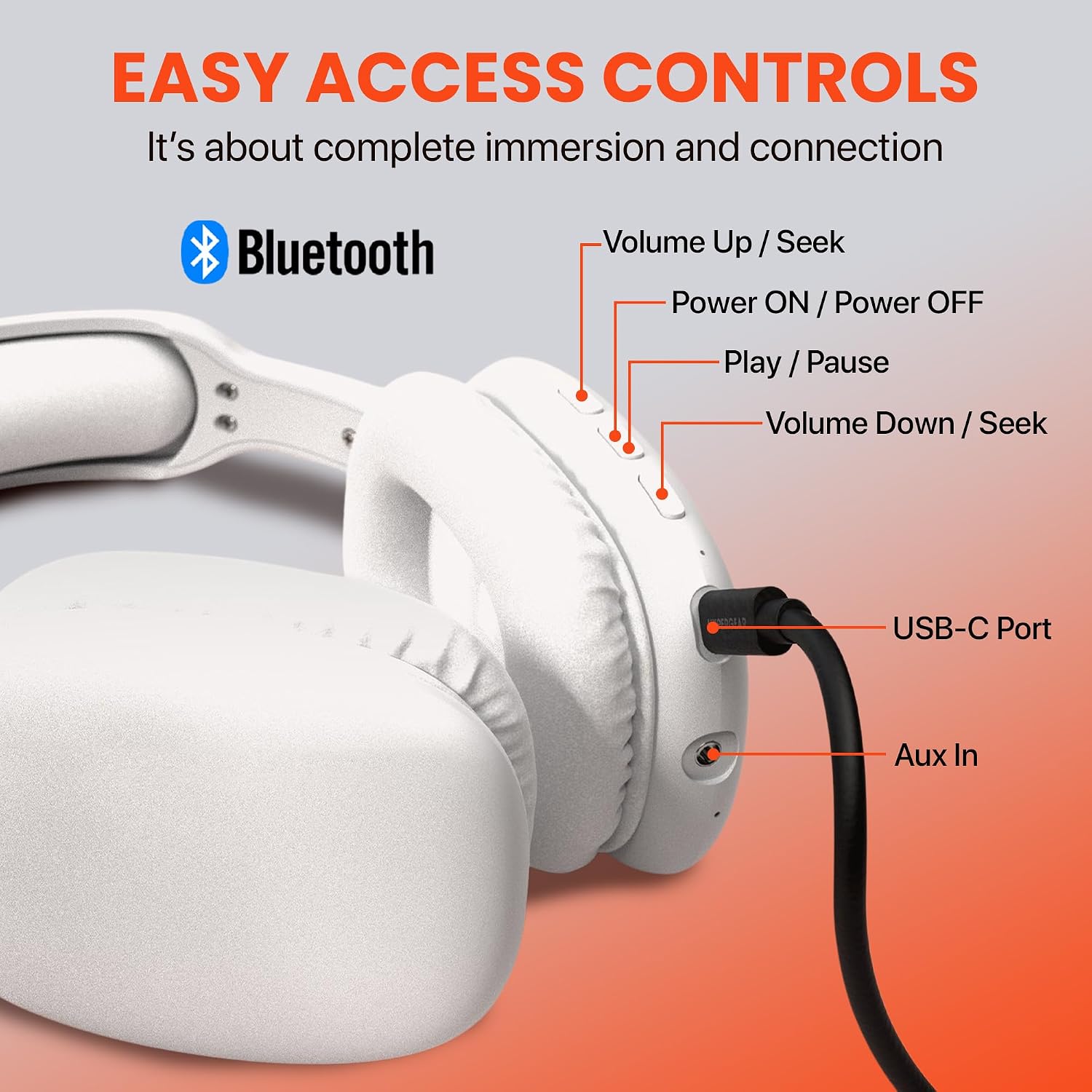
Image: Detailed diagram illustrating the location and function of all control buttons and ports on the HyperGear Vibe headphones.
അടിസ്ഥാന നിയന്ത്രണങ്ങൾ:
| ബട്ടൺ/ആക്ഷൻ | ഫംഗ്ഷൻ |
|---|---|
| പവർ ഓൺ/ഓഫ് ബട്ടൺ (അമർത്തിപ്പിടിക്കുക) | പവർ ഓൺ/ഓഫ്, ജോടിയാക്കൽ മോഡ് നൽകുക |
| പ്ലേ ചെയ്യുക/താൽക്കാലികമായി നിർത്തുക ബട്ടൺ (സിംഗിൾ പ്രസ്സ്) | സംഗീതം പ്ലേ ചെയ്യുക/താൽക്കാലികമായി നിർത്തുക, കോൾ സ്വീകരിക്കുക/അവസാനിപ്പിക്കുക |
| Volume Up / Seek Button (സിംഗിൾ പ്രസ്സ്) | വോളിയം കൂട്ടുക |
| Volume Up / Seek Button (അമർത്തിപ്പിടിക്കുക) | അടുത്ത ട്രാക്ക് |
| Volume Down / Seek Button (സിംഗിൾ പ്രസ്സ്) | വോളിയം കുറയ്ക്കുക |
| Volume Down / Seek Button (അമർത്തിപ്പിടിക്കുക) | മുമ്പത്തെ ട്രാക്ക് |
| യുഎസ്ബി-സി പോർട്ട് | ഇൻപുട്ട് ചാർജ് ചെയ്യുന്നു |
| തുറമുഖത്ത് ഓക്സ് | Connect via 3.5mm audio cable (not included) for wired listening |
കോളുകൾ ചെയ്യലും സ്വീകരിക്കലും:
- മറുപടി കോൾ: അമർത്തുക പ്ലേ ചെയ്യുക/താൽക്കാലികമായി നിർത്തുക ബട്ടൺ ഒരിക്കൽ.
- കോൾ അവസാനിപ്പിക്കുക: അമർത്തുക പ്ലേ ചെയ്യുക/താൽക്കാലികമായി നിർത്തുക ബട്ടൺ ഒരു കോളിനിടെ ഒരിക്കൽ.
- കോൾ നിരസിക്കുക: അമർത്തിപ്പിടിക്കുക പ്ലേ ചെയ്യുക/താൽക്കാലികമായി നിർത്തുക ബട്ടൺ 2 സെക്കൻഡ് നേരത്തേക്ക്.
- അവസാന നമ്പർ വീണ്ടും ഡയൽ ചെയ്യുക: രണ്ടുതവണ അമർത്തുക പ്ലേ ചെയ്യുക/താൽക്കാലികമായി നിർത്തുക ബട്ടൺ.
മെയിൻ്റനൻസ്
ശരിയായ പരിചരണം നിങ്ങളുടെ ഹെഡ്ഫോണുകളുടെ ദീർഘായുസ്സും മികച്ച പ്രകടനവും ഉറപ്പാക്കും.
- വൃത്തിയാക്കൽ: ഹെഡ്ഫോണുകൾ മൃദുവായ, ചെറുതായി ഡി-ടാപ്പിംഗ് മെഷീൻ ഉപയോഗിച്ച് തുടയ്ക്കുക.amp cloth. Do not use harsh chemicals or abrasive cleaners. Ensure no liquid enters the ports.
- സംഭരണം: ഉപയോഗത്തിലില്ലാത്തപ്പോൾ, ഹെഡ്ഫോണുകൾ തണുത്തതും വരണ്ടതുമായ സ്ഥലത്ത് സൂക്ഷിക്കുക, നേരിട്ടുള്ള സൂര്യപ്രകാശത്തിൽ നിന്നും കടുത്ത താപനിലയിൽ നിന്നും അകറ്റി നിർത്തുക. മടക്കാവുന്ന രൂപകൽപ്പന ഒതുക്കമുള്ള സംഭരണം അനുവദിക്കുന്നു.
- ബാറ്ററി കെയർ: ബാറ്ററി ലൈഫ് നിലനിർത്താൻ, പതിവായി ഉപയോഗിക്കുന്നില്ലെങ്കിലും ഹെഡ്ഫോണുകൾ പതിവായി ചാർജ് ചെയ്യുക. ദീർഘനേരം ബാറ്ററി പൂർണ്ണമായും ഡിസ്ചാർജ് ചെയ്യുന്നത് ഒഴിവാക്കുക.
ട്രബിൾഷൂട്ടിംഗ്
എന്തെങ്കിലും പ്രശ്നങ്ങൾ നേരിടുകയാണെങ്കിൽ, താഴെപ്പറയുന്ന പൊതുവായ പ്രശ്നങ്ങളും പരിഹാരങ്ങളും പരിശോധിക്കുക:
| പ്രശ്നം | പരിഹാരം |
|---|---|
| ഹെഡ്ഫോണുകൾ ഓണാകില്ല. | ഹെഡ്ഫോണുകൾ പൂർണ്ണമായും ചാർജ് ചെയ്തിട്ടുണ്ടെന്ന് ഉറപ്പാക്കുക. ഒരു പവർ സ്രോതസ്സിലേക്ക് കണക്റ്റ് ചെയ്ത് വീണ്ടും ശ്രമിക്കുക. |
| ഉപകരണവുമായി ജോടിയാക്കാൻ കഴിയില്ല. | Ensure headphones are in pairing mode (flashing LED). Turn off and on Bluetooth on your device. Move headphones closer to the device. Forget previous pairings on your device and try again. |
| ശബ്ദമില്ല അല്ലെങ്കിൽ കുറഞ്ഞ ശബ്ദമില്ല. | Check volume levels on both headphones and your device. Ensure headphones are properly paired. Try playing different audio sources. |
| Sound is distorted or cuts out. | Move closer to your device to avoid interference. Check for obstacles between headphones and device. Ensure headphones are fully charged. |
| മൈക്രോഫോൺ പ്രവർത്തിക്കുന്നില്ല. | Ensure headphones are properly connected. Check microphone settings on your device. |
സ്പെസിഫിക്കേഷനുകൾ
| ഫീച്ചർ | വിശദാംശങ്ങൾ |
|---|---|
| മോഡലിൻ്റെ പേര് | വൈബ് |
| കണക്റ്റിവിറ്റി ടെക്നോളജി | വയർലെസ് (ബ്ലൂടൂത്ത്) |
| ബ്ലൂടൂത്ത് പതിപ്പ് | 5.0 |
| ബ്ലൂടൂത്ത് ശ്രേണി | 10 മീറ്റർ (ഏകദേശം 33 അടി) |
| ബാറ്ററി ലൈഫ് | 10 Hours (continuous playback) |
| ചാർജിംഗ് സമയം | 2 മണിക്കൂർ |
| ഓഡിയോ ഡ്രൈവർ തരം | ഡൈനാമിക് ഡ്രൈവർ |
| ഫ്രീക്വൻസി റേഞ്ച് | 20Hz - 20,000Hz |
| ശബ്ദ നിയന്ത്രണം | സൗണ്ട് ഐസൊലേഷൻ |
| ചെവി പ്ലേസ്മെൻ്റ് | ചെവിക്ക് മുകളിൽ |
| മെറ്റീരിയൽ | Memory Foam (earcups) |
| ഇനത്തിൻ്റെ ഭാരം | 11.7 ഔൺസ് |
| ഉൽപ്പന്ന അളവുകൾ | 7.17 x 3.43 x 9.85 ഇഞ്ച് |
| അനുയോജ്യമായ ഉപകരണങ്ങൾ | സെൽഫോണുകൾ, ടാബ്ലെറ്റുകൾ, ലാപ്ടോപ്പുകൾ, ഡെസ്ക്ടോപ്പുകൾ |
| ഉൾപ്പെടുത്തിയ ഘടകങ്ങൾ | USB-C ചാർജിംഗ് കേബിൾ |
| യു.പി.സി | 633755156137 |
വാറൻ്റിയും പിന്തുണയും
HyperGear products are built with quality and reliability in mind. For information regarding warranty coverage, technical support, or customer service, please visit the official HyperGear webസൈറ്റിൽ ബന്ധപ്പെടുക അല്ലെങ്കിൽ അവരുടെ ഉപഭോക്തൃ പിന്തുണയുമായി നേരിട്ട് ബന്ധപ്പെടുക. വാങ്ങിയതിന്റെ തെളിവായി നിങ്ങളുടെ വാങ്ങൽ രസീത് സൂക്ഷിക്കുക.
For further assistance, you may also refer to the product's detail page on Amazon.com: https://www.amazon.com/dp/B09SBTDD9Z


