1. ആമുഖം
This manual provides essential information for the safe and efficient operation of your Crosley Discovery CR8009B-DU Record Player. Please read these instructions thoroughly before using the device and retain them for future reference.
The Crosley Discovery Record Player is a portable, belt-driven turntable designed to play vinyl records at three speeds (33 1/3, 45, and 78 RPM). It features built-in stereo speakers, Bluetooth input for streaming digital music, and Bluetooth output for connecting to external wireless speakers. Additional connectivity options include RCA outputs for wired external speakers or receivers, and a headphone jack for private listening.
2 സുരക്ഷാ വിവരങ്ങൾ
സുരക്ഷിതമായ പ്രവർത്തനം ഉറപ്പാക്കുന്നതിനും കേടുപാടുകൾ തടയുന്നതിനും, ഇനിപ്പറയുന്ന മുൻകരുതലുകൾ പാലിക്കുക:
- യൂണിറ്റ് മഴ, ഈർപ്പം, അമിതമായ ചൂട് എന്നിവയിൽ തുറന്നുകാട്ടരുത്.
- റേഡിയേറ്ററുകൾ, ഹീറ്റ് രജിസ്റ്ററുകൾ, സ്റ്റൗകൾ അല്ലെങ്കിൽ മറ്റ് ഉപകരണങ്ങൾ (ഉൾപ്പെടെ) പോലുള്ള താപ സ്രോതസ്സുകൾക്ക് സമീപം യൂണിറ്റ് സ്ഥാപിക്കുന്നത് ഒഴിവാക്കുക. ampലൈഫയറുകൾ) ചൂട് ഉത്പാദിപ്പിക്കുന്നത്.
- വെന്റിലേഷൻ തുറസ്സുകളൊന്നും തടയരുത്. നിർമ്മാതാവിന്റെ നിർദ്ദേശങ്ങൾക്കനുസൃതമായി ഇൻസ്റ്റാൾ ചെയ്യുക.
- പ്രത്യേകിച്ച് പ്ലഗുകൾ, കൺവീനിയൻസ് റെസെപ്റ്റക്കിളുകൾ, ഉപകരണത്തിൽ നിന്ന് പുറത്തുകടക്കുന്ന ഇടം എന്നിവയിൽ നടക്കുകയോ നുള്ളുകയോ ചെയ്യുന്നതിൽ നിന്ന് പവർ കോർഡ് സംരക്ഷിക്കുക.
- നിർമ്മാതാവ് വ്യക്തമാക്കിയ അറ്റാച്ച്മെൻ്റുകൾ/ആക്സസറികൾ മാത്രം ഉപയോഗിക്കുക.
- മിന്നൽ കൊടുങ്കാറ്റുകളുടെ സമയത്തോ ദീർഘനേരം ഉപയോഗിക്കാത്ത സമയത്തോ ഈ ഉപകരണം അൺപ്ലഗ് ചെയ്യുക.
- എല്ലാ സേവനങ്ങളും യോഗ്യതയുള്ള സേവന ഉദ്യോഗസ്ഥർക്ക് റഫർ ചെയ്യുക. പവർ സപ്ലൈ കോർഡ് അല്ലെങ്കിൽ പ്ലഗ് കേടാകുക, ദ്രാവകം ഒഴുകുകയോ ഉപകരണങ്ങൾ ഉപകരണത്തിലേക്ക് വീഴുകയോ ചെയ്യുക, ഉപകരണം മഴയോ ഈർപ്പമോ സമ്പർക്കം പുലർത്തുക, സാധാരണയായി പ്രവർത്തിക്കാത്തത് എന്നിങ്ങനെയുള്ള ഏതെങ്കിലും വിധത്തിൽ ഉപകരണത്തിന് കേടുപാടുകൾ സംഭവിക്കുമ്പോൾ സേവനം ആവശ്യമാണ്. , അല്ലെങ്കിൽ ഉപേക്ഷിച്ചു.
3. പാക്കേജ് ഉള്ളടക്കം
താഴെ ലിസ്റ്റ് ചെയ്തിരിക്കുന്ന എല്ലാ ഇനങ്ങളും നിങ്ങളുടെ പാക്കേജിൽ ഉൾപ്പെടുത്തിയിട്ടുണ്ടെന്ന് ഉറപ്പാക്കുക:
- Crosley CR8009B-DU Turntable
- 45 ആർപിഎം അഡാപ്റ്റർ
- പവർ അഡാപ്റ്റർ
4. സജ്ജീകരണം
നിങ്ങളുടെ റെക്കോർഡ് പ്ലെയർ സജ്ജീകരിക്കാൻ ഈ ഘട്ടങ്ങൾ പാലിക്കുക:
- യൂണിറ്റ് അൺപാക്ക് ചെയ്യുക: പാക്കേജിംഗിൽ നിന്ന് റെക്കോർഡ് പ്ലെയറും എല്ലാ അനുബന്ധ ഉപകരണങ്ങളും ശ്രദ്ധാപൂർവ്വം നീക്കം ചെയ്യുക.
- പവർ കണക്ഷൻ: Connect the power adaptor to the DC IN port on the back of the unit and plug it into a wall outlet.
- പ്ലേസ്മെൻ്റ്: Place the record player on a stable, level surface. Ensure adequate ventilation around the unit.

The Crosley Discovery Record Player in Dune, shown open and ready for use. The turntable platter and tonearm are visible.

The back panel of the record player, featuring RCA output jacks for connecting to external speakers or a receiver, and an auxiliary input for connecting other audio devices.
5. പ്രവർത്തന നിർദ്ദേശങ്ങൾ
5.1 ഒരു വിനൈൽ റെക്കോർഡ് പ്ലേ ചെയ്യുന്നു
- പവർ ഓൺ: Turn the ON/OFF/VOLUME knob clockwise until it clicks to power on the unit. The power indicator light will illuminate.
- വേഗത തിരഞ്ഞെടുക്കുക: Adjust the speed switch (located near the tonearm) to match the RPM of your record (33 1/3, 45, or 78 RPM). Use the included 45 RPM adapter for 7-inch singles.
- സ്ഥല രേഖ: നിങ്ങളുടെ വിനൈൽ റെക്കോർഡ് ടർടേബിൾ പ്ലാറ്ററിൽ ശ്രദ്ധാപൂർവ്വം വയ്ക്കുക.
- ലിഫ്റ്റ് ടോൺ ആം: Push the cueing lever (located next to the tonearm rest) backward to lift the tonearm.
- ടോൺആം സ്ഥാനം: Gently move the tonearm over the desired track of the record.
- താഴത്തെ ടോൺ ആം: Push the cueing lever forward to slowly lower the tonearm onto the record. Playback will begin.
- വോളിയം ക്രമീകരിക്കുക: Rotate the ON/OFF/VOLUME knob to adjust the playback volume.
- പിച്ച് ക്രമീകരിക്കുക: Use the PITCH control knob to fine-tune the playback speed if needed.
This video demonstrates the basic operation of the Crosley Discovery Turntable, including placing a record, lowering the tonearm, and adjusting playback settings.
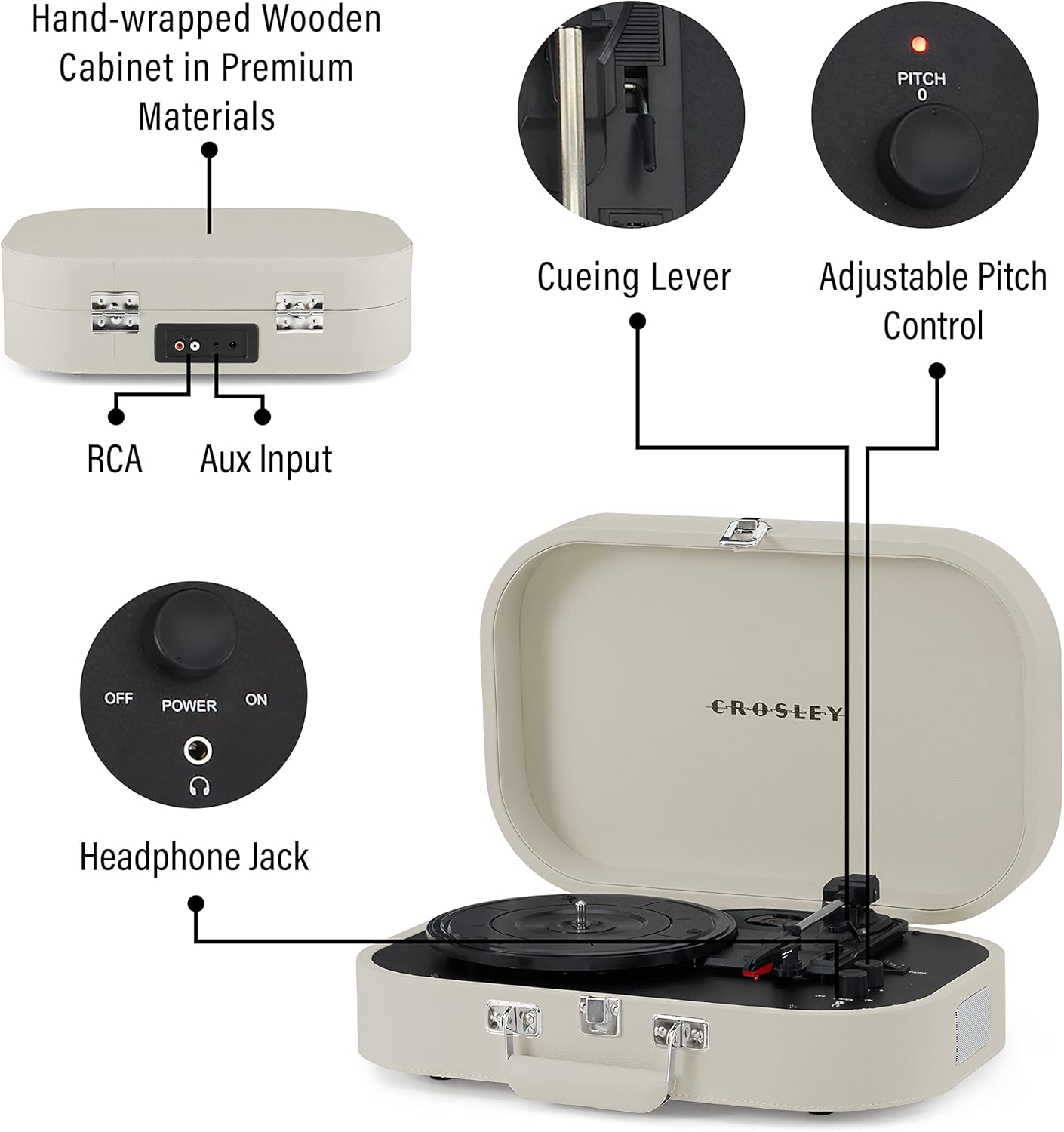
എ വിശദമായി view of the control panel, highlighting the pitch adjustment knob, volume control, power switch, phono/Bluetooth mode selector, and headphone jack for private listening.
5.2 Bluetooth Input (Streaming to Turntable)
To stream music from your Bluetooth-enabled device through the record player's built-in speakers:
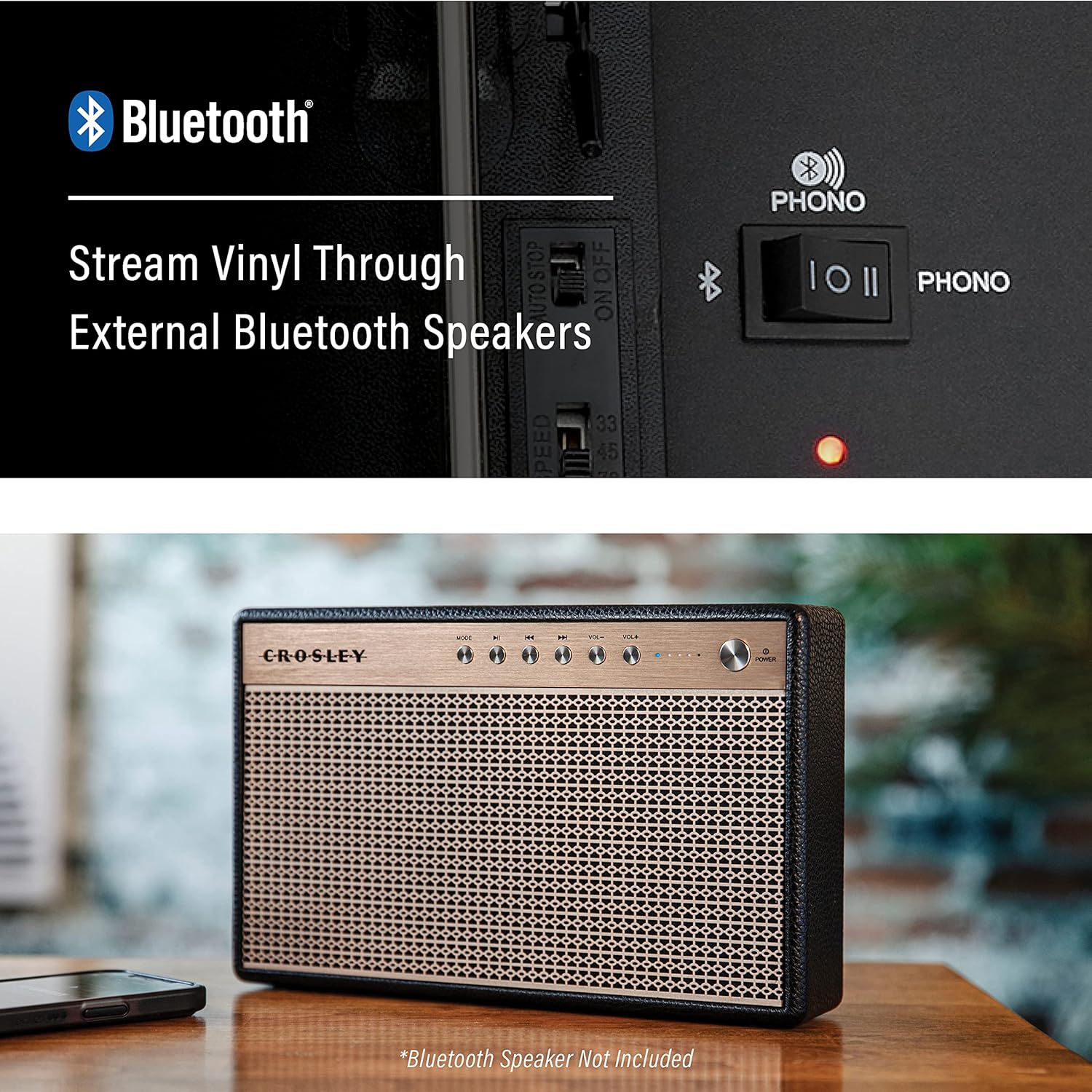
- ബ്ലൂടൂത്ത് മോഡിലേക്ക് മാറുക: Slide the PHONO/BLUETOOTH switch to the Bluetooth position. The Bluetooth indicator light will flash.
- ഉപകരണം ജോടിയാക്കുക: Enable Bluetooth on your external device (e.g., smartphone, tablet) and select "Crosley Discovery" from the list of available devices.
- പ്ലേബാക്ക് ആരംഭിക്കുക: Once paired, the Bluetooth indicator light will stop flashing and remain solid. You can now play music from your device, and it will sound through the record player's speakers.
An illustration of the record player's Bluetooth input capability, allowing users to stream digital music from a smartphone or other Bluetooth-enabled device through the turntable's built-in speakers.
5.3 Bluetooth Output (Streaming from Turntable)
To stream vinyl audio from the record player to an external Bluetooth speaker:
- ബാഹ്യ സ്പീക്കറിൽ ജോടിയാക്കൽ പ്രാപ്തമാക്കുക: നിങ്ങളുടെ ബാഹ്യ ബ്ലൂടൂത്ത് സ്പീക്കർ പെയറിംഗ് മോഡിലേക്ക് മാറ്റുക (നിർദ്ദേശങ്ങൾക്ക് നിങ്ങളുടെ സ്പീക്കറിന്റെ മാനുവൽ കാണുക).
- Activate Bluetooth Output: While playing a record, press and hold the Bluetooth button on the record player. The Bluetooth indicator light will flash rapidly, indicating it's searching for an external speaker.
- ബന്ധിപ്പിക്കുക: Once connected, the Bluetooth indicator light will remain solid, and audio from the record player will be streamed to your external Bluetooth speaker.

The record player connected wirelessly to an external Bluetooth speaker, showcasing its ability to stream vinyl audio to compatible external sound systems.
5.4 Using External Speakers or Headphones
For wired audio connections:
- ആർസിഎ putട്ട്പുട്ട്: Connect RCA cables (not included) from the RCA OUT ports on the back of the record player to the audio input of your receiver or powered external speakers.
- ഹെഡ്ഫോൺ ജാക്ക്: Plug 3.5mm headphones into the HEADPHONE jack for private listening. This will mute the built-in speakers.
6. പരിപാലനം
Proper care ensures the longevity of your record player:
- യൂണിറ്റ് വൃത്തിയാക്കൽ: മൃദുവായതും ഉണങ്ങിയതുമായ തുണി ഉപയോഗിച്ച് പുറംഭാഗം തുടയ്ക്കുക. അബ്രാസീവ് ക്ലീനറുകളോ ലായകങ്ങളോ ഉപയോഗിക്കരുത്.
- സ്റ്റൈലസ് കെയർ: Handle the stylus (needle) with extreme care. Clean it periodically with a soft brush, brushing from back to front. Replace the stylus when sound quality deteriorates.
- റെക്കോർഡ് കെയർ: രേഖകൾ വൃത്തിയായും പൊടി രഹിതമായും സൂക്ഷിക്കുക. വളച്ചൊടിക്കൽ തടയാൻ അവ സ്ലീവുകളിൽ ലംബമായി സൂക്ഷിക്കുക.
7. പ്രശ്നപരിഹാരം
If you encounter issues, refer to the table below for common problems and solutions:
| പ്രശ്നം | സാധ്യമായ കാരണം | പരിഹാരം |
|---|---|---|
| ശക്തിയില്ല | പവർ അഡാപ്റ്റർ ബന്ധിപ്പിച്ചിട്ടില്ല അല്ലെങ്കിൽ ഔട്ട്ലെറ്റ് സജീവമല്ല. | Ensure power adaptor is securely connected and the outlet is functional. |
| സ്പീക്കറുകളിൽ നിന്ന് ശബ്ദമില്ല | Volume too low, headphones connected, or external speakers not properly connected/powered. | Increase volume, disconnect headphones, check external speaker connections and power. |
| റെക്കോർഡ് സ്കിപ്പുകൾ | Dirty record, worn stylus, or unstable surface. | Clean record, replace stylus, place unit on a stable surface. |
| ബ്ലൂടൂത്ത് ജോടിയാക്കൽ പ്രശ്നങ്ങൾ | Device too far, Bluetooth not enabled, or incorrect mode selected. | Ensure devices are within range, Bluetooth is enabled, and the correct Bluetooth mode (input/output) is selected. |
8 സ്പെസിഫിക്കേഷനുകൾ
| ഫീച്ചർ | വിശദാംശങ്ങൾ |
|---|---|
| മോഡൽ നമ്പർ | CR8009B-DU |
| ബ്രാൻഡ് | ക്രോസ്ലി |
| ഉൽപ്പന്ന അളവുകൾ | 10.63 x 15.75 x 4.72 ഇഞ്ച് |
| ഇനത്തിൻ്റെ ഭാരം | 6.5 പൗണ്ട് |
| പരമാവധി റൊട്ടേഷണൽ സ്പീഡ് | 78 RPM (supports 33 1/3, 45, and 78 RPM) |
| പ്രത്യേക ഫീച്ചർ | Portable, Bluetooth In/Out |
| മെറ്റീരിയൽ | പ്ലാസ്റ്റിക് |
| ഉൾപ്പെടുത്തിയ ഘടകങ്ങൾ | 45 RPM Adapter, CR8009B-DU Turntable, Power Adaptor |

A diagram illustrating the overall dimensions of the Crosley Discovery Record Player, including width, height, and depth, for placement and storage planning.
9. വാറൻ്റിയും പിന്തുണയും
For warranty information or technical support, please refer to the documentation included with your product or visit the official Crosley website. You may also find additional resources and contact information on the Crosley Store on Amazon.


