1. ആമുഖം
The TOUCAN Outdoor Floodlight Security Camera is designed to provide comprehensive outdoor surveillance with integrated lighting. This manual provides detailed instructions for the installation, operation, and maintenance of your device. Please read this manual thoroughly before using the product to ensure proper setup and functionality.
2. പാക്കേജ് ഉള്ളടക്കം
താഴെ ലിസ്റ്റ് ചെയ്തിരിക്കുന്ന എല്ലാ ഇനങ്ങളും നിങ്ങളുടെ പാക്കേജിൽ ഉൾപ്പെടുത്തിയിട്ടുണ്ടെന്ന് ഉറപ്പാക്കുക:
- TOUCAN Security Light Camera
- സുരക്ഷിത ക്യാമറ മൗണ്ട്
- പവർ സപ്ലൈ (2 മീ)
- പവർ എക്സ്റ്റൻഷൻ കേബിൾ (6 മീ)
- സ്ക്രൂകളും മതിൽ ആങ്കറുകളും
3. ഉൽപ്പന്നം കഴിഞ്ഞുview
Familiarize yourself with the components of your TOUCAN Outdoor Floodlight Security Camera.

ചിത്രം: മുൻഭാഗം view of the TOUCAN Outdoor Floodlight Security Camera, showing the integrated LED floodlight, camera lens, and antenna.
- എൽഇഡി ഫ്ലഡ്ലൈറ്റ്: Provides 1200 lumens of illumination.
- ക്യാമറ ലെൻസ്: Captures 1080P Full HD video with a 143-degree viewing ആംഗിൾ.
- മോഷൻ സെൻസർ: Radar-based motion detection for accurate alerts.
- മൈക്രോഫോണും സ്പീക്കറും: ടു-വേ ഓഡിയോ ആശയവിനിമയം പ്രാപ്തമാക്കുന്നു.
- ആൻ്റിന: വൈഫൈ കണക്റ്റിവിറ്റിക്കായി.
- റീസെറ്റ് ബട്ടൺ: Located on the back of the camera.
4. സജ്ജീകരണം
4.1 അപ്ലിക്കേഷൻ ഇൻസ്റ്റാളേഷൻ
To begin, download the Toucan Smart Home app on your smartphone. The app is available for both iOS and Android devices.
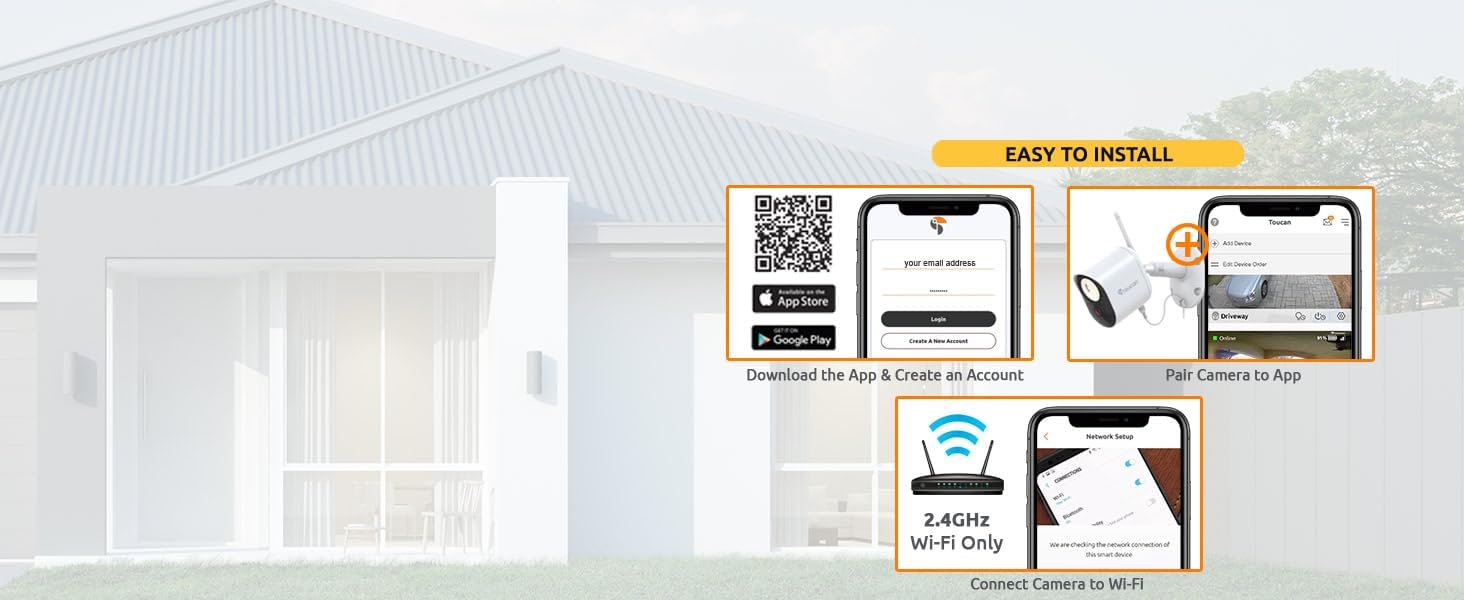
Image: Visual guide for app download, account creation, and initial device pairing.
- Scan the QR code provided in the quick start guide or visit toucansmarthome.com/pages/smarthomeapp എന്ന വിലാസത്തിൽ ലഭ്യമാണ്. to download the Toucan Smart Home app.
- നിങ്ങളുടെ മൊബൈൽ ഉപകരണത്തിൽ ആപ്പ് ഇൻസ്റ്റാൾ ചെയ്യുക.
4.2 Device Pairing and Wi-Fi Connection
Follow the in-app instructions to pair your camera and connect it to your home Wi-Fi network.
- Open the Toucan Smart Home app and create a new account or log in.
- Tap the '+' icon to add a new device and select your camera model.
- Follow the on-screen prompts to connect the camera to your 2.4GHz Wi-Fi network only. 5GHz networks are not supported.
4.3 ഫിസിക്കൽ ഇൻസ്റ്റലേഷൻ
The camera is designed for outdoor use and is IP56 weatherproof. It requires a standard electrical outlet for power.

Image: The TOUCAN camera mounted outdoors, showing its weatherproof construction during rainfall.
- Choose a suitable outdoor location for mounting the camera, ensuring it has a clear view of the area you wish to monitor and is within range of your Wi-Fi network.
- Use the provided secure camera mount, screws, and wall anchors to securely attach the camera to a wall or eave. The installation type is screw-in.
- Connect the camera to the included 8-meter waterproof power cable and plug it into a standard electrical outlet. No hardwiring is required. An additional 6-meter waterproof extension cable is available separately if needed.
5. ഓപ്പറേഷൻ
5.1 തത്സമയം View
Access real-time video footage from your camera through the Toucan Smart Home app at any time.
5.2 ടു-വേ ഓഡിയോ
Communicate with visitors or deter unwanted guests using the camera's built-in microphone and speaker.

Image: A smartphone displaying the live camera feed, with an overlay showing the two-way audio function in use.
- തത്സമയം മുതൽ view in the app, tap the microphone icon to speak through the camera.
- Utilize pre-recorded auto-responses available in the app for quick communication.
5.3 മോഷൻ ഡിറ്റക്ഷൻ
The camera features radar motion detection to accurately identify activity in your monitored area.

Image: Illustration of radar motion detection coverage and app interface for adjusting sensitivity.
- Customize motion zones within the app to focus detection on specific areas.
- Adjust motion sensitivity settings (Low, Medium, High, Max) to minimize false alerts.
5.4 ലൈറ്റ് കൺട്രോൾ
The integrated 1200 lumens LED floodlight can be controlled manually, set on a schedule, or activated by motion.

Image: The TOUCAN camera's 1200 lumens floodlight actively illuminating a dark yard.
- Turn the light on or off directly from the Toucan Smart Home app.
- Configure schedules for automatic light activation.
- Enable motion-activated lighting to illuminate areas when activity is detected.
5.5 Siren Alarm
Activate the loud 110dB siren and flashing light directly from the app to deter intruders.

Image: The TOUCAN camera activating its siren and flashing light as a deterrent.
- Tap the siren icon in the app to manually trigger the alarm.
5.6 നൈറ്റ് വിഷൻ
The camera provides clear surveillance even in low-light conditions with both color and infrared night vision.

ചിത്രം: മൂന്ന് views demonstrating the camera's performance: clear daytime, vibrant color night vision, and detailed black-and-white infrared night vision.
- The camera automatically switches to night vision mode in low light.
- Benefit from crystal-clear color night vision when the floodlight is active, or standard infrared night vision in complete darkness.
5.7 ക്ലൗഡ് സംഭരണം
The TOUCAN camera offers cloud storage for recorded events without requiring a subscription for basic features.

Image: A smartphone displaying the event history in the Toucan Smart Home app, highlighting the no-subscription feature.
- Access the last 24 hours of recorded clips for free.
- Video download and pre-recorded messages are included without a subscription.
- Optional subscription plans are available for extended cloud storage history.
6. പരിപാലനം
- വൃത്തിയാക്കൽ: Periodically clean the camera lens and floodlight cover with a soft, damp cloth to ensure optimal image clarity and light output. Avoid abrasive cleaners.
- കേബിൾ പരിശോധന: Regularly check the power cable and connections for any signs of wear or damage. Ensure all connections remain secure.
- ഫേംവെയർ അപ്ഡേറ്റുകൾ: Keep your camera's firmware updated through the Toucan Smart Home app to ensure the latest features and security enhancements.
7. പ്രശ്നപരിഹാരം
If you encounter issues with your TOUCAN Outdoor Floodlight Security Camera, refer to the following common solutions:
- Camera Disconnection: Ensure your Wi-Fi router is functioning correctly and the camera is within range. Verify that your Wi-Fi network is 2.4GHz. If issues persist, try resetting the camera using the reset button on the back of the device.
- മോശം ചിത്രത്തിന്റെ ഗുണനിലവാരം: ക്യാമറ ലെൻസ് വൃത്തിയാക്കുക. ക്യാമറയുടെ ലെൻസ് ഫീൽഡിൽ തടസ്സങ്ങളൊന്നുമില്ലെന്ന് ഉറപ്പാക്കുക. view. Check your Wi-Fi signal strength in the app.
- മോഷൻ ഡിറ്റക്ഷൻ പ്രശ്നങ്ങൾ: Adjust the motion sensitivity settings in the app. Ensure motion zones are correctly configured.
- ആപ്പ് പ്രതികരിക്കുന്നില്ല: Close and reopen the Toucan Smart Home app. Ensure your smartphone's operating system is up to date.
- ശക്തിയില്ല: Verify the power cable is securely connected to both the camera and the electrical outlet. Check if the outlet is functional.
For further assistance, consult the in-app help section or contact TOUCAN customer support.
8 സ്പെസിഫിക്കേഷനുകൾ
| ഫീച്ചർ | വിശദാംശങ്ങൾ |
|---|---|
| മോഡൽ നമ്പർ | 0451 / TCNTSLC100W |
| വീഡിയോ ക്യാപ്ചർ റെസല്യൂഷൻ | 1080p ഫുൾ എച്ച്ഡി |
| Viewing ആംഗിൾ | 143 ഡിഗ്രി |
| പ്രകാശ സ്രോതസ്സ് തരം | LED (1200 lumens) |
| പ്രത്യേക സവിശേഷതകൾ | Motion Sensor (Radar), Night Vision (Color & IR), 2-Way Audio, Siren Alarm |
| കണക്റ്റിവിറ്റി ടെക്നോളജി | വയർലെസ്സ് (വൈ-ഫൈ 2.4GHz) |
| പവർ ഉറവിടം | കോർഡഡ് ഇലക്ട്രിക് (പ്ലഗ്-ഇൻ) |
| വാട്ട്tage | 7.5 വാട്ട്സ് |
| കാലാവസ്ഥാ പ്രൂഫ് റേറ്റിംഗ് | IP56 |
| അളവുകൾ (L x W x H) | 25.4 x 8.9 x 22.2 സെ.മീ (10 x 3.5 x 8.75 ഇഞ്ച്) |
| ഭാരം | 1.43 കി.ഗ്രാം |
| അനുയോജ്യമായ ഉപകരണങ്ങൾ | Smartphone (iOS, Android), Amazon Alexa, Google Home |
9. വാറൻ്റിയും പിന്തുണയും
For information regarding product warranty, returns, or technical support, please refer to the official TOUCAN website or contact their customer service directly. Details can typically be found on the product packaging or the manufacturer's webസൈറ്റ്.


