1. ആമുഖം
This manual provides essential instructions for the proper use and maintenance of your LOTUS Smartwatch Model 50003/A. Please read this guide thoroughly before using your smartwatch to ensure optimal performance and longevity.
The LOTUS Smartwatch 50003/A features an intuitive interface and elegant design, offering a variety of smart functions. It is equipped with Bluetooth connectivity, allowing seamless synchronization with your mobile devices. This synchronization enables features such as call and message notifications, music control, and other practical functions for daily life.
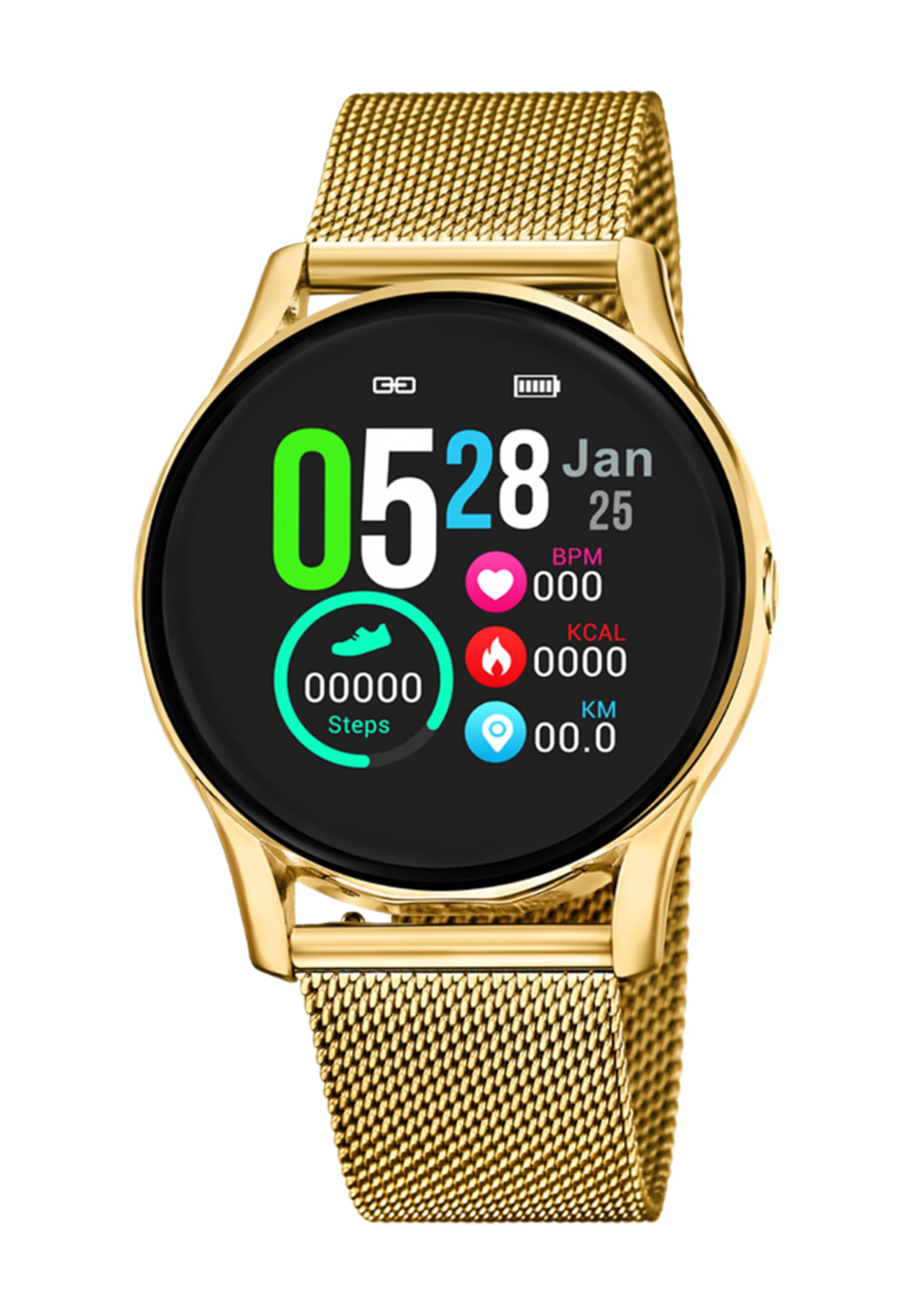
ചിത്രം 1.1: മുൻഭാഗം view of the LOTUS Smartwatch 50003/A.
2. പാക്കേജ് ഉള്ളടക്കം
Please check the package contents upon unboxing. The standard package for the LOTUS Smartwatch 50003/A should include:
- LOTUS Smartwatch 50003/A
- ചാർജിംഗ് കേബിൾ
- ഉപയോക്തൃ മാനുവൽ (ഈ പ്രമാണം)
3. സജ്ജീകരണ ഗൈഡ്
3.1. സ്മാർട്ട് വാച്ച് ചാർജ് ചെയ്യുന്നു
Before initial use, fully charge your smartwatch.
- സ്മാർട്ട് വാച്ചിന്റെ പിൻഭാഗത്തുള്ള ചാർജിംഗ് പോർട്ടിലേക്ക് ചാർജിംഗ് കേബിൾ ബന്ധിപ്പിക്കുക.
- ചാർജിംഗ് കേബിളിന്റെ മറ്റേ അറ്റം ഒരു USB പവർ അഡാപ്റ്ററിലേക്കോ (ഉൾപ്പെടുത്തിയിട്ടില്ല) കമ്പ്യൂട്ടറിന്റെ USB പോർട്ടിലേക്കോ പ്ലഗ് ചെയ്യുക.
- വാച്ച് ഡിസ്പ്ലേ ചാർജിംഗ് സ്റ്റാറ്റസ് സൂചിപ്പിക്കും. പൂർണ്ണമായി ചാർജ് ചെയ്യാൻ ഏകദേശം 2-3 മണിക്കൂർ അനുവദിക്കുക.
3.2. കമ്പാനിയൻ ആപ്പ് ഇൻസ്റ്റാൾ ചെയ്യുന്നു
To unlock all features and synchronize your smartwatch with your smartphone, you need to install the official LOTUS Connected app.
- Scan the QR code provided in the watch packaging or search for "LOTUS Connected" in your smartphone's app store (Google Play Store for Android, Apple App Store for iOS).
- ആപ്പ് ഡൗൺലോഡ് ചെയ്ത് ഇൻസ്റ്റാൾ ചെയ്യുക.
- ഒരു അക്കൗണ്ട് സൃഷ്ടിക്കുന്നതിനോ ലോഗിൻ ചെയ്യുന്നതിനോ ഓൺ-സ്ക്രീൻ നിർദ്ദേശങ്ങൾ പാലിക്കുക.

Image 3.2: Synchronizing the smartwatch with the companion app on a smartphone.
3.3. നിങ്ങളുടെ സ്മാർട്ട്ഫോണുമായി ജോടിയാക്കൽ
Ensure Bluetooth is enabled on your smartphone and the smartwatch is charged.
- Open the LOTUS Connected app on your smartphone.
- Follow the app's instructions to add a new device.
- The app will search for available smartwatches. Select "LOTUS 50003/A" from the list.
- Confirm the pairing request on both your smartphone and smartwatch if prompted.
- ജോടിയാക്കിക്കഴിഞ്ഞാൽ, വാച്ച് നിങ്ങളുടെ ഫോണുമായി സമയവും ഡാറ്റയും സമന്വയിപ്പിക്കും.
4. പ്രവർത്തന നിർദ്ദേശങ്ങൾ
4.1. അടിസ്ഥാന നാവിഗേഷൻ
- ടച്ച് സ്ക്രീൻ: മെനുകളിലൂടെയും സവിശേഷതകളിലൂടെയും നാവിഗേറ്റ് ചെയ്യാൻ ഇടത്തേക്ക്/വലത്തേക്ക്, മുകളിലേക്കും താഴേക്കും സ്വൈപ്പ് ചെയ്യുക. തിരഞ്ഞെടുക്കാൻ ടാപ്പ് ചെയ്യുക.
- സൈഡ് ബട്ടണുകൾ: The smartwatch may have one or more physical buttons. Typically, one button serves as a power on/off, back, or home button. Refer to the on-screen prompts for specific button functions.

ചിത്രം 4.1: ഉദാample of a smartwatch display showing activity data.
4.2 പ്രധാന സവിശേഷതകൾ
- അറിയിപ്പുകൾ: Receive alerts for incoming calls, messages, and app notifications directly on your wrist. Manage notification settings via the LOTUS Connected app.
- സംഗീത നിയന്ത്രണം: Control music playback on your connected smartphone (play, pause, skip tracks, adjust volume).
- പ്രവർത്തന ട്രാക്കിംഗ്: Monitor steps, distance, calories burned, and sleep patterns. View കമ്പാനിയൻ ആപ്പിലെ വിശദമായ സ്ഥിതിവിവരക്കണക്കുകൾ.
- ജല പ്രതിരോധം: The smartwatch is water resistant. Avoid prolonged submersion or use in hot water/steam. Refer to specifications for exact water resistance rating.
5. പരിപാലനം
5.1. നിങ്ങളുടെ സ്മാർട്ട് വാച്ച് വൃത്തിയാക്കൽ
- മൃദുവായ, ലിന്റ് രഹിത തുണി ഉപയോഗിച്ച് വാച്ച് സ്ക്രീനും ബോഡിയും തുടയ്ക്കുക.
- കഠിനമായ അഴുക്കിന്, ചെറുതായി dampതുണിയിൽ വെള്ളം ഒഴിക്കുക. കഠിനമായ രാസവസ്തുക്കളോ ഉരച്ചിലുകളോ ഉള്ള വസ്തുക്കൾ ഒഴിവാക്കുക.
- ചാർജ് ചെയ്യുന്നതിനുമുമ്പ് ചാർജിംഗ് കോൺടാക്റ്റുകൾ വൃത്തിയുള്ളതും വരണ്ടതുമാണെന്ന് ഉറപ്പാക്കുക.
5.2. ബാറ്ററി പരിചരണം
- Charge the smartwatch regularly. Avoid letting the battery completely drain for extended periods.
- Do not expose the smartwatch to extreme temperatures, as this can affect battery life and performance.
- If the watch will not be used for a long time, charge it to about 50% before storing.
6. പ്രശ്നപരിഹാരം
6.1. പൊതുവായ പ്രശ്നങ്ങളും പരിഹാരങ്ങളും
- വാച്ച് ഓണാകുന്നില്ല: വാച്ച് പൂർണ്ണമായും ചാർജ് ചെയ്തിട്ടുണ്ടെന്ന് ഉറപ്പാക്കുക. അത് ചാർജറുമായി ബന്ധിപ്പിച്ച് പവർ ഓൺ ചെയ്യാൻ ശ്രമിക്കുന്നതിന് മുമ്പ് കുറച്ച് മിനിറ്റ് കാത്തിരിക്കുക.
- സ്മാർട്ട്ഫോണുമായി ജോടിയാക്കാൻ കഴിയില്ല:
- നിങ്ങളുടെ സ്മാർട്ട്ഫോണിൽ ബ്ലൂടൂത്ത് പ്രവർത്തനക്ഷമമാക്കിയിട്ടുണ്ടെന്ന് ഉറപ്പാക്കുക.
- സ്മാർട്ട് വാച്ച് നിങ്ങളുടെ ഫോണിന്റെ പരിധിയിലാണെന്ന് ഉറപ്പാക്കുക.
- നിങ്ങളുടെ സ്മാർട്ട്ഫോണും സ്മാർട്ട് വാച്ചും പുനരാരംഭിക്കുക.
- ആപ്പ് വഴി ഉപകരണം അൺപെയർ ചെയ്ത് വീണ്ടും പെയർ ചെയ്യാൻ ശ്രമിക്കുക.
- അറിയിപ്പുകൾ ലഭിച്ചിട്ടില്ല:
- Check notification settings in the LOTUS Connected app.
- നിങ്ങളുടെ സ്മാർട്ട്ഫോണിൽ ആപ്പിന് ആവശ്യമായ അനുമതികൾ ഉണ്ടെന്ന് ഉറപ്പാക്കുക.
- Verify that the smartwatch is properly connected via Bluetooth.
- ഹ്രസ്വ ബാറ്ററി ലൈഫ്:
- സ്ക്രീൻ തെളിച്ചം കുറയ്ക്കുക.
- Disable unnecessary notifications or features.
- ഉപയോഗിക്കുന്നതിന് മുമ്പ് വാച്ച് പൂർണ്ണമായും ചാർജ് ചെയ്തിട്ടുണ്ടെന്ന് ഉറപ്പാക്കുക.
6.2. ഫാക്ടറി റീസെറ്റ്
If issues persist, a factory reset may resolve them. This will erase all data on the smartwatch and restore it to its original settings.
- Navigate to the "Settings" menu on your smartwatch.
- Look for an option like "System," "Reset," or "Factory Reset."
- ആവശ്യപ്പെടുമ്പോൾ റീസെറ്റ് സ്ഥിരീകരിക്കുക.
- After resetting, you will need to re-pair the smartwatch with your phone and set it up again.
7 സ്പെസിഫിക്കേഷനുകൾ
| ഫീച്ചർ | വിശദാംശങ്ങൾ |
|---|---|
| ബ്രാൻഡ് | ലോട്ടസ് |
| മോഡൽ നമ്പർ | 50003/എ |
| നിറം | കറുപ്പ് |
| ഓപ്പറേറ്റിംഗ് സിസ്റ്റം അനുയോജ്യത | ആൻഡ്രോയിഡ്, ഐഒഎസ് |
| സ്ക്രീൻ വലിപ്പം | 39.65 മില്ലിമീറ്റർ |
| പ്രത്യേക സവിശേഷതകൾ | വെള്ളത്തെ പ്രതിരോധിക്കുന്ന |
| അനുയോജ്യമായ ഉപകരണങ്ങൾ | സ്മാർട്ട്ഫോൺ |
| ബാറ്ററി കോമ്പോസിഷൻ | ലിഥിയം ലോഹം |
| സ്പെയർ പാർട്സ് ലഭ്യത | 5 വർഷം |
8. വാറൻ്റിയും പിന്തുണയും
Your LOTUS Smartwatch 50003/A comes with a manufacturer's warranty. Please refer to the warranty card included in your product packaging for specific terms and conditions.
ഈ മോഡലിന്റെ സ്പെയർ പാർട്സ് വാങ്ങിയ തീയതി മുതൽ 5 വർഷം വരെ ലഭ്യമാണ്.
For technical support, service, or warranty claims, please contact LOTUS customer service through their official webസൈറ്റ് അല്ലെങ്കിൽ നിങ്ങളുടെ വാറന്റി ഡോക്യുമെന്റേഷനിൽ നൽകിയിരിക്കുന്ന ബന്ധപ്പെടാനുള്ള വിവരങ്ങൾ.


