1. ആമുഖം
The My Arcade Gamer V Classic is a portable gaming system designed for on-the-go entertainment. This device comes preloaded with 220 classic video games, offering a wide variety of genres including entertainment, sports, and adventure. Its compact size and 2.5-inch color display make it suitable for use at home, during travel, or at social gatherings. This manual provides essential information for setting up, operating, maintaining, and troubleshooting your Gamer V Classic.
2. ബോക്സിൽ എന്താണുള്ളത്?
- Gamer V Classic Portable Gaming System
- ഉപയോക്തൃ ഗൈഡ് (ഈ പ്രമാണം)
3. ഉൽപ്പന്ന സവിശേഷതകൾ
- കുട്ടികൾക്കുള്ള സൌഹൃദ ഡിസൈൻ: No console or controllers required.
- Excellent Gaming Experience: Perfect for travel, birthday parties, gifts, and more.
- Rich Collection of Classic Games: Includes 220 preloaded video games including various types such as entertainment, sports, and adventure.
- സൗകര്യപ്രദം: 2.5" color display, suitable for playing portable games outdoors.
- വോളിയം നിയന്ത്രണം: Integrated volume control for adjustable audio.
- ചെറുതും ഭാരം കുറഞ്ഞതും: എളുപ്പത്തിൽ കൊണ്ടുപോകാൻ കഴിയുന്ന തരത്തിൽ രൂപകൽപ്പന ചെയ്തിരിക്കുന്നു.
- ഊർജ്ജ സ്രോതസ്സ്: 3 AAA ബാറ്ററികൾ (ഉൾപ്പെടുത്തിയിട്ടില്ല) ഉപയോഗിച്ച് പ്രവർത്തിക്കുന്നു.
4. സജ്ജീകരണം
4.1 ബാറ്ററി ഇൻസ്റ്റാളേഷൻ
- Locate the battery compartment on the back of the Gamer V Classic unit.
- ബാറ്ററി കമ്പാർട്ട്മെൻ്റ് കവർ തുറക്കുക.
- കമ്പാർട്ടുമെന്റിനുള്ളിൽ സൂചിപ്പിച്ചിരിക്കുന്നതുപോലെ ശരിയായ പോളാരിറ്റി (+/-) ഉറപ്പാക്കിക്കൊണ്ട് 3 പുതിയ AAA ബാറ്ററികൾ ഇടുക.
- ബാറ്ററി കമ്പാർട്ട്മെൻ്റ് കവർ സുരക്ഷിതമായി അടയ്ക്കുക.
കുറിപ്പ്: Batteries are not included. Alternatively, the unit can be powered via a USB-C cable (not included) connected to a 5V power source.
4.2 പവർ ചെയ്യുന്നു
Press and hold the power button (usually located on the top left of the device) for a few seconds until the screen illuminates and the My Arcade logo appears.

Image: The Gamer V Classic in use, showing its compact design and screen.
5. പ്രവർത്തന നിർദ്ദേശങ്ങൾ
5.1 നിയന്ത്രണങ്ങൾ കഴിഞ്ഞുview
- ഡി-പാഡ് (ഡയറക്ഷണൽ പാഡ്): Located on the left, used for movement and menu navigation.
- A/B Buttons: Action buttons located on the right, used for jumping, firing, selecting, etc.
- ആരംഭ ബട്ടൺ: Initiates games and pauses gameplay.
- റീസെറ്റ് ബട്ടൺ: Returns to the main menu or restarts the current game.
- ഹോം ബട്ടണ്: Returns to the game selection screen.
- വോളിയം നിയന്ത്രണം: Adjusts the audio level of the device.
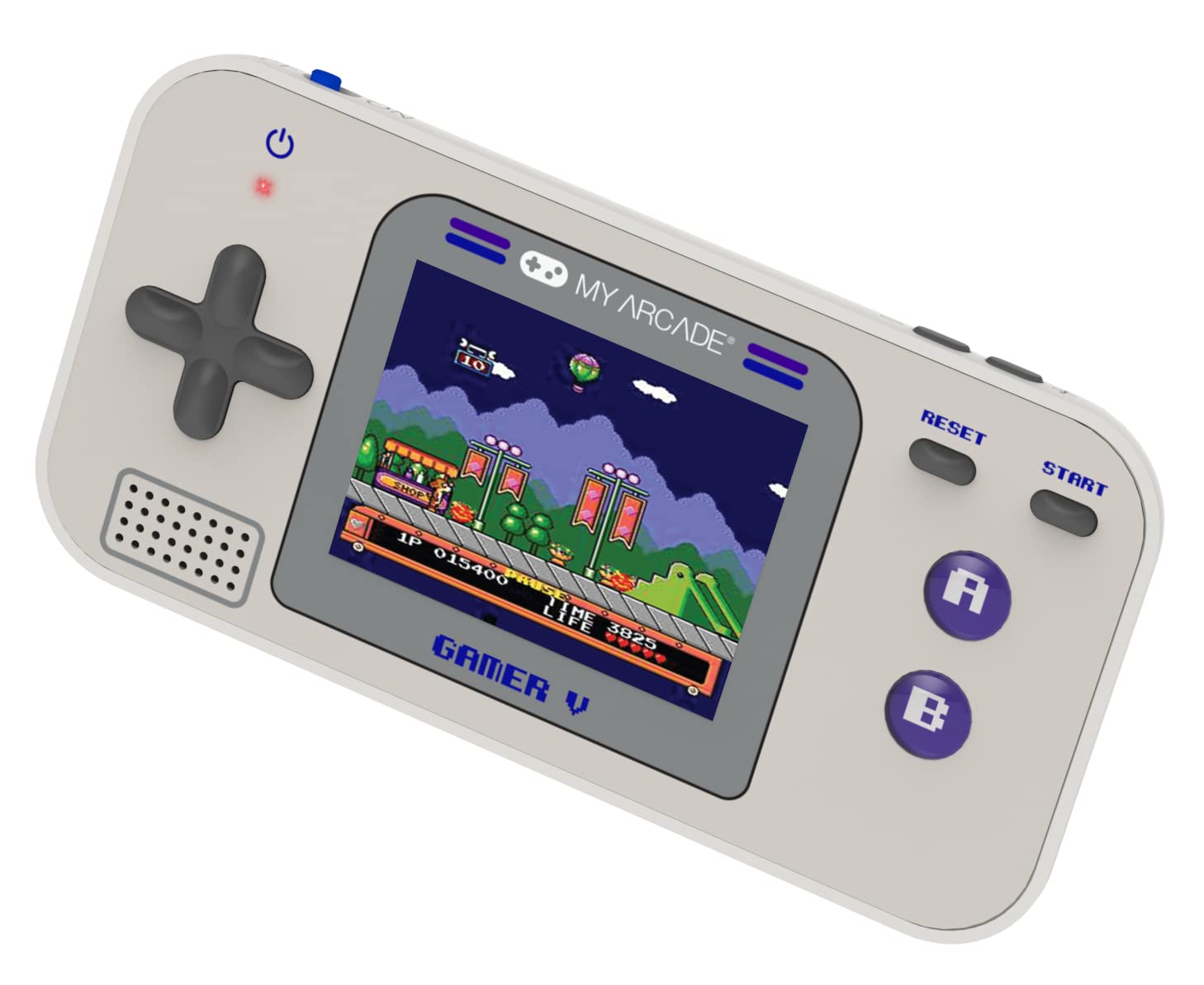
ചിത്രം: വിശദമായത് view of the Gamer V Classic controls.
5.2 Game Selection and Play
- After powering on, the device will display the main game selection menu.
- Use the D-Pad to scroll through the list of available games.
- Press the 'A' button or 'Start' button to select and launch a game.
- Follow on-screen instructions for specific game controls.
- To return to the game selection menu, press the 'Home' button.
5.3 വോളിയം ക്രമീകരിക്കൽ
Use the dedicated volume control buttons or switch (location may vary slightly by unit) to increase or decrease the sound output.
6. പരിപാലനം
- വൃത്തിയാക്കൽ: ഉപകരണം വൃത്തിയാക്കാൻ മൃദുവായതും ഉണങ്ങിയതുമായ തുണി ഉപയോഗിക്കുക. ലിക്വിഡ് ക്ലീനറുകളോ എയറോസോളുകളോ ഉപയോഗിക്കരുത്.
- സംഭരണം: Store the device in a cool, dry place away from direct sunlight and extreme temperatures. If storing for an extended period, remove the batteries.
- ബാറ്ററി കെയർ: Replace all batteries at the same time. Do not mix old and new batteries or different types of batteries. Dispose of used batteries responsibly.
- ആഘാതം ഒഴിവാക്കുക: Do not drop or subject the device to strong impacts, as this may damage internal components or the screen.
7. പ്രശ്നപരിഹാരം
| പ്രശ്നം | സാധ്യമായ കാരണം | പരിഹാരം |
|---|---|---|
| ഉപകരണം ഓണാക്കില്ല. | ബാറ്ററികൾ കുറവാണ് അല്ലെങ്കിൽ ഡെഡ് ആണ്. തെറ്റായ ബാറ്ററി ഇൻസ്റ്റാളേഷൻ. | Replace batteries with new ones, ensuring correct polarity. Try powering via USB-C cable. |
| Screen is blank or distorted. | Low battery power. Device malfunction. | Replace batteries or connect to USB-C power. If problem persists, contact customer support. |
| ശബ്ദമില്ല അല്ലെങ്കിൽ കുറഞ്ഞ ശബ്ദമില്ല. | Volume set too low. Mute function activated. | Adjust volume using the volume controls. Ensure no external headphones are connected if not intended. |
| ബട്ടണുകൾ പ്രതികരിക്കുന്നില്ല. | Device frozen. Low battery power. | Try pressing the 'Reset' button. Replace batteries. Power cycle the device (turn off and on). |
8 സ്പെസിഫിക്കേഷനുകൾ
- ഉൽപ്പന്ന അളവുകൾ: 5"L x 2.5"W x 0.75"H
- കൺട്രോളർ തരം: ബട്ടൺ നിയന്ത്രണം
- ഇനത്തിൻ്റെ ഭാരം: 0.15 കിലോഗ്രാം (5.3 ഔൺസ്)
- സ്ക്രീൻ വലിപ്പം: 2.5 ഇഞ്ച്
- ഊർജ്ജ സ്രോതസ്സ്: ബാറ്ററി പവർ (3 AAA ബാറ്ററികൾ ആവശ്യമാണ്, ഉൾപ്പെടുത്തിയിട്ടില്ല)
- ഹാർഡ്വെയർ ഇന്റർഫേസ്: Internal with removable media
- പ്രായപരിധി (വിവരണം): Kid, Teen
- ഡിസ്പ്ലേ തരം: എൽസിഡി അല്ലെങ്കിൽ എൽഇഡി
- മെറ്റീരിയൽ: പ്ലാസ്റ്റിക്
- ഫോം ഘടകം: ഹാൻഡ്ഹെൽഡ്
- ഇനം മോഡൽ നമ്പർ: DGUN-3920
- നിർമ്മാതാവ്: എൻ്റെ ആർക്കേഡ്
9. വാറൻ്റിയും പിന്തുണയും
For warranty information and customer support, please refer to the official My Arcade webസൈറ്റിൽ ബന്ധപ്പെടുക അല്ലെങ്കിൽ അവരുടെ ഉപഭോക്തൃ സേവന വിഭാഗവുമായി ബന്ധപ്പെടുക. വാങ്ങിയതിന്റെ തെളിവായി നിങ്ങളുടെ വാങ്ങൽ രസീത് സൂക്ഷിക്കുക.


