1. ആമുഖം
വാങ്ങിയതിന് നന്ദി.asing the AMS Modern Wall Clock. This clock features a unique word display with LED digits and a precise quartz movement, designed to be a functional and aesthetic addition to your space. This manual provides essential information for the safe and efficient use of your new clock.
2 സുരക്ഷാ വിവരങ്ങൾ
- ഉപയോഗിക്കുന്നതിന് മുമ്പ് എല്ലാ നിർദ്ദേശങ്ങളും ശ്രദ്ധാപൂർവ്വം വായിക്കുക.
- നേരിട്ടുള്ള സൂര്യപ്രകാശം, തീവ്രമായ താപനില, ഉയർന്ന ഈർപ്പം എന്നിവയിൽ നിന്ന് ക്ലോക്ക് അകറ്റി നിർത്തുക.
- Do not expose the clock to water or other liquids.
- Use only the specified battery type and ensure correct polarity.
- ബാറ്ററികൾ കുട്ടികൾക്ക് ലഭ്യമാകാതെ സൂക്ഷിക്കുക.
- ക്ലോക്ക് സ്വയം വേർപെടുത്താനോ നന്നാക്കാനോ ശ്രമിക്കരുത്. യോഗ്യതയുള്ള സേവന ഉദ്യോഗസ്ഥരെ ബന്ധപ്പെടുക.
3. പാക്കേജ് ഉള്ളടക്കം
പാക്കേജിൽ ഇനിപ്പറയുന്ന ഇനങ്ങൾ ഉണ്ടോ എന്ന് പരിശോധിക്കുക:
- AMS Modern Wall Clock (Model AM T1235)
- ഉപയോക്തൃ മാനുവൽ (ഈ പ്രമാണം)
കുറിപ്പ്: ബാറ്ററികൾ ഉൾപ്പെടുത്തിയിട്ടില്ല, പ്രത്യേകം വാങ്ങണം.
4. സജ്ജീകരണം
4.1 അൺപാക്കിംഗ്
Carefully remove the clock from its packaging. Retain the packaging for future storage or transport.
4.2 ബാറ്ററി ഇൻസ്റ്റാളേഷൻ
The AMS Modern Wall Clock operates on batteries. Follow these steps to install them:
- ക്ലോക്കിന്റെ പിൻഭാഗത്ത് ബാറ്ററി കമ്പാർട്ട്മെന്റ് കണ്ടെത്തുക.
- ബാറ്ററി കമ്പാർട്ട്മെൻ്റ് കവർ തുറക്കുക.
- Insert the required batteries (refer to the 'Specifications' section for battery type) ensuring the correct polarity (+ and -) as indicated inside the compartment.
- ബാറ്ററി കമ്പാർട്ട്മെൻ്റ് കവർ സുരക്ഷിതമായി അടയ്ക്കുക.
4.3 Mounting the Clock
This wall clock is designed for easy mounting:
- Choose a suitable location on a wall, ensuring it is sturdy enough to support the clock's weight.
- Use a screw or nail (not included) appropriate for your wall type.
- Hang the clock securely using the hanging slot on the back of the unit.
5. പ്രവർത്തന നിർദ്ദേശങ്ങൾ
5.1 സമയം ക്രമീകരിക്കുന്നു
After installing the batteries, the clock will begin to operate. To set the correct time:
- Locate the time setting dial or button on the back of the clock.
- Rotate the dial or press the button to advance the time until the correct time is displayed by the illuminated words.
- The clock will automatically adjust its word display to reflect the set time in five-minute increments.
5.2 Understanding the Word Display
The AMS Modern Wall Clock displays time using illuminated words. The display changes every five minutes. For example, if it is 1:00, the words "ES IST EINS UHR" will illuminate. If it is 1:05, it might show "ES IST FÜNF NACH EINS".
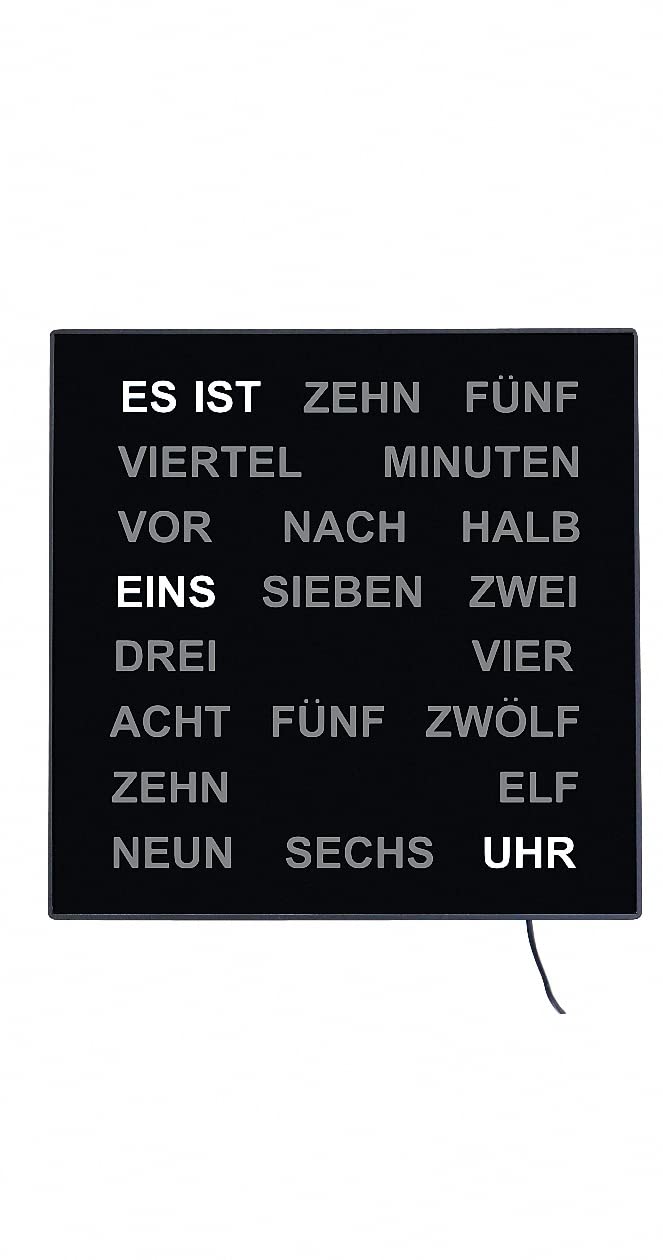
This image shows the front face of the AMS Modern Wall Clock. The clock features a black background with white LED words that illuminate to indicate the time. Words like "ES IST", "ZEHN", "FÜNF", "VIERTEL", "MINUTEN", "VOR", "NACH", "HALB", "EINS", "SIEBEN", "ZWEI", "DREI", "VIER", "ACHT", "FÜNF", "ZWÖLF", "ZEHN", "ELF", "NEUN", "SECHS", and "UHR" are visible, with "ES IST", "EINS", and "UHR" currently illuminated, indicating "It is one o'clock".
6. പരിപാലനം
6.1 വൃത്തിയാക്കൽ
To clean the clock, gently wipe the surface with a soft, dry cloth. Do not use abrasive cleaners, solvents, or chemical sprays, as these may damage the finish or internal components.
6.2 ബാറ്ററി മാറ്റിസ്ഥാപിക്കൽ
When the clock's display starts to dim or the time becomes inaccurate, it is time to replace the batteries. Follow the battery installation steps in Section 4.2. Always replace all batteries at the same time with new ones of the same type.
7. പ്രശ്നപരിഹാരം
- Clock not working: Ensure batteries are installed correctly with proper polarity. Check if batteries are new and fully charged.
- Incorrect time display: Reset the time using the setting dial/button on the back. If the issue persists, replace the batteries.
- Dim or flickering display: ഇത് സാധാരണയായി ബാറ്ററി പവർ കുറവാണെന്ന് സൂചിപ്പിക്കുന്നു. ബാറ്ററികൾ മാറ്റിസ്ഥാപിക്കുക.
ഈ പരിഹാരങ്ങൾ പരീക്ഷിച്ചതിന് ശേഷവും പ്രശ്നങ്ങൾ നിലനിൽക്കുകയാണെങ്കിൽ, ദയവായി ഉപഭോക്തൃ പിന്തുണയുമായി ബന്ധപ്പെടുക.
8 സ്പെസിഫിക്കേഷനുകൾ
| ഫീച്ചർ | വിശദാംശങ്ങൾ |
|---|---|
| ബ്രാൻഡ് | എ.എം.എസ് |
| മോഡൽ നമ്പർ | AM T1235 |
| ചലന തരം | ക്വാർട്സ് പ്രസ്ഥാനം |
| ഡിസ്പ്ലേ തരം | Analog (Word Clock with LED digits) |
| പവർ ഉറവിടം | ബാറ്ററി പവർ (ബാറ്ററികൾ ഉൾപ്പെടുത്തിയിട്ടില്ല) |
| മെറ്റീരിയൽ | പ്ലാസ്റ്റിക് |
| നിറം | കറുപ്പ് |
| ഉൽപ്പന്ന അളവുകൾ | 11.02"ആംശം x 11.02"ആംശം |
| ഇനത്തിൻ്റെ ഭാരം | 3.3 പൗണ്ട് |
| ഉത്ഭവം | ജർമ്മനിയിൽ നിർമ്മിച്ചത് |
9. വാറണ്ടിയും പിന്തുണയും
The AMS Modern Wall Clock comes with a 2-year product warranty. For warranty claims or technical support, please contact your retailer or the manufacturer directly. Keep your proof of purchase for warranty validation.
For further assistance, please refer to the contact information provided by your point of purchase or visit the official AMS webസൈറ്റ്.


