1. ആമുഖം
വാങ്ങിയതിന് നന്ദി.asing the iFi Zen Air CAN Headphone Amplifier. This manual provides detailed instructions for the proper setup, operation, and maintenance of your device. Please read this manual thoroughly before use to ensure optimal performance and longevity of your ampജീവൻ.
The iFi Zen Air CAN is designed to enhance your audio experience by providing powerful and clear amplification for a wide range of headphones, connecting to various audio sources such as PCs, Macs, smartphones, tablets, TVs, and streamers.
2 സുരക്ഷാ വിവരങ്ങൾ
- യൂണിറ്റ് വെള്ളം, ഈർപ്പം അല്ലെങ്കിൽ തീവ്രമായ താപനില എന്നിവയിൽ തുറന്നുകാട്ടരുത്.
- Use only a compatible 5V DC power supply. An incompatible power supply may damage the unit.
- താപ സ്രോതസ്സുകൾക്ക് സമീപമോ നേരിട്ടുള്ള സൂര്യപ്രകാശത്തിലോ യൂണിറ്റ് സ്ഥാപിക്കുന്നത് ഒഴിവാക്കുക.
- യൂണിറ്റ് സ്വയം തുറക്കാനോ സർവീസ് ചെയ്യാനോ ശ്രമിക്കരുത്. എല്ലാ സർവീസിംഗും യോഗ്യതയുള്ള ഉദ്യോഗസ്ഥർക്ക് റഫർ ചെയ്യുക.
- പ്രവർത്തന സമയത്ത് യൂണിറ്റിന് ചുറ്റും ശരിയായ വായുസഞ്ചാരം ഉറപ്പാക്കുക.
- കേൾവിക്ക് കേടുപാടുകൾ സംഭവിക്കാതിരിക്കാൻ മിതമായ ശബ്ദത്തിൽ കേൾക്കുക.
3. പാക്കേജ് ഉള്ളടക്കം
എല്ലാ ഇനങ്ങളും നിലവിലുണ്ടോ എന്ന് ദയവായി പരിശോധിക്കുക:
- iFi Zen Air CAN Headphone Ampലൈഫയർ യൂണിറ്റ്
- ഉപയോക്തൃ മാനുവൽ (ഈ പ്രമാണം)
- കുറിപ്പ്: A 5V DC power supply is typically sold separately. Please ensure you have a compatible power adapter.
4. ഉൽപ്പന്നം കഴിഞ്ഞുview
The iFi Zen Air CAN features a user-friendly design with essential controls and connectivity options.
4.1 ഫ്രണ്ട് പാനൽ
ചിത്രം: മുൻഭാഗം view of the iFi Zen Air CAN, showing the power button, input selector, gain selector, volume knob, 6.3mm headphone output, 4.4mm S-Balanced headphone output, XBass button, and XSpace button.
- പവർ ബട്ടൺ: യൂണിറ്റ് ഓണാക്കുകയോ ഓഫാക്കുകയോ ചെയ്യുന്നു.
- ഇൻപുട്ട് സെലക്ടർ: Switches between Input 1 (3.5mm S-Balanced), Input 2 (RCA), and Input 3 (RCA).
- ഗെയിൻ സെലക്ടർ: ക്രമീകരിക്കുന്നു amplification level (0dB, 9dB, 18dB) to match your headphones' sensitivity.
- വോളിയം നോബ്: ഔട്ട്പുട്ട് വോളിയം നിയന്ത്രിക്കുന്നു.
- 6.3mm ഹെഡ്ഫോൺ ഔട്ട്പുട്ട്: Standard single-ended headphone connection.
- 4.4mm S-Balanced Headphone Output: Balanced headphone connection for improved audio quality with compatible headphones.
- XBass ബട്ടൺ: Engages or disengages the XBass analog bass correction system.
- XSpace Button: Engages or disengages the XSpace holographic sound field system.
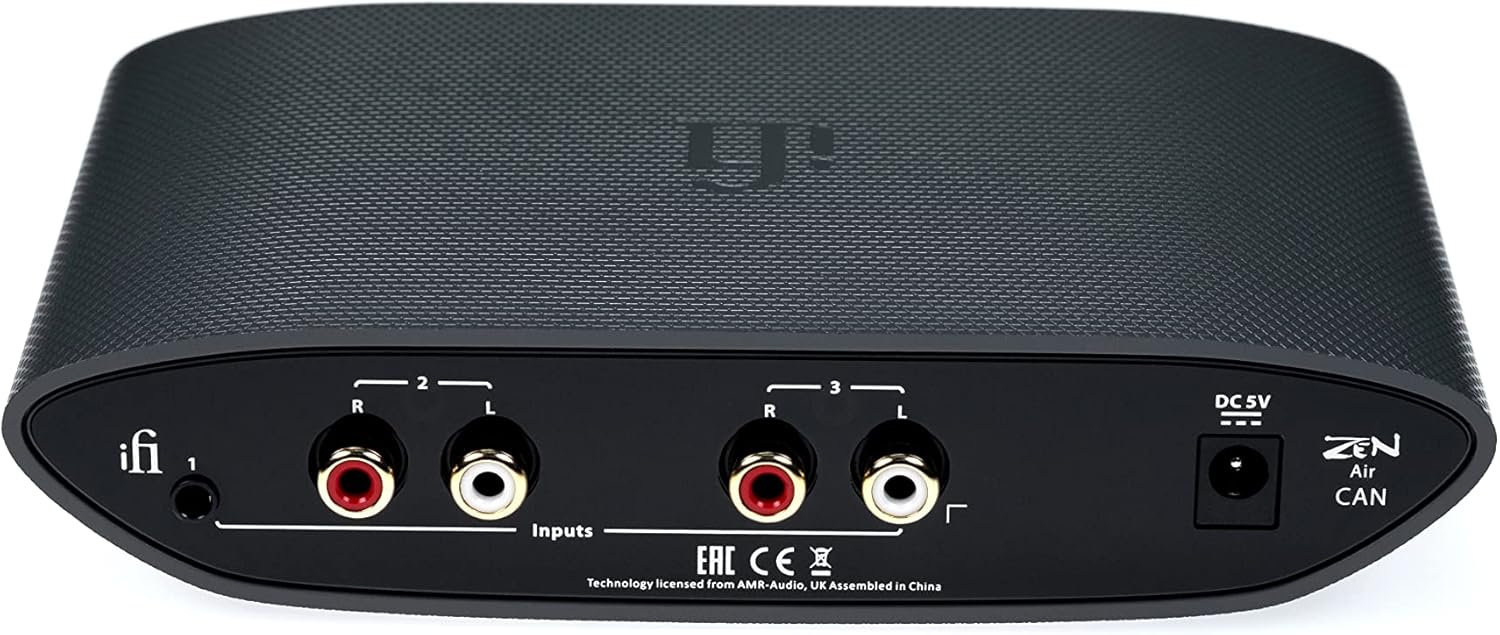
4.2 പിൻ പാനൽ

ചിത്രം: പിൻഭാഗം view of the iFi Zen Air CAN, showing the 3.5mm S-Balanced input, two pairs of RCA inputs (left and right channels), and the DC 5V power input.
- 3.5mm S-Balanced Input: Audio input for sources with a 3.5mm S-Balanced output.
- RCA Inputs (1 & 2): Two pairs of stereo RCA inputs for connecting audio sources.
- DC 5V പവർ ഇൻപുട്ട്: Connect the 5V DC power supply here.
4.3 കണക്ഷൻ ഡയഗ്രം

Image: Diagram illustrating the various input and output connections on the iFi Zen Air CAN, including 6.3mm single-ended output, 4.4mm S-Balanced output, 3.5mm S-Balanced input, RCA inputs, and DC 5V power input.
5. സജ്ജീകരണം
Follow these steps to set up your iFi Zen Air CAN:
- ഓഡിയോ ഉറവിടം ബന്ധിപ്പിക്കുക: Choose one of the available inputs on the rear panel (3.5mm S-Balanced or RCA) and connect your audio source (e.g., PC, Mac, smartphone, TV, streamer) using appropriate cables.
- ഹെഡ്ഫോണുകൾ ബന്ധിപ്പിക്കുക: Plug your headphones into either the 6.3mm single-ended output or the 4.4mm S-Balanced output on the front panel.
- പവർ ബന്ധിപ്പിക്കുക: Connect a compatible 5V DC power supply (not included) to the DC 5V input on the rear panel, then plug the power supply into a wall outlet.
- പവർ ഓൺ: Press the power button on the front panel to turn on the unit. The LED indicator will illuminate.
- ഇൻപുട്ട് തിരഞ്ഞെടുക്കുക: Use the input selector button to choose the input corresponding to your connected audio source.
- നേട്ടം ക്രമീകരിക്കുക: Start with the lowest gain setting (0dB) and adjust as needed based on your headphones' sensitivity and desired volume.
- വോളിയം സജ്ജമാക്കുക: Slowly turn the volume knob clockwise to increase the volume to a comfortable listening level.
6. പ്രവർത്തന നിർദ്ദേശങ്ങൾ
6.1 Gain Settings

Image: The iFi Zen Air CAN with text explaining the concept of gain and its three settings (0dB, 9dB, 18dB).
The Zen Air CAN features three gain settings: 0dB, 9dB, and 18dB. Gain refers to the amplifier's ability to increase the amplitude of the audio signal. Selecting the appropriate gain setting is crucial for optimal sound quality and to prevent distortion.
- 0dB: Suitable for highly sensitive headphones or in-ear monitors (IEMs).
- 9dB: A balanced setting for most standard headphones.
- 18dB: Provides significant amplification for demanding, low-sensitivity headphones.
Experiment with the gain settings to find the best match for your headphones and listening preferences. If you experience distortion, try a lower gain setting.
6.2 XBass and XSpace
The Zen Air CAN includes two analog processing modes to enhance your listening experience:
- എക്സ്ബാസ്: This feature provides an analog bass correction system, designed to restore accurate bass response that can sometimes be lost in headphones. Press the XBass button to activate or deactivate it.
- XSpace: This feature creates a holographic sound field, expanding the perceived soundstage beyond your head. Press the XSpace button to activate or deactivate it.
These features are implemented in the analog domain, ensuring no digital degradation of the audio signal.
7. പരിപാലനം
- വൃത്തിയാക്കൽ: യൂണിറ്റിന്റെ പുറംഭാഗം വൃത്തിയാക്കാൻ മൃദുവായതും ഉണങ്ങിയതുമായ തുണി ഉപയോഗിക്കുക. ലിക്വിഡ് ക്ലീനറുകളോ ലായകങ്ങളോ ഉപയോഗിക്കരുത്.
- സംഭരണം: When not in use for extended periods, store the unit in a cool, dry place away from direct sunlight and dust.
- കേബിൾ കെയർ: Handle all cables with care. Avoid sharp bends or excessive pulling.
8. പ്രശ്നപരിഹാരം
| പ്രശ്നം | സാധ്യമായ കാരണം | പരിഹാരം |
|---|---|---|
| ശബ്ദമില്ല | യൂണിറ്റ് പവർ ചെയ്തിട്ടില്ല തെറ്റായ ഇൻപുട്ട് തിരഞ്ഞെടുത്തു ഹെഡ്ഫോണുകൾ കണക്റ്റ് ചെയ്തിട്ടില്ല വോളിയം വളരെ കുറവാണ് Source device not playing audio | പവർ ബട്ടൺ അമർത്തുക Select correct input ഹെഡ്ഫോണുകൾ പൂർണ്ണമായും പ്ലഗിൻ ചെയ്തിട്ടുണ്ടെന്ന് ഉറപ്പാക്കുക വോളിയം കൂട്ടുക Check audio playback on source device |
| വികലമായ ശബ്ദം | Gain setting too high Source volume too high കേബിൾ കേബിൾ | ലാഭക്ഷമത ക്രമീകരണം കുറയ്ക്കുക Lower volume on source device മറ്റൊരു ഓഡിയോ കേബിൾ പരീക്ഷിക്കുക |
| മൂളൽ അല്ലെങ്കിൽ മൂളൽ ശബ്ദം | ഗ്രൗണ്ട് ലൂപ്പ് Interference from power supply കേബിൾ കേബിൾ | Ensure all components are on the same power strip or outlet Try a different 5V DC power supply (e.g., iFi iPower) Replace audio cables |
| യൂണിറ്റ് പവർ ഓണാക്കുന്നില്ല | ഔട്ട്ലെറ്റ് ചെയ്യാൻ വൈദ്യുതിയില്ല വൈദ്യുതി വിതരണം ബന്ധിപ്പിച്ചിട്ടില്ല തെറ്റായ വൈദ്യുതി വിതരണം | വാൾ ഔട്ട്ലെറ്റ് പരിശോധിക്കുക Ensure power supply is fully connected Try a different compatible 5V DC power supply |
9 സ്പെസിഫിക്കേഷനുകൾ
- മോഡൽ: സെൻ എയർ CAN
- ഇനം മോഡൽ നമ്പർ: 03111014-0004
- ബ്രാൻഡ്: iFi
- ഇനത്തിൻ്റെ ഭാരം: 1.3 പൗണ്ട് (0.59 കി.ഗ്രാം)
- ഉൽപ്പന്ന അളവുകൾ: 1.4 x 4.6 x 1.4 ഇഞ്ച് (3.56 x 11.68 x 3.56 സെ.മീ)
- കണക്റ്റിവിറ്റി ടെക്നോളജി: ബാഹ്യ ലൈൻ റിട്ടേൺ
- ചാനലുകളുടെ എണ്ണം: 3
- അനുയോജ്യമായ ഉപകരണങ്ങൾ: Personal Computer, Mac, Smartphone, Tablet, TV, Streamers
- പിന്തുണയ്ക്കുന്ന സോഫ്റ്റ്വെയർ: Mac (and other operating systems via analog input)
- പവർ ഇൻപുട്ട്: DC 5V (Power supply sold separately)
- ഇൻപുട്ടുകൾ: 3.5mm S-Balanced, 2x RCA Stereo
- ഔട്ട്പുട്ടുകൾ: 6.3mm Single-Ended, 4.4mm S-Balanced
- ഗെയിൻ സെറ്റിംഗ്സ്: 0dB, 9dB, 18dB
- പ്രത്യേക സവിശേഷതകൾ: XBass, XSpace
10. വാറൻ്റിയും പിന്തുണയും
The iFi Zen Air CAN is covered by a manufacturer's warranty. Please refer to the warranty card included with your product or visit the official iFi webനിങ്ങളുടെ പ്രദേശത്തിന് പ്രത്യേകമായുള്ള വിശദമായ വാറന്റി നിബന്ധനകൾക്കും വ്യവസ്ഥകൾക്കും സൈറ്റ് സന്ദർശിക്കുക.
For technical support, troubleshooting assistance, or service inquiries, please contact iFi customer support through their official website or authorized distributors. Ensure you have your product model and serial number available when contacting support.
iFi Official Webസൈറ്റ്: www.ifi-audio.com


