FLITI ഗാലക്സി പ്രൊജക്ടർ ഇൻസ്ട്രക്ഷൻ മാനുവൽ
Model: galaxy projector-1
പ്രധാനപ്പെട്ട സുരക്ഷാ വിവരങ്ങൾ
Please read all safety instructions carefully before operating this product. Failure to follow these instructions may result in injury or damage to the product.
- മുതിർന്നവരുടെ മേൽനോട്ടം: Do not allow children to operate this product alone.
- ഉദ്ദേശിച്ച ഉപയോഗം: This product is designed for indoor use in night or dark environments. Outdoor use, or use in daylight or strong light conditions, will significantly affect the projection effect.
- ജല പ്രതിരോധം: The product has an IP20 waterproof rating, meaning it is suitable for dry environments only. Avoid exposure to water or damp വ്യവസ്ഥകൾ.
- പ്രവർത്തന താപനില: The recommended operating temperature range is 0-45°C (32-113°F). Operation outside this range, especially in excessively high or low temperatures, may cause the product to malfunction or the laser to not illuminate.
- പവർ അഡാപ്റ്റർ: Use only a DC5V/2A power adapter with this product. Using an adapter with incorrect voltage or current may damage the laser module and shorten the product's service life.
- ശാരീരിക കൈകാര്യം ചെയ്യൽ: Avoid dropping or subjecting the device to strong impacts, as this may damage the internal laser module.
- Normal Operation Noise: A slight noise may be heard when the internal motor rotates. This is normal and does not indicate a quality defect.

ഉൽപ്പന്നം കഴിഞ്ഞുview
The FLITI Galaxy Projector creates a captivating visual experience with its nebula and galaxy projections. It features a wide coverage area, integrated Bluetooth speaker, white noise functions, and various lighting modes to enhance any room.

പ്രധാന സവിശേഷതകൾ:
- Dynamic Galaxy & Nebula Projections: Projects sci-fi nebula shapes and dreamy galaxy patterns.
- വിപുലമായ കവറേജ്: Designed to illuminate an entire room, not just the ceiling.
- ഇന്റഗ്രേറ്റഡ് ബ്ലൂടൂത്ത് സ്പീക്കർ: Connect your device to play music.
- White Noise Functionality: Provides soothing sounds for relaxation.
- ക്രമീകരിക്കാവുന്ന ക്രമീകരണങ്ങൾ: Includes timing, brightness adjustment, and various lighting modes.
- റിമോട്ട് കൺട്രോൾ: ദൂരെ നിന്ന് സൗകര്യപ്രദമായ പ്രവർത്തനം.

സജ്ജമാക്കുക
- അൺപാക്ക് ചെയ്യുന്നു: Carefully remove the galaxy projector and its accessories from the packaging. Ensure all components, including the projection lamp and base, are present.
- പ്ലേസ്മെൻ്റ്: Place the projector on a stable, flat surface. For optimal projection, position it in the center of the room or at a desired angle to cover the intended area. The projector's base allows for adjustable light direction.
- പവർ കണക്ഷൻ: Connect the provided DC5V/2A power adapter to the projector's power input port. Plug the adapter into a standard electrical outlet.
- പ്രാരംഭ പവർ ഓൺ: ഉപകരണം ഓണാക്കാൻ പ്രൊജക്ടറിലോ റിമോട്ട് കൺട്രോളിലോ പവർ ബട്ടൺ അമർത്തുക.
പ്രവർത്തന നിർദ്ദേശങ്ങൾ
Basic Controls (via Projector Buttons or Remote Control):
- പവർ ഓൺ/ഓഫ്: പ്രൊജക്ടർ ഓണാക്കാനോ ഓഫാക്കാനോ പവർ ബട്ടൺ അമർത്തുക.
- ലൈറ്റ് മോഡുകൾ: Cycle through various galaxy and nebula projection modes.
- തെളിച്ച ക്രമീകരണം: Adjust the intensity of the projected light.
- ഭ്രമണ വേഗത: Control the speed of the galaxy/nebula rotation.
- ടൈമർ പ്രവർത്തനം: Set an automatic shut-off timer (e.g., 1H/2H/4H options may be available).

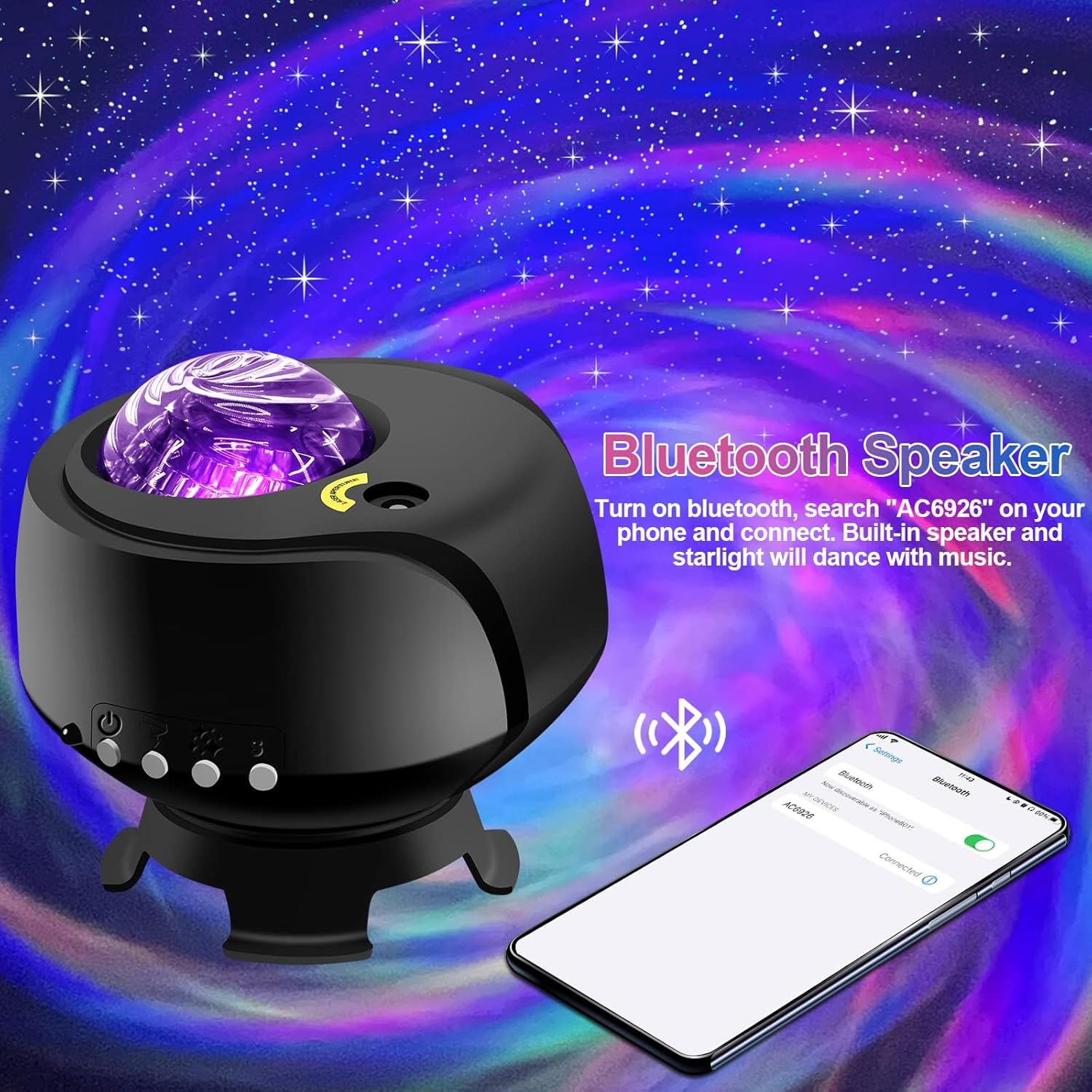
ബ്ലൂടൂത്ത് സ്പീക്കർ പ്രവർത്തനം:
- പ്രൊജക്ടർ ഓണാണെന്ന് ഉറപ്പാക്കുക.
- നിങ്ങളുടെ മൊബൈൽ ഉപകരണത്തിൽ, ബ്ലൂടൂത്ത് പ്രവർത്തനക്ഷമമാക്കി ലഭ്യമായ ഉപകരണങ്ങൾക്കായി തിരയുക.
- Select the device named "AC6926" to pair.
- Once connected, you can play audio through the projector's built-in speaker. The projected starlight can synchronize with the music.
White Noise Function:
The projector includes a white noise feature to aid relaxation or sleep. Refer to the remote control or projector buttons for specific controls to activate and select white noise sounds.
മെയിൻ്റനൻസ്
- വൃത്തിയാക്കൽ: Disconnect the power before cleaning. Use a soft, dry cloth to wipe the exterior of the projector. Do not use abrasive cleaners, solvents, or excessive moisture, as these can damage the finish or internal components.
- ലെൻസ് കെയർ: Gently wipe the projection lens with a soft, lint-free cloth to ensure clear projection.
- സംഭരണം: When not in use for extended periods, store the projector in a cool, dry place, away from direct sunlight and extreme temperatures. Keep it in its original packaging if possible to protect it from dust and impacts.
ട്രബിൾഷൂട്ടിംഗ്
- Projector Does Not Turn On:
- പ്രൊജക്ടറിലേക്കും പ്രവർത്തിക്കുന്ന ഒരു ഇലക്ട്രിക്കൽ ഔട്ട്ലെറ്റിലേക്കും പവർ അഡാപ്റ്റർ സുരക്ഷിതമായി ബന്ധിപ്പിച്ചിട്ടുണ്ടെന്ന് ഉറപ്പാക്കുക.
- Verify that you are using the correct DC5V/2A power adapter.
- Check if the power button on the projector or remote control is functioning.
- No Projection / Dim Projection:
- Ensure the room is sufficiently dark. The product is designed for optimal performance in low-light conditions.
- Adjust the brightness settings using the remote control or projector buttons.
- Check if the projection lens is clean and free from obstructions.
- Verify the ambient temperature is within the recommended 0-45°C range.
- ബ്ലൂടൂത്ത് കണക്ഷൻ പ്രശ്നങ്ങൾ:
- Ensure the projector is powered on and in Bluetooth pairing mode.
- നിങ്ങളുടെ മൊബൈൽ ഉപകരണത്തിന്റെ ബ്ലൂടൂത്ത് പ്രവർത്തനക്ഷമമാക്കിയിട്ടുണ്ടെന്നും പരിധിക്കുള്ളിലാണെന്നും ഉറപ്പാക്കുക.
- ഉപകരണം ജോടി മാറ്റി വീണ്ടും ജോടിയാക്കാൻ ശ്രമിക്കുക.
- പ്രൊജക്ടറും നിങ്ങളുടെ മൊബൈൽ ഉപകരണവും പുനരാരംഭിക്കുക.
- മോട്ടോർ ശബ്ദം:
- A slight noise during motor rotation is normal and not a defect. If the noise is excessive or unusual, contact customer support.
സ്പെസിഫിക്കേഷനുകൾ
| ഫീച്ചർ | സ്പെസിഫിക്കേഷൻ |
|---|---|
| മോഡൽ നമ്പർ | ഗാലക്സി പ്രൊജക്ടർ-1 |
| ബ്രാൻഡ് | FLITI |
| നിറം | കറുപ്പ് |
| ആകൃതി | നക്ഷത്രം |
| മെറ്റീരിയൽ | പ്ലാസ്റ്റിക് |
| ഫിനിഷ് തരം | പ്രൊജക്ടർ |
| പ്രകാശ സ്രോതസ്സ് തരം | എൽഇഡി |
| പവർ ഉറവിടം | കോർഡഡ് ഇലക്ട്രിക് |
| വാല്യംtage | 240 വോൾട്ട് |
| വാട്ട്tage | 4 വാട്ട്സ് |
| ഉൽപ്പന്ന അളവുകൾ | 5.5"L x 4"W x 5.1"H |
| ഇനത്തിൻ്റെ ഭാരം | 13.1 ഔൺസ് (370 ഗ്രാം) |
| ഉൾപ്പെടുത്തിയ ഘടകങ്ങൾ | പ്രൊജക്ഷൻ എൽamp, അടിസ്ഥാനം |
| പ്രത്യേക സവിശേഷതകൾ | നിറം മാറ്റുന്നു |
| സ്റ്റൈൽ സ്വിച്ചുചെയ്യുക | റിമോട്ട് |
| യു.പി.സി | 199284591172 |
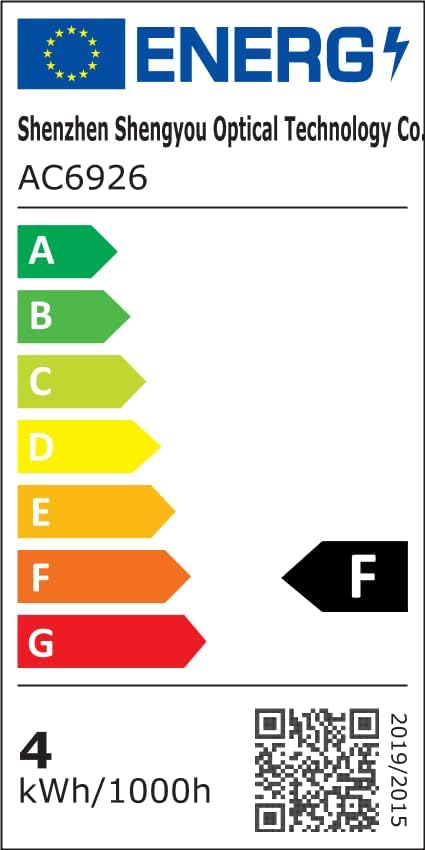
ഊർജ്ജ കാര്യക്ഷമത വിവരം:
വാറൻ്റി & പിന്തുണ
FLITI is committed to providing high-quality products and customer satisfaction. For any questions, concerns, or support needs regarding your Galaxy Projector, please contact the manufacturer directly.
- നിർമ്മാതാവ്: FLITI
- സംരക്ഷണ പദ്ധതികൾ: Extended protection plans are available for purchase separately. Please refer to your retailer for details on 3-Year or 4-Year protection plans.
- റിട്ടേണുകൾ: This product is eligible for a 30-day refund/replacement return policy.


