ആമുഖം
Elevate your audio experience with the TOPTECH Audio KL-6 Bluetooth Speaker—a compact yet powerful 4-inch wireless speaker designed for dynamic sound and ultimate portability. Whether you're hosting an event, enjoying music at the park, or leading a small gathering, the KL-6 delivers clear, booming sound backed by vibrant LED lighting for added ambiance. It includes a built-in microphone for karaoke, announcements, or hands-free communication, and a convenient carry handle to take the party anywhere. With Bluetooth connectivity and rechargeable functionality, this speaker blends convenience with performance—your go-to sound system for indoor and outdoor fun.
പ്രധാനപ്പെട്ട സുരക്ഷാ വിവരങ്ങൾ
- Read all instructions carefully before using the speaker.
- സ്പീക്കറിനെ തീവ്രമായ താപനില, ഈർപ്പം, നേരിട്ടുള്ള സൂര്യപ്രകാശം എന്നിവയ്ക്ക് വിധേയമാക്കരുത്.
- സ്പീക്കർ വെള്ളത്തിൽ നിന്നോ മറ്റ് ദ്രാവകങ്ങളിൽ നിന്നോ അകറ്റി നിർത്തുക.
- സ്പീക്കർ ഡിസ്അസംബ്ലിംഗ് ചെയ്യാനോ പരിഷ്കരിക്കാനോ ശ്രമിക്കരുത്. ഇത് വാറന്റി അസാധുവാക്കും.
- Use only the specified charging cable and power adapter (if applicable).
- കുട്ടികൾക്ക് ലഭ്യമാകാതെ സൂക്ഷിക്കുക.
- പ്രാദേശിക ചട്ടങ്ങൾക്കനുസൃതമായി ഉൽപ്പന്നം ഉത്തരവാദിത്തത്തോടെ വിനിയോഗിക്കുക.
പാക്കേജ് ഉള്ളടക്കം
പാക്കേജിലെ ഉള്ളടക്കങ്ങൾ ശ്രദ്ധാപൂർവ്വം പരിശോധിക്കുക. എന്തെങ്കിലും ഇനങ്ങൾ നഷ്ടപ്പെട്ടാലോ കേടുപാടുകൾ സംഭവിച്ചാലോ, നിങ്ങളുടെ റീട്ടെയിലറെ ബന്ധപ്പെടുക.
- TOPTECH Audio KL-6 Bluetooth Speaker
- വയർഡ് മൈക്രോഫോൺ
- യുഎസ്ബി ചാർജിംഗ് കേബിൾ
- ഉപയോക്തൃ മാനുവൽ (ഈ പ്രമാണം)
ഉൽപ്പന്നം കഴിഞ്ഞുview

Figure 1: TOPTECH Audio KL-6 Bluetooth Speaker and Wired Microphone.
The TOPTECH Audio KL-6 is a portable Bluetooth speaker featuring a 4-inch driver, integrated LED lights, and a built-in handle for easy transport. It comes with a wired microphone for vocal applications.
നിയന്ത്രണങ്ങളും തുറമുഖങ്ങളും

Figure 2: Top panel controls and rear ports of the KL-6 speaker.
- എം (മോഡ്) ബട്ടൺ: Switches between Bluetooth, USB, TF Card, and AUX modes.
- പ്ലേ/താൽക്കാലികമായി നിർത്തുക ബട്ടൺ: ഓഡിയോ പ്ലേബാക്ക് പ്ലേ ചെയ്യുകയോ താൽക്കാലികമായി നിർത്തുകയോ ചെയ്യുന്നു.
- മുമ്പത്തെ ട്രാക്ക്/വോളിയം ഡൗൺ ബട്ടൺ: മുമ്പത്തെ ട്രാക്കിനായി ഹ്രസ്വമായി അമർത്തുക, ശബ്ദം കുറയ്ക്കാൻ ദീർഘനേരം അമർത്തുക.
- അടുത്ത ട്രാക്ക്/വോളിയം അപ്പ് ബട്ടൺ: അടുത്ത ട്രാക്കിനായി ഷോർട്ട് പ്രസ്സ് ചെയ്യുക, വോളിയം കൂട്ടാൻ ദീർഘനേരം അമർത്തുക.
- USB പോർട്ട്: ഒരു യുഎസ്ബി ഫ്ലാഷ് ഡ്രൈവിൽ നിന്ന് ഓഡിയോ പ്ലേ ചെയ്യുന്നതിന്.
- ടിഎഫ് കാർഡ് സ്ലോട്ട്: ഒരു TF (മൈക്രോ എസ്ഡി) കാർഡിൽ നിന്ന് ഓഡിയോ പ്ലേ ചെയ്യുന്നതിന്.
- ഓഫ്/ഓൺ സ്വിച്ച്: സ്പീക്കർ ഓൺ അല്ലെങ്കിൽ ഓഫ് ആക്കുന്നു.
- DC 5V പോർട്ട്: സ്പീക്കറിന്റെ ആന്തരിക ബാറ്ററി ചാർജ് ചെയ്യുന്നതിന്.
- MIC Port: Connects the wired microphone.
- ഓക്സ് പോർട്ട്: 3.5mm ഓഡിയോ കേബിൾ വഴി ബാഹ്യ ഓഡിയോ ഉപകരണങ്ങൾ ബന്ധിപ്പിക്കുന്നതിന്.
സജ്ജമാക്കുക
സ്പീക്കറെ കുറ്റപ്പെടുത്തുന്നു
- Locate the DC 5V charging port on the top panel of the speaker.
- Connect the small end of the USB charging cable to the DC 5V port.
- Connect the standard USB end of the cable to a USB power adapter (not included) or a computer's USB port.
- ചാർജിംഗ് ഇൻഡിക്കേറ്റർ ലൈറ്റ് (ഉണ്ടെങ്കിൽ) ചാർജ് ചെയ്യുമ്പോൾ പ്രകാശിക്കുകയും പൂർണ്ണമായി ചാർജ് ചെയ്യുമ്പോൾ ഓഫാകുകയും ചെയ്യും.
- സാധാരണയായി ഒരു പൂർണ്ണ ചാർജ് ഏകദേശം 3-4 മണിക്കൂർ എടുക്കും.
കുറിപ്പ്: It is recommended to fully charge the speaker before first use to maximize battery life.
പവർ ചെയ്യുന്നത് ഓൺ/ഓഫ്
- To power on the speaker, slide the ഓഫ്/ഓൺ എന്നതിലേക്ക് മാറുക ON position. You will hear an audible prompt.
- To power off the speaker, slide the ഓഫ്/ഓൺ എന്നതിലേക്ക് മാറുക ഓഫ് സ്ഥാനം.
പ്രവർത്തന നിർദ്ദേശങ്ങൾ
ബ്ലൂടൂത്ത് ജോടിയാക്കൽ
- സ്പീക്കർ ഓണാണെന്നും ബ്ലൂടൂത്ത് മോഡിൽ ആണെന്നും ഉറപ്പാക്കുക. ഇല്ലെങ്കിൽ, അമർത്തുക എം (മോഡ്) button until you hear the "Bluetooth mode" prompt.
- നിങ്ങളുടെ സ്മാർട്ട്ഫോണിലോ, ടാബ്ലെറ്റിലോ, അല്ലെങ്കിൽ മറ്റ് ബ്ലൂടൂത്ത് പ്രവർത്തനക്ഷമമാക്കിയ ഉപകരണത്തിലോ ബ്ലൂടൂത്ത് പ്രവർത്തനക്ഷമമാക്കുക.
- ഇതിനായി തിരയുക available Bluetooth devices. The speaker will appear as "KL-6" or "TOPTECH KL-6".
- Select "KL-6" from the list to pair. Once successfully paired, you will hear a confirmation sound.
- You can now play audio from your device through the KL-6 speaker.
കുറിപ്പ്: For optimal performance, keep your Bluetooth device within 10 meters (33 feet) of the speaker.
മൈക്രോഫോൺ ഉപയോഗിക്കുന്നു
- Connect the wired microphone's plug into the എം.ഐ.സി port on the speaker's top panel.
- Ensure the microphone's ON/OFF switch is in the ON സ്ഥാനം.
- Adjust the speaker's master volume using the volume buttons to control the microphone's output level.
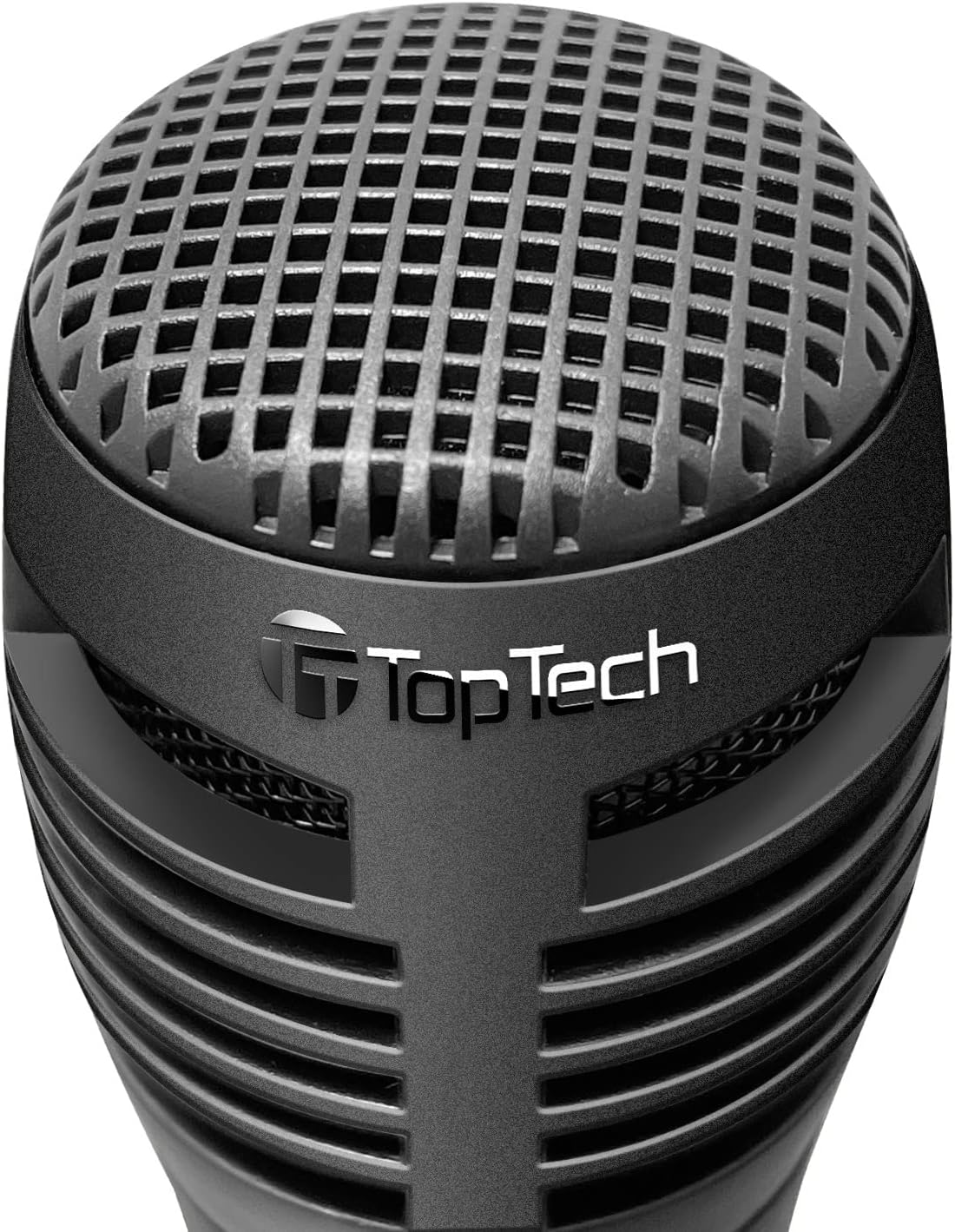
Figure 3: Wired Microphone for vocal input.
LED ലൈറ്റ് മോഡുകൾ
The KL-6 speaker features dynamic LED lighting that enhances your audio experience. The lights automatically react to the rhythm of the music.

Figure 4: KL-6 speaker with active LED light display.
- Multicolor Gradation: Lights transition smoothly through various colors.
- Reactive Color Show: Lights change and pulse in sync with the music's rhythm.
കുറിപ്പ്: There is no dedicated button to turn off the LED lights. They are designed to operate with the speaker's power.
USB / TF Card Playback
- Insert a USB flash drive or TF (microSD) card into the respective port on the speaker. Ensure the card is formatted correctly and contains compatible audio file(ഉദാ. MP3).
- The speaker will automatically switch to USB or TF Card mode and begin playing audio. If not, press the എം (മോഡ്) ശരിയായ മോഡ് തിരഞ്ഞെടുക്കാൻ ബട്ടൺ.
- ഉപയോഗിക്കുക മുമ്പത്തെ ട്രാക്ക് ഒപ്പം അടുത്ത ട്രാക്ക് നാവിഗേഷനുള്ള ബട്ടണുകൾ.
- ഉപയോഗിക്കുക പ്ലേ/താൽക്കാലികമായി നിർത്തുക പ്ലേബാക്ക് നിയന്ത്രിക്കാനുള്ള ബട്ടൺ.
പ്രധാന കുറിപ്പ്: For USB and TF card playback, the speaker's volume is controlled solely by the speaker's volume buttons. There is no independent volume control for these sources from the connected media itself. Compatibility issues may arise with storage devices smaller than 32GB.
AUX ഇൻപുട്ട്
- 3.5mm ഓഡിയോ കേബിളിന്റെ ഒരു അറ്റം (ഉൾപ്പെടുത്തിയിട്ടില്ല) സ്പീക്കറിലെ AUX പോർട്ടുമായി ബന്ധിപ്പിക്കുക.
- കേബിളിന്റെ മറ്റേ അറ്റം ഹെഡ്ഫോൺ ജാക്കിലേക്കോ നിങ്ങളുടെ ബാഹ്യ ഉപകരണത്തിന്റെ ഓഡിയോ ഔട്ട്പുട്ടിലേക്കോ ബന്ധിപ്പിക്കുക (ഉദാ: MP3 പ്ലെയർ, കമ്പ്യൂട്ടർ).
- സ്പീക്കർ സ്വയമേവ AUX മോഡിലേക്ക് മാറും. ഇല്ലെങ്കിൽ, അമർത്തുക എം (മോഡ്) AUX മോഡ് തിരഞ്ഞെടുക്കാൻ ബട്ടൺ.
- നിങ്ങളുടെ ബാഹ്യ ഉപകരണത്തിൽ നിന്ന് പ്ലേബാക്കും ശബ്ദവും നിയന്ത്രിക്കുക.
പരിപാലനവും പരിചരണവും
- മൃദുവായതും ഉണങ്ങിയതുമായ തുണി ഉപയോഗിച്ച് സ്പീക്കർ വൃത്തിയാക്കുക. അബ്രസീവ് ക്ലീനറുകളോ ലായകങ്ങളോ ഉപയോഗിക്കരുത്.
- Avoid exposing the speaker to dust, dirt, or sand.
- ദീർഘനേരം ഉപയോഗിക്കാത്തപ്പോൾ സ്പീക്കർ തണുത്തതും വരണ്ടതുമായ സ്ഥലത്ത് സൂക്ഷിക്കുക.
- Do not block the speaker grille or ventilation openings.
ട്രബിൾഷൂട്ടിംഗ്
| പ്രശ്നം | സാധ്യമായ കാരണം | പരിഹാരം |
|---|---|---|
| സ്പീക്കർ പവർ ഓൺ ചെയ്യുന്നില്ല. | ബാറ്ററി തീർന്നു. | നൽകിയിരിക്കുന്ന USB കേബിൾ ഉപയോഗിച്ച് സ്പീക്കർ പൂർണ്ണമായും ചാർജ് ചെയ്യുക. |
| സ്പീക്കറിൽ നിന്ന് ശബ്ദമില്ല. | വോളിയം വളരെ കുറവാണ് അല്ലെങ്കിൽ മ്യൂട്ട് ചെയ്തിരിക്കുന്നു. തെറ്റായ മോഡ് തിരഞ്ഞെടുത്തു. | Increase volume on both the speaker and your connected device. Press the എം (മോഡ്) button to select the correct input source. |
| ബ്ലൂടൂത്ത് ഉപകരണം ജോടിയാക്കാൻ കഴിയില്ല. | സ്പീക്കർ ജോടിയാക്കൽ മോഡിലല്ല. ഉപകരണം വളരെ അകലെയാണ്. തടസ്സം. | Ensure speaker is in Bluetooth mode. Move device closer. Turn off other Bluetooth devices. Try unpairing and re-pairing. |
| മൈക്രോഫോൺ പ്രവർത്തിക്കുന്നില്ല. | Microphone switch is OFF. Not properly connected. | Ensure the microphone's ON/OFF switch is in the ON position. Check that the microphone is securely plugged into the എം.ഐ.സി തുറമുഖം. |
| No volume control for USB/TF card. | This is a design characteristic. | Volume for USB and TF card playback is controlled solely by the speaker's volume buttons. External device volume controls do not apply in these modes. |
| LED lights are always on. | This is a design characteristic. | The LED lights are integrated and designed to operate when the speaker is powered on. There is no separate control to turn them off. |
സാങ്കേതിക സവിശേഷതകൾ

Figure 5: KL-6 speaker dimensions.
| മോഡൽ: | KL-6 |
| ബ്രാൻഡ്: | TOPTECH |
| കണക്റ്റിവിറ്റി: | ബ്ലൂടൂത്ത്, യുഎസ്ബി, ടിഎഫ് കാർഡ്, ഓക്സ് |
| ഊർജ്ജ സ്രോതസ്സ്: | റീചാർജ് ചെയ്യാവുന്ന ബാറ്ററി |
| ഓഡിയോ ഇൻപുട്ട്: | Microphone, AUX |
| ഉൽപ്പന്ന അളവുകൾ (L x W x H): | 5 x 5 x 7 ഇഞ്ച് |
| ഇനത്തിൻ്റെ ഭാരം: | 1.5 പൗണ്ട് |
| ബാറ്ററി: | 1 AA battery (included) - Note: This refers to the internal rechargeable battery. |
| UPC: | 752574406992 |
വാറൻ്റിയും പിന്തുണയും
The TOPTECH Audio KL-6 Bluetooth Speaker comes with a standard manufacturer's warranty. Please refer to the warranty card included in your package for specific terms and conditions.
For technical support, troubleshooting assistance, or warranty claims, please contact TOPTECH customer service through the retailer where you purchased the product or visit the official TOPTECH webബന്ധപ്പെടാനുള്ള വിവരങ്ങൾക്കുള്ള സൈറ്റ്.
ഓൺലൈൻ പിന്തുണ: Visit the TOPTECH Store on Amazon


