ആമുഖം
This user manual provides detailed instructions for the VVB 14-in-1 USB C Docking Station. This versatile hub expands a single USB-C/Thunderbolt 3/4 port on your laptop into a comprehensive workstation, offering dual 4K HDMI, VGA, Gigabit Ethernet, multiple USB ports, SD/TF card readers, and power delivery. Please read this manual carefully to ensure proper setup and operation.
ഉൽപ്പന്നം കഴിഞ്ഞുview
The VVB 14-in-1 USB C Docking Station is designed to enhance your connectivity and productivity. Below is an overview of its features and ports.

Figure 1: VVB 14-in-1 USB C Docking Station with connected devices.
പോർട്ട് ലേഔട്ട്

Figure 2: Detailed diagram of the docking station's ports, including USB-C PD, SD/TF, HDMI, VGA, Ethernet, USB 3.0, USB 2.0, and Audio/Mic.
- USB-C PD 100W പോർട്ട്: For power input to charge your laptop (up to 87W output).
- USB-C ഡാറ്റ പോർട്ട് (5Gbps): അതിവേഗ ഡാറ്റ കൈമാറ്റത്തിനായി.
- HDMI 1 (4K@60Hz): High-definition video output.
- HDMI 2 (4K@30Hz): High-definition video output.
- VGA (1080P@60Hz): Video output for older monitors.
- Gigabit Ethernet (1000Mbps): Stable wired network connection.
- 3 x USB 3.0 Ports (5Gbps): High-speed data transfer for peripherals like external drives, smartphones, and tablets.
- 2 x USB 2.0 Ports (480Mbps): For connecting keyboard, mouse, and other low-bandwidth devices.
- SD/TF Card Reader (104MB/s): For reading and writing to SD and Micro SD cards.
- 3.5mm Audio & Mic Port: For connecting headphones or speakers with a microphone.
സജ്ജീകരണ നിർദ്ദേശങ്ങൾ
- ലാപ്ടോപ്പിലേക്ക് കണക്റ്റുചെയ്യുക: Plug the integrated USB-C cable from the docking station into a full-function USB-C (Thunderbolt 3/4) port on your laptop. Ensure your laptop's USB-C port supports video output.
- പവർ കണക്ഷൻ (ഓപ്ഷണൽ എന്നാൽ ശുപാർശ ചെയ്യുന്നത്): For stable operation and laptop charging, connect your laptop's original USB-C power adapter (65W or higher recommended) to the USB-C PD 100W port on the docking station.

Figure 3: Connecting the power adapter to the USB-C PD port for charging and stable operation.
- പെരിഫറലുകൾ ബന്ധിപ്പിക്കുക: Connect your monitors, keyboard, mouse, Ethernet cable, and other devices to the corresponding ports on the docking station.
- ഡ്രൈവർ ഇൻസ്റ്റാളേഷൻ: The docking station is plug-and-play for most operating systems (Windows, macOS, Linux). No additional driver installation is typically required.
പ്രവർത്തന നിർദ്ദേശങ്ങൾ
കണക്ഷനുകൾ പ്രദർശിപ്പിക്കുക
The docking station supports dual 4K HDMI and triple display configurations (HDMI + HDMI + VGA).
For Windows Laptops:
Windows systems support both SST (Mirror) and MST (Extended) modes, allowing for various display configurations.
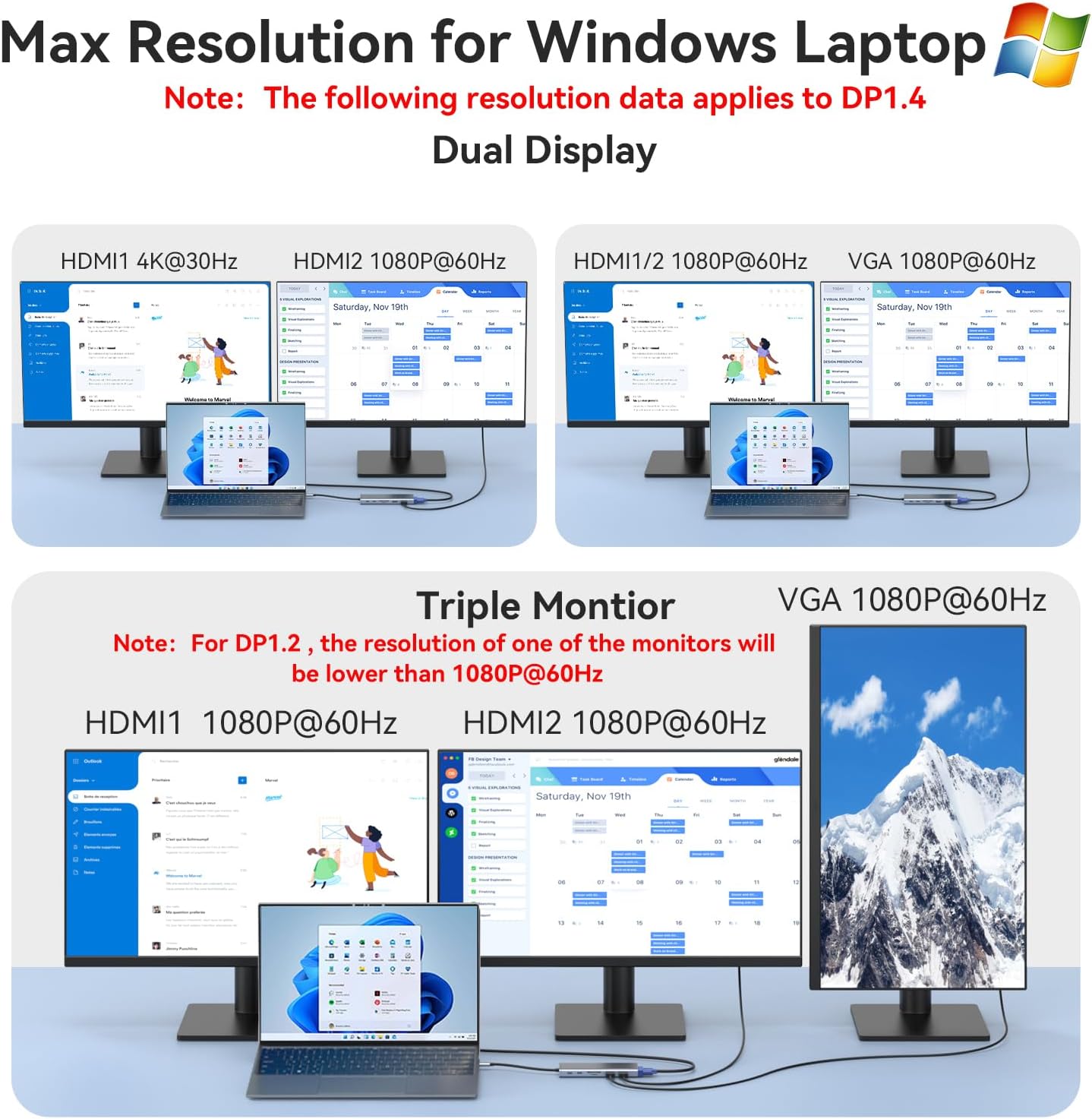
Figure 4: Windows laptop display configurations and resolutions.
- സിംഗിൾ ഡിസ്പ്ലേ:
- HDMI 1: Up to 4K@60Hz
- HDMI 2: Up to 4K@30Hz (DP1.4 source)
- VGA: Up to 1080P@60Hz
- ഡ്യുവൽ ഡിസ്പ്ലേ:
- HDMI 1 + HDMI 2: 4K@30Hz + 2K@60Hz (DP1.4 source)
- HDMI 1 + VGA: 1080P@60Hz
- HDMI 2 + VGA: 1080P@60Hz
- ട്രിപ്പിൾ ഡിസ്പ്ലേ:
- HDMI 1 + HDMI 2 + VGA: All displays will output at 1080P@60Hz.
കുറിപ്പ്: For optimal performance, ensure your laptop's USB-C port supports DP1.4 Alt Mode.
For Mac Laptops:
Mac OS systems typically support only Mirror (SST) mode for external displays. Extended display functionality may be limited to A-BBB (laptop display + three identical external displays).
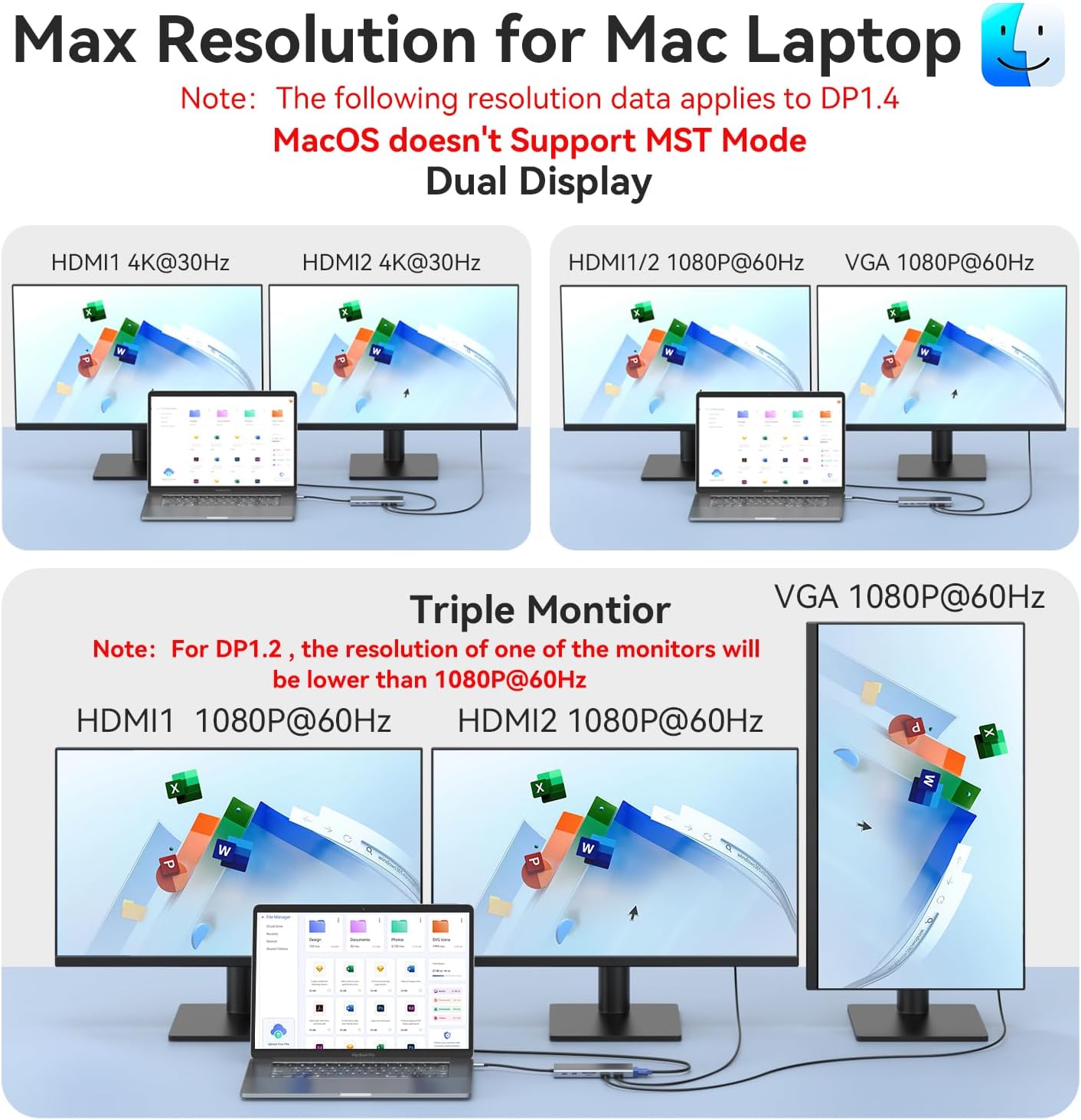
Figure 5: Mac laptop display configurations and resolutions.
- മിറർ മോഡ്: All connected external displays will mirror the laptop's screen.
- Extended Mode (Limited): If supported, the laptop screen will be A, and all external monitors will display the same extended content (BBB).
കുറിപ്പ്: MacBook laptops only support mirror display (same image on external monitors) due to macOS limitations on MST for multiple external displays.
Data Transfer Ports
- USB 3.0 പോർട്ടുകൾ (3x): Connect external hard drives, USB flash drives, smartphones, and other high-speed devices for data transfer up to 5Gbps.
- USB 2.0 പോർട്ടുകൾ (2x): Ideal for connecting keyboard, mouse, and other low-bandwidth peripherals without lag, with speeds up to 480Mbps.
- USB-C ഡാറ്റ പോർട്ട്: Use this port for additional USB-C device connectivity and data transfer up to 5Gbps.
- SD/TF കാർഡ് റീഡർ: Insert your SD or Micro SD card to quickly access photos and videos at speeds up to 104MB/s. Perfect for photographers and video editors.
നെറ്റ്വർക്ക് കണക്ഷൻ
The Gigabit Ethernet port provides a stable and fast wired internet connection.

Figure 6: Connecting to the Gigabit Ethernet port for a stable wired network.
- Connect an Ethernet cable from your router/modem to the RJ45 port on the docking station.
- Supports 10/100/1000BASE-T networks for ultra-fast and reliable wired connectivity.
ഓഡിയോ കണക്ഷൻ
- Plug your 3.5mm headphones, speakers, or microphone into the 3.5mm Audio & Mic port for high-definition lossless sound quality.
അനുയോജ്യത
This docking station is highly compatible with a wide range of laptops featuring a full-function USB-C, Thunderbolt 3, or Thunderbolt 4 port that supports video output.

Figure 7: Operating System Compatibility.
പിന്തുണയ്ക്കുന്ന ഓപ്പറേറ്റിംഗ് സിസ്റ്റങ്ങൾ:
- Windows (Windows 7/8/10/11)
- macOS (macOS 10.12 and above)
- ലിനക്സ്
- Chrome OS
- Android (for compatible devices with DisplayPort Alt Mode)
Examples of Compatible Devices:
- ഡെൽ: XPS 13/15/17, Precision 5510, Vostro 5515, Latitude series (e.g., 5330, 5420, 5430, 5530, 7330, 7420, 7430, 7530, 9420, 9430), Inspiron.
- HP: Elitebook, Zbook G7/G8, Probook, Spectre x2/x360.
- മൈക്രോസോഫ്റ്റ് സർഫസ്: Surface Pro 7/X/8/Go, Surface Book 2, Surface Laptop 3.
- ലെനോവോ: Thinkpad, Yoga series (e.g., 720/910/920/930/C930/C940/C740/C730).
- അസൂസ്: ZenBook Pro Duo UX581.
- ഹുവാവേ: MateBook X/MateBook X Pro.
- സാംസങ്: Galaxy Book S, Chromebook Plus.
- Google: Chromebook Pixel Book.
- ആപ്പിൾ: iPhone 15 Pro Max/15 Pro/15 Plus/15 (for display output and data transfer).
പ്രധാനപ്പെട്ടത്: Ensure your device's USB-C port supports "DisplayPort Alternate Mode" (DP Alt Mode) for video output and "Power Delivery" (PD) for charging functionality.
സ്പെസിഫിക്കേഷനുകൾ
| ഫീച്ചർ | സ്പെസിഫിക്കേഷൻ |
|---|---|
| മോഡൽ | 14 IN 1 Dock |
| തുറമുഖങ്ങൾ | 2x HDMI, 1x VGA, 1x Gigabit Ethernet, 3x USB 3.0, 2x USB 2.0, 1x USB-C Data, 1x USB-C PD, 1x SD Card, 1x TF Card, 1x 3.5mm Audio/Mic |
| HDMI 1 Resolution | 4K@60Hz വരെ |
| HDMI 2 Resolution | 4K@30Hz വരെ |
| വിജിഎ റെസലൂഷൻ | 1080P@60Hz വരെ |
| യുഎസ്ബി 3.0 ഡാറ്റാ വേഗത | 5Gbps വരെ |
| യുഎസ്ബി 2.0 ഡാറ്റാ വേഗത | 480Mbps വരെ |
| USB-C Data Speed | 5Gbps വരെ |
| SD/TF Card Speed | 104MB/s വരെ |
| ഇഥർനെറ്റ് സ്പീഡ് | 10/100/1000Mbps (ഗിഗാബിറ്റ്) |
| പവർ ഡെലിവറി | Up to 100W input (approx. 87W output to laptop) |
| മെറ്റീരിയൽ | പ്ലാസ്റ്റിക് |
| അളവുകൾ | 15.75 x 8 x 1.7 സെ.മീ (6.2 x 3.15 x 0.67 ഇഞ്ച്) |
| ഭാരം | 135 ഗ്രാം (0.3 പൗണ്ട്) |
| ഓപ്പറേറ്റിംഗ് സിസ്റ്റങ്ങൾ | Linux, Windows, Mac OS, Chrome OS, Android |
ട്രബിൾഷൂട്ടിംഗ്
- ഡിസ്പ്ലേ ഔട്ട്പുട്ട് ഇല്ല:
- നിങ്ങളുടെ ലാപ്ടോപ്പിന്റെ USB-C പോർട്ട് DisplayPort Alt മോഡിനെ പിന്തുണയ്ക്കുന്നുണ്ടെന്ന് ഉറപ്പാക്കുക.
- എല്ലാ കേബിൾ കണക്ഷനുകളും പരിശോധിക്കുക (USB-C മുതൽ ലാപ്ടോപ്പ് വരെ, HDMI/VGA മുതൽ മോണിറ്ററുകൾ വരെ).
- നിങ്ങളുടെ ലാപ്ടോപ്പ് പുനരാരംഭിക്കാൻ ശ്രമിക്കുക.
- Verify monitor input settings.
- For Mac, remember extended display limitations (A-BBB).
- ലാപ്ടോപ്പ് ചാർജ് ചെയ്യുന്നില്ല:
- Ensure your laptop's USB-C port supports Power Delivery (PD).
- Use your laptop's original power adapter (65W or higher recommended) connected to the docking station's USB-C PD port.
- Some laptops require specific power profiles; check laptop manufacturer's guidelines.
- തിരിച്ചറിയാത്ത USB ഉപകരണങ്ങൾ:
- USB ഉപകരണം വീണ്ടും ബന്ധിപ്പിക്കുക.
- Try a different USB port on the docking station.
- Ensure the docking station is properly powered (if applicable).
- Check device drivers on your laptop.
- ഇതർനെറ്റ് കണക്ഷൻ പ്രശ്നങ്ങൾ:
- ഡോക്കിംഗ് സ്റ്റേഷനിലേക്കും നിങ്ങളുടെ റൂട്ടറിലേക്കും/മോഡത്തിലേക്കുമുള്ള ഇതർനെറ്റ് കേബിൾ കണക്ഷൻ പരിശോധിക്കുക.
- Verify network settings on your laptop.
- നിങ്ങളുടെ റൂട്ടർ/മോഡം പുനരാരംഭിക്കുക.
- SD/TF Card Not Reading:
- Ensure the card is inserted correctly and fully.
- മറ്റൊരു കാർഡ് പരീക്ഷിക്കൂ.
- Check if the card is locked (physical switch).
- ഓഡിയോ പ്രശ്നങ്ങൾ:
- Ensure your audio device is properly plugged into the 3.5mm port.
- Check your laptop's sound output settings to ensure the docking station's audio output is selected.
മെയിൻ്റനൻസ്
- മൃദുവായതും ഉണങ്ങിയതുമായ തുണി ഉപയോഗിച്ച് തുടച്ച് ഡോക്കിംഗ് സ്റ്റേഷൻ വൃത്തിയായി സൂക്ഷിക്കുക.
- തീവ്രമായ ഊഷ്മാവ്, ഈർപ്പം അല്ലെങ്കിൽ നേരിട്ടുള്ള സൂര്യപ്രകാശം എന്നിവയിലേക്ക് ഉപകരണം എക്സ്പോഷർ ചെയ്യുന്നത് ഒഴിവാക്കുക.
- ഉപകരണം ഡിസ്അസംബ്ലിംഗ് ചെയ്യരുത്. എല്ലാ അറ്റകുറ്റപ്പണികളും യോഗ്യതയുള്ള ഉദ്യോഗസ്ഥർ നടത്തണം.
- Disconnect the docking station when not in use for extended periods.
വാറൻ്റിയും പിന്തുണയും
For warranty information and technical support, please refer to the product packaging or contact VVB customer service directly. Contact details can typically be found on the manufacturer's official webസൈറ്റ് അല്ലെങ്കിൽ നിങ്ങളുടെ വാങ്ങൽ പോയിന്റ് വഴി.
VVB is committed to providing high-quality products and excellent customer service. If you have any questions or encounter issues with your docking station, please do not hesitate to reach out to our support team.


