1. ആമുഖം
Thank you for choosing the FLEXISPOT F8L Gas Spring Monitor Arm. This manual provides detailed instructions for the safe and efficient installation, operation, and maintenance of your new monitor arm. Please read this manual thoroughly before use and keep it for future reference.
പ്രധാന സവിശേഷതകൾ:
- Detachable VESA plate for easy monitor attachment.
- Adjustable height for ergonomic viewing, reducing neck, eye, and back strain.
- Wide range of motion for tilt, swivel, and rotation, allowing optimal viewകോണുകൾ.
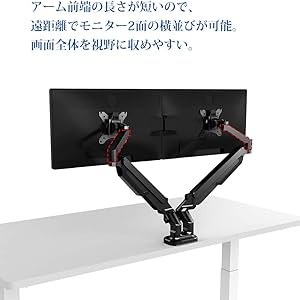
- Compact design suitable for narrow desks, enabling side-by-side monitor placement at a distance.
- Supports VESA standards: 75x75mm and 100x100mm.
- Compatible with monitors from 17" to 36" and weighing between 2-9kg.

This image shows the FLEXISPOT F8L Gas Spring Monitor Arm in white, supporting a monitor. The arm is extended, demonstrating its adjustable nature and sleek design.
2. സുരക്ഷാ നിർദ്ദേശങ്ങൾ
- അസംബ്ലി ചെയ്യുന്നതിന് മുമ്പ് എല്ലാ ഭാഗങ്ങളും ഉണ്ടെന്നും കേടുപാടുകൾ സംഭവിച്ചിട്ടില്ലെന്നും ഉറപ്പാക്കുക. ഏതെങ്കിലും ഭാഗങ്ങൾ നഷ്ടപ്പെട്ടാലോ തകരാറുള്ളാലോ ഉപയോഗിക്കരുത്.
- Do not exceed the maximum weight capacity of 9kg (19.8 lbs) or the maximum screen size of 36 inches. Overloading can cause instability and potential injury.
- Install the monitor arm on a stable and sturdy desk surface that can support the combined weight of the arm and your monitor.
- Perform all adjustments slowly and carefully. Avoid sudden movements that could cause the monitor to swing or fall.
- ഇൻസ്റ്റലേഷൻ ഏരിയയിൽ നിന്ന് കുട്ടികളെയും വളർത്തുമൃഗങ്ങളെയും അകറ്റി നിർത്തുക.
- If you encounter any difficulties during installation or operation, refer to the troubleshooting section or contact customer support.
3. പാക്കേജ് ഉള്ളടക്കം
നിങ്ങളുടെ പാക്കേജിൽ എല്ലാ ഘടകങ്ങളും ഉൾപ്പെടുത്തിയിട്ടുണ്ടെന്ന് ദയവായി പരിശോധിക്കുക:
- മോണിറ്റർ ആം അസംബ്ലി
- ഡെസ്ക് Clamp അടിസ്ഥാനം
- ഗ്രോമെറ്റ് മൗണ്ട് ബേസ്
- വെസ പ്ലേറ്റ്
- Hardware Kit (screws, washers, Allen wrenches)
- കേബിൾ മാനേജ്മെന്റ് ക്ലിപ്പുകൾ
- ഇൻസ്ട്രക്ഷൻ മാനുവൽ
4. സജ്ജീകരണവും ഇൻസ്റ്റാളേഷനും
The FLEXISPOT F8L monitor arm supports two installation methods: C-clamp and Grommet mount. Choose the method suitable for your desk.
4.1 Choosing Your Mounting Method

This diagram illustrates the two primary ways to attach the monitor arm to your desk: the C-clamp method (bottom right) for desk edges and the grommet mount method (top right) for desks with existing cable holes. The grommet mount requires a hole size of 8.5-70mm, and both methods support a desk thickness of 20-100mm.
- C-Clamp മൗണ്ട്: Ideal for desks with edges. Supports desk thickness from 20mm to 100mm.
- Grommet Mount: Requires an existing hole in your desk (diameter 8.5mm to 70mm). Supports desk thickness from 20mm to 100mm.
4.2 Attaching the Monitor Arm to Your Desk
- C-Cl-ന്amp മൗണ്ട്:
- C-cl അറ്റാച്ചുചെയ്യുകamp മോണിറ്റർ ഭുജത്തിന്റെ പ്രധാന ധ്രുവത്തിലേക്ക് ബേസ്.
- cl സ്ഥാനംamp on the edge of your desk and tighten the knob until it is securely fastened.
- For Grommet Mount:
- Assemble the grommet mount base and insert it through the hole in your desk.
- Secure it from underneath the desk using the provided plate and nut.
4.3 Attaching the Monitor to the Arm

This image demonstrates the detachable VESA plate feature. The VESA plate can be easily removed from the monitor arm, allowing you to attach it to the back of your monitor first, and then slide the monitor with the plate onto the arm for a simpler installation process.
- മോണിറ്ററിലേക്ക് VESA പ്ലേറ്റ് അറ്റാച്ചുചെയ്യുക:
- Remove the VESA plate from the monitor arm by lifting it upwards.
- Align the VESA plate with the mounting holes on the back of your monitor (75x75mm or 100x100mm).
- Secure the plate to the monitor using the appropriate screws from the hardware kit. Do not overtighten.
- മോണിറ്റർ കൈയിലേക്ക് മൌണ്ട് ചെയ്യുക:
- Carefully slide the monitor (with the attached VESA plate) onto the arm's mounting head until it clicks into place.
- Ensure the monitor is securely seated before releasing അത്.
5. പ്രവർത്തനവും ക്രമീകരണങ്ങളും
The FLEXISPOT F8L monitor arm offers a wide range of adjustments to achieve your optimal viewഅനുഭവം.
5.1 ഗ്യാസ് സ്പ്രിംഗ് ടെൻഷൻ ക്രമീകരണം
The gas spring tension needs to be adjusted according to your monitor's weight to ensure smooth and stable movement. If the monitor sags or springs up too easily, adjust the tension screw located on the arm joint (often covered by a plastic cap).
- Use the provided Allen wrench to turn the screw.
- തിരിയുക ഘടികാരദിശയിൽ to increase tension (for heavier monitors).
- തിരിയുക എതിർ ഘടികാരദിശയിൽ to decrease tension (for lighter monitors).
- Adjust gradually until the monitor stays in position when released.
5.2 Monitor Position Adjustments

This diagram illustrates the extensive range of motion for the monitor arm, including 360° rotation, 180° horizontal swivel, and tilt adjustment from -90° to 15°. These features allow for precise positioning of your monitor.
- ഉയരം ക്രമീകരിക്കൽ: Gently push or pull the monitor up or down to adjust its vertical position. The gas spring will hold it in place.
- ടിൽറ്റ് അഡ്ജസ്റ്റ്മെന്റ്: Tilt the monitor screen up or down from -90° to 15° to reduce glare and optimize viewing ആംഗിൾ.
- സ്വിവൽ അഡ്ജസ്റ്റ്മെന്റ്: Swivel the monitor arm horizontally up to 180° to share your screen or change viewദിശ.
- റൊട്ടേഷൻ അഡ്ജസ്റ്റ്മെന്റ്: Rotate the monitor 360° between landscape and portrait orientations.
This illustration compares typical poor posture when using a fixed monitor stand (left) versus the improved ergonomic posture achievable with a monitor arm (right). By allowing flexible height and angle adjustments, the monitor arm helps reduce strain on the neck, eyes, and back.
6. പരിപാലനം
- Regularly check all screws and connections to ensure they are tight and secure. Retighten if necessary.
- Clean the monitor arm with a soft, damp തുണി. ഫിനിഷിന് കേടുവരുത്തുന്ന ഉരച്ചിലുകളുള്ള ക്ലീനറുകളോ ലായകങ്ങളോ ഒഴിവാക്കുക.
- Do not lubricate the gas spring mechanism. It is designed to be maintenance-free.
7. പ്രശ്നപരിഹാരം
| പ്രശ്നം | സാധ്യമായ കാരണം | പരിഹാരം |
|---|---|---|
| മോണിറ്റർ തൂങ്ങുന്നു അല്ലെങ്കിൽ ആവശ്യമുള്ള ഉയരത്തിൽ നിൽക്കുന്നില്ല. | Gas spring tension is too low for the monitor's weight. | Increase gas spring tension by turning the adjustment screw clockwise with the provided Allen wrench. |
| Monitor is difficult to push down or springs up too quickly. | Gas spring tension is too high for the monitor's weight. | Decrease gas spring tension by turning the adjustment screw counter-clockwise with the provided Allen wrench. |
| Monitor wobbles or feels unstable. | മൗണ്ട് clamp/grommet is not tight enough, or VESA screws are loose. | ഡെസ്ക് cl ഉറപ്പാക്കുകamp/grommet mount is securely tightened. Check and tighten all VESA mounting screws on the back of the monitor. |
| Cannot attach VESA plate to monitor. | Incorrect VESA pattern or screw size. | Verify your monitor's VESA pattern (75x75mm or 100x100mm). Use the correct screws from the hardware kit. |
8 സ്പെസിഫിക്കേഷനുകൾ
| ഫീച്ചർ | വിശദാംശങ്ങൾ |
|---|---|
| മോഡൽ | F8L |
| VESA അനുയോജ്യത | 75x75mm, 100x100mm |
| സ്ക്രീൻ വലിപ്പം അനുയോജ്യത | 17" - 36" |
| ലോഡ് കപ്പാസിറ്റി | 2 - 9 കി.ഗ്രാം (4.4 - 19.8 പൗണ്ട്) |
| ടിൽറ്റ് റേഞ്ച് | -90 ° മുതൽ +15 ° വരെ |
| സ്വിവൽ റേഞ്ച് | 180° |
| ഭ്രമണം | 360° (Landscape to Portrait) |
| മൗണ്ടിംഗ് തരം | C-Clamp അല്ലെങ്കിൽ ഗ്രോമെറ്റ് മൗണ്ട് |
| മേശയുടെ കനം (Clamp/ഗ്രോമെറ്റ്) | 20mm - 100mm |
| പരമാവധി ആം എക്സ്റ്റൻഷൻ | ഏകദേശം 62 സെ.മീ (24.4 ഇഞ്ച്) |
| Max Height from Desk | ഏകദേശം 51 സെ.മീ (20.1 ഇഞ്ച്) |

This diagram provides key dimensions of the monitor arm, including a maximum height of approximately 51cm and a maximum horizontal extension of approximately 62cm, illustrating its reach and adjustability.
9. വാറണ്ടിയും ഉപഭോക്തൃ പിന്തുണയും
FLEXISPOT provides a 1 വർഷത്തെ വാറൻ്റി from the date of purchase for this product. This warranty covers manufacturing defects and material flaws under normal use.
For any questions, concerns, or issues regarding your FLEXISPOT F8L Gas Spring Monitor Arm, please contact our customer support team:
- ഇമെയിൽ: contact@flexispot.jp
- Please provide your purchase details and a description of the issue for faster assistance.


