ആമുഖം
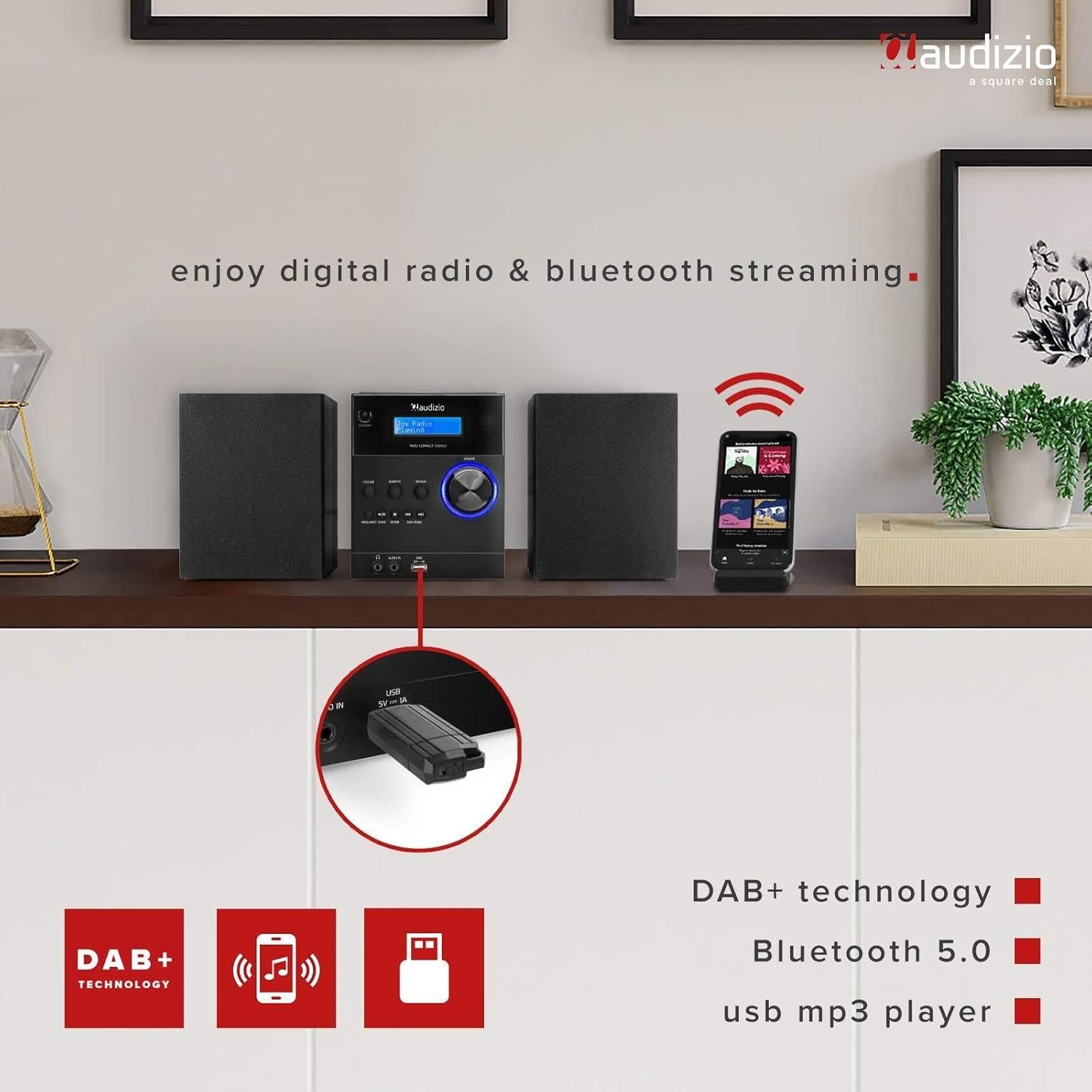
The Audizio Metz Stereo Set is a versatile audio system designed for home use, offering multiple playback options. It integrates DAB+ and FM radio tuners, a CD player, Bluetooth wireless connectivity, and a USB port for MP3 playback. Additionally, it features an AUX input for external devices, an alarm clock, and a sleep timer function. This manual provides comprehensive instructions for the safe and efficient setup, operation, and maintenance of your Audizio Metz Stereo Set.
സുരക്ഷാ വിവരങ്ങൾ
- ഉപകരണം പ്രവർത്തിപ്പിക്കുന്നതിന് മുമ്പ് എല്ലാ നിർദ്ദേശങ്ങളും ശ്രദ്ധാപൂർവ്വം വായിക്കുക.
- ഭാവി റഫറൻസിനായി മാനുവൽ സൂക്ഷിക്കുക.
- തീയോ വൈദ്യുതാഘാതമോ തടയാൻ യൂണിറ്റ് മഴയിലോ ഈർപ്പത്തിലോ തുറന്നുകാട്ടരുത്.
- ശരിയായ വായുസഞ്ചാരം ഉറപ്പാക്കുക; ഏതെങ്കിലും വായുസഞ്ചാര ദ്വാരങ്ങൾ തടയരുത്.
- സുസ്ഥിരവും പരന്നതുമായ പ്രതലത്തിൽ യൂണിറ്റ് സ്ഥാപിക്കുക.
- നിർമ്മാതാവ് വ്യക്തമാക്കിയ അറ്റാച്ച്മെൻ്റുകൾ/ആക്സസറികൾ മാത്രം ഉപയോഗിക്കുക.
- മിന്നൽ കൊടുങ്കാറ്റുകളുടെ സമയത്തോ ദീർഘകാലത്തേക്ക് ഉപയോഗിക്കാത്ത സമയത്തോ യൂണിറ്റ് അൺപ്ലഗ് ചെയ്യുക.
- എല്ലാ സേവനങ്ങളും യോഗ്യതയുള്ള സേവന ഉദ്യോഗസ്ഥർക്ക് റഫർ ചെയ്യുക.
പാക്കേജ് ഉള്ളടക്കം
Please check that all items listed below are present in the packaging:
- Audizio Metz Stereo Unit
- 2 x സ്പീക്കറുകൾ
- റിമോട്ട് കൺട്രോൾ
- പവർ കേബിൾ
- ഉപയോക്തൃ മാനുവൽ

Image: The Audizio Metz Stereo Set, including the main unit, two speakers, and the remote control.
ഉൽപ്പന്നം കഴിഞ്ഞുview: നിയന്ത്രണങ്ങളും കണക്ഷനുകളും
ഫ്രണ്ട് പാനൽ നിയന്ത്രണങ്ങൾ
ചിത്രം: വിശദമായത് view of the front panel, showing the LCD display, control buttons, and input ports.
- സ്റ്റാൻഡ്ബൈ ബട്ടൺ: യൂണിറ്റ് ഓണാക്കുകയോ ഓഫാക്കുകയോ ചെയ്യുന്നു.
- CD/USB Button: Selects CD or USB playback mode.
- DAB/FM ബട്ടൺ: Selects DAB+ or FM radio mode.
- BT/AUX Button: Selects Bluetooth or AUX input mode.
- പ്ലേ/താൽക്കാലികമായി നിർത്തുക ബട്ടൺ: സിഡി, യുഎസ്ബി, ബ്ലൂടൂത്ത് എന്നിവയ്ക്കുള്ള പ്ലേബാക്ക് നിയന്ത്രിക്കുന്നു.
- ബട്ടൺ നിർത്തുക: Stops playback for CD and USB.
- Menu/Info/Scan Button: Accesses menu options, displays information, or initiates station scan.
- ബട്ടൺ നൽകുക: മെനുവിലെ തിരഞ്ഞെടുപ്പുകൾ സ്ഥിരീകരിക്കുന്നു.
- Skip/Tune Buttons: Navigates tracks, stations, or menu options.
- വോളിയം നോബ്: ഓഡിയോ ഔട്ട്പുട്ട് ലെവൽ ക്രമീകരിക്കുന്നു.
- ഹെഡ്ഫോൺ ജാക്ക് (3.5 മിമി): ഹെഡ്ഫോണുകൾ ഉപയോഗിച്ച് സ്വകാര്യ ശ്രവണത്തിനായി.
- Audio In (3.5mm): ബാഹ്യ ഓഡിയോ ഉറവിടങ്ങളെ ബന്ധിപ്പിക്കുന്നു.
- USB പോർട്ട്: MP3 പ്ലേബാക്കിനായി USB ഫ്ലാഷ് ഡ്രൈവുകൾ ബന്ധിപ്പിക്കുന്നതിന്.
- LCD ഡിസ്പ്ലേ: Shows current mode, station information, track details, and menu options.
പിൻ പാനൽ കണക്ഷനുകൾ

Image: The rear panel of the main unit, highlighting the speaker connection terminals and power input.
- സ്പീക്കർ ടെർമിനലുകൾ: Connect the left and right speakers.
- പവർ ഇൻപുട്ട്: എസി പവർ കേബിൾ ബന്ധിപ്പിക്കുക.
- FM/DAB ആന്റിന: For radio signal reception.
സജ്ജമാക്കുക
1. സ്പീക്കറുകൾ ബന്ധിപ്പിക്കുന്നു
Connect the included speakers to the corresponding speaker terminals on the rear of the main unit. Ensure that the positive (+) terminal on the unit connects to the positive (+) terminal on the speaker, and the negative (-) terminal on the unit connects to the negative (-) terminal on the speaker. Incorrect polarity can affect sound quality.
2. പവർ കണക്ഷൻ
Plug the power cable into the AC power input on the rear of the main unit, then connect the other end to a standard wall outlet (230V/50Hz). The unit will enter standby mode.
3. ആൻ്റിന സജ്ജീകരണം
Extend the telescopic antenna fully for optimal reception of both DAB+ and FM radio signals. Adjust its position if reception is poor.
പ്രവർത്തന നിർദ്ദേശങ്ങൾ
പവർ ഓൺ/ഓഫ്
അമർത്തുക സ്റ്റാൻഡ് ബൈ button on the front panel or remote control to switch the unit on or off. When powered on, the LCD display will illuminate.
DAB+ റേഡിയോ പ്രവർത്തനം
- അമർത്തുക DAB/FM button repeatedly until "DAB Radio" appears on the display.
- The unit will automatically scan for available DAB+ stations upon first use. If needed, press Menu/Info/Scan and select "Full Scan".
- ഉപയോഗിക്കുക ഒഴിവാക്കുക/ട്യൂൺ ചെയ്യുക buttons to browse through the list of available stations.
- ഒരു സ്റ്റേഷൻ പ്രീസെറ്റായി സംരക്ഷിക്കാൻ, അമർത്തിപ്പിടിക്കുക മെമ്മറി button on the remote, then use the number buttons to select a preset slot (1-10) and press നൽകുക.
- ഒരു പ്രീസെറ്റ് തിരിച്ചുവിളിക്കാൻ, അമർത്തുക മെമ്മറി button briefly, then select the preset number.
എഫ്എം റേഡിയോ ഓപ്പറേഷൻ
- അമർത്തുക DAB/FM button repeatedly until "FM Radio" appears on the display.
- To automatically scan for the next available station, press and hold the സ്കാൻ ചെയ്യുക button. To manually tune, use the ഒഴിവാക്കുക/ട്യൂൺ ചെയ്യുക ബട്ടണുകൾ.
- To save an FM station as a preset, press and hold the മെമ്മറി button on the remote, then use the number buttons to select a preset slot (1-10) and press നൽകുക.
- ഒരു പ്രീസെറ്റ് തിരിച്ചുവിളിക്കാൻ, അമർത്തുക മെമ്മറി button briefly, then select the preset number.
ബ്ലൂടൂത്ത് ജോടിയാക്കലും പ്ലേബാക്കും
- അമർത്തുക BT/AUX button repeatedly until "Bluetooth" appears on the display. The unit will enter pairing mode, indicated by a flashing Bluetooth icon.
- നിങ്ങളുടെ സ്മാർട്ട്ഫോണിലോ, ടാബ്ലെറ്റിലോ, മറ്റ് ബ്ലൂടൂത്ത് പ്രവർത്തനക്ഷമമാക്കിയ ഉപകരണത്തിലോ, ബ്ലൂടൂത്ത് പ്രവർത്തനക്ഷമമാക്കി ലഭ്യമായ ഉപകരണങ്ങൾക്കായി തിരയുക.
- Select "Audizio Metz" from the list of devices to pair. Once connected, the Bluetooth icon will stop flashing.
- You can now stream audio from your device to the stereo set. Use the unit's or your device's controls for playback (Play/Pause, Skip).

Image: The stereo set demonstrating Bluetooth connectivity with a smartphone.
സിഡി പ്ലേബാക്ക്
- Gently open the top-loading CD compartment cover.
- Place a CD (CD-R/RW compatible) onto the spindle with the label side facing up. Close the cover securely.
- അമർത്തുക സിഡി / യുഎസ്ബി button repeatedly until "CD" mode is selected. The unit will begin reading the CD and playback will start automatically.
- ഉപയോഗിക്കുക പ്ലേ/താൽക്കാലികമായി നിർത്തുക, നിർത്തുക, ഒപ്പം ഒഴിവാക്കുക പ്ലേബാക്ക് നിയന്ത്രിക്കുന്നതിനുള്ള ബട്ടണുകൾ.

Image: The top-loading CD player with a disc in place, ready for playback.
USB MP3 പ്ലേബാക്ക്
- MP3 അടങ്ങിയ യുഎസ്ബി ഫ്ലാഷ് ഡ്രൈവ് ചേർക്കുക files into the USB port on the front panel. Ensure the USB drive is formatted to FAT32.
- അമർത്തുക സിഡി / യുഎസ്ബി button repeatedly until "USB" mode is selected. The unit will read the files and begin playback.
- ഉപയോഗിക്കുക പ്ലേ/താൽക്കാലികമായി നിർത്തുക, നിർത്തുക, ഒപ്പം ഒഴിവാക്കുക പ്ലേബാക്ക് നിയന്ത്രിക്കുന്നതിനുള്ള ബട്ടണുകൾ.

Image: A USB flash drive connected to the front USB port for MP3 playback.
AUX ഇൻപുട്ട്
- Connect an external audio device (e.g., an MP3 player) to the ഓഡിയോ ഇൻ 3.5mm jack on the front panel using a 3.5mm audio cable (not included).
- അമർത്തുക BT/AUX button repeatedly until "AUX" mode is selected.
- Control playback from your external audio device. The volume can be adjusted using the unit's volume knob.
Alarm and Sleep Timer Functions
The Audizio Metz Stereo Set includes an alarm clock and a sleep timer. These functions can be accessed and configured via the മെനു button on the unit or the dedicated buttons on the remote control (TIMER, SLEEP, ALARM). Follow the on-screen prompts to set your desired alarm time, source (e.g., radio, buzzer), and sleep timer duration.

Image: Visual representation of the clock, sleep timer, and alarm features.
ഹെഡ്ഫോൺ ഉപയോഗം
To listen privately, plug 3.5mm headphones into the headphone jack on the front panel. The sound output from the speakers will automatically be muted.
റിമോട്ട് കൺട്രോൾ
The included remote control provides convenient access to all functions of the stereo set. Ensure batteries are correctly inserted. Point the remote control towards the main unit's front panel for optimal response.

Image: The remote control for the Audizio Metz Stereo Set, showing all buttons.
മെയിൻ്റനൻസ്
- വൃത്തിയാക്കൽ: Use a soft, dry cloth to clean the exterior surfaces of the unit and speakers. Do not use liquid cleaners, aerosols, or abrasive chemicals.
- സിഡി കമ്പാർട്ട്മെന്റ്: Keep the CD compartment free of dust and debris. Avoid touching the CD lens.
- സംഭരണം: യൂണിറ്റ് ദീർഘനേരം സൂക്ഷിക്കുകയാണെങ്കിൽ, പവർ ഔട്ട്ലെറ്റിൽ നിന്ന് അത് അൺപ്ലഗ് ചെയ്ത് തണുത്തതും വരണ്ടതുമായ സ്ഥലത്ത് സൂക്ഷിക്കുക.
ട്രബിൾഷൂട്ടിംഗ്
| പ്രശ്നം | സാധ്യമായ കാരണം / പരിഹാരം |
|---|---|
| ശക്തിയില്ല | Check if the power cable is securely connected to the unit and the wall outlet. Ensure the wall outlet is functional. Press the Standby button. |
| ശബ്ദമില്ല | Verify speaker connections. Adjust the volume level. Ensure headphones are not plugged in if sound is desired from speakers. Confirm the correct audio source is selected. |
| മോശം റേഡിയോ സ്വീകരണം | Adjust the position and extension of the antenna. Try rescanning for stations in DAB+ or FM mode. |
| സിഡി പ്ലേ ചെയ്യുന്നില്ല | Ensure the CD is inserted correctly with the label side up. Clean the CD if it is dirty or scratched. Verify the CD is compatible (CD-R/RW). |
| USB drive not playing | Ensure the USB drive is formatted to FAT32. Check that the files are in MP3 format. Try a different USB drive. |
| ബ്ലൂടൂത്ത് ജോടിയാക്കൽ പ്രശ്നങ്ങൾ | Ensure the unit is in Bluetooth mode. Enable Bluetooth on your device and search for "Audizio Metz". Move your device closer to the stereo set. Disconnect from other Bluetooth devices. |
| റിമോട്ട് കൺട്രോൾ പ്രവർത്തിക്കുന്നില്ല | Check the battery orientation and replace batteries if necessary. Ensure there is a clear line of sight between the remote and the unit's IR receiver. |
സ്പെസിഫിക്കേഷനുകൾ
| ഫീച്ചർ | വിശദാംശങ്ങൾ |
|---|---|
| ബ്രാൻഡ് | ഓഡിസിയോ |
| മോഡൽ | മെറ്റ്സ് |
| Stereo Unit Dimensions (W x H x D) | 140 x 210 x 175 മിമി |
| Speaker Dimensions (per speaker, W x H x D) | 130 x 125 x 175 മിമി |
| ഭാരം (സെറ്റ്) | 2.5 കി.ഗ്രാം |
| പവർ ഔട്ട്പുട്ട് | 30 വാട്ട് |
| വാല്യംtage | 220 വോൾട്ട് |
| പവർ തരം | വയർഡ് ഇലക്ട്രിക് |
| ഹാർഡ്വെയർ ഇന്റർഫേസ് | 3.5 എംഎം ഓഡിയോ, യുഎസ്ബി |
| അനുയോജ്യമായ ഉപകരണങ്ങൾ | സ്മാർട്ട്ഫോൺ, ടാബ്ലെറ്റ് |
| ഓഡിയോ put ട്ട്പുട്ട് മോഡ് | സ്റ്റീരിയോ |
| പിന്തുണയ്ക്കുന്ന ഓഡിയോ ഫോർമാറ്റ് | MP3 |
| സറൗണ്ട് കോൺഫിഗറേഷൻ | 2.0 |
| കണക്റ്റിവിറ്റി | ബ്ലൂടൂത്ത് |
| DAB+ Presets | 10 |
| എഫ്എം പ്രീസെറ്റുകൾ | 10 |
| ഹെഡ്ഫോൺ ജാക്ക് | 3.5 മി.മീ |
| AUX ലൈൻ ഇൻപുട്ട് | 3.5 മി.മീ |
വാറൻ്റിയും പിന്തുണയും
The Audizio Metz Stereo Set comes with a 2-year warranty from the date of purchase. This warranty covers manufacturing defects and ensures the product functions as intended under normal use. For warranty claims, technical support, or any inquiries, please contact your original retailer or the Audizio customer service department. Please retain your proof of purchase for warranty validation.


