1. ആമുഖവും സുരക്ഷാ വിവരങ്ങളും
This manual provides essential information for the safe operation, installation, and maintenance of your POLESTAR 12V DC ATV/UTV Electric Winch. Please read this manual thoroughly before operating the winch to ensure proper use and to prevent personal injury or property damage.

Figure 1.1: POLESTAR 3500 lb. Electric Winch with steel cable, roller fairlead, and hook.
പ്രധാനപ്പെട്ട സുരക്ഷാ മുന്നറിയിപ്പുകൾ:
- Read and understand manual: Always read and fully understand the owner's manual before operating the winch.
- സംരക്ഷണ ഗിയർ ധരിക്കുക: Always wear safety goggles and heavy-duty leather gloves when operating the winch.
- Never exceed rated capacity: Do not exceed the winch's rated load capacity of 3500 lbs.
- Winch is for pulling only: This winch is intended for pulling applications only, not for lifting.
- Keep clear of cable: Always keep hands, body, and loose clothing clear of the wire rope, hook, and fairlead during operation.
- ഉപയോഗിക്കുന്നതിന് മുമ്പ് പരിശോധിക്കുക: Always inspect the winch, cable, and all connections for damage before each use.
- കുട്ടികളെ അകറ്റി നിർത്തുക: Do not allow children to operate or play near the winch.
- Secure vehicle: Always ensure the vehicle is properly secured and braked before winching operations.
2. ഉൽപ്പന്ന ഘടകങ്ങളും ബോക്സിലുള്ളതും
Your POLESTAR Electric Winch package includes the following components. Please verify all parts are present and undamaged upon unpacking.

Figure 2.1: Complete kit contents including the winch, roller fairlead, hook, wiring, remote control, and mounting hardware.
ഉൾപ്പെടുത്തിയ ഘടകങ്ങൾ:
- POLESTAR 3500 lb. Electric Winch with Steel Cable
- റോളർ ഫെയർലീഡ്
- Wired Remote Control (10 ft. ergonomic handheld)
- Heavy-Duty Hook with Safety Latch
- Control Box / Solenoid Assembly
- Power Cables and Wiring Harness
- മൗണ്ടിംഗ് ഹാർഡ്വെയർ (ബോൾട്ടുകൾ, നട്ടുകൾ, വാഷറുകൾ)
- വിഞ്ച് സ്ട്രാപ്പ്
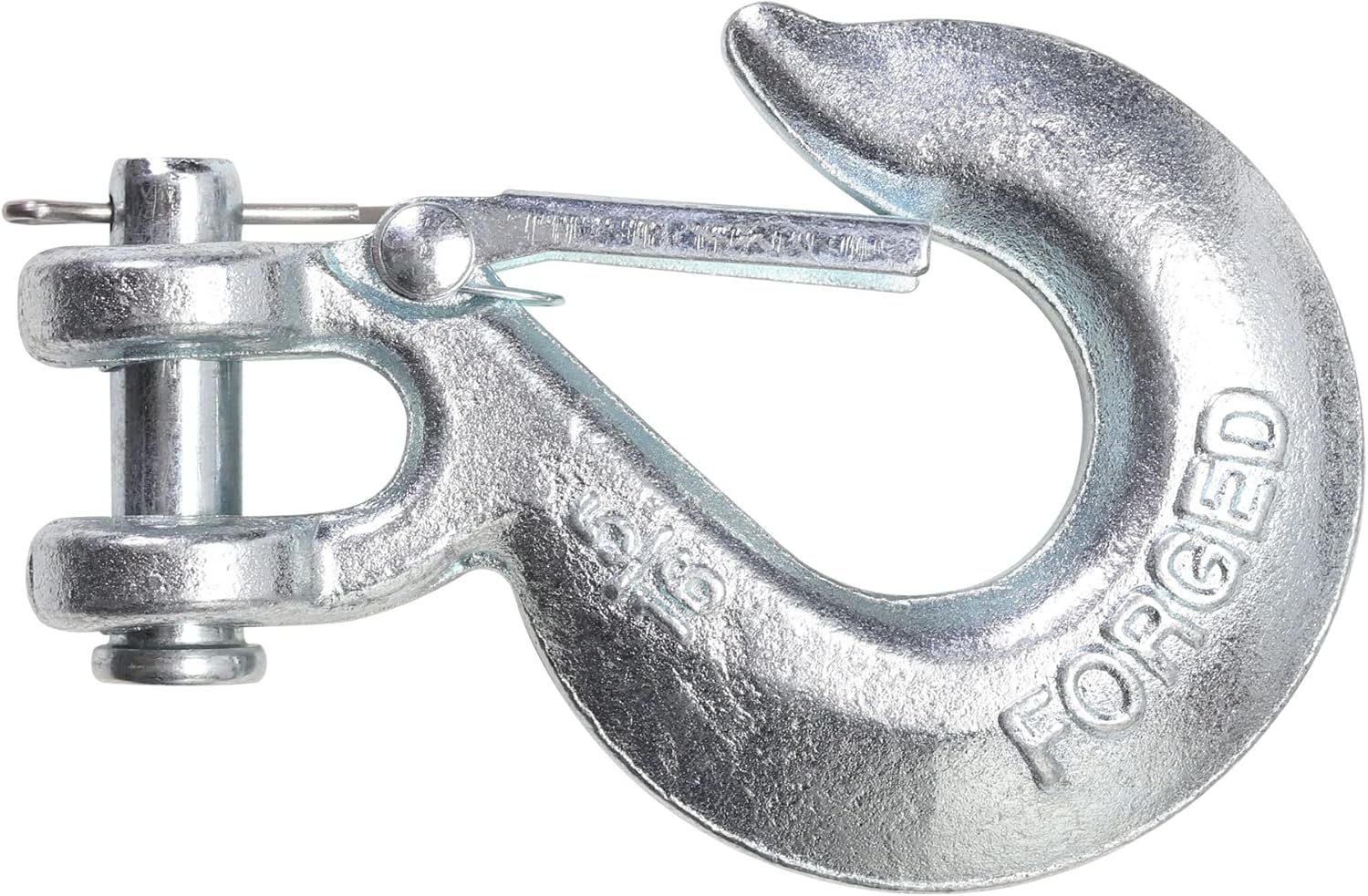
Figure 2.2: Detail of the heavy-duty hook with its safety latch mechanism.
3. സജ്ജീകരണവും ഇൻസ്റ്റാളേഷനും
നിങ്ങളുടെ വിഞ്ചിന്റെ സുരക്ഷിതവും ഫലപ്രദവുമായ പ്രവർത്തനത്തിന് ശരിയായ ഇൻസ്റ്റാളേഷൻ നിർണായകമാണ്. ഏതെങ്കിലും ഘട്ടത്തെക്കുറിച്ച് നിങ്ങൾക്ക് ഉറപ്പില്ലെങ്കിൽ, യോഗ്യതയുള്ള ഒരു പ്രൊഫഷണലിനെ സമീപിക്കുക.
3.1 Mounting the Winch
- Choose a mounting location on your ATV/UTV that is structurally sound and can support the winch's weight and pulling forces. A dedicated winch mounting plate is recommended.
- Position the winch and mark the drilling points for the mounting bolts.
- Drill appropriate holes and secure the winch using the provided mounting hardware. Ensure all bolts are tightened securely.
- Mount the roller fairlead to the vehicle's bumper or winch plate, aligning it with the winch drum.

Figure 3.1: The winch securely mounted on a vehicle, ready for operation.
3.2 ഇലക്ട്രിക്കൽ കണക്ഷനുകൾ
മുന്നറിയിപ്പ്: Disconnect the vehicle's battery before making any electrical connections to prevent accidental short circuits or injury.
- Mount the control box/solenoid assembly in a dry, protected location near the winch, ensuring easy access for wiring.
- Connect the thick power cables from the winch motor to the corresponding terminals on the control box. Refer to the wiring diagram provided with your winch for specific connections (usually color-coded).
- Connect the main positive (+) cable from the control box to the positive terminal of your vehicle's 12V battery.
- Connect the main negative (-) cable from the control box to the negative terminal of your vehicle's battery or a suitable chassis ground point.
- Connect the remote control cable to the designated port on the control box.
- Once all connections are secure, reconnect the vehicle's battery.
4. പ്രവർത്തന നിർദ്ദേശങ്ങൾ
Familiarize yourself with the winch controls and functions before attempting any recovery operations.
4.1 Free Spooling the Cable
The free spooling clutch allows you to manually pull out the wire rope quickly without using motor power.
- Locate the clutch lever on the side of the winch.
- Rotate the clutch lever to the "Free Spool" or "Disengaged" position.
- Carefully pull the wire rope out to the desired length, ensuring it unwinds smoothly from the drum.
- Once the desired length is reached, rotate the clutch lever back to the "Engaged" or "Locked" position before any winching operation. Ensure it is fully engaged.
4.2 Winching Operation
Always ensure the vehicle is stable and the winch is properly anchored before beginning a pull.
- Ensure the clutch is fully engaged.
- Attach the hook securely to a suitable anchor point (e.g., tree saver strap around a tree, recovery point on another vehicle). Ensure the hook's safety latch is closed.
- Stand clear of the wire rope and the path of the vehicle. Use the wired remote control for safe operation at a distance (10 ft. reach).
- Press the "IN" button on the remote to begin retracting the wire rope and pulling the load.
- Press the "OUT" button to pay out the wire rope.
- Operate the winch in short bursts to prevent overheating and to allow the motor to cool.
- Monitor the wire rope for proper winding on the drum. Avoid piling up on one side.
- Once the recovery is complete, release the remote button, disengage the clutch, and carefully unhook the cable.
- Rewind the wire rope neatly onto the drum under light tension.

Figure 4.1: An ATV utilizing the winch for recovery in challenging terrain.
5. പരിപാലനം
Regular maintenance will extend the life and ensure the safe operation of your POLESTAR winch.
- കേബിൾ പരിശോധന: Regularly inspect the steel wire rope for kinks, fraying, broken strands, or corrosion. Replace damaged cable immediately.
- ശുചിത്വം: Keep the winch and its components clean from dirt, mud, and debris. Use a damp ഉപരിതലങ്ങൾ തുടയ്ക്കാനുള്ള തുണി.
- ഇലക്ട്രിക്കൽ കണക്ഷനുകൾ: Periodically check all electrical connections for corrosion or looseness. Clean and tighten as necessary.
- ലൂബ്രിക്കേഷൻ: Consult a professional for internal lubrication of gears and bearings if necessary. The motor and gearbox are generally sealed units.
- സംഭരണം: When not in use, store the winch in a dry, protected environment to prevent exposure to harsh elements.

ചിത്രം 5.1: ആന്തരിക view illustrating the winch drum and cable winding. Proper cable winding is essential for longevity.
6. പ്രശ്നപരിഹാരം
നിങ്ങളുടെ വിഞ്ചിൽ പ്രശ്നങ്ങൾ നേരിടുകയാണെങ്കിൽ, ഇനിപ്പറയുന്ന പൊതുവായ ട്രബിൾഷൂട്ടിംഗ് ഘട്ടങ്ങൾ പരിശോധിക്കുക:
| പ്രശ്നം | സാധ്യമായ കാരണം | പരിഹാരം |
|---|---|---|
| Winch does not operate (no power) |
|
|
| Winch operates slowly or with reduced power |
|
|
| Cable does not free spool |
|
|
For issues not covered here, or if problems persist, please contact POLESTAR customer support.
7 സ്പെസിഫിക്കേഷനുകൾ
Detailed technical specifications for your POLESTAR 3500 lb. Electric Winch:
- മോഡൽ: 12V DC ATV/UTV Electric Winch
- ലോഡ് കപ്പാസിറ്റി: 3500 പൗണ്ട് (1587 കി.ഗ്രാം)
- മോട്ടോർ: 12V DC 1.3 HP പെർമനന്റ് മാഗ്നറ്റ്
- ഗിയർ ട്രെയിൻ: 3-Planetary Gear
- ഗിയർ റിഡക്ഷൻ റേഷ്യോ: 167:1
- ബ്രേക്കിംഗ്: ഓട്ടോമാറ്റിക് ലോഡ്-ഹോൾഡിംഗ് ബ്രേക്ക്
- വയർ റോപ്പ്: Steel Cable, 1/4" (0.2") Diameter x 50' Length
- ഫെയർലീഡ്: റോളർ ഫെയർലീഡ്
- റിമോട്ട് കൺട്രോൾ: 10 ft. Ergonomic Wired Handheld Remote
- അളവുകൾ: 13.3 X 4.7 X 4.6 ഇഞ്ച്
- ഭാരം: 22.93 lbs (Product Item Weight: 26.1 pounds, Package Dimensions: 16.85 x 12.17 x 6.57 inches)
- Designed, Engineered, and Tested: യുഎസ്എയിൽ


Figure 7.1: Illustrations of the winch's powerful motor and efficient 3-planetary gear train.
8. വാറൻ്റിയും പിന്തുണയും
POLESTAR stands behind the quality of its products.
- നിർമ്മാതാവിൻ്റെ വാറൻ്റി: ഈ ഉൽപ്പന്നം എ 1 വർഷത്തെ വാറൻ്റി വാങ്ങിയ തീയതി മുതൽ. സാധാരണ ഉപയോഗത്തിലുള്ള മെറ്റീരിയലുകളിലെയും വർക്ക്മാൻഷിപ്പുകളിലെയും വൈകല്യങ്ങൾ ഈ വാറന്റി ഉൾക്കൊള്ളുന്നു.
- ഉപഭോക്തൃ പിന്തുണ: For technical assistance, warranty claims, or replacement parts, please contact POLESTAR customer service. Refer to the contact information provided with your product packaging or visit the official POLESTAR webസൈറ്റ്.
- ഓൺലൈൻ ഉറവിടങ്ങൾ: കൂടുതൽ വിവരങ്ങൾക്കും, പതിവുചോദ്യങ്ങൾക്കും, ഉൽപ്പന്ന രജിസ്ട്രേഷനും, സന്ദർശിക്കുക POLESTAR Store on Amazon.


