1. ആമുഖം
The POMIACAM X9-MOVTADHS Pro is an advanced 8-inch retina touch screen IP camera tester designed for comprehensive surveillance system installation and maintenance. This all-in-one device supports a wide range of camera technologies including 8K H.265/H.264 IP, 8MP TVI/AHD/CVI, CVBS, and SDI. It integrates multiple essential tools such as a digital multimeter, TDR cable diagnostics, optical power meter (OPM), visual fault locator (VFL), PoE power output, 4K HDMI input/output, and a Wi-Fi analyzer. This manual provides detailed instructions for the safe and effective use of your device.
2 സുരക്ഷാ വിവരങ്ങൾ
Please read and understand all safety warnings and instructions before operating this device. Failure to follow these instructions may result in electric shock, fire, or serious injury.
- മഴയോ ഈർപ്പമോ ഉപകരണത്തെ തുറന്നുകാട്ടരുത്.
- Avoid operating the device in environments with extreme temperatures or high humidity.
- നൽകിയിരിക്കുന്ന പവർ അഡാപ്റ്ററും അനുബന്ധ ഉപകരണങ്ങളും മാത്രം ഉപയോഗിക്കുക.
- ഉപകരണം ഡിസ്അസംബ്ലിംഗ് ചെയ്യാനോ പരിഷ്ക്കരിക്കാനോ ശ്രമിക്കരുത്. എല്ലാ സേവനങ്ങളും യോഗ്യതയുള്ള ഉദ്യോഗസ്ഥരെ ഏൽപ്പിക്കുക.
- Exercise caution when working with electrical circuits, especially when using the multimeter functions.
3. പാക്കേജ് ഉള്ളടക്കം
നിങ്ങളുടെ പാക്കേജിൽ എല്ലാ ഇനങ്ങളും ഉണ്ടെന്ന് ഉറപ്പാക്കുക:
- POMIACAM X9-MOVTADHS Pro IP Camera Tester Unit
- പവർ അഡാപ്റ്റർ
- ലിഥിയം പോളിമർ ബാറ്ററി (മുൻകൂട്ടി ഇൻസ്റ്റാൾ ചെയ്തത്)
- Multimeter Test Leads
- BNC കേബിളുകൾ
- RS485 കേബിൾ
- ഓഡിയോ കേബിൾ
- ഡിസി പവർ കേബിൾ
- കേബിൾ ട്രേസർ
- സുരക്ഷാ സ്ട്രാപ്പ്
- ചുമക്കുന്ന കേസ്
- ഉപയോക്തൃ മാനുവൽ (ഈ പ്രമാണം)
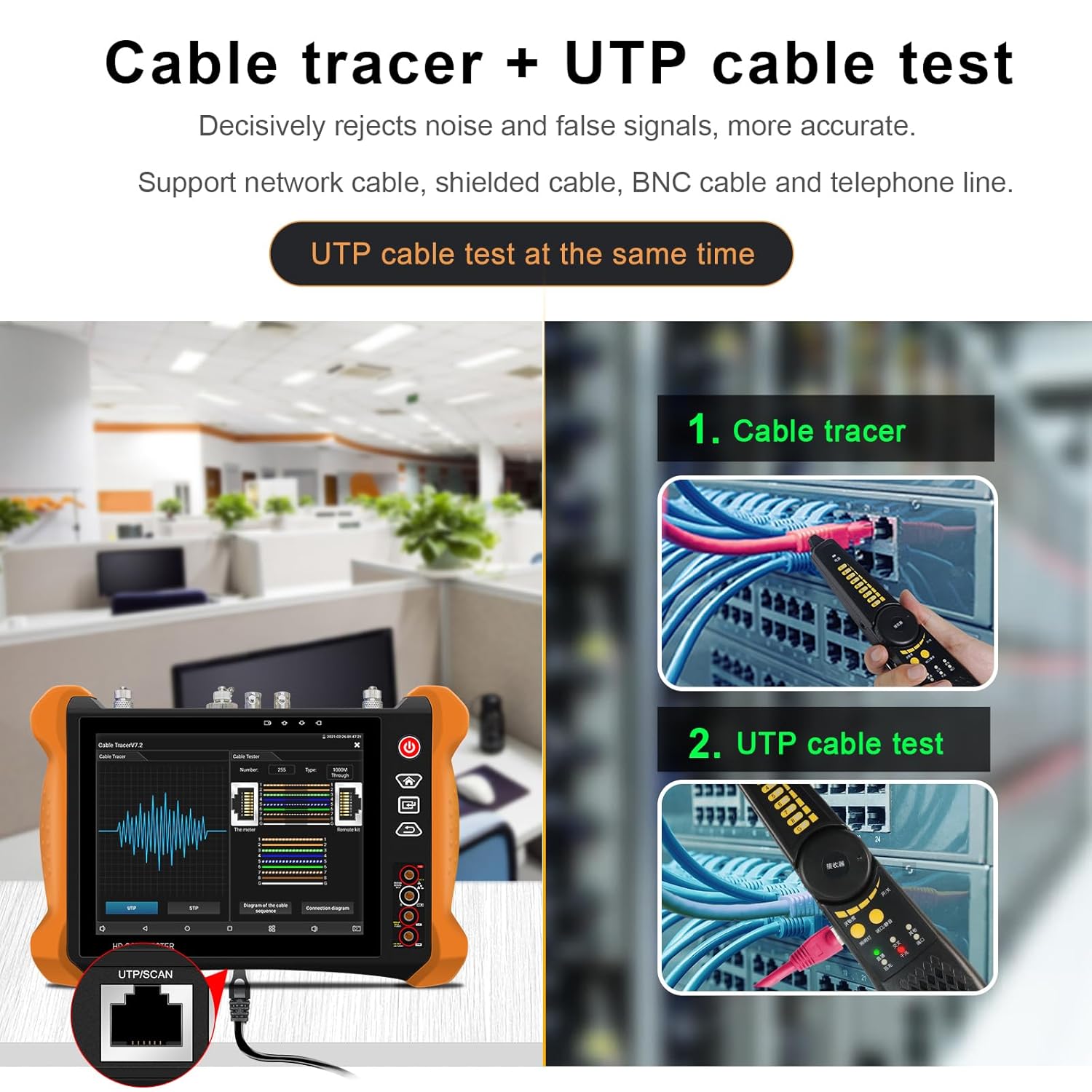
Figure 3.1: The complete package of the POMIACAM X9-MOVTADHS Pro IP Camera Tester, including the main unit, various testing cables, power adapter, and a protective carrying case, illustrating all components provided with the product.

Figure 3.2: A different perspective of the product and its accessories, clearly showing the included cable tracer, multimeter probes, and various connection cables, highlighting the comprehensive toolkit provided for diverse testing scenarios.
4. ഡിവൈസ് ഓവർview ഇന്റർഫേസും
The X9-MOVTADHS Pro features an 8-inch retina touch screen and a robust design for field use. Familiarize yourself with the device's layout and ports.

ചിത്രം 4.1: വശം view of the tester with its protective cover opened, revealing the 8-inch screen displaying a live video feed from a connected camera, demonstrating its real-time monitoring capability.

Figure 4.2: This diagram illustrates the various input and output ports on the POMIACAM X9-MOVTADHS Pro, including connections for optical power meter, PoE power output, network testing, SDI input, TDR cable test, DC power inputs/outputs, video and audio connections, micro SD card slot, and network cable ports, providing a comprehensive overview of its connectivity.
Key Interface Components:
- Optical Power Meter (OPM) Port: For fiber optic power testing.
- PoE Power Output / Network Testing Port: Provides PoE power and network connectivity.
- PSE/PoE Voltagഇ അളവ്: Measures Power Sourcing Equipment voltage.
- Visual Fault Locator (VFL) Port: For fiber optic fault detection.
- എൽഇഡി എൽamp: സംയോജിത പ്രകാശ സ്രോതസ്സ്.
- എസ്ഡിഐ ഇൻ: Serial Digital Interface input.
- TDR Cable Test Port: For Time Domain Reflectometer cable diagnostics.
- DC12V/3A Output Power: Power output for cameras.
- Video Input/HD IN: Connects to various video signals.
- വീഡിയോ Outട്ട്: Video signal output.
- RS 485 Port: For PTZ control and data communication.
- DC5V/2A പവർ ഔട്ട്പുട്ട്: Additional power output.
- DC24V/2A പവർ ഔട്ട്പുട്ട്: Additional power output.
- 12V/3A Input: പ്രധാന പവർ ഇൻപുട്ട്.
- ഓഡിയോ ഇൻ/ഔട്ട്: ഓഡിയോ പരിശോധനയ്ക്കായി.
- മൈക്രോ എസ്ഡി കാർഡ് സ്ലോട്ട്: സംഭരണത്തിനായി.
- HD ഔട്ട്: എച്ച്ഡിഎംഐ .ട്ട്പുട്ട്.
- UTP / Cable Tracer Port: For tracing network cables.
- Network Cable TDR Test Port: Dedicated port for network cable TDR.
5. സജ്ജീകരണം
5.1 പ്രാരംഭ ചാർജിംഗ്
Before first use, fully charge the device using the provided power adapter. Connect the adapter to the 12V/3A input port and plug it into a power outlet. The charging indicator will show the charging status.
5.2 പവർ ഓൺ/ഓഫ്
- പവർ ഓൺ: സ്ക്രീൻ പ്രകാശിക്കുന്നത് വരെ പവർ ബട്ടൺ (സാധാരണയായി വശത്തോ മുകളിലോ ആയിരിക്കും) അമർത്തിപ്പിടിക്കുക.
- പവർ ഓഫ്: Press and hold the power button until a power-off menu appears, then select 'Power Off'. A short press will typically put the device into sleep mode.
5.3 അടിസ്ഥാന നാവിഗേഷൻ
The device operates via an 8-inch retina touch screen. Tap icons to open applications, swipe to navigate menus, and use the physical buttons for quick access to common functions.

Figure 5.1: The POMIACAM X9-MOVTADHS Pro IP Camera Tester being held, with its vibrant 8-inch retina touch screen displaying the main interface, including options for IP Camera Test, CVBS & HD Camera, Cable Test, Media Player, Tools, My APPS, Manual, and Update.
6. പ്രവർത്തന നിർദ്ദേശങ്ങൾ
6.1 ഐപി ക്യാമറ ടെസ്റ്റ്
This function allows testing of IP cameras, supporting 8K H.265/H.264 video formats and ONVIF auto-detection.
- Connect the IP camera to the tester's network port.
- Select 'IP Camera Test' from the main menu.
- The tester will automatically detect ONVIF cameras. Select the camera from the list.
- View live video, configure camera settings, and perform network diagnostics.
6.2 Analog Camera Test (HD Coaxial Test)
The device supports 8MP TVI/AHD/CVI, CVBS, and SDI camera testing.
- Connect the analog camera to the appropriate BNC input (TVI/AHD/CVI or SDI IN).
- Select 'CVBS & HD Camera' from the main menu.
- The tester will automatically detect the camera type and display the video feed.
- Utilize coaxial PTZ control and OSD menu access for camera configuration.

Figure 6.1: Table outlining the HD Coaxial 4.0 test functionalities, specifying the supported resolutions and frame rates for various camera types including CVI, TVI, AHD, HD-SDI, and EX-SDI, demonstrating the tester's compatibility with a wide range of coaxial camera systems up to 8MP.
6.3 Digital Multimeter Function
The integrated digital multimeter allows for various electrical measurements.
- Connect the multimeter test leads to the designated ports on the tester.
- Select the 'Multimeter' application from the 'Tools' menu.
- Choose the desired measurement type: DC/AC voltage, resistance, continuity, diode, or capacitance.
- Perform measurements and record data as needed.
6.4 TDR Cable Test
The Time Domain Reflectometer (TDR) function measures cable length and identifies faults like short circuits or breaks up to 1200 meters.
- Connect the cable to be tested to the TDR cable test port.
- Select 'Cable Test' from the main menu and then choose 'TDR'.
- Initiate the test. The device will display cable length and fault locations.

Figure 6.2: The TDR 2.0 cable test screen, illustrating how the device measures cable length and identifies short circuits or breaks, with a visual representation of the cable's integrity and fault distance.

Figure 6.3: Different types of cables that the tester can work with, such as telephone, BNC, network, elevator, RVV, and power cables, indicating its versatility in cable testing applications.
6.5 Optical Power Meter (OPM) & Visual Fault Locator (VFL)
These tools are used for fiber optic cable testing.
- ഒപിഎം: Connect the fiber optic cable to the OPM port. Select the OPM function from 'Tools' to measure optical power at various wavelengths (1625, 1550, 1490, 1310, 1300, 850nm).
- വിഎഫ്എൽ: Connect the fiber optic cable to the VFL port. Activate the 10mW VFL (650nm wavelength) to visually locate bends and breaks in multi-mode and single-mode fibers up to 10KM.
6.6 PoE പവർ ഔട്ട്പുട്ട്
The tester can provide Power over Ethernet (PoE) to power compatible devices.
- Connect the network cable from the tester's PoE output port to the PoE-compatible device (e.g., an IP camera).
- Activate the PoE output function from the menu. The tester will supply power to the connected device.
6.7 HDMI Input/Output
The device supports 4K HDMI input and output for connecting to external displays or receiving video signals.
- എച്ച്ഡിഎംഐ ഇൻപുട്ട്: Connect an HDMI source to the HDMI IN port to display its video on the tester's screen.
- HDMI ഔട്ട്പുട്ട്: Connect an external monitor to the HD OUT port to display the tester's screen content.
6.8 Wi-Fi Analyzer
Analyze Wi-Fi signal strength and stability.
- Select the 'Wi-Fi Analyzer' application from the 'Tools' menu.
- The device will scan for available Wi-Fi networks and display their signal strength, channel usage, and stability.
- Use this information to optimize Wi-Fi channel selection for better performance.

Figure 6.4: This image illustrates the dual 1000M Ethernet ports for connecting and testing network devices, alongside a visual representation of the Wi-Fi Analyzer feature, which helps in optimizing wireless network performance by showing signal strength and channel usage.
6.9 HD Coaxial Level Meter
Measure video signal quality for coaxial systems.
- Connect the coaxial cable to the appropriate input.
- Access the 'HD Coaxial Level Meter' function.
- The device will display peak level, sync level, and burst level, allowing for quick diagnosis of signal issues.

Figure 6.5: The HD coaxial level meter interface, providing critical video signal quality measurements such as peak level, sync level, and burst level, which are essential for diagnosing and ensuring optimal performance of coaxial camera systems.
6.10 Coaxial HD Focus and Video Signal Quality Test
This feature assists in achieving optimal camera focus and assessing image quality.
- അതേസമയം viewing a coaxial HD camera feed, access the focus and quality test function.
- Adjust the camera's focal length while observing the 'Current Value' and 'Peak Value' indicators. The closer the current value is to the peak, the clearer the image.
- Image quality indicators (Dark, Normal, Brighter) provide feedback on the overall video signal quality.

Figure 6.6: The coaxial HD focus and video signal quality test screen, which assists users in achieving optimal camera focus and assessing the overall image quality, with indicators for current and peak focus values.
7. പരിപാലനം
7.1 വൃത്തിയാക്കൽ
- Wipe the device with a soft, dry cloth. For stubborn dirt, use a slightly damp തുണി പിന്നീട് നന്നായി ഉണക്കുക.
- Do not use abrasive cleaners, solvents, or strong chemicals, as these can damage the screen or casing.
- പോർട്ടുകൾ പൊടിയും അവശിഷ്ടങ്ങളും ഇല്ലാതെ സൂക്ഷിക്കുക. ആവശ്യമെങ്കിൽ കംപ്രസ് ചെയ്ത വായു ഉപയോഗിക്കുക.
7.2 ബാറ്ററി കെയർ
The device is equipped with a 7.4V 7000mAh Lithium Polymer battery.
- ബാറ്ററി ലൈഫ് വർദ്ധിപ്പിക്കാൻ, ബാറ്ററി ഇടയ്ക്കിടെ പൂർണ്ണമായും ഡിസ്ചാർജ് ചെയ്യുന്നത് ഒഴിവാക്കുക.
- ബാറ്ററിയുടെ ആരോഗ്യം നിലനിർത്താൻ, ഉപയോഗത്തിലില്ലെങ്കിൽ പോലും, ഉപകരണം പതിവായി ചാർജ് ചെയ്യുക.
- ദീർഘനേരം ഉപയോഗിക്കാത്തപ്പോൾ ഉപകരണം തണുത്തതും വരണ്ടതുമായ സ്ഥലത്ത് സൂക്ഷിക്കുക.

Figure 7.1: The device's internal 7.4V 7000mAh Lithium Polymer battery, emphasizing its long-lasting power, and also shows the anti-sunlight screen protecting cover, designed to improve screen visibility in bright outdoor conditions.
8. പ്രശ്നപരിഹാരം
This section addresses common issues you might encounter with the POMIACAM X9-MOVTADHS Pro.
- ഉപകരണം പവർ ഓൺ ചെയ്യുന്നില്ല:
- ബാറ്ററി ചാർജ്ജ് ചെയ്തിട്ടുണ്ടെന്ന് ഉറപ്പാക്കുക. പവർ അഡാപ്റ്റർ കണക്റ്റ് ചെയ്ത് വീണ്ടും ശ്രമിക്കുക.
- ഹാർഡ് റീസെറ്റ് നടത്താൻ പവർ ബട്ടൺ കുറഞ്ഞത് 10 സെക്കൻഡ് അമർത്തിപ്പിടിക്കുക.
- No video display from camera:
- Check all cable connections to ensure they are secure and correctly plugged into the appropriate ports.
- Verify the camera is powered on and functioning correctly.
- Ensure the correct camera type (IP, AHD, TVI, CVI, SDI, CVBS) is selected in the tester's menu.
- For IP cameras, confirm network settings (IP address, subnet mask) are compatible.
- ടച്ച് സ്ക്രീൻ പ്രതികരിക്കുന്നില്ല:
- ഉപകരണം പുനരാരംഭിക്കുക.
- സ്ക്രീൻ വൃത്തിയുള്ളതും ഈർപ്പമോ അവശിഷ്ടങ്ങളോ ഇല്ലാത്തതുമാണെന്ന് ഉറപ്പാക്കുക.
- TDR or Multimeter readings are inaccurate:
- Ensure test leads and cables are properly connected and not damaged.
- Calibrate the device if a calibration option is available in the settings.
9 സ്പെസിഫിക്കേഷനുകൾ
| ഫീച്ചർ | സ്പെസിഫിക്കേഷൻ |
|---|---|
| മോഡൽ | X9-MOVTADHS |
| പ്രദർശിപ്പിക്കുക | 8-inch Retina Touch Screen, 2048*1536 Resolution |
| ഐപി ക്യാമറ ടെസ്റ്റ് | 8K H.265/H.264, ONVIF Auto-detection |
| Analog Camera Test | 8MP TVI/AHD/CVI, CVBS, SDI |
| മൾട്ടിമീറ്റർ | DC/AC വോളിയംtage, Resistance, Continuity, Diode, Capacitance |
| TDR Cable Test | Measurement Range up to 1200 meters |
| ഒപ്റ്റിക്കൽ പവർ മീറ്റർ (OPM) | Wavelengths: 1625, 1550, 1490, 1310, 1300, 850nm; Range: -70 ~ +10 dBm |
| വിഷ്വൽ ഫാൾട്ട് ലൊക്കേറ്റർ (VFL) | 10mW, 650nm Wavelength, Test Range 10KM |
| PoE പവർ put ട്ട്പുട്ട് | Yes, DC48V |
| HDMI | 4K HDMI Input/Output |
| വൈഫൈ | Built-in Wi-Fi, Wi-Fi Analyzer, Hotspot Function |
| ബാറ്ററി | 7.4V 7000mAh Lithium Polymer (13-hour runtime) |
| അളവുകൾ | 13.78 x 12.01 x 3.94 ഇഞ്ച് |
| ഭാരം | 6.27 പൗണ്ട് |
| ഓപ്പറേറ്റിംഗ് വോളിയംtage (Min.) | 12 വോൾട്ട് (DC) |
10. വാറൻ്റിയും പിന്തുണയും
The POMIACAM X9-MOVTADHS Pro IP Camera Tester comes with a one-year warranty from the date of purchase. This warranty covers manufacturing defects and malfunctions under normal use. Please retain your proof of purchase for warranty claims.
For technical support, troubleshooting assistance, or warranty inquiries, please contact POMIACAM customer service. Our support team is available to assist you with any questions or issues you may encounter.
ബന്ധപ്പെടാനുള്ള വിവരങ്ങൾ: Refer to the product packaging or the official POMIACAM webഏറ്റവും പുതിയ ഉപഭോക്തൃ പിന്തുണ കോൺടാക്റ്റ് വിശദാംശങ്ങൾക്കായുള്ള സൈറ്റ്.


