ആമുഖം
This manual provides instructions for the YAOHUIMI replacement remote control, designed for use with various Fujitsu air conditioner models. This remote control offers essential functions for operating your air conditioning unit, including temperature adjustment, mode selection, and timer settings. Please verify your original remote control model or air conditioner model number for compatibility before use.
സജ്ജമാക്കുക
ബാറ്ററി ഇൻസ്റ്റാളേഷൻ
To begin using your remote control, install two AAA batteries (not included) into the battery compartment located on the back of the unit.
- റിമോട്ട് കൺട്രോളിൻ്റെ പിൻഭാഗത്ത് ബാറ്ററി കമ്പാർട്ട്മെൻ്റ് കവർ കണ്ടെത്തുക.
- കമ്പാർട്ട്മെന്റ് തുറക്കാൻ കവർ താഴേക്ക് സ്ലൈഡ് ചെയ്യുക.
- കമ്പാർട്ടുമെന്റിനുള്ളിലെ അടയാളപ്പെടുത്തലുകളുമായി പോസിറ്റീവ് (+), നെഗറ്റീവ് (-) ടെർമിനലുകൾ ശരിയായി വിന്യസിക്കുന്നുണ്ടെന്ന് ഉറപ്പാക്കാൻ രണ്ട് AAA ബാറ്ററികൾ ഇടുക.
- കവർ സുരക്ഷിതമായി ക്ലിക്കുചെയ്യുന്നത് വരെ അതിൻ്റെ സ്ഥാനത്തേക്ക് തിരികെ സ്ലൈഡ് ചെയ്യുക.
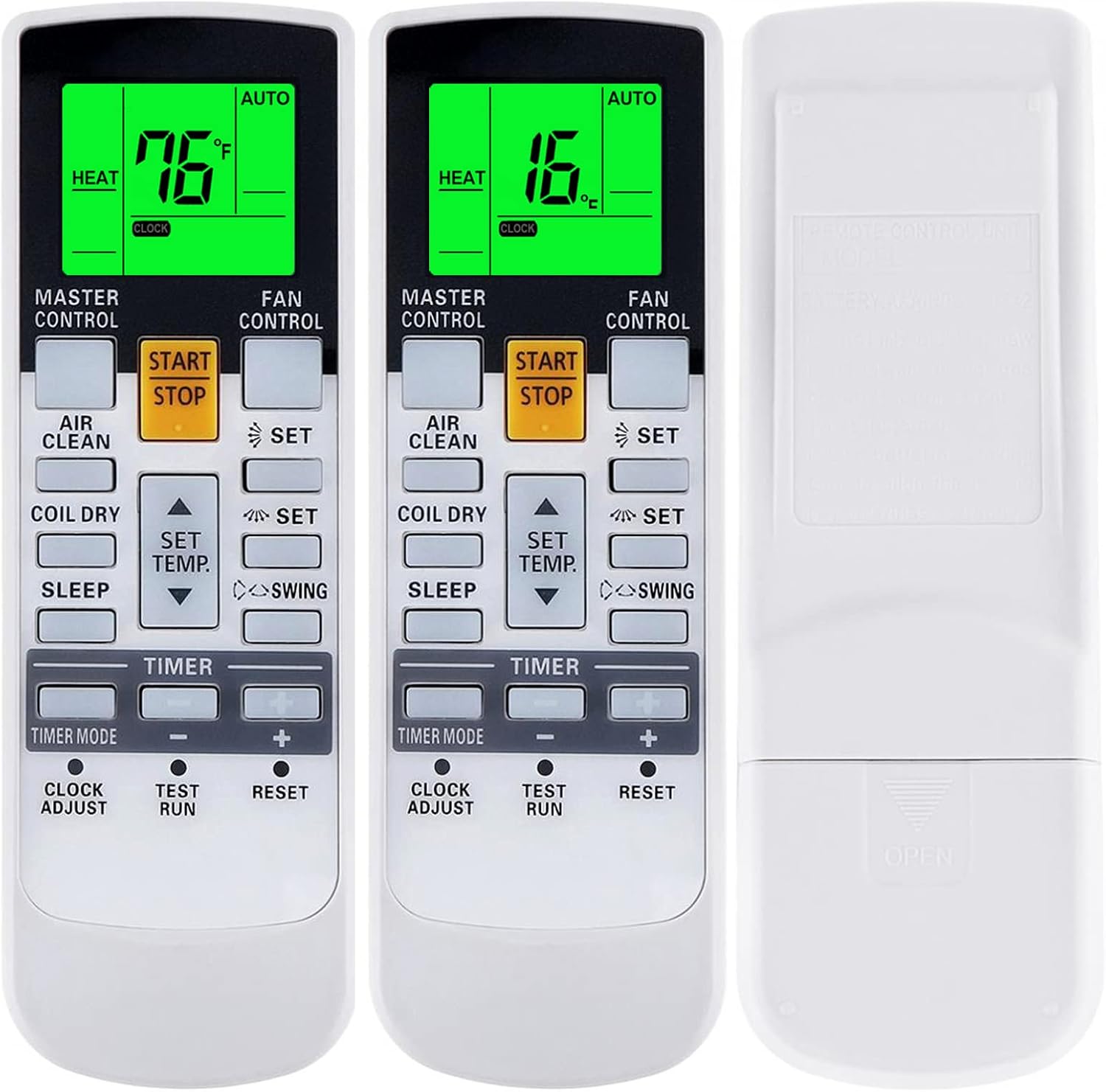
Image: Back of the remote control with the battery compartment indicated. Ensure correct battery polarity during installation.
പ്രാരംഭ ഉപയോഗം
No programming is typically required for this replacement remote control. Once batteries are installed, it should be ready to operate compatible Fujitsu air conditioner models directly.
പ്രവർത്തന നിർദ്ദേശങ്ങൾ
പൊതു പ്രവർത്തനങ്ങൾ
- ആരംഭിക്കുക/നിർത്തുക: Powers the air conditioner ON or OFF.
- SET TEMP. (Up/Down Arrows): ആവശ്യമുള്ള താപനില ക്രമീകരണം ക്രമീകരിക്കുന്നു.
- ഫാൻ നിയന്ത്രണം: Cycles through fan speed settings (e.g., Auto, Low, Medium, High).
- മാസ്റ്റർ നിയന്ത്രണം: ഓപ്പറേറ്റിംഗ് മോഡ് തിരഞ്ഞെടുക്കുന്നു (ഉദാ: ഓട്ടോ, കൂൾ, ഡ്രൈ, ഹീറ്റ്, ഫാൻ).
- സ്വിംഗ്: ലൂവർ സ്വിംഗ് ഫംഗ്ഷൻ സജീവമാക്കുന്നു അല്ലെങ്കിൽ നിർജ്ജീവമാക്കുന്നു.
- വായു ശുദ്ധി: Engages the air purification function, if available on your AC unit.
- കോയിൽ ഡ്രൈ: Activates the coil dry function to prevent mold growth.
- ഉറക്കം: Activates the sleep mode for comfortable overnight operation.
- ടൈമർ മോഡ്: Sets or cancels the ON/OFF timer. Use the +/- buttons to adjust time.
- ക്ലോക്ക് അഡ്ജസ്റ്റ്: Sets the current time on the remote control display.
- ടെസ്റ്റ് റൺ: For service use only. Do not press during normal operation.
- പുന SE സജ്ജമാക്കുക: ഫാക്ടറി ഡിഫോൾട്ട് ക്രമീകരണങ്ങളിലേക്ക് റിമോട്ട് കൺട്രോൾ പുനഃസജ്ജമാക്കുന്നു.

ചിത്രം: മുൻഭാഗം view of the remote control, illustrating the layout of buttons and the digital display.
താപനില ഡിസ്പ്ലേ (ഫാരൻഹീറ്റ്/സെൽഷ്യസ്)
The remote control supports displaying temperature in both Fahrenheit (°F) and Celsius (°C).
- ഫാരൻഹീറ്റിനും സെൽഷ്യസിനും ഇടയിൽ മാറാൻ, അമർത്തിപ്പിടിക്കുക താപനില സജ്ജമാക്കുക. up and down arrows simultaneously for approximately 3-5 seconds. The display will toggle between the two units.
ഗ്രീൻ ബാക്ക്ലൈറ്റ്
The remote control features a green backlight for improved visibility in low-light conditions. The backlight activates automatically when any button is pressed and remains on for a short period.

Image: The remote control display showing temperature in both Fahrenheit and Celsius, highlighting the green backlight feature.
പ്രത്യേക പ്രവർത്തനങ്ങൾ
Certain advanced functions, such as "10°C HEAT", "50°F HEAT", "MINI.HEAT", or "ECONOMY", are available only if your original remote control and air conditioner unit supported these specific features. To activate these, you may need to press and hold a specific button for approximately 4 seconds.

Image: Illustration showing the remote control and an arrow indicating to press and hold the SET TEMP. button for 4 seconds to access special functions like 10°C Heat, 50°F Heat, Mini Heat, or Economy, if supported by your AC unit.
മെയിൻ്റനൻസ്
ബാറ്ററി മാറ്റിസ്ഥാപിക്കൽ
Replace batteries when the remote control's display becomes dim or its operational range decreases. Always replace both batteries simultaneously with new AAA batteries.
വൃത്തിയാക്കൽ
മൃദുവായതും ഉണങ്ങിയതുമായ തുണി ഉപയോഗിച്ച് റിമോട്ട് കൺട്രോൾ തുടയ്ക്കുക. ലിക്വിഡ് ക്ലീനറുകളോ അബ്രാസീവ് വസ്തുക്കളോ ഉപയോഗിക്കരുത്, കാരണം ഇവ ഉപരിതലത്തിനോ ആന്തരിക ഘടകങ്ങളോ കേടുവരുത്തും.
ട്രബിൾഷൂട്ടിംഗ്
- റിമോട്ട് പ്രതികരിക്കുന്നില്ല: Check battery orientation and ensure batteries are not depleted. Replace if necessary.
- പരിമിതമായ ശ്രേണി: Ensure there are no obstructions between the remote control and the air conditioner's receiver. Replace batteries if the range is consistently poor.
- തെറ്റായ പ്രവർത്തനങ്ങൾ: Verify that your air conditioner model is listed as compatible. If certain advanced functions do not work, your AC unit may not support them.
സ്പെസിഫിക്കേഷനുകൾ
| ബ്രാൻഡ് | YAOHUIMI |
| മോഡൽ നമ്പർ | എ420220331-ബീഗ്വാങ്-308 |
| അനുയോജ്യമായ ഉപകരണങ്ങൾ | Fujitsu Air Conditioners (various models including AR-JW27, AR-JW19, AR-JW31, AR-DL1, AR-JW1) |
| പവർ ഉറവിടം | 2 x AAA ബാറ്ററികൾ (ഉൾപ്പെടുത്തിയിട്ടില്ല) |