1. ആമുഖവും അവസാനവുംview
The ALORAIR Storm Pro is a high-capacity LGR commercial dehumidifier designed for efficient moisture removal in large spaces. It is ideal for water damage restoration projects, construction drying, and humidity control in basements, garages, and job sites. This unit features smart Wi-Fi connectivity for remote monitoring and control, a built-in condensate pump for continuous drainage, and a robust, portable design.

Figure 1: ALORAIR Storm Pro Dehumidifier with accompanying mobile app interface and filter.
2 സുരക്ഷാ വിവരങ്ങൾ
Please read and understand all safety warnings and operating instructions before using this appliance. Failure to follow these instructions may result in electric shock, fire, property damage, or personal injury. Keep this manual for future reference.
- Always connect the unit to a properly grounded electrical outlet.
- കേടായ പവർ കോർഡ് അല്ലെങ്കിൽ പ്ലഗ് ഉപയോഗിച്ച് യൂണിറ്റ് പ്രവർത്തിപ്പിക്കരുത്.
- യൂണിറ്റ് സുസ്ഥിരവും നിരപ്പും ഉള്ള പ്രതലത്തിൽ സ്ഥാപിച്ചിട്ടുണ്ടെന്ന് ഉറപ്പാക്കുക.
- പ്രവർത്തന സമയത്ത് കുട്ടികളെയും വളർത്തുമൃഗങ്ങളെയും യൂണിറ്റിൽ നിന്ന് അകറ്റി നിർത്തുക.
- എയർ ഇൻലെറ്റുകളോ ഔട്ട്ലെറ്റുകളോ തടയരുത്.
- വൃത്തിയാക്കുന്നതിനോ അറ്റകുറ്റപ്പണികൾ നടത്തുന്നതിനോ മുമ്പ് യൂണിറ്റ് അൺപ്ലഗ് ചെയ്യുക.
3. ഉൽപ്പന്ന സവിശേഷതകളും ഘടകങ്ങളും
- ഉയർന്ന ശേഷി: Removes up to 180 pints of moisture per day (at 95°F, 90% RH) covering up to 2300 sq. ft.
- സ്മാർട്ട് വൈഫൈ നിയന്ത്രണം: Monitor and control the dehumidifier remotely using the AlorAir DryEasy mobile APP.
- Built-in Condensate Pump: Features an internal heavy-duty pump with a 14.7 ft drain height and a 19.6 ft long drain hose for automatic continuous drainage.
- യാന്ത്രിക പ്രവർത്തനങ്ങൾ: Includes automatic shut-off/on based on preset humidity levels, automatic restart after power outages, and auto defrost.
- പോർട്ടബിൾ ഡിസൈൻ: Equipped with four universal casters and ergonomically placed handles for easy mobility across various terrains.
- നീണ്ടുനിൽക്കുന്ന നിർമ്മാണം: Sturdy quick-disassemble polyethylene shell for enhanced durability and easy maintenance.
- Efficient Evaporator: Features a Rare Earth Aluminum Alloy Evaporator with auto defrosting capabilities.
- Easy Filter Access: Quickly replace the MERV-8 filter for optimal performance.
- Superior Stacking: Designed for efficient storage and transport, allowing multiple units to be stacked.
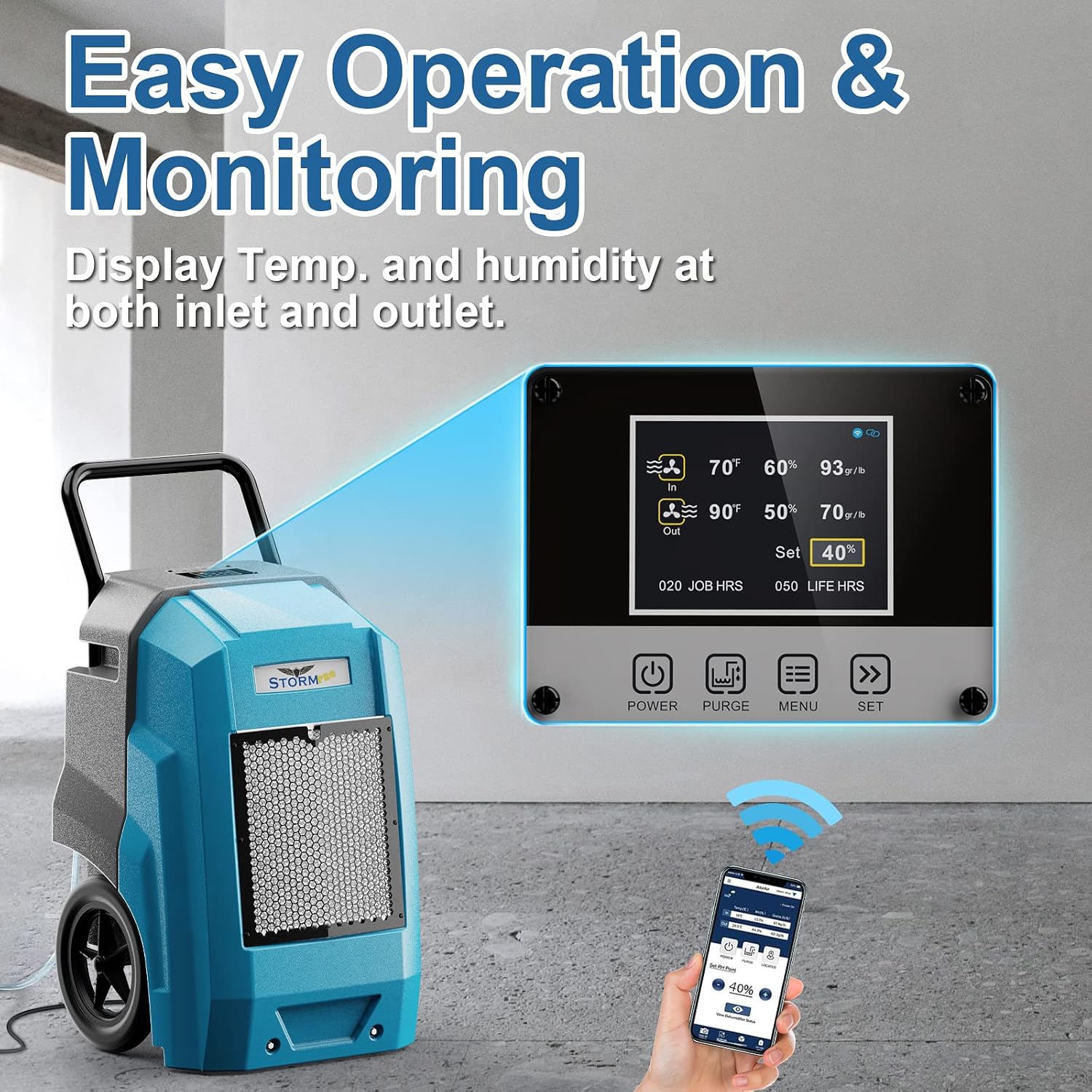
Figure 2: Easy operation and monitoring via the control panel and mobile app.

Figure 3: Built-in heavy-duty pump allows for drainage anywhere.
4. സജ്ജീകരണം
4.1 അൺപാക്കിംഗ്
Carefully remove the dehumidifier from its packaging. Inspect the unit for any signs of damage during transit. Retain packaging materials for future storage or transport.
4.2 ഇൻസ്റ്റലേഷൻ കൈകാര്യം ചെയ്യുക
The unit comes with an ergonomically designed handle for easy transport. Attach the handle securely using the provided fasteners. The handle can also be detached for compact storage.
4.3 ഡ്രെയിൻ ഹോസ് കണക്ഷൻ
Connect the provided 19.6 ft drain hose to the pump drain outlet located on the unit. Ensure a secure connection to prevent leaks. The built-in pump allows for continuous drainage up to a height of 14.7 ft, directing water to a sink, drain, or outside.
4.4 പവർ കണക്ഷൻ
Plug the unit into a standard 110V AC grounded electrical outlet. The power cord is approximately 12 feet long. Ensure the power cord is not obstructed or placed in a high-traffic area.
4.5 മൊബൈൽ ആപ്പ് സജ്ജീകരണം
Download the free AlorAir DryEasy mobile APP from your device's app store. Follow the in-app instructions for registration and connecting your dehumidifier via Smart Wi-Fi. Please note that the Wi-Fi application may exhibit compatibility issues with certain Android devices. Verify app availability on your specific device before purchase. For assistance, contact customer service.
വീഡിയോ 1: കഴിഞ്ഞുview of the AlorAir 180 Pints Commercial Dehumidifier with Pump & Smart Wi-Fi features.
Video 2: Demonstrates the ALORAIR-Lite APP, highlighting its stability and new version features.
Video 3: Instructions for ALORAIR APP Registration.
5. പ്രവർത്തന നിർദ്ദേശങ്ങൾ
5.1 പവർ ഓൺ/ഓഫ്
Press the 'Power' button on the control panel or use the mobile app to turn the unit on or off.
5.2 ലക്ഷ്യ ഈർപ്പം ക്രമീകരിക്കൽ
Use the 'Set' buttons on the control panel or the mobile app to adjust your desired humidity level. The unit will automatically operate to maintain this preset level.
5.3 ടൈമർ ക്രമീകരണം
Utilize the timer function on the control panel to schedule operation times. This allows for automated shut-off or start-up.
5.4 തുടർച്ചയായ പ്രവർത്തനം
The unit can be set for continuous operation, ideal for severe moisture conditions. It will automatically shut off when the room humidity reaches the set level and restart when humidity rises above it.
5.5 Monitoring via App
The mobile app provides real-time data on temperature and humidity at both the inlet and outlet. It also offers filter reminders and smart alerts for offline devices or equipment faults.
6. പരിപാലനം
6.1 Filter Replacement/Cleaning
The unit uses a MERV-8 filter. Regularly check and clean or replace the filter to ensure optimal performance and air quality. The mobile app provides filter lifespan reminders.
Video 4: Instructions on how to change the MERV-8 filter for Storm Pro/Ultra models.
6.2 ഓട്ടോ ഡിഫ്രോസ്റ്റ് ഫംഗ്ഷൻ
The advanced auto-defrosting system continuously monitors ambient temperature. If low temperatures are detected, the unit initiates an automatic defrost cycle, temporarily stopping the compressor while the fan continues to operate. This prevents frost buildup and extends unit lifespan.
6.3 ഡ്രെയിൻ ഹോസ് മെയിന്റനൻസ്
Periodically check the drain hose for any blockages or kinks to ensure uninterrupted water removal.
7. പ്രശ്നപരിഹാരം
- ആപ്പ് കണക്റ്റിവിറ്റി പ്രശ്നങ്ങൾ: If experiencing problems with the mobile app, especially on Android devices, ensure your device is compatible by checking the Google Play Store. Contact customer service for further assistance.
- Unit Not Dehumidifying: Check that the desired humidity level is set lower than the current room humidity. Ensure air inlets and outlets are not blocked. Verify the filter is clean.
- വെള്ളം വറ്റുന്നില്ല: Inspect the drain hose for kinks, blockages, or improper connection. Ensure the drain height does not exceed 14.7 ft.
- പിശക് കോഡുകൾ: Refer to the detailed troubleshooting section in the full user manual for specific error code interpretations and solutions.
8 സ്പെസിഫിക്കേഷനുകൾ
| ഫീച്ചർ | സ്പെസിഫിക്കേഷൻ |
|---|---|
| ബ്രാൻഡ് | അലോറൈർ |
| മോഡലിൻ്റെ പേര് | കൊടുങ്കാറ്റ് പ്രോ |
| ശേഷി | 180 Pints (at 95°F, 90% RH) / 85 Pints per Day (AHAM) |
| ഫ്ലോർ ഏരിയ കവറേജ് | 2300 ചതുരശ്ര അടി വരെ |
| എയർ ഫ്ലോ കപ്പാസിറ്റി | മിനിറ്റിന് 210 ക്യുബിക് അടി |
| വാല്യംtage | 110 വോൾട്ട് (എസി) |
| വാട്ട്tage | 640 വാട്ട് മണിക്കൂർ |
| ഇനത്തിൻ്റെ ഭാരം | 85.8 പൗണ്ട് |
| ഉൽപ്പന്ന അളവുകൾ | 21.2"D x 22"W x 38"H |
| ഹോസ് നീളം കളയുക | 19.6 അടി |
| Max Drain Height | 14.7 അടി |
| ഓപ്പറേഷൻ മോഡ് | തുടർച്ചയായി |
| പ്രത്യേക ഫീച്ചർ | Built-In Pump, Smart WiFi |
| മെറ്റീരിയൽ | പ്ലാസ്റ്റിക് |
9. വാറൻ്റിയും പിന്തുണയും
Every ALORAIR commercial dehumidifier comes with a 5-year limited warranty. A professional customer support team is available to assist you with any inquiries or issues.
- 6 മാസത്തെ ഭാഗങ്ങളും അധ്വാനവും: മാറ്റിസ്ഥാപിക്കൽ ഭാഗങ്ങൾക്കോ യൂണിറ്റിനോ ഉള്ള ഷിപ്പ്മെന്റ് ചാർജുകൾ ഉൾപ്പെടുന്നു.
- 1 വർഷത്തെ ഭാഗങ്ങളും അധ്വാനവും: തകരാറുള്ള ഉൽപ്പന്നം നന്നാക്കാനോ മാറ്റിസ്ഥാപിക്കാനോ തിരികെ അയയ്ക്കുന്നതിനുള്ള ഷിപ്പ്മെന്റ് ചാർജ് ഉൾപ്പെടുന്നില്ല.
- 3 വർഷത്തെ ഭാഗങ്ങളും അധ്വാനവും: Parts and labor coverage for refrigeration system only.
- 5 വർഷത്തെ കംപ്രസ്സറും കോയിലും: ഈ ഘടകങ്ങൾക്കുള്ള പ്രത്യേക കവറേജ്.
For additional warranty information or assistance, please refer to the product user manual or contact ALORAIR customer service.


