1. ആമുഖം
This manual provides detailed instructions for the installation, operation, and maintenance of your SV3C C11 Outdoor Wireless 5MP PTZ Security Camera. Please read this manual thoroughly before using the product to ensure proper functionality and safety.

Image 1: SV3C C11 Outdoor Wireless 5MP PTZ Security Camera. This image displays the main unit of the camera, highlighting its dome-shaped body, antenna, and the array of LED lights around the lens.
2. ഉൽപ്പന്ന സവിശേഷതകൾ
- ഉയർന്ന റെസല്യൂഷൻ ഇമേജിംഗ്: Equipped with a 5-megapixel Full HD lens for clear and smooth video capture, day or night.
- Pan/Tilt Functionality: Remotely adjust the viewing angle with 355° horizontal pan and 90° vertical tilt via the smartphone application.
- വിപുലമായ കണ്ടെത്തൽ: Features AI human detection and automatic tracking, reducing false alarms and following detected movement.
- കളർ നൈറ്റ് വിഷൻ: Integrated white LED lights enable clear color video recording even in complete darkness, alongside traditional infrared black and white mode.
- Dual-Band Wi-Fi & Wired Connectivity: Supports both 2.4GHz and 5GHz wireless networks, as well as a wired LAN connection for flexible installation.
- ടു-വേ ഓഡിയോ: Built-in microphone and speaker allow for remote communication and audio monitoring.
- വെതർപ്രൂഫ് ഡിസൈൻ: Constructed from aluminum alloy with an IP66 dustproof and waterproof rating, suitable for outdoor use in various weather conditions.
- Multi-Device & Expandable Monitoring: View up to 6 cameras simultaneously on one device. Expandable to up to 64 SV3C HX series cameras.
- Multiple Platform Support: Compatible with iOS, Android, and Windows (via HiP2P Client software).
3. പാക്കേജ് ഉള്ളടക്കം
പാക്കേജിൽ എല്ലാ ഇനങ്ങളും ഉണ്ടെന്ന് ദയവായി പരിശോധിക്കുക:
- SV3C C11 PTZ Security Camera Unit
- പവർ അഡാപ്റ്റർ
- ആൻ്റിന
- ലാൻ കേബിൾ
- മൗണ്ടിംഗ് സ്ക്രൂകൾ (4 പീസുകൾ)
- ഉപയോക്തൃ മാനുവൽ (ക്വിക്ക് സ്റ്റാർട്ട് ഗൈഡ്)
4. സജ്ജീകരണ ഗൈഡ്
4.1 പ്രാരംഭ കണക്ഷൻ
- പവർ ഓൺ: Connect the camera to the power adapter and plug it into an electrical outlet. The camera will perform a self-test.
- Wired Connection (Recommended for Initial Setup): Connect the camera to your router using the provided LAN cable. Ensure your smartphone/PC is connected to the same network.
- വയർലെസ് കണക്ഷൻ: If you prefer wireless, ensure the antenna is securely attached. You will configure Wi-Fi settings later via the app.

Image 2: Illustration of wired (LAN cable) and wireless (Wi-Fi) connection methods for the camera to a router.
4.2 ആപ്പ് ഇൻസ്റ്റാളേഷനും ക്യാമറ ജോടിയാക്കലും
- അപ്ലിക്കേഷൻ ഡൗൺലോഡുചെയ്യുക: Download and install the "Camhi" or "Camhipro" app from your smartphone's app store (iOS/Android).
- ക്യാമറ ചേർക്കുക: Open the app, register an account if necessary, and follow the in-app instructions to add a new camera. This typically involves scanning a QR code on the camera or manually entering its UID.
- Configure Wi-Fi (if applicable): If you initially connected via LAN, you can configure Wi-Fi settings within the app to enable wireless operation. Ensure the camera and your device are on the same network during this process.
For PC monitoring, download the "HiP2P Client" software from the official SV3C webസൈറ്റ്.
5. പ്രവർത്തന നിർദ്ദേശങ്ങൾ
5.1 തത്സമയം View ഒപ്പം പ്ലേബാക്ക്
- Access live video streams and recorded footage through the Camhi/Camhipro app or HiP2P Client software.
- Adjust video quality (e.g., to HD) from the live view screen in the app.

Image 3: Demonstrates the camera's clear 5MP image quality during both day and night, as viewed on a smartphone.
5.2 പാൻ, ടിൽറ്റ് നിയന്ത്രണം
- In the app's live view, use the on-screen controls to pan the camera horizontally (355°) and tilt it vertically (90°).
- Set up preset positions for quick navigation to specific areas.

Image 4: Illustrates the camera's pan (355°) and tilt (90°) capabilities, showing its wide coverage area.

Image 5: Shows how preset positions can be configured to monitor multiple areas around a property.
5.3 നൈറ്റ് വിഷൻ മോഡുകൾ
ക്യാമറ ഒന്നിലധികം രാത്രി ദർശന ഓപ്ഷനുകൾ വാഗ്ദാനം ചെയ്യുന്നു:
- ഇൻഫ്രാറെഡ് മോഡ്: Standard black and white night vision using IR LEDs.
- പൂർണ്ണ വർണ്ണ മോഡ്: Utilizes built-in white LED lights to provide full-color video in low-light conditions.
- ഇന്റലിജന്റ് മോഡ്: Automatically switches between IR and color night vision based on detected motion or ambient light.

Image 6: Compares the visual output of the camera in color night vision, daytime 5MP, and black and white infrared night vision modes.

Image 7: Shows the in-app interface for selecting different night vision modes: Infrared, Full Color, and Intelligent.
5.4 AI Human Detection & Auto Tracking
- The camera can detect human shapes, reducing false alarms from pets or inanimate objects.
- When motion is detected, the camera automatically begins recording and tracks the movement of the subject.
- Sensor lights can be configured to activate at night to deter intruders.
- Receive instant notifications on your smartphone or tablet when an event is detected.
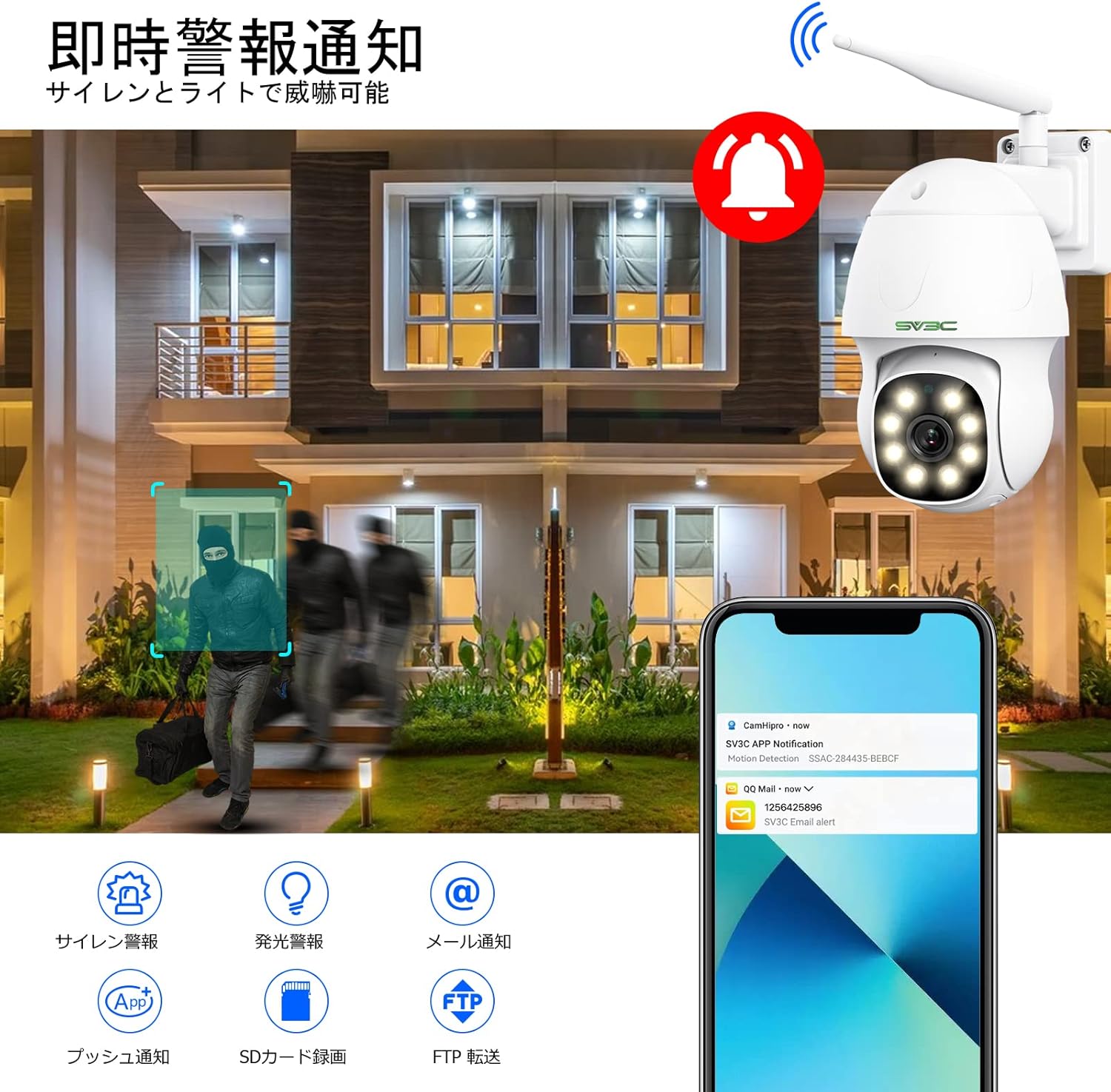
Image 8: Depicts the camera detecting an intruder, triggering a siren, light, and sending notifications to a smartphone.
5.5 ടു-വേ ഓഡിയോ
- Use the built-in microphone to listen to audio around the camera.
- Speak through the built-in speaker via the app to communicate with individuals near the camera.

Image 9: Illustrates the two-way audio feature, showing a child speaking to the camera and receiving a response.
5.6 Storage and Recording
- The camera supports local storage via a Micro SD card (not included). Insert the card into the designated slot.
- റെക്കോർഡ് ചെയ്ത footage can be accessed and played back through the app.
- FTP storage is also supported for alarm recordings.

ചിത്രം 10: ക്ലോസ്-അപ്പ് view of the camera's Micro SD card slot, indicating local storage capability.
5.7 Multi-Device Monitoring
- Monitor your camera feed from various devices including smartphones (iOS, Android), tablets (iPad, Android), and PCs (Mac OS, Windows).
- The HiP2P Client software for PC allows for more detailed configuration and simultaneous viewing of multiple cameras.

Image 11: Shows the camera feed being monitored on multiple devices, including a PC running P2P Client software, and various mobile apps.

Image 12: Illustrates the camera's compatibility with various web browsers and operating systems for monitoring.
6. ഇൻസ്റ്റാളേഷനും പ്ലേസ്മെന്റും
The SV3C C11 camera is designed for outdoor use and can be mounted on walls or eaves. Ensure the mounting location provides a clear view of the area you wish to monitor and is within Wi-Fi range or accessible for a wired connection.

Image 13: Shows the camera installed outdoors, enduring rain, snow, and fog, highlighting its IP66 weatherproof rating.
7. പരിപാലനം
- വൃത്തിയാക്കൽ: ക്യാമറ ലെൻസും ബോഡിയും പതിവായി മൃദുവായ, d തുണി ഉപയോഗിച്ച് തുടയ്ക്കുക.amp പൊടിയും അഴുക്കും നീക്കം ചെയ്യാൻ തുണി ഉപയോഗിക്കുക. കഠിനമായ രാസവസ്തുക്കൾ ഉപയോഗിക്കരുത്.
- ഫേംവെയർ അപ്ഡേറ്റുകൾ: Check the SV3C official webഒപ്റ്റിമൽ പ്രകടനവും സുരക്ഷയും ഉറപ്പാക്കാൻ ഫേംവെയർ അപ്ഡേറ്റുകൾക്കായി ഇടയ്ക്കിടെ സൈറ്റ് സന്ദർശിക്കുക.
- പവർ സൈക്കിൾ: If the camera experiences connectivity issues, try power cycling it by unplugging and replugging the power adapter after a few seconds.
8. പ്രശ്നപരിഹാരം
ഈ വിഭാഗം പൊതുവായ പ്രശ്നങ്ങളും അവയുടെ പരിഹാരങ്ങളും അഭിസംബോധന ചെയ്യുന്നു.
- Q1: Setup and installation methods are unclear.
- A: A quick start guide is included with the product. For detailed setup instructions, please refer to the full manual available for download on the official SV3C website (HX series). You can also contact SV3C support via Amazon: ① Access your order history from Account Services. ② Click on the seller's shop link. ③ Click "Ask a question." ④ Select the type and content of your inquiry. ⑤ Click "Enter message." ⑥ After entering, click "Send email." Alternatively, email customer support using the address provided in the manual.
- Q2: The camera is not detected when searching for LAN cameras, even when connected via LAN cable.
- A: Ensure the camera and your smartphone/PC are connected to the same network. If it's still not recognized, try connecting wirelessly by following the instructions in the manual.
- Q3: The resolution is low, and the image is not clear. How do I adjust the settings?
- A: You can change to high quality in the Camhi/Camhipro app. On the live screen of the Camhi/Camhipro app, select "HD" to switch to high resolution. For HiP2P Client, right-click the camera's UID on the preview screen and select "Full HD."
- Q4: Infrared or intelligent night vision does not turn on automatically.
- A: The camera's infrared or illumination lights activate based on ambient light conditions. If the environment (e.g., garden, entrance) is sufficiently bright due to streetlights or other lighting, the camera may remain in daytime mode (color) even at night, and the lights will not turn on. For the lights to activate, the surrounding environment needs to be dark.
- Q5: The wireless LAN connection suddenly became disconnected on my smartphone. What could be the cause?
- A: The wireless connection may occasionally drop due to radio wave interference. If the connection remains lost for several minutes, try power cycling the camera (turn off power, wait a few seconds, then turn back on). If the issue persists, please contact customer support.
- Q6: The QR code cannot be read during initial setup.
- A: If the QR code cannot be read, press and hold the camera's reset button for 10-15 seconds, then try again. If it still fails, please contact support.
- Q7: Alarm saving to FTP server from the IP camera stopped working from January 1, 2025.
- A: As of January 1, 2025, there was a change in the FTP encryption method. Saving to previous folders is no longer possible; files can only be saved to the root directory. For detailed explanations and solutions, please check the official website (HX Series - Manual FTP folder creation method).
9 സ്പെസിഫിക്കേഷനുകൾ
| ഫീച്ചർ | വിശദാംശങ്ങൾ |
|---|---|
| ബ്രാൻഡ് | എസ്വി 3 സി |
| മോഡൽ നമ്പർ | C11 |
| മെറ്റീരിയൽ | അലുമിനിയം |
| വാട്ടർപ്രൂഫ് ലെവൽ | IP66 (ജലപ്രൂഫ്) |
| പാക്കേജ് അളവുകൾ | 20.3 x 17.4 x 10.7 സെ.മീ |
| ഇനത്തിൻ്റെ ഭാരം | 990 ഗ്രാം |
| ശുപാർശ ചെയ്യുന്ന ഉപയോഗം | Security, Monitoring |
| കണക്റ്റിവിറ്റി ടെക്നോളജി | Wired, Wi-Fi (2.4GHz & 5GHz) |
| പ്രത്യേക സവിശേഷതകൾ | 5MP Resolution, PTZ Technology, Motion Detection/AI Human Detection, Two-Way Audio, Color Night Vision & Infrared Night Vision |
| ഇൻഡോർ/ഔട്ട്ഡോർ ഉപയോഗം | ഔട്ട്ഡോർ |
| അനുയോജ്യമായ ഉപകരണങ്ങൾ | Tablet (also iOS, Android, PC) |
| കണക്ഷൻ പ്രോട്ടോക്കോൾ | വൈഫൈ |
| ഇനങ്ങളുടെ എണ്ണം | 1 |
| ഫ്രെയിം റേറ്റ് | 15 fps |
10. വാറൻ്റിയും പിന്തുണയും
For warranty information and customer support, please refer to the quick start guide included with your product or visit the official SV3C website. You can also contact SV3C support directly through your Amazon order history as described in the Troubleshooting section (Q1).
SV3C was established in 2013 as a security camera company. Leveraging years of camera manufacturing technology, they research, develop, produce, and sell security cameras for both corporate and individual use.


