ആമുഖം
The ORICO 1TB MTQ Portable SSD is a high-performance external solid-state drive designed for fast and reliable data storage. Featuring USB-C connectivity and supporting up to 40Gbps transfer speeds, it is ideal for users requiring rapid data access and transfer across various devices.
പ്രധാന സവിശേഷതകളിൽ ഇവ ഉൾപ്പെടുന്നു:
- IML high-end technology for scratch resistance, strong corrosion resistance, and long service life.
- Colorful plastic shell with a zinc alloy middle frame for durability, shock resistance, and anti-drop protection.
- 40Gbps master control scheme and USB-C output interface, supporting Plug and Play with UASP acceleration protocol.
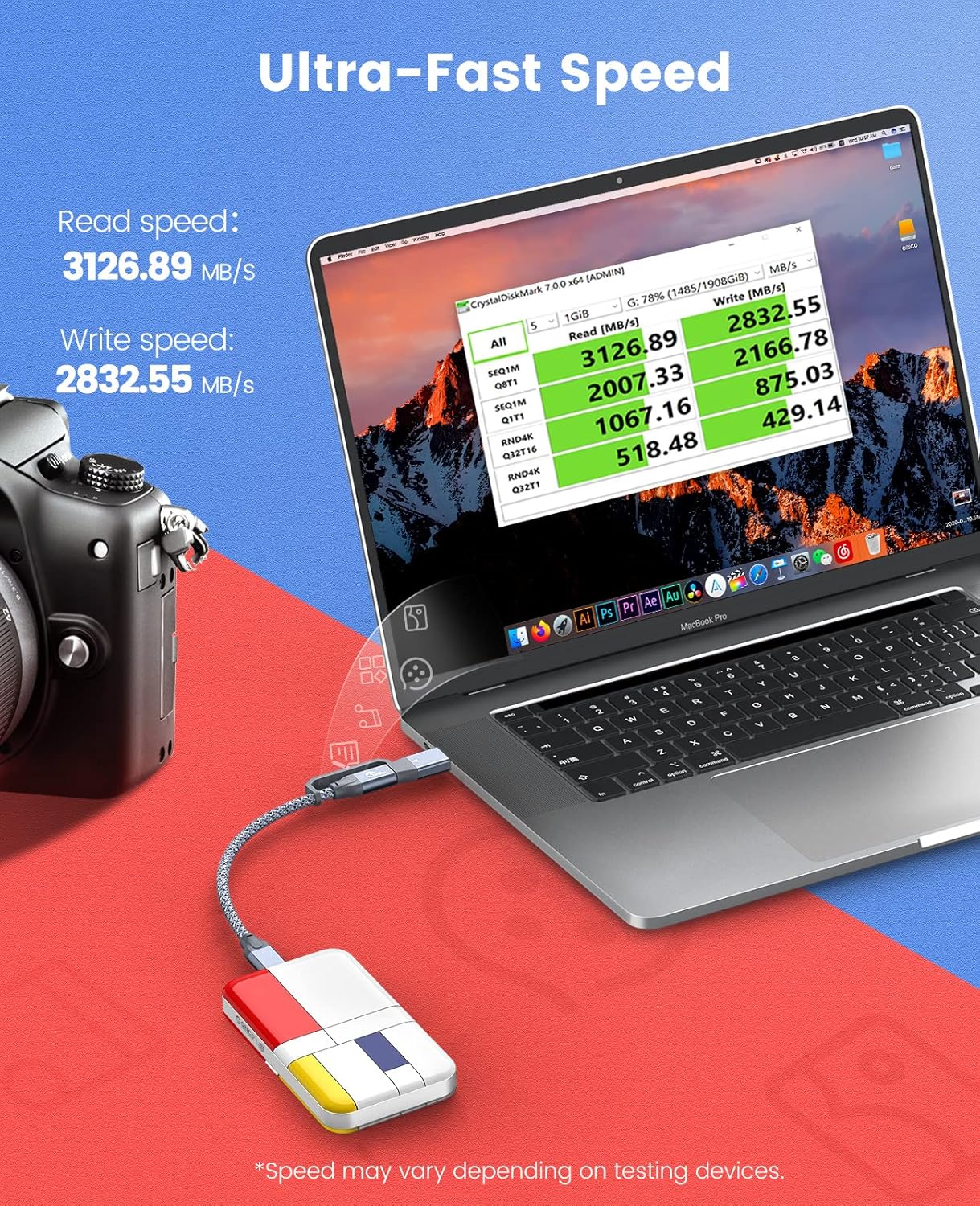
- High-speed NAND FLASH particles, offering a maximum reading speed of 3150MB/S (requires 40Gbps host interface).
- Wide compatibility with PCs, notebooks, smartphones, game consoles, routers, and operating systems like Windows, Mac OS, Linux, Android, and iPad.
പാക്കേജ് ഉള്ളടക്കം
പാക്കേജിൽ എല്ലാ ഇനങ്ങളും ഉണ്ടെന്ന് ദയവായി പരിശോധിക്കുക:
- 1 x ORICO MTQ Portable SSD (1TB)
- 1 x USB C to USB A and USB C data cable (0.3 meters)
- 1 x ഉപയോക്തൃ മാനുവൽ
സജ്ജമാക്കുക
Connecting your ORICO MTQ Portable SSD is a straightforward process. The device supports Plug and Play functionality, allowing for immediate use with compatible systems.
നിങ്ങളുടെ ഉപകരണത്തിലേക്ക് കണക്റ്റുചെയ്യുന്നു
- Locate the included 2-in-1 USB-C data cable. This cable features a USB-C connector on one end and a convertible USB-A/USB-C connector on the other.
- Connect the USB-C end of the cable to the USB-C port on your ORICO MTQ Portable SSD.
- Connect the other end of the cable to an available USB-A or USB-C port on your computer, laptop, smartphone, or other compatible device.
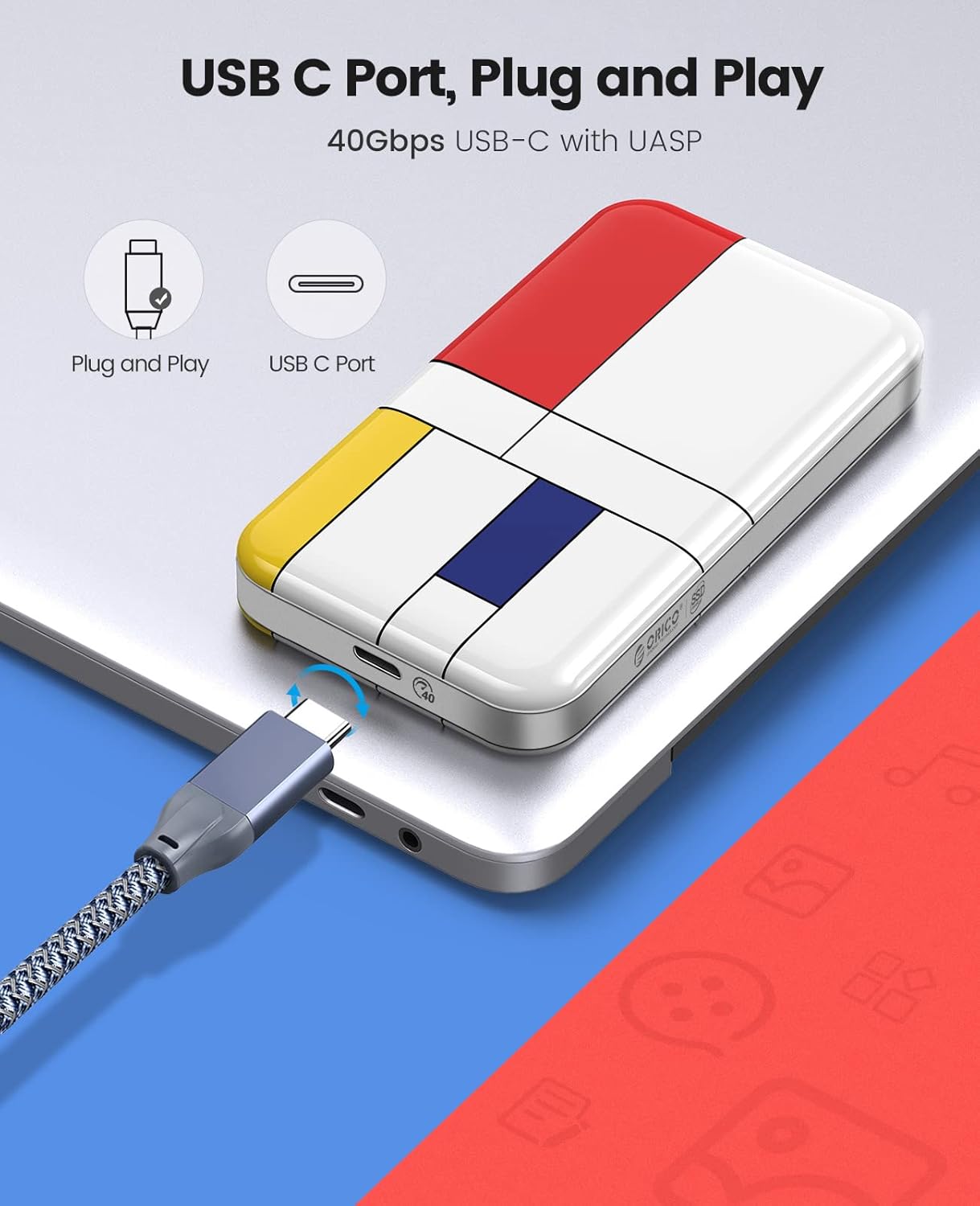

The device will be automatically recognized by most operating systems. For optimal performance, especially on Windows, you may need to enable write caching (see Troubleshooting section).
Video: ORICO MTQ Portable External SSD Overview
SSD പ്രവർത്തിപ്പിക്കൽ
Once connected, the ORICO MTQ Portable SSD functions like any other external storage device. You can drag and drop files, copy, paste, and manage data as needed.
Data Transfer and Speed
The SSD is designed for ultra-fast data transfer. To achieve the maximum advertised speeds of up to 3150MB/s, ensure your host device has a 40Gbps USB-C or Thunderbolt port.
സാർവത്രിക അനുയോജ്യത
The ORICO MTQ Portable SSD offers broad compatibility with various operating systems and devices, making it a versatile storage solution.

ഉപയോഗ സാഹചര്യങ്ങൾ
The compact and durable design, combined with high-speed performance, makes the ORICO MTQ Portable SSD suitable for various applications:
- പഠനം: Store large documents, presentations, and research files.
- ഫോട്ടോഗ്രാഫി: Quickly transfer and backup high-resolution photos and videos from cameras.
- ഓഫീസ്: Carry essential work files, project data, and software installations.

മെയിൻ്റനൻസ്
To ensure the longevity and optimal performance of your ORICO MTQ Portable SSD, follow these maintenance guidelines:
- സുരക്ഷിതമായ നീക്കം: ഡാറ്റാ അഴിമതി തടയുന്നതിന്, നിങ്ങളുടെ ഓപ്പറേറ്റിംഗ് സിസ്റ്റത്തിൽ നിന്ന് SSD ഭൗതികമായി വിച്ഛേദിക്കുന്നതിന് മുമ്പ് എല്ലായ്പ്പോഴും സുരക്ഷിതമായി അത് പുറത്തെടുക്കുക.
- ശാരീരിക പരിചരണം: Avoid dropping the device or exposing it to extreme temperatures, moisture, or strong magnetic fields. While durable, excessive force can cause damage.
- വൃത്തിയാക്കൽ: SSD യുടെ പുറംഭാഗം വൃത്തിയാക്കാൻ മൃദുവായതും ഉണങ്ങിയതുമായ തുണി ഉപയോഗിക്കുക. ലിക്വിഡ് ക്ലീനറുകളോ ലായകങ്ങളോ ഉപയോഗിക്കരുത്.
- ഫേംവെയർ അപ്ഡേറ്റുകൾ: ഇടയ്ക്കിടെ ഔദ്യോഗിക ORICO പരിശോധിക്കുക. website for any available firmware updates for your SSD model. Updates can improve performance and stability.
ട്രബിൾഷൂട്ടിംഗ്
If you encounter issues with your ORICO MTQ Portable SSD, consider the following troubleshooting steps:
ഉപകരണം തിരിച്ചറിഞ്ഞിട്ടില്ല
- കേബിൾ കണക്ഷൻ പരിശോധിക്കുക: Ensure the USB cable is securely connected to both the SSD and your host device. Try a different USB port or cable if available.
- Try Different Device: Test the SSD on another computer or compatible device to determine if the issue is with the SSD or the original host device.
- Check Disk Management (Windows): In Windows, open Disk Management (right-click Start button > Disk Management). Check if the SSD appears there. It might need to be initialized or formatted.
- Check System Information (Mac): On Mac, go to Apple menu > About This Mac > System Report > USB. Check if the SSD is listed.
മന്ദഗതിയിലുള്ള ട്രാൻസ്ഫർ വേഗത
- Verify Port Speed: Ensure your host device's USB-C port supports 40Gbps (USB4 or Thunderbolt 3/4). Connecting to a slower USB port will result in reduced speeds.
- Enable Write Caching (Windows): For optimal write performance on Windows, you may need to enable write caching. Go to Device Manager > Disk drives > Right-click your ORICO SSD > Properties > Policies tab > Select 'Better performance' and 'Enable write caching on the device'. Note: Always safely eject the drive after enabling this feature to prevent data loss.
- Power Connection (Mac): On Mac, ensure your Mac is plugged into power. Some Mac models may reduce port performance when running on battery.
സ്പെസിഫിക്കേഷനുകൾ
| ഫീച്ചർ | വിശദാംശങ്ങൾ |
|---|---|
| ബ്രാൻഡ് | ഒറിക്കോ |
| മോഡൽ നമ്പർ | e17dd970-40ba-4a5c-bd8e-c816bf4fd191 (MTQ Series) |
| ഡിജിറ്റൽ സ്റ്റോറേജ് കപ്പാസിറ്റി | 1000 ജിബി (1 ടിബി) |
| ഹാർഡ് ഡ്രൈവ് ഇൻ്റർഫേസ് | USB 1.1 (Note: This refers to the internal interface, actual external connectivity is USB-C 40Gbps) |
| കണക്റ്റിവിറ്റി ടെക്നോളജി | USB-C (40Gbps) |
| പരമാവധി വായന വേഗത | Up to 3150MB/s (requires 40Gbps host interface) |
| പ്രത്യേക ഫീച്ചർ | പോർട്ടബിൾ |
| ഇനത്തിൻ്റെ ഭാരം | 9.9 ഔൺസ് |
| ഉൽപ്പന്ന അളവുകൾ | 8.27 x 4.33 x 1.42 ഇഞ്ച് |
| നിറം | Black (with artistic color matching design) |
| നിർമ്മാതാവ് | ഷെൻസെൻ ഒറിക്കോ ടെക്നോളജീസ് കമ്പനി, ലിമിറ്റഡ് |
വാറൻ്റി
The ORICO MTQ Portable SSD comes with a 3 വർഷത്തെ പരിമിത വാറൻ്റി. Please retain your proof of purchase for warranty claims. For detailed warranty terms and conditions, refer to the official ORICO webസൈറ്റ് അല്ലെങ്കിൽ ഉപഭോക്തൃ പിന്തുണയുമായി ബന്ധപ്പെടുക.
പിന്തുണ
For further assistance, technical support, or to provide feedback, please visit the official ORICO website or contact their customer service department. You can often find FAQs, driver downloads, and additional resources online.
Official ORICO Store: ആമസോണിലെ ORICO സ്റ്റോർ സന്ദർശിക്കുക


