1. ആമുഖം
Thank you for choosing the Powerwerks PWR10 Powered Speaker Cabinet. This manual provides essential information for the safe and efficient operation of your new speaker. The PWR10 is a high-performance active speaker designed for various audio applications, featuring robust power output, versatile input options, and integrated digital signal processing (DSP).
യൂണിറ്റ് പ്രവർത്തിപ്പിക്കുന്നതിന് മുമ്പ് ദയവായി ഈ മാനുവൽ നന്നായി വായിച്ച് ഭാവിയിലെ റഫറൻസിനായി സൂക്ഷിക്കുക.
2 സുരക്ഷാ വിവരങ്ങൾ
വൈദ്യുതാഘാതം, തീപിടുത്തം അല്ലെങ്കിൽ പരിക്ക് എന്നിവയുടെ അപകടസാധ്യത കുറയ്ക്കുന്നതിന്, എല്ലായ്പ്പോഴും ഈ അടിസ്ഥാന സുരക്ഷാ മുൻകരുതലുകൾ പാലിക്കുക:
- ഊർജ്ജ സ്രോതസ്സ്: ഈ മാനുവലിൽ വിവരിച്ചിരിക്കുന്ന തരത്തിലുള്ള ഒരു പവർ സപ്ലൈയിലോ യൂണിറ്റിലോ മാത്രം യൂണിറ്റ് ബന്ധിപ്പിക്കുക.
- ഗ്രൗണ്ടിംഗ്: Ensure the power cord is properly grounded to prevent electric shock.
- വെൻ്റിലേഷൻ: വെന്റിലേഷൻ തുറസ്സുകൾ തടയരുത്. യൂണിറ്റിന് ചുറ്റും മതിയായ വായുസഞ്ചാരം ഉറപ്പാക്കുക.
- ജലവും ഈർപ്പവും: യൂണിറ്റ് മഴയിലോ ഈർപ്പത്തിലോ ഒതുങ്ങരുത്. ദ്രാവകങ്ങൾ നിറച്ച വസ്തുക്കൾ യൂണിറ്റിൽ വയ്ക്കരുത്.
- ചൂട്: റേഡിയേറ്ററുകൾ, ഹീറ്റ് രജിസ്റ്ററുകൾ, സ്റ്റൗകൾ അല്ലെങ്കിൽ മറ്റ് ചൂട് ഉൽപ്പാദിപ്പിക്കുന്ന ഉപകരണങ്ങൾ പോലുള്ള താപ സ്രോതസ്സുകളിൽ നിന്ന് യൂണിറ്റ് അകറ്റി നിർത്തുക.
- സേവനം: ഈ ഉൽപ്പന്നം സ്വയം സേവിക്കാൻ ശ്രമിക്കരുത്. യോഗ്യതയുള്ള സേവന ഉദ്യോഗസ്ഥർക്ക് എല്ലാ സേവനങ്ങളും റഫർ ചെയ്യുക.
- വൃത്തിയാക്കൽ: വൃത്തിയാക്കുന്നതിന് മുമ്പ് പവർ ഔട്ട്ലെറ്റിൽ നിന്ന് യൂണിറ്റ് പ്ലഗ് അൺപ്ലഗ് ചെയ്യുക. വൃത്തിയാക്കാൻ ഉണങ്ങിയ തുണി ഉപയോഗിക്കുക.
3. പാക്കേജ് ഉള്ളടക്കം
The Powerwerks PWR10 package includes the following items:
- Powerwerks PWR10 Powered Speaker Cabinet
- പവർ കോർഡ്
- ഉപയോക്തൃ മാനുവൽ (ഈ പ്രമാണം)
4. ഉൽപ്പന്ന സവിശേഷതകൾ
The Powerwerks PWR10 Powered Speaker Cabinet offers a range of features designed for optimal audio performance and versatility:
- ഉയർന്ന പവർ ഔട്ട്പുട്ട്: 600 watts of Class D ampലിഫിക്കേഷൻ.
- ടു-വേ സ്പീക്കർ സിസ്റ്റം: Features one 10-inch low-frequency driver and one high-frequency compression driver.
- ഒന്നിലധികം ഓഡിയോ ഇൻപുട്ടുകൾ: Two channels with XLR / Line combo inputs for microphones or line-level devices.
- Integrated DSP: Four selectable EQ presets: Main, Monitor, DJ, and Speech.
- ബ്ലൂടൂത്ത് കണക്റ്റിവിറ്റി: അനുയോജ്യമായ ഉപകരണങ്ങളിൽ നിന്നുള്ള തടസ്സമില്ലാത്ത വയർലെസ് ഓഡിയോ സ്ട്രീമിംഗ്.
- True Stereo Linking: Connect wirelessly to another Powerwerks PWR series speaker for stereo sound.
- XLR Thru Output: Allows for system expansion by connecting to other powered speakers.
- പോർട്ടബിൾ ഡിസൈൻ: Durable wooden cabinet with integrated handles for easy transport.
- സ്റ്റാൻഡേർഡ് പോൾ മൗണ്ട്: Compatible with standard speaker poles for elevated placement.

ചിത്രം 1: മുൻഭാഗം view of the Powerwerks PWR10 Powered Speaker Cabinet, showcasing its protective grille and Powerwerks logo.
5. നിയന്ത്രണങ്ങളും കണക്ഷനുകളും
Familiarize yourself with the control panel located on the rear of the PWR10 speaker. This section details each control and connection point.

ചിത്രം 2: വിശദമായത് view of the rear control panel of the Powerwerks PWR10, showing inputs, outputs, and control knobs.
5.1. Input Section
- INPUT 1 (XLR / Line Combo): This input accepts both XLR (microphone level) and 1/4-inch TRS/TS (line level) connectors. Use for microphones, mixers, or other audio sources.
- INPUT 2 (XLR / Line Combo): Similar to Input 1, this input also accepts XLR and 1/4-inch TRS/TS connectors for additional audio sources.
- GAIN 1 & 2: Rotary controls to adjust the input sensitivity for Input 1 and Input 2 respectively. Adjust these to achieve an optimal signal level without distortion.
5.2. Bluetooth Section
- LINK Button: Used for wirelessly linking two PWR series speakers for True Stereo operation.
- ജോടി ബട്ടൺ: Initiates Bluetooth pairing mode to connect with a Bluetooth audio source (e.g., smartphone, tablet).
- Bluetooth Indicator LED: Illuminates when a Bluetooth device is connected.
5.3. Output and DSP Section
- DSP EQ PRESETS: A rotary selector to choose between four optimized sound modes:
- പ്രധാനം: General purpose setting for front-of-house sound.
- നിരീക്ഷിക്കുക: Optimized for stagഇ നിരീക്ഷണ ആപ്ലിക്കേഷനുകൾ.
- DJ: Enhanced bass and treble for music playback.
- പ്രസംഗം: Optimized for vocal clarity in spoken word applications.
- മാസ്റ്റർ വോളിയം: Controls the overall output level of the speaker.
- OUTPUT (XLR Thru): An XLR output that sends a mix of the input signals to another powered speaker or audio device for system expansion.
- പവർ എൽഇഡി: Indicates when the unit is powered on.
- പരിധി LED: Illuminates when the internal limiter is active, indicating that the signal is approaching distortion. Reduce input gain or master volume if this LED frequently lights up.
5.4. Power Section
- എസി ഇൻലെറ്റ്: വിതരണം ചെയ്ത പവർ കോർഡ് ഇവിടെ ബന്ധിപ്പിക്കുക.
- വൈദ്യുതി സ്വിച്ച്: സ്പീക്കർ ഓണാക്കുകയോ ഓഫാക്കുകയോ ചെയ്യുന്നു.
6. സജ്ജീകരണം
ശരിയായ സജ്ജീകരണം ഒപ്റ്റിമൽ പ്രകടനവും സുരക്ഷയും ഉറപ്പാക്കുന്നു.
6.1. പ്ലേസ്മെന്റ്
- ഫ്ലോർ പ്ലേസ്മെൻ്റ്: Place the speaker on a stable, flat surface.
- പോൾ മൗണ്ടിംഗ്: The PWR10 features a standard pole mount receptacle on the bottom. Insert the speaker onto a sturdy speaker pole stand. Ensure the stand is stable and capable of supporting the speaker's weight.
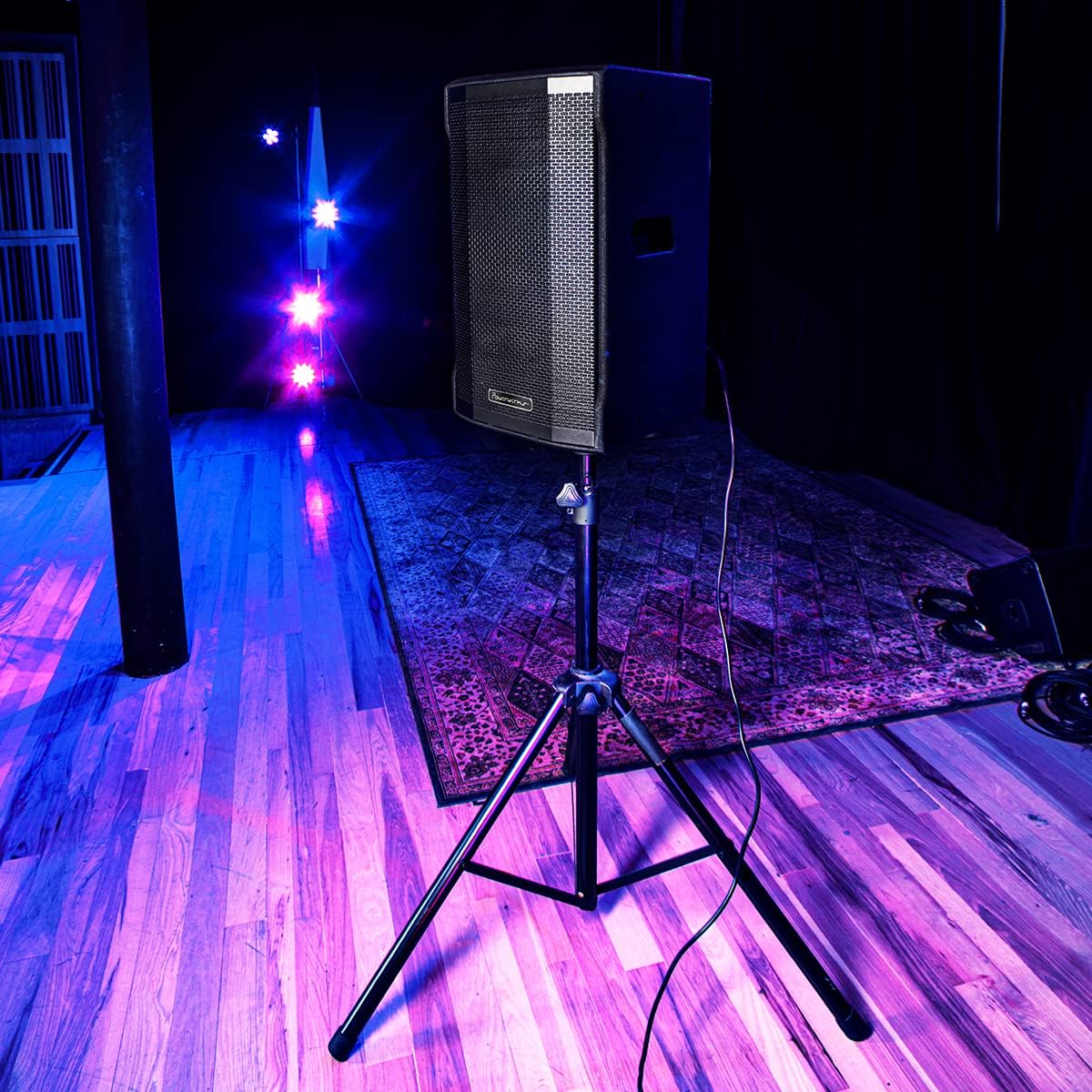
Image 3: The Powerwerks PWR10 speaker positioned on a stand, illustrating a typical setup for live sound applications.
6.2. പവർ കണക്ഷൻ
- പിൻ പാനലിലെ പവർ സ്വിച്ച് ഓഫ് സ്ഥാനത്താണെന്ന് ഉറപ്പാക്കുക.
- Connect the supplied power cord to the AC INLET on the speaker.
- പവർ കോർഡിന്റെ മറ്റേ അറ്റം ഗ്രൗണ്ടഡ് ഇലക്ട്രിക്കൽ ഔട്ട്ലെറ്റിലേക്ക് പ്ലഗ് ചെയ്യുക.
6.3 പ്രാരംഭ പരിശോധനകൾ
- Before powering on, ensure all gain controls are set to their minimum (fully counter-clockwise) position.
- എല്ലാ ഓഡിയോ കേബിളുകളും സുരക്ഷിതമായി ബന്ധിപ്പിച്ചിട്ടുണ്ടെന്ന് ഉറപ്പാക്കുക.
7. പ്രവർത്തന നിർദ്ദേശങ്ങൾ
7.1. പവർ ഓൺ/ഓഫ്
- To power on, flip the POWER switch to the ON position. The POWER LED will illuminate.
- To power off, flip the POWER switch to the OFF position.
7.2. ഓഡിയോ ഉറവിടങ്ങൾ ബന്ധിപ്പിക്കുന്നു
- Connect your microphone or line-level device (e.g., mixer, instrument pre-amp) to INPUT 1 or INPUT 2 using an appropriate XLR or 1/4-inch cable.
- Slowly increase the corresponding GAIN control for the connected input until the desired volume is achieved without the LIMIT LED flashing excessively.
- Adjust the MASTER VOLUME to control the overall output level.
7.3. ബ്ലൂടൂത്ത് ജോടിയാക്കൽ
- Press the PAIR button on the rear panel. The Bluetooth indicator LED will flash, indicating it is in pairing mode.
- On your Bluetooth-enabled device (smartphone, tablet), search for available Bluetooth devices.
- Select "Powerwerks PWR10" from the list.
- Once connected, the Bluetooth indicator LED will glow solid. You can now stream audio wirelessly to the speaker.
7.4. Using DSP Presets
Rotate the DSP EQ PRESETS knob to select the desired sound profile:
- പ്രധാനം: Standard flat response for general use.
- നിരീക്ഷിക്കുക: Tailored for stage monitoring, often with reduced bass to prevent muddiness.
- DJ: Boosted bass and treble for impactful music playback.
- പ്രസംഗം: Optimized for vocal clarity, often with a mid-range boost.
7.5. True Stereo Linking (with another PWR series speaker)
- Ensure both PWR series speakers are powered on and within Bluetooth range.
- On the first speaker (which will act as the master), pair your Bluetooth audio source as described in section 7.3.
- On the master speaker, press the LINK button. The Bluetooth indicator LED will flash.
- On the second speaker (slave), press its LINK button. The Bluetooth indicator LED will flash.
- Once linked, both speakers' Bluetooth indicator LEDs will glow solid, and audio will play in stereo.
8. പരിപാലനം
Regular maintenance helps prolong the life of your speaker.
- വൃത്തിയാക്കൽ: Disconnect the power cord before cleaning. Use a soft, dry cloth to wipe down the cabinet. Do not use abrasive cleaners, solvents, or waxes.
- സംഭരണം: When not in use for extended periods, store the speaker in a dry, dust-free environment.
- പരിശോധന: Periodically check the power cord and audio cables for any signs of damage.
9. പ്രശ്നപരിഹാരം
If you encounter issues with your PWR10 speaker, refer to the following common problems and solutions:
- ശക്തിയില്ല:
- Ensure the power cord is securely connected to both the speaker and a working electrical outlet.
- Check the POWER switch is in the ON position.
- മറ്റൊരു ഉപകരണം പ്ലഗ് ഇൻ ചെയ്ത് ഇലക്ട്രിക്കൽ ഔട്ട്ലെറ്റ് പ്രവർത്തനക്ഷമമാണെന്ന് ഉറപ്പാക്കുക.
- ശബ്ദമില്ല:
- Check that the MASTER VOLUME is turned up.
- Ensure the GAIN controls for the active inputs are adjusted appropriately.
- Verify audio cables are securely connected and not damaged.
- ബ്ലൂടൂത്ത് ഉപയോഗിക്കുകയാണെങ്കിൽ, ഉപകരണം ജോടിയാക്കിയിട്ടുണ്ടെന്നും ഓഡിയോ സ്ട്രീം ചെയ്യുന്നുണ്ടെന്നും ഉറപ്പാക്കുക.
- മറ്റൊരു ഓഡിയോ ഉറവിടമോ കേബിളോ ഉപയോഗിച്ച് പരീക്ഷിക്കുക.
- വികലമായ ശബ്ദം:
- Reduce the GAIN controls for the inputs.
- മാസ്റ്റർ വോളിയം കുറയ്ക്കുക.
- If the LIMIT LED is frequently lit, reduce the input signal level.
- ഓഡിയോ ഉറവിടത്തിൽ എന്തെങ്കിലും വ്യതിയാനങ്ങൾ ഉണ്ടോ എന്ന് പരിശോധിക്കുക.
- ബ്ലൂടൂത്ത് കണക്റ്റുചെയ്യുന്നില്ല:
- Ensure the speaker is in PAIRING mode (Bluetooth LED flashing).
- നിങ്ങളുടെ ഉപകരണത്തിൽ ബ്ലൂടൂത്ത് പ്രവർത്തനക്ഷമമാക്കിയിട്ടുണ്ടെന്ന് ഉറപ്പാക്കുക.
- നിങ്ങളുടെ ഉപകരണം സ്പീക്കറിന് അടുത്തേക്ക് നീക്കുക.
- ഉപകരണം ജോടി മാറ്റി വീണ്ടും ജോടിയാക്കാൻ ശ്രമിക്കുക.
- ബ്ലൂടൂത്ത് വഴി സ്പീക്കറുമായി മറ്റ് ഉപകരണങ്ങളൊന്നും നിലവിൽ ബന്ധിപ്പിച്ചിട്ടില്ലെന്ന് ഉറപ്പാക്കുക.
10 സ്പെസിഫിക്കേഷനുകൾ
Detailed technical specifications for the Powerwerks PWR10 Powered Speaker Cabinet:

Image 4: Diagram illustrating the dimensions of the Powerwerks PWR10 speaker.
| മോഡലിൻ്റെ പേര് | Powerwerks 600 Watt 1 x 10" Speaker |
| സ്പീക്കർ തരം | 2-Channel Active Speaker, Component |
| വൂഫർ വ്യാസം | 10 ഇഞ്ച് |
| വാട്ട്tage | 600 വാട്ട്സ് (പീക്ക്) |
| കണക്റ്റിവിറ്റി ടെക്നോളജി | Bluetooth, XLR, 1/4-inch Line |
| ഓഡിയോ put ട്ട്പുട്ട് മോഡ് | Stereo (via True Stereo Linking) |
| DSP EQ പ്രീസെറ്റുകൾ | Main, Monitor, DJ, Speech |
| ഉൽപ്പന്ന അളവുകൾ (D x W x H) | 28.3" x 15" x 15.6" |
| ഇനത്തിൻ്റെ ഭാരം | 42.9 പൗണ്ട് (19.5 കിലോഗ്രാം) |
| പവർ ഉറവിടം | കോർഡഡ് ഇലക്ട്രിക് |
| മൗണ്ടിംഗ് തരം | ഫ്ലോർ സ്റ്റാൻഡിംഗ്, പോൾ മൗണ്ട് |
| നിറം | കറുപ്പ് |
| യു.പി.സി | 701963063117 |
11. വാറൻ്റിയും പിന്തുണയും
The Powerwerks PWR10 Powered Speaker Cabinet comes with a limited warranty. Please refer to the warranty card included with your product or contact Powerwerks customer support for specific details regarding coverage and duration.
For technical assistance, troubleshooting beyond this manual, or warranty claims, please contact Powerwerks customer support through their official webസൈറ്റ് അല്ലെങ്കിൽ നിങ്ങളുടെ വാങ്ങൽ ഡോക്യുമെന്റേഷനോടൊപ്പം നൽകിയിരിക്കുന്ന ബന്ധപ്പെടാനുള്ള വിവരങ്ങൾ.


