ആമുഖം
Welcome to the Playzoom Kids Smartwatch & Earbuds Set. This device is designed to provide engaging and educational entertainment for children, featuring a camera, games, music playback, and various timekeeping functions. This manual will guide you through the setup, operation, and maintenance of your new Playzoom device.

Figure 1: Playzoom Kids Smartwatch and Earbuds Set
ബോക്സിൽ എന്താണുള്ളത്
എല്ലാ ഇനങ്ങളും ഉണ്ടെന്ന് ഉറപ്പാക്കാൻ പാക്കേജ് ഉള്ളടക്കങ്ങൾ പരിശോധിക്കുക:
- പ്ലേസൂം കിഡ്സ് സ്മാർട്ട് വാച്ച്
- Playzoom Earbuds
- USB-Powered Charging Cable
- Warranty/Quick Start Guide

Figure 2: Contents of the Playzoom Smartwatch and Earbuds Set
സജ്ജമാക്കുക
1 ഉപകരണം ചാർജ് ചെയ്യുന്നു
The Playzoom Smartwatch is powered by a built-in Lithium Ion battery. Before first use, fully charge the device using the provided USB-powered charging cable. Connect the small end of the USB cable to the smartwatch's charging port and the other end to a standard USB power adapter (not included) or a computer's USB port.
A full charge typically takes approximately 2-3 hours. The battery indicator on the screen will show charging progress.
2. പ്രാരംഭ പവർ ഓൺ
Press and hold the power button (usually located on the side of the smartwatch) for a few seconds until the Playzoom logo appears on the screen. The device will boot up and display the main clock face.
പ്രവർത്തന നിർദ്ദേശങ്ങൾ
പൊതു നാവിഗേഷൻ
The smartwatch features a touch screen for easy navigation. Swipe left or right to browse through different applications and functions. Tap an icon to select and open an application.
Digital Camera with Video Record
The smartwatch includes a swivel camera for taking photos and recording videos. To access the camera, tap the camera icon on the screen. You can swivel the camera lens to capture selfies or record your surroundings.
- ഫോട്ടോ എടുക്കുന്നു: Tap the shutter icon to capture an image. The smartwatch can store up to 8000 images.
- വീഡിയോകൾ റെക്കോർഡുചെയ്യുന്നു: Switch to video mode and tap the record button. The device can record up to 28 minutes of video.
- മീഡിയ കൈമാറുന്നു: Photos and videos can be saved and uploaded to your computer via the USB cable. Connect the smartwatch to your computer, and it will appear as a removable storage device.
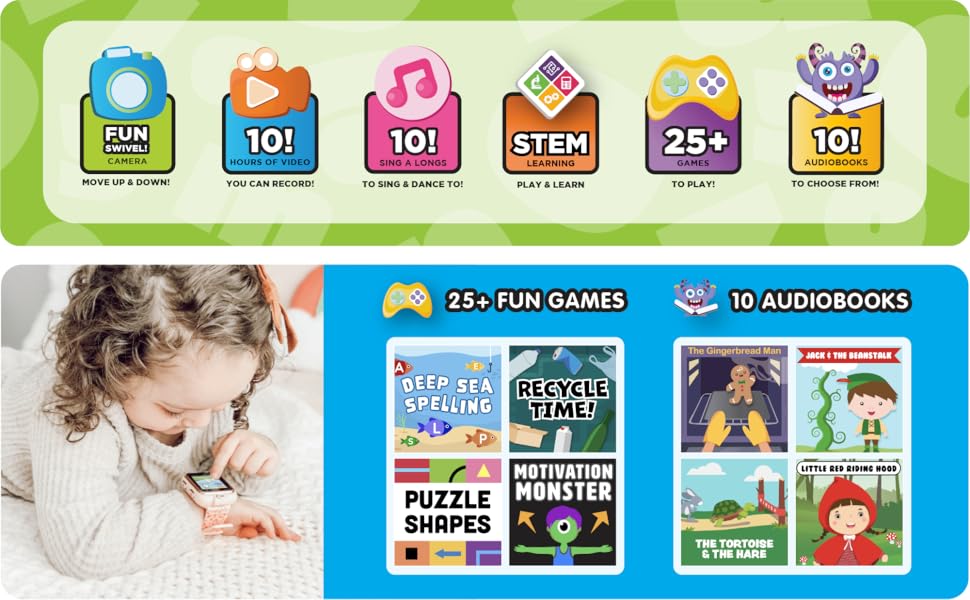
Figure 3: Key Features of the Playzoom Smartwatch
Customizable Clock Faces
Personalize your smartwatch by choosing from various pre-installed wallpapers and screen-savers. Access the settings menu to change the clock face and customize the appearance of your device.
Educational Games and Activities
The smartwatch comes pre-loaded with a variety of learning and active games designed to engage children. These games often include sound animation for an interactive experience.
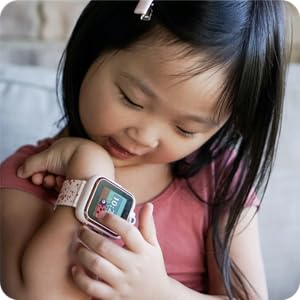
Figure 4: Child Interacting with the Smartwatch
MP3 Music Player & Audio Books
Use the included earbuds to listen to your favorite music and audio stories. The smartwatch supports MP3 playback. Transfer audio files to the device via the USB cable, similar to transferring photos and videos.
Note: No app is needed for this smartwatch, as it does not connect to any data connection or GPS for safe use.
Timekeeping Functions
The smartwatch includes several useful timekeeping tools:
- സ്റ്റോപ്പ് വാച്ച്: സമയക്രമീകരണ പ്രവർത്തനങ്ങൾക്ക്.
- അലാറം: ഓർമ്മപ്പെടുത്തലുകൾക്കായി അലാറങ്ങൾ സജ്ജമാക്കുക.
- ടൈമർ: A countdown timer for various uses.
- കലണ്ടർ: View the current date and month.
മെയിൻ്റനൻസ്
വൃത്തിയാക്കൽ
To clean the smartwatch and earbuds, gently wipe them with a soft, dry, lint-free cloth. Do not use abrasive cleaners, solvents, or aerosol sprays, as these may damage the device. Avoid exposing the device to excessive moisture.
സംഭരണം
When not in use for extended periods, store the device in a cool, dry place away from direct sunlight and extreme temperatures. Ensure the battery is partially charged before storing to prolong its lifespan.
ട്രബിൾഷൂട്ടിംഗ്
If you encounter any issues with your Playzoom Smartwatch, please refer to the following common solutions:
| പ്രശ്നം | സാധ്യമായ കാരണം | പരിഹാരം |
|---|---|---|
| ഉപകരണം പവർ ഓണാക്കുന്നില്ല. | കുറഞ്ഞതോ തീർന്നതോ ആയ ബാറ്ററി. | Charge the device using the USB cable for at least 30 minutes. |
| സ്ക്രീൻ പ്രതികരിക്കുന്നില്ല. | താൽക്കാലിക സോഫ്റ്റ്വെയർ തകരാർ. | ഉപകരണം പുനരാരംഭിക്കുന്നത് വരെ പവർ ബട്ടൺ അമർത്തിപ്പിടിച്ചുകൊണ്ട് ഒരു സോഫ്റ്റ് റീസെറ്റ് നടത്തുക. |
| കൈമാറാൻ കഴിയില്ല fileകമ്പ്യൂട്ടറിലേക്ക്. | തെറ്റായ USB കണക്ഷൻ അല്ലെങ്കിൽ ഡ്രൈവർ പ്രശ്നം. | USB കേബിൾ സുരക്ഷിതമായി ബന്ധിപ്പിച്ചിട്ടുണ്ടെന്ന് ഉറപ്പാക്കുക. മറ്റൊരു USB പോർട്ട് അല്ലെങ്കിൽ കമ്പ്യൂട്ടർ പരീക്ഷിക്കുക. |
| Sound not working with earbuds. | Earbuds not properly plugged in or volume too low. | Ensure earbuds are fully inserted into the audio jack. Check the volume settings on the smartwatch. |
സ്പെസിഫിക്കേഷനുകൾ
| ഫീച്ചർ | വിശദാംശങ്ങൾ |
|---|---|
| ഉൽപ്പന്ന അളവുകൾ | 9 x 2 x 9 ഇഞ്ച് |
| ഇനത്തിൻ്റെ ഭാരം | 7.8 ഔൺസ് |
| മോഡൽ നമ്പർ | PZ202B-42-F01 |
| ബാറ്ററികൾ | 1 ലിഥിയം അയോൺ ബാറ്ററി (ഉൾപ്പെടുത്തിയിരിക്കുന്നു) |
| സ്റ്റാൻഡിംഗ് സ്ക്രീൻ ഡിസ്പ്ലേ വലുപ്പം | 36.58 മില്ലിമീറ്റർ |
| ഓപ്പറേറ്റിംഗ് സിസ്റ്റം | Proprietary (Children's Smartwatch OS) |
| പ്രത്യേക സവിശേഷതകൾ | Back-up battery, light, stopwatch, timer |
| കണക്റ്റിവിറ്റി ടെക്നോളജി | None (No GPS/Data connection for safety) |
| വയർലെസ് കമ്മ്യൂണിക്കേഷൻ സ്റ്റാൻഡേർഡ് | Bluetooth (for internal functions, not external connection) |
| നിർമ്മാതാവ് | American Exchange |
വാറൻ്റിയും പിന്തുണയും
This product comes with a warranty. Please refer to the included "Warranty/Quick Start Guide" for detailed information regarding warranty coverage, terms, and conditions.
For technical support, troubleshooting assistance, or inquiries about your Playzoom Kids Smartwatch & Earbuds Set, please contact the manufacturer, American Exchange, or visit their official support channels as indicated in the product packaging or quick start guide.


