ഉൽപ്പന്നം കഴിഞ്ഞുview
The CalDigit Thunderbolt 4 Element Hub is a versatile multi-port hub designed to expand the connectivity of your computer. This bundle includes the Thunderbolt 4 Element Hub and a USB-C to DisplayPort 1.4 video adapter, providing comprehensive solutions for display and peripheral connections.
It offers ultimate compatibility with Thunderbolt 4, Thunderbolt 3, USB 4, and USB-C Gen. 1 & 2 devices, making it a flexible solution for various setups.

Image: The CalDigit Thunderbolt 4 Element Hub shown with the included USB-C to DisplayPort adapter. The hub is a compact, silver-colored device with multiple ports on its sides, designed for desktop use.
പ്രധാന സവിശേഷതകൾ:
- Ultimate Compatibility: Works with Thunderbolt 4, Thunderbolt 3, USB 4, USB-C Gen. 1 & 2.
- 4 x Thunderbolt 4 40Gb/s Ports: Ideal for high-resolution displays and high-speed NVMe SSD storage devices.
- 4 x USB 3.2 Gen 2 10Gb Ports: Perfect for USB accessories such as keyboards, mice, SSD, or HDD storage devices.
- 60W പവർ ഡെലിവറി: Charge your computer or tablet while connecting up to 7 additional devices.
- USB-C to DisplayPort 1.4 Adapter: Included for easy connection of high-resolution displays, supporting 8K, dual 4K, or 1440p extended displays.
സജ്ജീകരണ ഗൈഡ്
Follow these steps to set up your CalDigit Thunderbolt 4 Element Hub:
1. അൺപാക്ക് ചെയ്യലും പരിശോധനയും
Carefully remove all components from the packaging. Ensure you have the CalDigit Thunderbolt 4 Element Hub, the power adapter, and the USB-C to DisplayPort 1.4 adapter. Inspect all items for any signs of damage.
2. പവർ കണക്ഷൻ
- Connect the power adapter to the DC In port on the back of the CalDigit Element Hub.
- Plug the power adapter into a wall outlet. The hub requires 19V 7.89A DC input.

ചിത്രം: മുകളിൽ നിന്ന് താഴേക്ക് view of the CalDigit Thunderbolt 4 Element Hub, showing the four USB-A ports on one side and the four Thunderbolt 4 ports and DC power input on the other. Various cables are depicted, illustrating connection types.
3. നിങ്ങളുടെ കമ്പ്യൂട്ടറുമായി ബന്ധിപ്പിക്കുന്നു
- Use a Thunderbolt 4 or USB4 cable (not included, typically comes with your computer or hub) to connect one of the Thunderbolt 4 ports on the hub to a Thunderbolt 4, Thunderbolt 3, or USB4 port on your computer.
- Ensure the connection is secure. The hub will provide up to 60W of power delivery to charge your connected laptop or tablet.
4. പെരിഫറലുകളും ഡിസ്പ്ലേകളും ബന്ധിപ്പിക്കുന്നു
- USB ഉപകരണങ്ങൾ: Connect your USB accessories (keyboards, mice, external SSDs/HDDs) to the four USB 3.2 Gen 2 10Gb/s ports.
- തണ്ടർബോൾട്ട് ഉപകരണങ്ങൾ: Connect additional Thunderbolt devices, such as external GPUs or high-speed storage, to the remaining Thunderbolt 4 ports.
- പ്രദർശനങ്ങൾ:
- For display connectivity, use the included USB-C to DisplayPort 1.4 adapter. Connect the USB-C end of the adapter to one of the Thunderbolt 4 ports on the hub.
- Connect a DisplayPort cable from the adapter to your monitor.
- The hub supports a single display up to 8K resolution or dual 4K 60Hz displays. Ensure your computer and monitors support these resolutions.
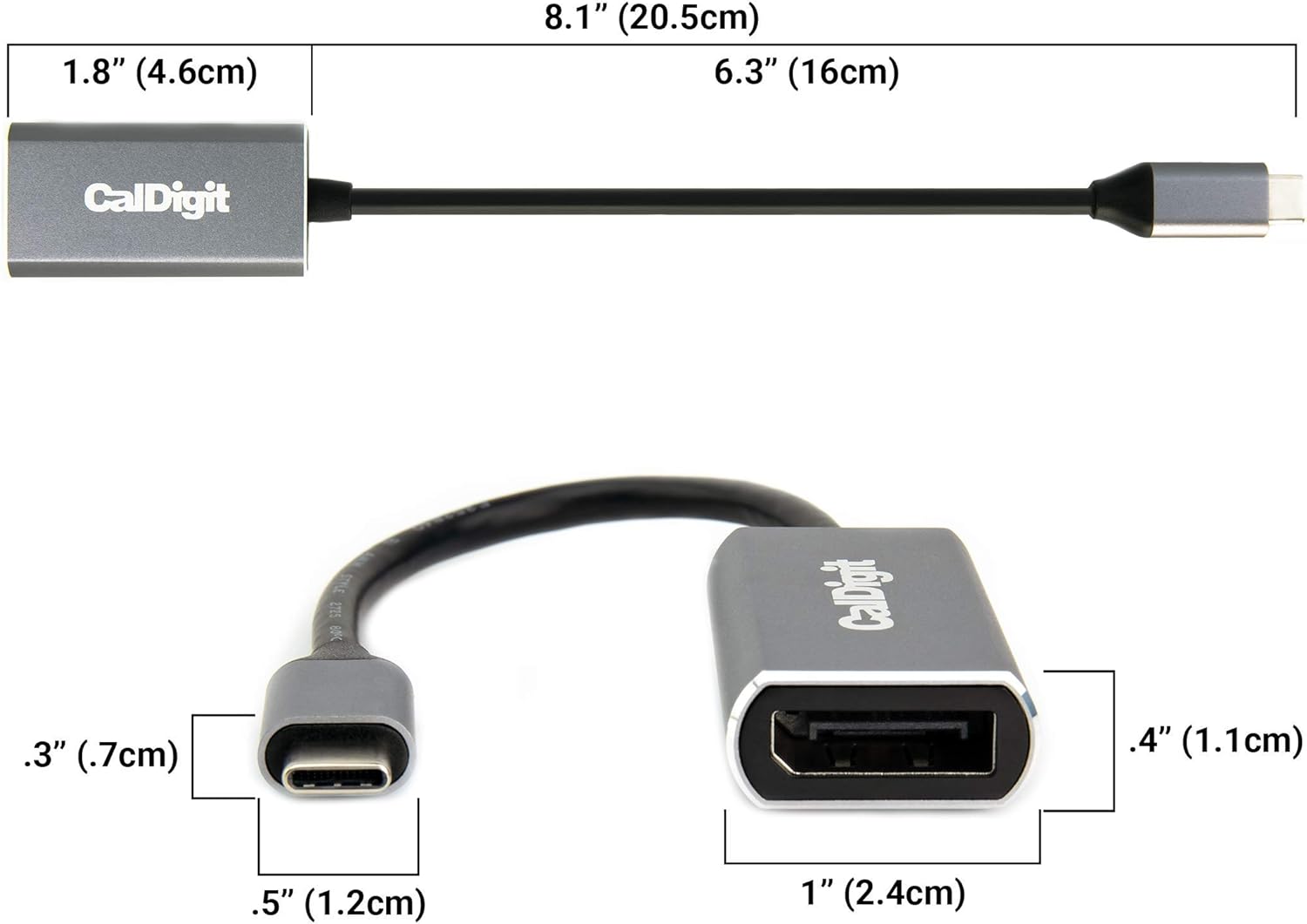
ചിത്രം: വിശദമായത് view of the CalDigit USB-C to DisplayPort 1.4 adapter, showing its dimensions. The adapter has a USB-C connector on one end and a DisplayPort connector on the other, with a short cable connecting them.
പ്രവർത്തന നിർദ്ദേശങ്ങൾ
Once the CalDigit Thunderbolt 4 Element Hub is set up, it operates automatically. Here are some key operational aspects:
ഡിസ്പ്ലേ കണക്റ്റിവിറ്റി
The Element Hub, in conjunction with the USB-C to DisplayPort adapter, allows for flexible display configurations:
- സിംഗിൾ ഡിസ്പ്ലേ: Connect a single monitor up to 8K resolution.
- ഡ്യുവൽ ഡിസ്പ്ലേകൾ: Connect two 4K monitors at 60Hz. Note that dual 4K 60Hz monitors require a Thunderbolt 3, Thunderbolt 4, or USB4 host computer. Some Windows PC manufacturers may limit Thunderbolt 3 ports to a single external monitor. Apple M1 based laptops only support a single display through their Thunderbolt 3 port.

Image: A setup showing a laptop connected to the CalDigit Thunderbolt 4 Element Hub, which in turn is connected to two external 4K monitors. This illustrates the dual display capability of the hub.
പവർ ഡെലിവറി
The hub provides up to 60W of power delivery to your connected host computer (laptop or tablet) through the Thunderbolt 4 connection. This allows you to charge your device while using the hub, reducing cable clutter.
Thunderbolt Daisy-Chain
You can expand your connectivity further by daisy-chaining additional Thunderbolt 3 or Thunderbolt 4 devices through the available Thunderbolt 4 downstream ports on the hub. This allows for a more complex and integrated workflow.

Image: A visual representation of Thunderbolt daisy-chaining, showing a laptop connected to the CalDigit Element Hub, which is then connected to another Thunderbolt device. This demonstrates how to expand your Thunderbolt workflow.
ഹൈ-സ്പീഡ് ഡാറ്റ ട്രാൻസ്ഫർ
The Thunderbolt 4 ports offer 40Gb/s bandwidth, ideal for high-speed NVMe SSDs and other demanding peripherals. The USB 3.2 Gen 2 ports provide 10Gb/s for standard USB accessories and storage devices.

ചിത്രം: ഒരു ക്ലോസ്-അപ്പ് view of the CalDigit Thunderbolt 4 Element Hub connected to a laptop and an external SSD, highlighting its capability to connect blazing fast SSDs with up to 3,000MB/s performance.
അനുയോജ്യത
The CalDigit Thunderbolt 4 Element Hub is designed for broad compatibility, working with a range of devices including iPad Pro, iPad Air (4th Gen), and Windows tablets, in addition to laptops. Users on tablets may experience reduced functionality compared to full desktop operating systems.

Image: An illustration showing the CalDigit Thunderbolt 4 Element Hub connected to an iPad Pro, demonstrating its compatibility with iPad Pro, iPad Air (4th Gen), and Windows Tablet devices. The image emphasizes display, charge, and connect functionalities.
വാറൻ്റിയും പിന്തുണയും
For detailed warranty information, product registration, and technical support, please visit the official CalDigit website. You can find the most up-to-date resources, FAQs, and contact options there.
Official CalDigit Store: CalDigit Store on Amazon
Always refer to the manufacturer's website for the latest drivers, firmware updates, and support documentation to ensure optimal performance and compatibility.


