ആമുഖം
Thank you for choosing the iJoy Ultra Wireless Over-Ear Bluetooth Headphones. These headphones are designed to provide a versatile audio experience with multiple connectivity options and comfortable wear. This manual will guide you through the features, setup, and operation of your new headphones.

Image: iJoy Ultra Wireless Over-Ear Bluetooth Headphones, showcasing the sleek design and over-ear cushions.
ബോക്സിൽ എന്താണുള്ളത്
നിങ്ങളുടെ പാക്കേജിൽ എല്ലാ ഇനങ്ങളും ഉണ്ടെന്ന് ഉറപ്പാക്കുക:
- iJoy Ultra Wireless Over-Ear Bluetooth Headphones
- യുഎസ്ബി ടൈപ്പ് സി ചാർജിംഗ് കേബിൾ
- ഓക്സ് കേബിൾ (3.5 മിമി)
ഉൽപ്പന്നം കഴിഞ്ഞുview
Familiarize yourself with the headphone controls and ports:

ചിത്രം: വശം view of the headphone ear cup, highlighting the control buttons for volume, track skipping, and power/play/pause/call management.
- Volume + / Skip Song: Hold for Volume Up, Press for Next Song.
- Power / Play / Pause / Answer/Reject Calls: Press to Play/Pause or Answer/Reject Calls. Hold to Power On/Off.
- വോളിയം - / മുൻ ഗാനം: Hold for Volume Down, Press for Previous Song.
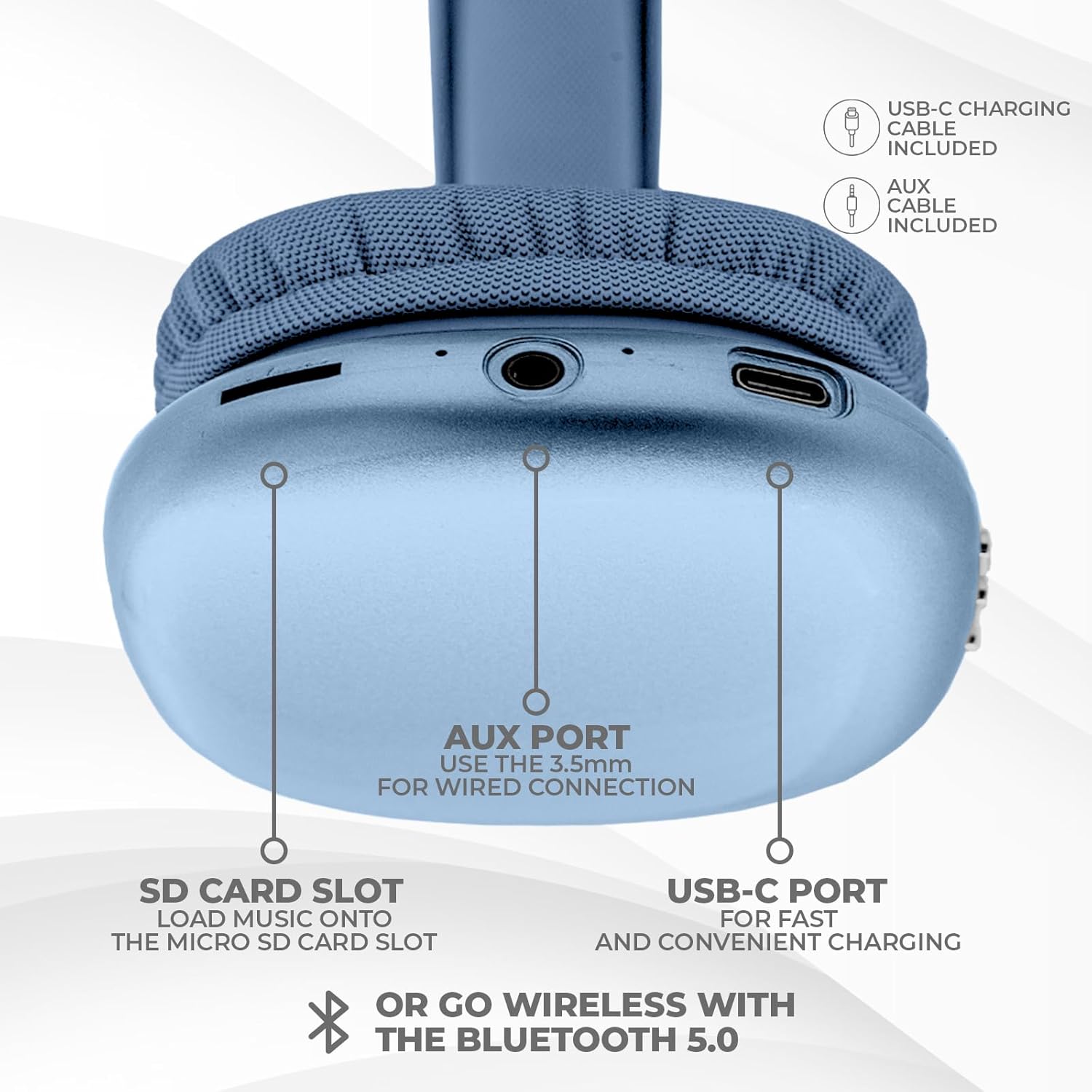
ചിത്രം: താഴെ view of the headphone ear cup, showing the USB-C charging port, AUX port, and SD card slot.
- യുഎസ്ബി-സി പോർട്ട്: ഹെഡ്ഫോണുകൾ ചാർജ് ചെയ്യുന്നതിനായി.
- AUX പോർട്ട് (3.5mm): വയർഡ് ഓഡിയോ കണക്ഷന്.
- SD കാർഡ് സ്ലോട്ട്: For direct audio playback from a Micro SD card.
സജ്ജമാക്കുക
1. ഹെഡ്ഫോണുകൾ ചാർജ് ചെയ്യുന്നു
ആദ്യമായി ഉപയോഗിക്കുന്നതിന് മുമ്പ്, നിങ്ങളുടെ ഹെഡ്ഫോണുകൾ പൂർണ്ണമായും ചാർജ് ചെയ്യുക. പൂർണ്ണമായി ചാർജ് ചെയ്യാൻ ഏകദേശം 2 മണിക്കൂർ എടുക്കും.
- Connect the provided USB Type C charging cable to the USB-C port on the headphone.
- USB കേബിളിന്റെ മറ്റേ അറ്റം അനുയോജ്യമായ ഒരു USB പവർ സ്രോതസ്സുമായി ബന്ധിപ്പിക്കുക (ഉദാ: വാൾ അഡാപ്റ്റർ, കമ്പ്യൂട്ടർ USB പോർട്ട്).
- LED ഇൻഡിക്കേറ്റർ ചാർജിംഗ് സ്റ്റാറ്റസ് കാണിക്കുകയും പൂർണ്ണമായി ചാർജ് ചെയ്യുമ്പോൾ അത് ഓഫാക്കുകയോ നിറം മാറ്റുകയോ ചെയ്യും.
2. ബ്ലൂടൂത്ത് ജോടിയാക്കൽ
To connect your headphones wirelessly:
- ഹെഡ്ഫോണുകൾ ചാർജ് ചെയ്തിട്ടുണ്ടെന്നും പവർ ഓഫ് ചെയ്തിട്ടുണ്ടെന്നും ഉറപ്പാക്കുക.
- ജോടിയാക്കൽ മോഡ് സൂചിപ്പിക്കുന്ന LED ഇൻഡിക്കേറ്റർ മിന്നുന്നതുവരെ പവർ ബട്ടൺ അമർത്തിപ്പിടിക്കുക.
- നിങ്ങളുടെ ഉപകരണത്തിൽ (സ്മാർട്ട്ഫോൺ, ടാബ്ലെറ്റ്, ലാപ്ടോപ്പ്), ബ്ലൂടൂത്ത് പ്രവർത്തനക്ഷമമാക്കി ലഭ്യമായ ഉപകരണങ്ങൾക്കായി തിരയുക.
- Select "iJoy Ultra" from the list of devices.
- Once connected, the LED indicator will typically show a solid light or slow flash.
Note: The Bluetooth range is approximately 10 meters (33 feet).
3. വയർഡ് കണക്ഷൻ (AUX)
For a non-wireless connection or when the battery is low:
- Connect one end of the provided 3.5mm AUX cable to the AUX port on the headphone.
- നിങ്ങളുടെ ഉപകരണത്തിലെ 3.5mm ഓഡിയോ ജാക്കുമായി AUX കേബിളിന്റെ മറ്റേ അറ്റം ബന്ധിപ്പിക്കുക.
- ഹെഡ്ഫോണുകൾ സ്വയമേവ വയർഡ് മോഡിലേക്ക് മാറും.
4. SD കാർഡ് പ്ലേബാക്ക്
To play music directly from a Micro SD card:
- ഒരു മൈക്രോ എസ്ഡി കാർഡ് ഇടുക (സംഗീതത്തോടൊപ്പം) files) into the SD card slot on the headphone.
- The headphones will automatically detect the card and begin playing music.
- Use the track control buttons to navigate your music.
പ്രവർത്തന നിർദ്ദേശങ്ങൾ
പവർ ഓൺ/ഓഫ്
- പവർ ഓൺ: പവർ ബട്ടൺ ഏകദേശം 3 സെക്കൻഡ് അമർത്തിപ്പിടിക്കുക.
- പവർ ഓഫ്: പവർ ബട്ടൺ ഏകദേശം 3 സെക്കൻഡ് അമർത്തിപ്പിടിക്കുക.
സംഗീത പ്ലേബാക്ക്
- പ്ലേ/താൽക്കാലികമായി നിർത്തുക: പവർ ബട്ടൺ ഒരിക്കൽ അമർത്തുക.
- അടുത്ത ട്രാക്ക്: Press the Volume + button once.
- മുമ്പത്തെ ട്രാക്ക്: Press the Volume - button once.
- വോളിയം കൂട്ടുക: Hold the Volume + button.
- വോളിയം താഴേക്ക്: Hold the Volume - button.
കോൾ മാനേജുമെന്റ്
When connected via Bluetooth:
- മറുപടി കോൾ: പവർ ബട്ടൺ ഒരിക്കൽ അമർത്തുക.
- കോൾ അവസാനിപ്പിക്കുക: Press the Power button once during a call.
- കോൾ നിരസിക്കുക: പവർ ബട്ടൺ ഏകദേശം 2 സെക്കൻഡ് അമർത്തിപ്പിടിക്കുക.
ബാറ്ററി ലൈഫ്
The headphones offer up to 10 hours of wireless playtime on a single charge.

Image: Visual representation of the headphones' battery life, indicating up to 10 hours of wireless playtime.
മെയിൻ്റനൻസ്
To ensure the longevity and optimal performance of your iJoy Ultra headphones:
- മൃദുവായതും ഉണങ്ങിയതുമായ തുണി ഉപയോഗിച്ച് ഹെഡ്ഫോണുകൾ പതിവായി വൃത്തിയാക്കുക.
- ഹെഡ്ഫോണുകൾ തീവ്രമായ താപനിലയിലോ, ഈർപ്പംയിലോ, നേരിട്ടുള്ള സൂര്യപ്രകാശത്തിലോ തുറന്നുകാട്ടുന്നത് ഒഴിവാക്കുക.
- ഉരച്ചിലുകളുള്ള ക്ലീനറുകളോ ലായകങ്ങളോ ഉപയോഗിക്കരുത്.
- ഉപയോഗിക്കാത്തപ്പോൾ തണുത്തതും ഉണങ്ങിയതുമായ സ്ഥലത്ത് ഹെഡ്ഫോണുകൾ സൂക്ഷിക്കുക.
- ഹെഡ്ഫോണുകൾ താഴെയിടുകയോ ശക്തമായ ആഘാതങ്ങൾക്ക് വിധേയമാക്കുകയോ ചെയ്യുന്നത് ഒഴിവാക്കുക.
ട്രബിൾഷൂട്ടിംഗ്
നിങ്ങളുടെ ഹെഡ്ഫോണുകളിൽ പ്രശ്നങ്ങൾ നേരിടുകയാണെങ്കിൽ, ഇനിപ്പറയുന്ന പൊതുവായ പരിഹാരങ്ങൾ പരിശോധിക്കുക:
| പ്രശ്നം | പരിഹാരം |
|---|---|
| ഹെഡ്ഫോണുകൾ പവർ ഓൺ ചെയ്യുന്നില്ല. | ഹെഡ്ഫോണുകൾ പൂർണ്ണമായും ചാർജ് ചെയ്തിട്ടുണ്ടെന്ന് ഉറപ്പാക്കുക. USB-C കേബിൾ ഉപയോഗിച്ച് ഒരു പവർ സ്രോതസ്സിലേക്ക് കണക്റ്റ് ചെയ്യുക. |
| ബ്ലൂടൂത്ത് വഴി ജോടിയാക്കാൻ കഴിയില്ല. | Make sure the headphones are in pairing mode (flashing LED). Turn off and on Bluetooth on your device. Ensure no other devices are currently connected to the headphones. Try 'forgetting' the device on your phone and re-pairing. |
| No sound or choppy audio. | Check volume levels on both headphones and your device. Ensure Bluetooth connection is stable or try a wired AUX connection. If using an SD card, ensure it is properly inserted and the fileകൾ അനുയോജ്യമാണ്. |
| Headphones are uncomfortable or too tight. | Adjust the headband for a better fit. The over-ear cushions are designed for comfort, but individual fit may vary. |
| Cannot connect to multiple devices simultaneously. | These headphones typically support connection to one device at a time. Disconnect from the current device before attempting to connect to another. |
സ്പെസിഫിക്കേഷനുകൾ
| ഫീച്ചർ | വിശദാംശങ്ങൾ |
|---|---|
| മോഡലിൻ്റെ പേര് | അൾട്രാ |
| ഇനം മോഡൽ നമ്പർ | IJHP21 |
| കണക്റ്റിവിറ്റി ടെക്നോളജി | വയർലെസ്സ് (ബ്ലൂടൂത്ത്), വയർഡ് (3.5mm AUX) |
| വയർലെസ് കമ്മ്യൂണിക്കേഷൻ ടെക്നോളജി | ബ്ലൂടൂത്ത് |
| ബ്ലൂടൂത്ത് ശ്രേണി | 10 മീറ്റർ (33 അടി) |
| ഹെഡ്ഫോണുകൾ ജാക്ക് | 3.5 mm ജാക്ക് |
| പ്രത്യേക സവിശേഷതകൾ | SD Card Slot, Soft Cushion Padding, USB Type C |
| ബാറ്ററി ലൈഫ് | 10 മണിക്കൂർ വരെ |
| ചാർജിംഗ് സമയം | 2 മണിക്കൂർ |
| നിയന്ത്രണ തരം | Volume Control, Track Management, Call Management |
| ചെവി പ്ലേസ്മെൻ്റ് | ചെവിക്ക് മുകളിൽ |
| മെറ്റീരിയൽ | പ്ലാസ്റ്റിക് |
| ഇനത്തിൻ്റെ ഭാരം | 8 ഔൺസ് |
| ഉൽപ്പന്ന അളവുകൾ | 7 x 3 x 8 ഇഞ്ച് |
| യു.പി.സി | 842700193053 |
ഔദ്യോഗിക ഉൽപ്പന്ന വീഡിയോ
Video: An official product video from iJoy Electronics showcasing the features and design of the iJoy Ultra Bluetooth Over-Ear Headphones.
വാറൻ്റിയും പിന്തുണയും
For warranty information or technical support, please refer to the documentation included with your product or contact iJoy customer service directly. Keep your proof of purchase for any warranty claims.


