1. ആമുഖം
The BOYA BY-XM6 S2 is a 2.4GHz dual-channel wireless microphone system designed to capture clear, broadcast-quality sound. It is ideal for a wide range of applications including vlogging, live streaming, interviews, and mobile journalism. This system offers stable signal transmission, high-fidelity recording, and an intuitive OLED display, making your audio recording process efficient and reliable.
2. പാക്കേജ് ഉള്ളടക്കം
താഴെ ലിസ്റ്റ് ചെയ്തിരിക്കുന്ന എല്ലാ ഇനങ്ങളും നിങ്ങളുടെ പാക്കേജിൽ ഉൾപ്പെടുത്തിയിട്ടുണ്ടെന്ന് ദയവായി പരിശോധിക്കുക:
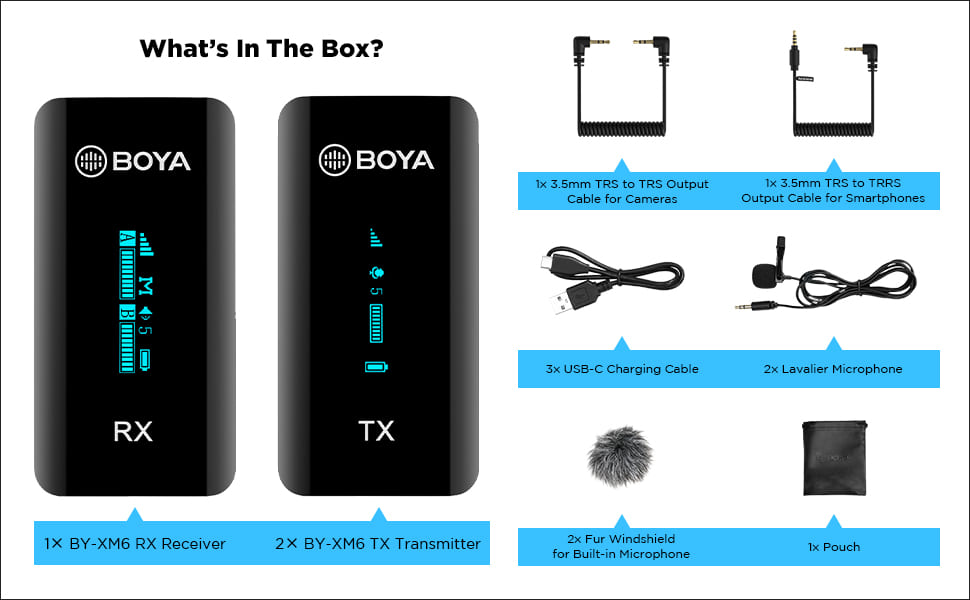
Image: All components included in the BOYA BY-XM6 S2 system package.
- 1x BY-XM6 RX റിസീവർ
- 2x BY-XM6 TX ട്രാൻസ്മിറ്റർ
- ക്യാമറകൾക്കുള്ള 1x 3.5mm ടിആർഎസ് മുതൽ ടിആർഎസ് ഔട്ട്പുട്ട് കേബിൾ
- സ്മാർട്ട്ഫോണുകൾക്കുള്ള 1x 3.5mm ടിആർഎസ് മുതൽ TRRS ഔട്ട്പുട്ട് കേബിൾ വരെ
- 3x USB-C ചാർജിംഗ് കേബിൾ
- 2x ലവലിയർ മൈക്രോഫോൺ
- ബിൽറ്റ്-ഇൻ മൈക്രോഫോണിനുള്ള 2x ഫർ വിൻഡ്ഷീൽഡ്
- 1x സഞ്ചി
3. ഉൽപ്പന്നം കഴിഞ്ഞുview
3.1 ഘടകങ്ങൾ
The BY-XM6 S2 system consists of two transmitters (TX) and one receiver (RX). Each unit is compact and features an OLED display for easy monitoring of settings and battery life.

Image: The BOYA BY-XM6 S2 system, including the receiver (RX) and two transmitters (TX).
3.2 പ്രധാന സവിശേഷതകൾ
- 2.4GHz Digital Frequency: Ensures stable and reliable wireless transmission up to 100 meters (328 feet) without obstacles.
- Dual Channel System: Supports two person interviewing or recording simultaneously.
- ഹൈ-ഫിഡിലിറ്റി റെക്കോർഡിംഗ്: Built-in low-noise microphone and included lavalier microphones provide clear audio.
- OLED ഡിസ്പ്ലേ: Easy-to-read screen shows battery level, signal strength, audio levels, and more.
- Multiple Input Modes: Can be used with the built-in microphone or external lavalier microphones.
- Real-time Headphone Monitoring: Allows you to monitor audio output directly from the receiver.
- മോണോ/സ്റ്റീരിയോ സ്വിച്ച്: Provides flexibility for post-production by allowing selection between mono and stereo recording modes.
- നീണ്ട ബാറ്ററി ലൈഫ്: Up to 7 hours of operation time on a single charge.
- ഒതുക്കമുള്ളതും പോർട്ടബിൾ: Lightweight design for easy carrying and discreet use.

Image: Key features of the BOYA BY-XM6 S2 system, highlighting its wireless capabilities and display.
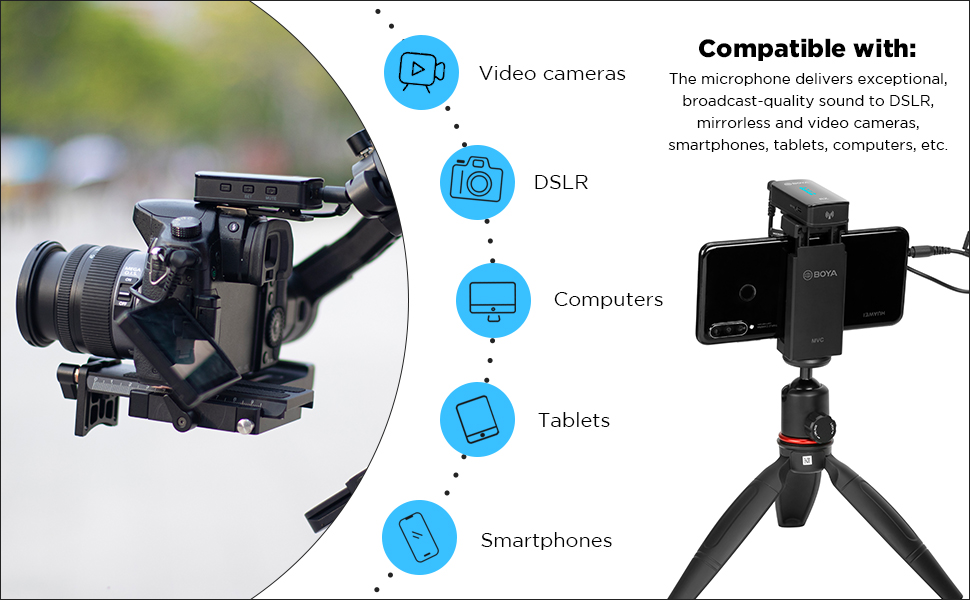
Image: The BOYA BY-XM6 S2 is compatible with various devices including cameras, smartphones, and computers.

Multiple input modes

Up to 7 hours operation time

അൾട്രാ കോംപാക്റ്റ് വലിപ്പം
4. സജ്ജീകരണ ഗൈഡ്
4.1 ഉപകരണങ്ങൾ ചാർജ് ചെയ്യുന്നു
Before first use, fully charge the transmitter (TX) and receiver (RX) units using the provided USB-C charging cables. Connect the cables to a standard USB power adapter (not included) or a computer's USB port. The OLED display will indicate charging status.
4.2 പവർ ഓൺ/ഓഫ്
- പവർ ഓൺ: Long press the power button on both the TX and RX units until the OLED display illuminates.
- പവർ ഓഫ്: Long press the power button again on both units until the display turns off.
4.3 റെക്കോർഡിംഗ് ഉപകരണങ്ങളിലേക്ക് ബന്ധിപ്പിക്കുന്നു
The BY-XM6 S2 system is designed for plug-and-play operation. The TX and RX units will automatically pair upon powering on. If pairing fails, refer to the troubleshooting section.
- For Cameras (DSLR/Mirrorless): Use the 3.5mm TRS to TRS output cable. Connect one end to the RX's 'OUT' port and the other end to your camera's microphone input.
- സ്മാർട്ട്ഫോണുകൾ/ടാബ്ലെറ്റുകൾക്ക്: Use the 3.5mm TRS to TRRS output cable. Connect one end to the RX's 'OUT' port and the other end to your smartphone's headphone/microphone jack. For devices without a 3.5mm jack, an appropriate adapter (e.g., USB-C to 3.5mm or Lightning to 3.5mm) may be required (not included).
- Connecting Lavalier Microphone: Plug the lavalier microphone into the 'MIC IN' port on the TX unit. Ensure it is securely connected.
5. പ്രവർത്തന നിർദ്ദേശങ്ങൾ
5.1 നിശബ്ദ പ്രവർത്തനം
To mute the transmitter, short press the mute button on the TX unit. A mute icon will appear on the OLED display. Short press again to unmute.
5.2 ഗെയിൻ കൺട്രോൾ
Adjust the audio input gain on the TX unit to optimize sound levels and prevent distortion. Use the '+' and '-' buttons to increase or decrease the gain. Monitor the audio level bar on the OLED display to ensure levels are within the optimal range.
5.3 മോണോ/സ്റ്റീരിയോ മോഡ് തിരഞ്ഞെടുക്കൽ
The receiver (RX) allows you to switch between mono and stereo output modes. Navigate through the menu on the RX unit to select the desired mode. In mono mode, both transmitter audio signals are mixed into a single channel. In stereo mode, each transmitter's audio is output to a separate channel (left/right).
5.4 തത്സമയ നിരീക്ഷണം
Connect headphones to the 3.5mm headphone jack on the RX unit to monitor the audio in real-time. This allows you to check audio quality and levels during recording.
6. പരിപാലനം
- വൃത്തിയാക്കൽ: യൂണിറ്റുകൾ വൃത്തിയാക്കാൻ മൃദുവായതും ഉണങ്ങിയതുമായ തുണി ഉപയോഗിക്കുക. കഠിനമായ രാസവസ്തുക്കളോ ഉരച്ചിലുകളോ ഉള്ള വസ്തുക്കളോ ഉപയോഗിക്കരുത്.
- സംഭരണം: Store the system in a cool, dry place away from direct sunlight and extreme temperatures. Use the provided pouch for protection.
- ബാറ്ററി കെയർ: For optimal battery life, avoid fully discharging the units frequently. Charge them regularly, even if not in use for extended periods.
- വിൻഡ്ഷീൽഡുകൾ: Regularly clean or replace the fur windshields to maintain effective wind noise reduction.
7. പ്രശ്നപരിഹാരം
| ഇഷ്യൂ | സാധ്യമായ കാരണം | പരിഹാരം |
|---|---|---|
| ശബ്ദമോ കുറഞ്ഞ വോളിയമോ ഇല്ല | Incorrect cable connection; low gain setting; muted transmitter; low battery. | Ensure cables are securely connected. Adjust gain on TX. Check if TX is muted. Charge units. |
| Voice breaks or signal dropouts | Obstacles between TX and RX; exceeding operating range; strong interference. | Reduce distance between TX and RX. Ensure clear line of sight. Avoid areas with strong Wi-Fi or other 2.4GHz devices. |
| Poor noise cancellation / Excessive background noise | Improper microphone placement; no windshield used; high ambient noise. | Ensure lavalier mic is placed correctly (e.g., 6-8 inches from mouth). Use the fur windshield, especially outdoors. Record in quieter environments. |
| ജോടിയാക്കാത്ത യൂണിറ്റുകൾ | Units too far apart; interference; pairing error. | Bring TX and RX closer together. Power cycle both units. Refer to manual for manual pairing steps if auto-pairing fails. |
| OLED ഡിസ്പ്ലേ പ്രവർത്തിക്കുന്നില്ല | Low battery; unit not powered on; hardware issue. | Charge the unit. Long press power button to ensure it's on. If issue persists, contact support. |
8 സാങ്കേതിക സവിശേഷതകൾ
| ഫീച്ചർ | സ്പെസിഫിക്കേഷൻ |
|---|---|
| ട്രാൻസ്മിഷൻ തരം | 2.4GHz ഡിജിറ്റൽ ഫ്രീക്വൻസി |
| പ്രവർത്തന ശ്രേണി | Up to 100m (328ft) (without obstacle) |
| RF ഔട്ട്പുട്ട് പവർ | <10mW |
| പോളാർ പാറ്റേൺ | ഓമ്നിഡയറക്ഷണൽ |
| ഫ്രീക്വൻസി പ്രതികരണം | 35Hz-18KHz |
| Maximum SPL (Built-in Mic) | 120dB SPL |
| Maximum SPL (Lavalier Mic) | 110dB SPL |
| Sensitivity (Built-in Mic) | -39dB |
| Sensitivity (Lavalier Mic) | -39dB |
| എസ്.എൻ.ആർ | > 84dB |
| പവർ ആവശ്യകതകൾ | അന്തർനിർമ്മിത ലി-അയൺ ബാറ്ററി അല്ലെങ്കിൽ യുഎസ്ബി-സി ഡിസി 5 വി |
| ബിൽറ്റ്-ഇൻ ബാറ്ററി ലൈഫ് | ഏകദേശം 7 മണിക്കൂർ |
| ഓഡിയോ ഇൻപുട്ടുകൾ | 3.5എംഎം ടിആർഎസ് എംഐസി/ലൈൻ ജാക്ക് അല്ലെങ്കിൽ ബിൽറ്റ്-ഇൻ മൈക്രോഫോൺ |
| ഭാരം (TX/RX) | Approx. 32g (1.13oz) each |
| Dimensions (TX/RX) | 62.1 × 31.6 × 16.5 മിമി |
| ഓഡിയോ ഔട്ട്പുട്ട് കണക്റ്റർ | 3.5mm Headphone Jack; 3.5mm TRS Output Jack |
| ഓഡിയോ ഔട്ട്പുട്ട് ലെവൽ | –60 dBV to -20dBV |
9. വാറൻ്റിയും പിന്തുണയും
This product is covered by a manufacturer's warranty. For specific warranty terms and conditions, please refer to the documentation provided with your purchase or visit the official BOYA website. For technical support, service, or inquiries regarding your BOYA BY-XM6 S2 system, please contact the importer/packer:
Dexter Ventures Pvt. Ltd.
New Delhi and Thane Maharashtra
ഇമെയിൽ: contact@dexterventures.in


