1. ആമുഖം
വാങ്ങിയതിന് നന്ദി.asing the Donner DED-70 Electronic Drum Set. This manual provides essential information for the proper setup, operation, and maintenance of your new instrument. The DED-70 is designed to offer a realistic drumming experience with quiet mesh pads, making it ideal for home practice and learning. Its compact and adjustable design accommodates various users, including children and students.

Figure 1: Complete Donner DED-70 Electronic Drum Set
2. സജ്ജീകരണം
2.1 പായ്ക്ക് അൺപാക്ക് ചെയ്യലും ഘടക പരിശോധനയും
Carefully unpack all components from the box. Verify that all parts listed below are present and undamaged:
- ഡ്രം മൊഡ്യൂൾ
- Mesh Drum Pads (4x 6-inch)
- Cymbals (3x 8-inch, 360° sensing)
- കിക്ക് ഡ്രം പെഡൽ
- ഹൈ-ഹാറ്റ് പെഡൽ
- Drum Rack/Stand
- Drum Throne (Stool)
- മുരിങ്ങയില
- ഹെഡ്ഫോണുകൾ
- പവർ അഡാപ്റ്റർ
- കണക്ഷൻ കേബിളുകൾ
2.2 അസംബ്ലി നിർദ്ദേശങ്ങൾ
- Assemble the Drum Rack: Connect the frame components as shown in the diagram. Ensure all joints are securely fastened.
- Attach Pads and Cymbals: Mount the mesh drum pads and cymbals onto the rack. The 360° sensing cymbals can be positioned for optimal playability.
- പെഡലുകൾ ഇൻസ്റ്റാൾ ചെയ്യുക: Place the kick drum pedal and hi-hat pedal on the floor in their respective positions. The kick pedal is designed for a realistic foot feel.
- കേബിളുകൾ ബന്ധിപ്പിക്കുക: Connect each pad, cymbal, and pedal to the drum module using the provided cables. Refer to the module's input labels for correct connections.
- Set up Drum Throne: Assemble the drum stool and adjust its height for comfortable playing posture.

Figure 2: Adjustable stand for ergonomic playing
2.3 ഉയരം ക്രമീകരിക്കൽ
The drum frame and drum throne are adjustable to suit different user heights and playing preferences. Loosen the adjustment clamps, set to the desired height, and securely tighten the clamps. This flexibility ensures comfortable use for children and adults alike.
3. പ്രവർത്തന നിർദ്ദേശങ്ങൾ
3.1 പവർ ഓൺ/ഓഫ്
- പവർ ഓൺ: Connect the power adapter to the drum module and a power outlet. Press the Power button on the module.
- പവർ ഓഫ്: Press and hold the Power button until the module shuts down. Disconnect the power adapter when not in use for extended periods.
- Mobile Power: The DED-70 can also be powered by a mobile battery (not included) for portable use. Connect the mobile battery to the designated power input on the module. Usage time varies with battery capacity.

Figure 3: Connecting a mobile power source
3.2 Sound Module Functions
The drum module is the central control unit for your DED-70. It features:
- ഡ്രം കിറ്റുകൾ: 12 preset drum kits offering a variety of sounds. Use the 'Kit' button to cycle through them.
- ടോണുകൾ: 68 individual instrument tones. These can be assigned to different pads for customization.
- ഗാനങ്ങൾ: Built-in songs for practice. Use the 'Song' button to select and play along.
- വോളിയം നിയന്ത്രണം: Adjust the master volume using the dedicated knob.
- മെട്രോനോം: A built-in metronome helps with rhythm training.

Figure 4: Drum module with various functions
3.3 Quiet Practice with Headphones
For silent practice, connect the included headphones to the headphone jack on the drum module. This allows you to practice without disturbing others, making it suitable for night practice or use in shared living spaces.

Figure 5: Practicing with headphones for quiet sessions
3.4 Pad and Cymbal Response
The DED-70 features high-density, two-layer mesh drum heads that provide a realistic rebound and quiet response. The 8-inch cymbals offer 360° sensing, ensuring consistent sound regardless of where or how they are struck. Integrated buzzers enhance the playing feel and prevent sound loss.

ചിത്രം 6: വിശദമായി view of a mesh drum pad
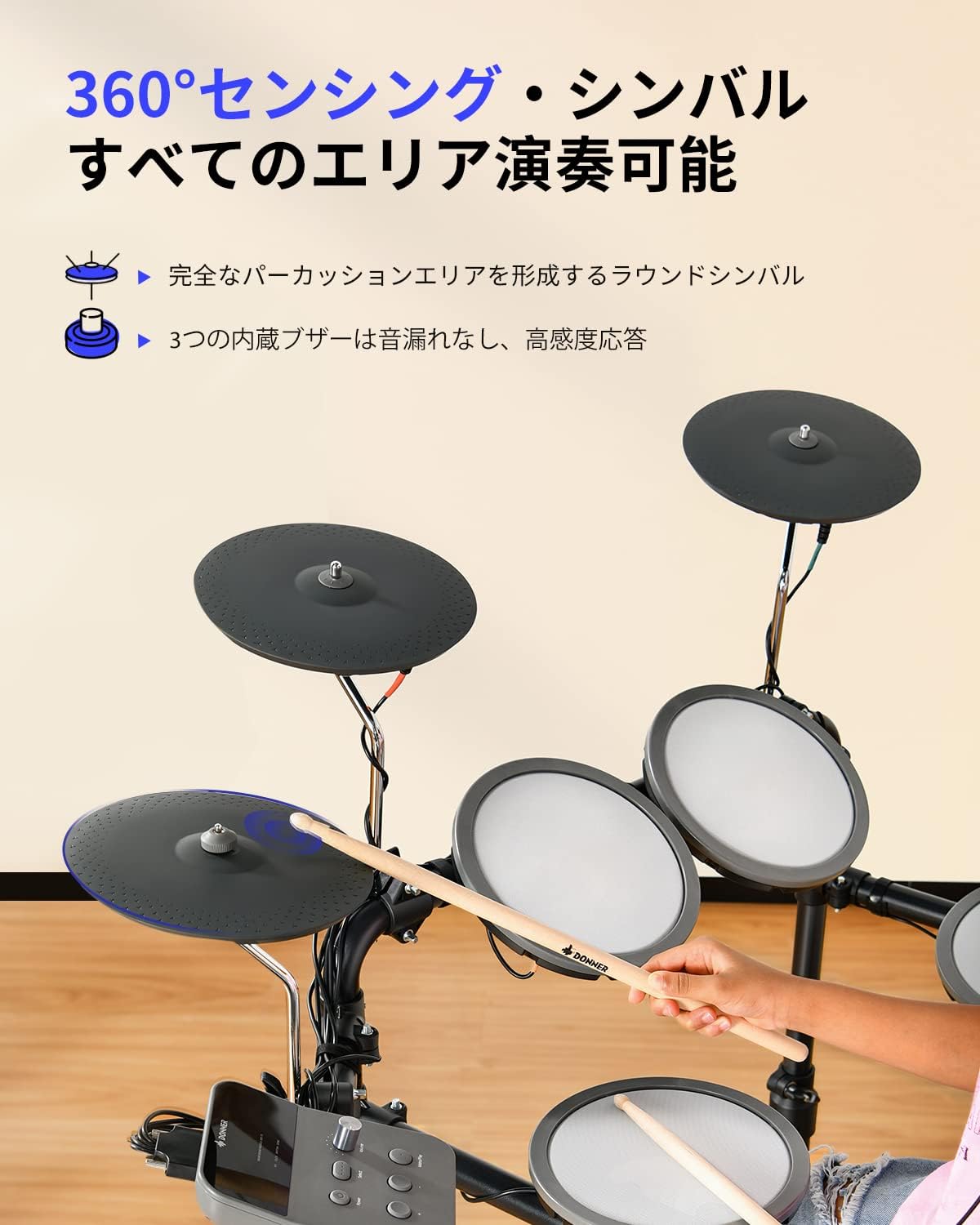
Figure 7: 360-degree sensing cymbal
4. പരിപാലനം
4.1 വൃത്തിയാക്കൽ
- Use a soft, dry cloth to wipe down the drum module, pads, cymbals, and frame.
- കഠിനമായ അഴുക്കിന്, ചെറുതായി dampen the cloth with water. Avoid using abrasive cleaners, solvents, or waxes, as these can damage the surfaces.
- Do not spray cleaning liquids directly onto the drum module or any electronic components.
4.2 സംഭരണം
- Store the drum set in a cool, dry place away from direct sunlight, extreme temperatures, and high humidity.
- If storing for an extended period, disconnect the power adapter and consider covering the drum set to protect it from dust.
- The foldable design allows for compact storage when not in use.
4.3 Care for Mesh Pads and Cymbals
- Avoid striking the mesh pads or cymbals with excessive force, which can cause damage.
- Use only the provided or recommended drumsticks.
- Regularly check the tension of the mesh pads. If adjustable, ensure they are set to a comfortable playing tension.
5. പ്രശ്നപരിഹാരം
If you encounter issues with your DED-70, please refer to the following common problems and solutions:
| പ്രശ്നം | സാധ്യമായ കാരണം | പരിഹാരം |
|---|---|---|
| No sound from headphones/output. | Volume too low; cables disconnected; headphones faulty. | Increase volume; check all cable connections; test with different headphones. |
| Pad/Cymbal unresponsive or inconsistent. | Cable loose; pad/cymbal damaged; module settings incorrect. | Check cable connections; ensure pads/cymbals are securely mounted; reset module to factory settings if necessary. |
| Drum module not powering on. | Power adapter not connected; power outlet faulty; mobile battery depleted. | Ensure power adapter is fully connected; try a different power outlet; charge or replace mobile battery. |
| പെഡലുകൾ പ്രതികരിക്കുന്നില്ല. | Pedal cable loose; pedal damaged. | Check pedal cable connection to the module; ensure pedal is placed on a stable surface. |
ഈ പരിഹാരങ്ങൾ പരീക്ഷിച്ചതിനു ശേഷവും പ്രശ്നം നിലനിൽക്കുകയാണെങ്കിൽ, ദയവായി ഡോണർ കസ്റ്റമർ സപ്പോർട്ടുമായി ബന്ധപ്പെടുക.
6 സ്പെസിഫിക്കേഷനുകൾ
| ഫീച്ചർ | വിശദാംശങ്ങൾ |
|---|---|
| മോഡൽ | DED-70 |
| ബ്രാൻഡ് | ഡോണർ |
| ഡ്രം പാഡുകൾ | 4 x 6-inch Mesh Pads |
| കൈത്താളങ്ങൾ | 3 x 8-inch Cymbals (360° sensing) |
| ഡ്രം കിറ്റുകൾ | 12 Preset Kits |
| ടോണുകൾ | 68 ടൺ |
| ഗാനങ്ങൾ | Built-in Practice Songs |
| വൈദ്യുതി വിതരണം | 2-way (AC Adapter, Mobile Battery compatible) |
| മെറ്റീരിയൽ | Iron, Rubber |
| ഉൽപ്പന്ന അളവുകൾ (LxWxH) | 97 x 50 x 105 സെ.മീ |
| ഉൾപ്പെടുത്തിയ ഘടകങ്ങൾ | Drumsticks, Headphones, Drum Throne, Power Adapter, Cables |
7. വാറൻ്റിയും പിന്തുണയും
7.1 വാറൻ്റി വിവരങ്ങൾ
ഡോണർ ഉൽപ്പന്നങ്ങൾ ഉയർന്ന നിലവാരമുള്ള മാനദണ്ഡങ്ങൾ പാലിച്ചാണ് നിർമ്മിക്കുന്നത്. നിർദ്ദിഷ്ട വാറന്റി നിബന്ധനകൾക്കും വ്യവസ്ഥകൾക്കും, നിങ്ങളുടെ ഉൽപ്പന്നത്തിനൊപ്പം ഉൾപ്പെടുത്തിയിരിക്കുന്ന വാറന്റി കാർഡ് പരിശോധിക്കുകയോ ഔദ്യോഗിക ഡോണർ സന്ദർശിക്കുകയോ ചെയ്യുക. webസൈറ്റ്. വാറന്റി ക്ലെയിമുകൾക്കായി നിങ്ങളുടെ വാങ്ങലിന്റെ തെളിവ് സൂക്ഷിക്കുക.
7.2 ഉപഭോക്തൃ പിന്തുണ
If you have any questions, require technical assistance, or need to report an issue with your Donner DED-70 Electronic Drum Set, please contact Donner customer support through their official webസൈറ്റ് അല്ലെങ്കിൽ നിങ്ങളുടെ ഉൽപ്പന്ന പാക്കേജിംഗിൽ നൽകിയിരിക്കുന്ന ബന്ധപ്പെടാനുള്ള വിവരങ്ങൾ.


