ആമുഖം
This manual provides detailed instructions for the safe and efficient operation of your Max Power MPD816 PA Speaker. Please read this manual thoroughly before using the product and retain it for future reference.
The Max Power MPD816 is a portable PA speaker system designed for both indoor and outdoor use, featuring Bluetooth connectivity, LED lights, a rechargeable battery, and inputs for a microphone and auxiliary devices.
പാക്കേജ് ഉള്ളടക്കം
പാക്കേജിൽ എല്ലാ ഇനങ്ങളും ഉണ്ടെന്ന് ഉറപ്പാക്കുക:
- Max Power MPD816 PA Speaker
- വയർഡ് മൈക്രോഫോൺ
- റിമോട്ട് കൺട്രോൾ
- ടൈപ്പ്-സി ചാർജിംഗ് കേബിൾ
- ഉപയോക്തൃ മാനുവൽ (ഈ പ്രമാണം)

Figure 1: Max Power MPD816 PA Speaker with included wired microphone, remote control, and charging cable.
സജ്ജമാക്കുക
1. സ്പീക്കറിൽ നിന്ന് നിരക്ക് ഈടാക്കുന്നു
Before initial use, fully charge the speaker's built-in lithium-ion battery. The speaker comes with a Type-C charging cable for fast charging.
- Connect the Type-C charging cable to the charging port on the speaker.
- Connect the other end of the charging cable to a compatible AC power adapter (not included) or a USB power source.
- The charging indicator light will illuminate. Once fully charged, the indicator light may change color or turn off, depending on the model.
- ഒരു ഫുൾ ചാർജ് ഏകദേശം 6 മണിക്കൂർ പ്ലേബാക്ക് സമയം നൽകുന്നു.
Note: Use only the provided charging cable or a certified Type-C cable to prevent damage to the device.
2. പവർ ഓൺ/ഓഫ്
Locate the power switch on the control panel of the speaker.
- പവർ ഓൺ ചെയ്യാൻ: ഡിസ്പ്ലേ പ്രകാശിക്കുന്നത് വരെ പവർ ബട്ടൺ അമർത്തിപ്പിടിക്കുക.
- പവർ ഓഫ് ചെയ്യാൻ: ഡിസ്പ്ലേ ഓഫാകുന്നതുവരെ പവർ ബട്ടൺ അമർത്തിപ്പിടിക്കുക.
3. മൈക്രോഫോൺ ബന്ധിപ്പിക്കുന്നു
The wired microphone can be connected for karaoke or public address functions.
- Locate the microphone input jack on the speaker's control panel.
- Insert the microphone cable into the microphone input jack.
- Adjust the microphone volume using the dedicated knob on the control panel or the remote control.

Figure 2: Speaker control panel with various inputs and controls.
പ്രവർത്തന നിർദ്ദേശങ്ങൾ
1. ബ്ലൂടൂത്ത് കണക്റ്റിവിറ്റി
Connect your smartphone, tablet, or other Bluetooth-enabled device wirelessly to the speaker.
- Power on the speaker. The speaker will automatically enter Bluetooth pairing mode, indicated by a flashing Bluetooth icon on the display or an audible prompt.
- നിങ്ങളുടെ ഉപകരണത്തിൽ, ബ്ലൂടൂത്ത് പ്രവർത്തനക്ഷമമാക്കി ലഭ്യമായ ഉപകരണങ്ങൾക്കായി തിരയുക.
- Select "Max Power MPD816" (or similar name) from the list of devices.
- Once paired, the speaker will emit a confirmation sound, and the Bluetooth icon will stop flashing.
- ഇപ്പോൾ നിങ്ങളുടെ ഉപകരണത്തിൽ നിന്ന് സ്പീക്കറിലൂടെ ഓഡിയോ പ്ലേ ചെയ്യാൻ കഴിയും.
Note: The effective Bluetooth range is typically 5-10 meters. Obstacles may reduce this range.
2. എഫ്എം റേഡിയോ മോഡ്
Listen to your favorite radio stations using the built-in FM tuner.
- Press the "Mode" button on the speaker or remote control until "FM" is displayed.
- Press the "Play/Pause" button to automatically scan and save available FM stations.
- സംരക്ഷിച്ച സ്റ്റേഷനുകൾക്കിടയിൽ നാവിഗേറ്റ് ചെയ്യാൻ "മുമ്പത്തേത്", "അടുത്തത്" ബട്ടണുകൾ ഉപയോഗിക്കുക.
3. USB/TF കാർഡ് പ്ലേബാക്ക്
ഓഡിയോ പ്ലേ ചെയ്യുക files directly from a USB flash drive or TF (MicroSD) card.
- Insert a USB flash drive into the USB port or a TF card into the TF card slot.
- സ്പീക്കർ യാന്ത്രികമായി USB അല്ലെങ്കിൽ TF കാർഡ് മോഡിലേക്ക് മാറുകയും ഓഡിയോ പ്ലേ ചെയ്യാൻ തുടങ്ങുകയും ചെയ്യും. files. If not, press the "Mode" button to select the correct input.
- പ്ലേബാക്ക് നിയന്ത്രിക്കാൻ "പ്ലേ/താൽക്കാലികമായി നിർത്തുക", "മുമ്പത്തേത്", "അടുത്തത്" ബട്ടണുകൾ ഉപയോഗിക്കുക.
4. AUX ഇൻപുട്ട് മോഡ്
Connect external audio devices using an auxiliary cable.
- 3.5mm ഓഡിയോ കേബിളിന്റെ ഒരു അറ്റം (ഉൾപ്പെടുത്തിയിട്ടില്ല) സ്പീക്കറിലെ AUX ഇൻപുട്ട് പോർട്ടുമായി ബന്ധിപ്പിക്കുക.
- Connect the other end to the headphone jack or audio output of your external device (e.g., MP3 player, laptop).
- Press the "Mode" button on the speaker or remote control until "AUX" is displayed.
- നിങ്ങളുടെ ബാഹ്യ ഉപകരണത്തിൽ നിന്ന് പ്ലേബാക്കും ശബ്ദവും നിയന്ത്രിക്കുക.
5. LED Lights Control
The speaker features multi-color LED lights that can be turned on or off.
- Locate the dedicated LED light button on the control panel or remote control.
- Press the button to cycle through light modes or to turn the lights on/off.
6. റിമോട്ട് കൺട്രോൾ ഉപയോഗിക്കുന്നത്
ഉൾപ്പെടുത്തിയിരിക്കുന്ന റിമോട്ട് കൺട്രോൾ ദൂരെ നിന്ന് വിവിധ ഫംഗ്ഷനുകളിലേക്ക് സൗകര്യപ്രദമായ പ്രവേശനം നൽകുന്നു.
- ശക്തി: സ്പീക്കർ ഓൺ/ഓഫ് ചെയ്യുക.
- മോഡ്: Switch between Bluetooth, FM, USB/TF, and AUX modes.
- വോളിയം +/-: മാസ്റ്റർ വോളിയം ക്രമീകരിക്കുക.
- പ്ലേ/താൽക്കാലികമായി നിർത്തുക: ഓഡിയോ പ്ലേബാക്ക് പ്ലേ ചെയ്യുക അല്ലെങ്കിൽ താൽക്കാലികമായി നിർത്തുക.
- മുമ്പത്തെ അടുത്തത്: Skip tracks or navigate FM stations.
- EQ: Select equalizer presets (if available).
- നിശബ്ദമാക്കുക: ഓഡിയോ ഔട്ട്പുട്ട് നിശബ്ദമാക്കുക.
- നമ്പർ പാഡ്: Direct track selection in USB/TF mode.
മെയിൻ്റനൻസ്
- വൃത്തിയാക്കൽ: സ്പീക്കറിന്റെ പുറംഭാഗം വൃത്തിയാക്കാൻ മൃദുവായതും ഉണങ്ങിയതുമായ തുണി ഉപയോഗിക്കുക. അബ്രസീവ് ക്ലീനറുകൾ, മെഴുക് അല്ലെങ്കിൽ ലായകങ്ങൾ ഉപയോഗിക്കരുത്.
- സംഭരണം: ദീർഘനേരം ഉപയോഗിക്കാത്തപ്പോൾ, നേരിട്ടുള്ള സൂര്യപ്രകാശത്തിൽ നിന്നും കടുത്ത താപനിലയിൽ നിന്നും മാറി തണുത്തതും വരണ്ടതുമായ സ്ഥലത്ത് സ്പീക്കർ സൂക്ഷിക്കുക.
- ബാറ്ററി കെയർ: ബാറ്ററി ലൈഫ് വർദ്ധിപ്പിക്കാൻ, ബാറ്ററി ഇടയ്ക്കിടെ പൂർണ്ണമായും ഡിസ്ചാർജ് ചെയ്യുന്നത് ഒഴിവാക്കുക. ബാറ്ററിയുടെ ആരോഗ്യം നിലനിർത്താൻ, ഉപയോഗത്തിലില്ലെങ്കിൽ പോലും, സ്പീക്കർ പതിവായി റീചാർജ് ചെയ്യുക.
- വാട്ടർ എക്സ്പോഷർ: This speaker is not waterproof. Avoid exposing it to rain, splashes, or high humidity.
ട്രബിൾഷൂട്ടിംഗ്
| പ്രശ്നം | സാധ്യമായ കാരണം | പരിഹാരം |
|---|---|---|
| സ്പീക്കർ പവർ ഓൺ ചെയ്യുന്നില്ല. | ബാറ്ററി ഡിസ്ചാർജ് ചെയ്തു. | Connect the speaker to a power source using the Type-C charging cable and allow it to charge. |
| സ്പീക്കറിൽ നിന്ന് ശബ്ദമൊന്നുമില്ല. | Volume is too low or muted. Incorrect input mode selected. Device not properly connected. | Increase the volume on the speaker and your connected device. Ensure the speaker is not muted. Press the "Mode" button to select the correct input (Bluetooth, AUX, USB/TF). Re-establish Bluetooth connection or re-insert AUX/USB/TF. |
| ബ്ലൂടൂത്ത് ഉപകരണം ജോടിയാക്കാൻ കഴിയില്ല. | Speaker is not in pairing mode. Device is out of range. Another device is already connected. | Ensure the speaker is in Bluetooth mode and flashing. Move your device closer to the speaker. Disconnect any previously paired devices from the speaker or your device. |
| മൈക്രോഫോൺ പ്രവർത്തിക്കുന്നില്ല. | Microphone not properly connected. Microphone volume is too low. | Ensure the microphone cable is fully inserted into the microphone input. Adjust the microphone volume knob on the speaker. |
| റിമോട്ട് കൺട്രോൾ പ്രവർത്തിക്കുന്നില്ല. | Battery in remote is dead. Obstruction between remote and speaker. | Replace the battery in the remote control. Ensure there is a clear line of sight between the remote and the speaker's IR receiver. |
സ്പെസിഫിക്കേഷനുകൾ
| മോഡൽ നമ്പർ | MPD816 |
| ബ്രാൻഡ് | പരമാവധി പവർ |
| പവർ ഉറവിടം | AC (for charging) |
| ബാറ്ററി തരം | 1 ലിഥിയം അയോൺ (ഉൾപ്പെടുത്തിയിരിക്കുന്നു) |
| ബാറ്ററി ലൈഫ് | ഏകദേശം 6 മണിക്കൂർ |
| കണക്റ്റിവിറ്റി ടെക്നോളജി | ബ്ലൂടൂത്ത്, യുഎസ്ബി |
| ഓഡിയോ ഇൻപുട്ടുകൾ | AUX (3.5mm), Microphone, USB, TF Card |
| മെറ്റീരിയൽ | പ്ലാസ്റ്റിക് |
| അളവുകൾ (H x W x D) | 26.11 x 12.2 x 11.2 inches (approximate package dimensions, actual product dimensions are similar) |
| ഇനത്തിൻ്റെ ഭാരം | 9.08 പൗണ്ട് |
| യു.പി.സി | 761062716826 |
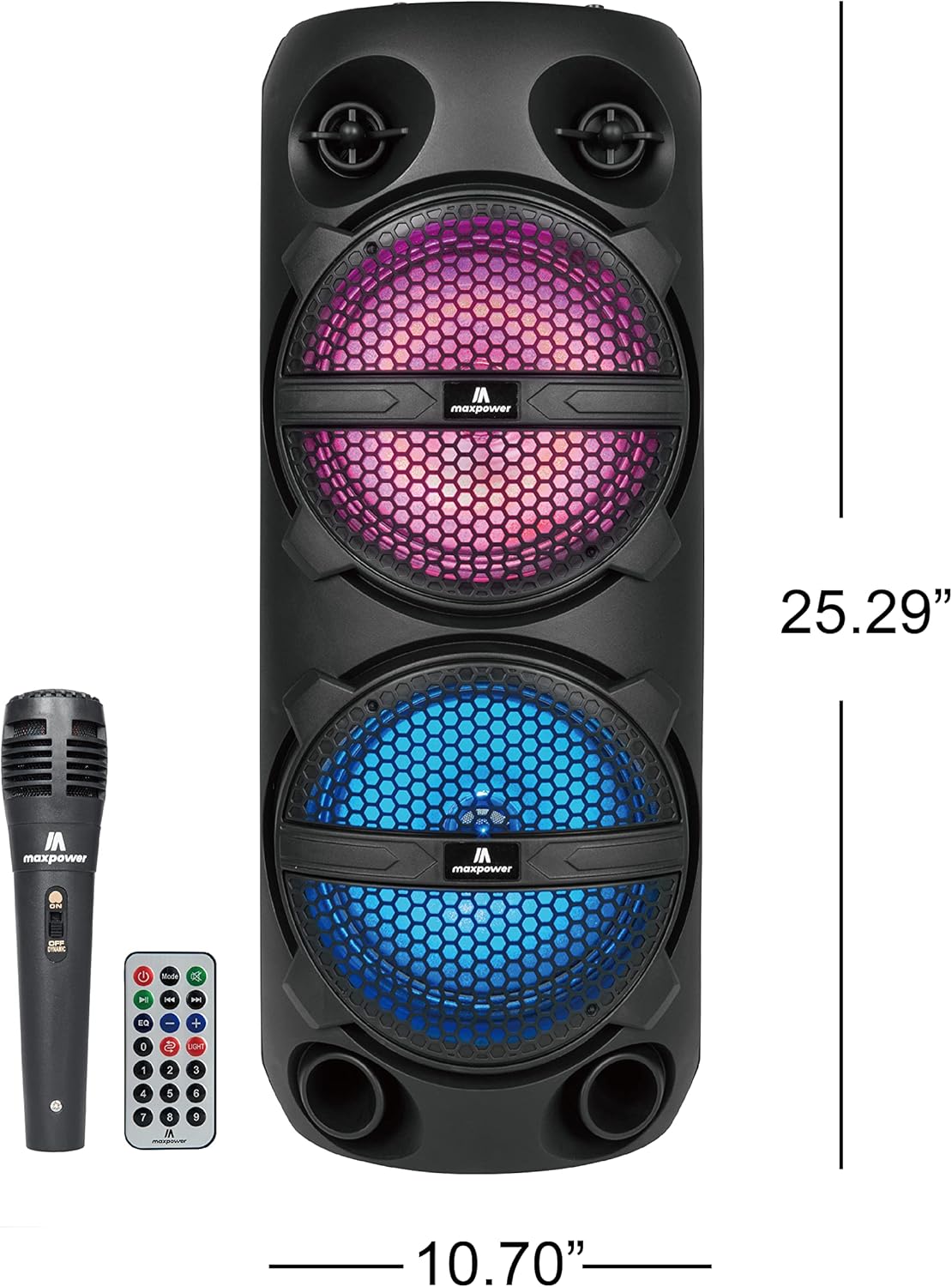
Figure 3: Max Power MPD816 PA Speaker with approximate dimensions.
സുരക്ഷാ വിവരങ്ങൾ
പ്രധാനപ്പെട്ട സുരക്ഷാ നിർദ്ദേശങ്ങൾ:
- ഈ നിർദ്ദേശങ്ങൾ ശ്രദ്ധാപൂർവ്വം വായിക്കുക.
- ഭാവി റഫറൻസിനായി ഈ നിർദ്ദേശങ്ങൾ സൂക്ഷിക്കുക.
- എല്ലാ മുന്നറിയിപ്പുകളും ശ്രദ്ധിക്കുക.
- എല്ലാ നിർദ്ദേശങ്ങളും പാലിക്കുക.
- വെള്ളത്തിനടുത്ത് ഈ ഉപകരണം ഉപയോഗിക്കരുത്.
- ഉണങ്ങിയ തുണി ഉപയോഗിച്ച് മാത്രം വൃത്തിയാക്കുക.
- വെന്റിലേഷൻ തുറസ്സുകളൊന്നും തടയരുത്. നിർമ്മാതാവിന്റെ നിർദ്ദേശങ്ങൾക്കനുസൃതമായി ഇൻസ്റ്റാൾ ചെയ്യുക.
- റേഡിയറുകൾ, ഹീറ്റ് രജിസ്റ്ററുകൾ, സ്റ്റൗകൾ, അല്ലെങ്കിൽ മറ്റ് ഉപകരണങ്ങൾ (ഉൾപ്പെടെ) പോലെയുള്ള താപ സ്രോതസ്സുകൾക്ക് സമീപം ഇൻസ്റ്റാൾ ചെയ്യരുത്. ampലൈഫയറുകൾ) ചൂട് ഉത്പാദിപ്പിക്കുന്നത്.
- പ്രത്യേകിച്ച് പ്ലഗുകൾ, കൺവീനിയൻസ് റെസെപ്റ്റക്കിളുകൾ, ഉപകരണത്തിൽ നിന്ന് പുറത്തുകടക്കുന്ന ഇടം എന്നിവയിൽ നടക്കുകയോ നുള്ളുകയോ ചെയ്യുന്നതിൽ നിന്ന് പവർ കോർഡ് സംരക്ഷിക്കുക.
- നിർമ്മാതാവ് വ്യക്തമാക്കിയ അറ്റാച്ച്മെൻ്റുകൾ/ആക്സസറികൾ മാത്രം ഉപയോഗിക്കുക.
- മിന്നൽ കൊടുങ്കാറ്റുകളുടെ സമയത്തോ ദീർഘനേരം ഉപയോഗിക്കാത്ത സമയത്തോ ഈ ഉപകരണം അൺപ്ലഗ് ചെയ്യുക.
- എല്ലാ സേവനങ്ങളും യോഗ്യതയുള്ള സേവന ഉദ്യോഗസ്ഥർക്ക് റഫർ ചെയ്യുക. പവർ സപ്ലൈ കോർഡ് അല്ലെങ്കിൽ പ്ലഗ് കേടാകുക, ദ്രാവകം ഒഴുകുകയോ ഉപകരണങ്ങൾ ഉപകരണത്തിലേക്ക് വീഴുകയോ ചെയ്യുക, ഉപകരണം മഴയോ ഈർപ്പമോ സമ്പർക്കം പുലർത്തുക, സാധാരണയായി പ്രവർത്തിക്കാത്തത് എന്നിങ്ങനെയുള്ള ഏതെങ്കിലും വിധത്തിൽ ഉപകരണത്തിന് കേടുപാടുകൾ സംഭവിക്കുമ്പോൾ സേവനം ആവശ്യമാണ്. , അല്ലെങ്കിൽ ഉപേക്ഷിച്ചു.


