1. ആമുഖം
Thank you for choosing the Wiko T50 smartphone. This manual provides essential information on how to set up, operate, and maintain your device. Please read this manual carefully before using your Wiko T50 to ensure proper functionality and safety.
2 സുരക്ഷാ വിവരങ്ങൾ
Always follow basic safety precautions when using your Wiko T50 to reduce the risk of injury, electric shock, fire, or damage to the device.
- ഉപകരണത്തെ തീവ്രമായ താപനിലയിലോ, നേരിട്ടുള്ള സൂര്യപ്രകാശത്തിലോ, ഉയർന്ന ആർദ്രതയിലോ തുറന്നുകാട്ടരുത്.
- Use only Wiko-approved chargers and accessories.
- ഉപകരണം താഴെയിടുകയോ ഗുരുതരമായ ആഘാതത്തിന് വിധേയമാക്കുകയോ ചെയ്യുന്നത് ഒഴിവാക്കുക.
- ഉപകരണം സ്വയം വേർപെടുത്താനോ നന്നാക്കാനോ ശ്രമിക്കരുത്. യോഗ്യതയുള്ള സേവന ഉദ്യോഗസ്ഥരെ ബന്ധപ്പെടുക.
- Keep the device away from pacemakers and other medical devices.
3. പാക്കേജ് ഉള്ളടക്കം
Ensure all items are present in your Wiko T50 package:
- Wiko T50 Smartphone
- ചാർജർ
- Lithium Polymer Battery (pre-installed or included)
- ഉപയോക്തൃ മാനുവൽ (ഈ പ്രമാണം)
4. ഉൽപ്പന്നം കഴിഞ്ഞുview
Familiarize yourself with the physical features of your Wiko T50 smartphone.
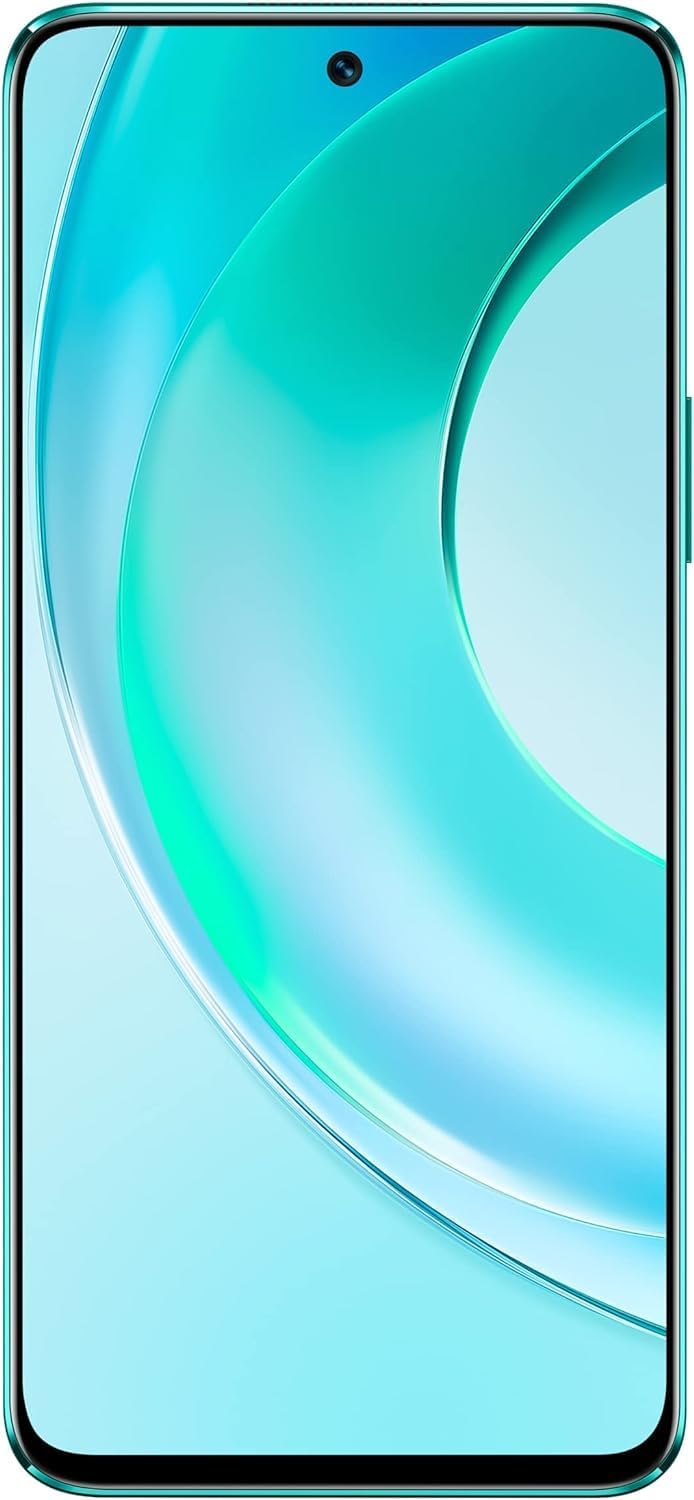
ചിത്രം 4.1: ഫ്രണ്ട് view of the Wiko T50 smartphone, showcasing its large display and front camera.

ചിത്രം 4.2: പിൻഭാഗം view of the Wiko T50 smartphone in Aqua Green, highlighting the triple camera module and Wiko branding.

ചിത്രം 4.3: വലത് വശം view of the Wiko T50 smartphone, showing the power button and volume rocker.

ചിത്രം 4.4: ഇടത് വശം view of the Wiko T50 smartphone, showing the SIM tray.
പ്രധാന ഘടകങ്ങൾ:
- ഡിസ്പ്ലേ: 6.6-inch FHD+ borderless display for immersive viewing.
- ക്യാമറകൾ: 64MP AI Triple Camera system on the rear, featuring a 120-degree ultra-wide angle lens. Front camera for selfies and video calls.
- ബട്ടണുകൾ: Power button and volume rocker located on the right side for easy access.
- തുറമുഖങ്ങൾ: ചാർജ് ചെയ്യുന്നതിനും ഡാറ്റ കൈമാറ്റം ചെയ്യുന്നതിനുമുള്ള യുഎസ്ബി പോർട്ട്.
- സിം ട്രേ: Dual SIM support for flexible connectivity.
5. സജ്ജീകരണം
5.1 സിം കാർഡുകൾ ചേർക്കൽ
- ഉപകരണത്തിന്റെ ഇടതുവശത്ത് സിം ട്രേ കണ്ടെത്തുക.
- ട്രേ തുറക്കാൻ നൽകിയിരിക്കുന്ന സിം എജക്റ്റർ ഉപകരണം ഉപയോഗിക്കുക.
- Carefully place your Nano-SIM cards into the designated slots. Ensure the gold contacts are facing down.
- സിം ട്രേ അതിന്റെ സ്ഥാനത്ത് ക്ലിക്ക് ആകുന്നതുവരെ സ്ലോട്ടിലേക്ക് പതുക്കെ തള്ളുക.
5.2 ബാറ്ററി ചാർജ് ചെയ്യുന്നു
- Connect the charger to the USB port at the bottom of your Wiko T50.
- ഒരു പവർ ഔട്ട്ലെറ്റിൽ ചാർജർ പ്ലഗ് ചെയ്യുക.
- The device supports 40W fast charging. The battery indicator on the screen will show charging progress.
- പൂർണ്ണമായി ചാർജ് ചെയ്തുകഴിഞ്ഞാൽ, ചാർജർ വിച്ഛേദിക്കുക.
5.3 പവർ ഓൺ/ഓഫ്
- പവർ ഓണാക്കാൻ: Press and hold the Power button on the right side until the Wiko logo appears.
- പവർ ഓഫ് ചെയ്യാൻ: പവർ ബട്ടൺ അമർത്തിപ്പിടിക്കുക, തുടർന്ന് സ്ക്രീനിലെ ഓപ്ഷനുകളിൽ നിന്ന് 'പവർ ഓഫ്' തിരഞ്ഞെടുക്കുക.
6. പ്രവർത്തിക്കുന്നു
6.1 അടിസ്ഥാന നാവിഗേഷൻ (ആൻഡ്രോയിഡ് 11.0)
- ടച്ച് സ്ക്രീൻ: Navigate the device using touch gestures such as tap, swipe, pinch-to-zoom.
- ഹോം സ്ക്രീൻ: നിങ്ങളുടെ ആപ്പുകൾക്കും വിജറ്റുകൾക്കുമുള്ള കേന്ദ്ര ഹബ്.
- അറിയിപ്പുകൾ: സ്ക്രീനിന്റെ മുകളിൽ നിന്ന് താഴേക്ക് സ്വൈപ്പ് ചെയ്യുക view അറിയിപ്പുകളും ദ്രുത ക്രമീകരണങ്ങളും.
- ആപ്പ് ഡ്രോയർ: ഇൻസ്റ്റാൾ ചെയ്ത എല്ലാ ആപ്ലിക്കേഷനുകളും ആക്സസ് ചെയ്യാൻ സ്ക്രീനിന്റെ താഴെ നിന്ന് മുകളിലേക്ക് സ്വൈപ്പ് ചെയ്യുക.
6.2 ക്യാമറ ഉപയോഗം
Your Wiko T50 features a 64MP AI Triple Camera system.
- നിങ്ങളുടെ ഹോം സ്ക്രീനിൽ നിന്നോ ആപ്പ് ഡ്രോയറിൽ നിന്നോ ക്യാമറ ആപ്പ് തുറക്കുക.
- നിങ്ങൾക്ക് ആവശ്യമുള്ള മോഡ് തിരഞ്ഞെടുക്കുക (ഫോട്ടോ, വീഡിയോ, പോർട്രെയ്റ്റ്, പ്രോ, മുതലായവ).
- ഒരു ഫോട്ടോ എടുക്കാൻ ഷട്ടർ ബട്ടൺ ടാപ്പ് ചെയ്യുക അല്ലെങ്കിൽ ഒരു വീഡിയോ റെക്കോർഡിംഗ് ആരംഭിക്കുക/നിർത്തുക.
- Switch between the main lens and the 120-degree ultra-wide lens for different perspectives.
6.3 കണക്റ്റിവിറ്റി
- വൈഫൈ: ലഭ്യമായ വൈഫൈ നെറ്റ്വർക്കുകളിലേക്ക് കണക്റ്റുചെയ്യാൻ ക്രമീകരണങ്ങൾ > നെറ്റ്വർക്കും ഇന്റർനെറ്റും > വൈഫൈ എന്നതിലേക്ക് പോകുക.
- ബ്ലൂടൂത്ത്: ബ്ലൂടൂത്ത് ഉപകരണങ്ങളുമായി ജോടിയാക്കാൻ ക്രമീകരണങ്ങൾ > കണക്റ്റുചെയ്ത ഉപകരണങ്ങൾ > കണക്ഷൻ മുൻഗണനകൾ > ബ്ലൂടൂത്ത് എന്നതിലേക്ക് പോകുക.
- മൊബൈൽ ഡാറ്റ (4G LTE): ക്രമീകരണം > നെറ്റ്വർക്കും ഇന്റർനെറ്റും > മൊബൈൽ നെറ്റ്വർക്ക് എന്നതിൽ നിങ്ങളുടെ സിം കാർഡ് സജീവമാണെന്നും മൊബൈൽ ഡാറ്റ പ്രവർത്തനക്ഷമമാക്കിയിട്ടുണ്ടെന്നും ഉറപ്പാക്കുക.
- USB: Connect your device to a computer using a USB cable for file കൈമാറ്റം അല്ലെങ്കിൽ ചാർജ്ജുചെയ്യൽ.
7. പരിപാലനം
- വൃത്തിയാക്കൽ: Use a soft, lint-free cloth to clean the screen and body of the device. Avoid using harsh chemicals or abrasive materials.
- സോഫ്റ്റ്വെയർ അപ്ഡേറ്റുകൾ: മികച്ച പ്രകടനവും സുരക്ഷയും ഉറപ്പാക്കാൻ സോഫ്റ്റ്വെയർ അപ്ഡേറ്റുകൾ പതിവായി പരിശോധിച്ച് ഇൻസ്റ്റാൾ ചെയ്യുക. ക്രമീകരണങ്ങൾ > സിസ്റ്റം > സിസ്റ്റം അപ്ഡേറ്റ് എന്നതിലേക്ക് പോകുക.
- ബാറ്ററി കെയർ: To prolong battery life, avoid fully discharging the battery frequently. Charge the device before the battery level drops too low.
- സ്റ്റോറേജ് മാനേജ്മെന്റ്: അനാവശ്യമായത് ഇടയ്ക്കിടെ നീക്കം ചെയ്യുക fileസംഭരണ ഇടം ശൂന്യമാക്കാനും ഉപകരണ വേഗത നിലനിർത്താനും ഉപയോക്താക്കളെയും ആപ്പുകളെയും ഉപയോഗിക്കുക.
8. പ്രശ്നപരിഹാരം
നിങ്ങൾ നേരിട്ടേക്കാവുന്ന പൊതുവായ പ്രശ്നങ്ങൾക്കുള്ള പരിഹാരങ്ങൾ ഇതാ:
| പ്രശ്നം | പരിഹാരം |
|---|---|
| ഉപകരണം പവർ ഓണാക്കുന്നില്ല | ബാറ്ററി ചാർജ്ജ് ചെയ്തിട്ടുണ്ടെന്ന് ഉറപ്പാക്കുക. ചാർജർ കണക്റ്റ് ചെയ്ത് വീണ്ടും പവർ ചെയ്യാൻ ശ്രമിക്കുന്നതിന് മുമ്പ് കുറച്ച് മിനിറ്റ് കാത്തിരിക്കുക. |
| ബാറ്ററി പെട്ടെന്ന് തീരുന്നു | Close unused apps, reduce screen brightness, disable Wi-Fi/Bluetooth when not in use. Check for background app activity. |
| Wi-Fi-യിലേക്ക് കണക്റ്റുചെയ്യാൻ കഴിയില്ല | Restart your Wi-Fi router and the phone. Ensure you have entered the correct Wi-Fi password. |
| ആപ്പുകൾ ക്രാഷ് ചെയ്യുകയോ മരവിക്കുകയോ ചെയ്യുന്നു | Restart the device. Clear the cache of the problematic app (Settings > Apps > [App Name] > Storage & cache > Clear cache). |
| നെറ്റ്വർക്ക് സിഗ്നൽ ഇല്ല | Ensure SIM card is properly inserted. Check if airplane mode is off. Try restarting the device. Contact your network provider if the issue persists. |
9 സ്പെസിഫിക്കേഷനുകൾ
Detailed technical specifications for the Wiko T50 smartphone:
| ഫീച്ചർ | സ്പെസിഫിക്കേഷൻ |
|---|---|
| മോഡലിൻ്റെ പേര് | T50 |
| ഇനം മോഡൽ നമ്പർ | W-P861-03 |
| ഓപ്പറേറ്റിംഗ് സിസ്റ്റം | ആൻഡ്രോയിഡ് 11.0 |
| ഇൻസ്റ്റാൾ ചെയ്ത RAM വലുപ്പം | 6 ജിബി |
| മെമ്മറി സ്റ്റോറേജ് കപ്പാസിറ്റി | 128 ജിബി |
| സിപിയു മോഡൽ | സ്നാപ്ഡ്രാഗൺ |
| സിപിയു വേഗത | 2 GHz |
| സ്ക്രീൻ വലിപ്പം | 6.6 ഇഞ്ച് |
| റെസലൂഷൻ | 1080 x 2400 |
| പുതുക്കിയ നിരക്ക് | 60 Hz |
| നിറം | അക്വാ ഗ്രീൻ |
| ബാറ്ററി പവർ റേറ്റിംഗ് | 4000 mAh (unspecified rating) |
| ഫോം ഫാക്ടർ | ബാർ |
| വയർലെസ് കമ്മ്യൂണിക്കേഷൻ ടെക്നോളജീസ് | സെല്ലുലാർ |
| കണക്റ്റിവിറ്റി ടെക്നോളജികൾ | ബ്ലൂടൂത്ത്, വൈ-ഫൈ, യു.എസ്.ബി |
| ജിപിഎസ് | ഗ്ലോനാസ് |
| മറ്റ് ക്യാമറ സവിശേഷതകൾ | പിൻഭാഗം |
| Device Interface_Primary | മൈക്രോഫോൺ, ടച്ച്സ്ക്രീൻ |
| ഇനത്തിൻ്റെ ഭാരം | 260 ഗ്രാം |
| പാക്കേജ് അളവുകൾ | 27.8 x 24.4 x 10.2 സെ.മീ |
| ആദ്യ തീയതി ലഭ്യമാണ് | മെയ് 15, 2022 |
10. വാറൻ്റിയും പിന്തുണയും
Wiko provides a limited warranty for its products. Please refer to the warranty card included with your purchase for specific terms and conditions. For technical support, service, or further inquiries, please visit the official Wiko webസൈറ്റ് അല്ലെങ്കിൽ അവരുടെ ഉപഭോക്തൃ സേവനവുമായി ബന്ധപ്പെടുക.
വാറൻ്റി ക്ലെയിമുകൾക്കായി നിങ്ങളുടെ വാങ്ങിയതിൻ്റെ തെളിവ് സൂക്ഷിക്കുക.