1. ആമുഖം
നിങ്ങളുടെ ലോജിടെക് റാലി ബാറിന്റെയും ടാപ്പ് ഐപി ബണ്ടിലിന്റെയും സജ്ജീകരണം, പ്രവർത്തനം, പരിപാലനം എന്നിവയ്ക്കുള്ള നിർദ്ദേശങ്ങൾ ഈ മാനുവൽ നൽകുന്നു. ഇടത്തരം മീറ്റിംഗ് റൂമുകൾക്കും മൈക്രോസോഫ്റ്റ് ടീമുകൾ, സൂം റൂമുകൾ, റിംഗ് സെൻട്രൽ റൂമുകൾ പോലുള്ള പിന്തുണയുള്ള പ്ലാറ്റ്ഫോമുകൾക്കും ഉയർന്ന നിലവാരമുള്ള വീഡിയോ കോൺഫറൻസിംഗ് അനുഭവങ്ങൾ നൽകുന്നതിനാണ് ഈ സംയോജിത പരിഹാരം രൂപകൽപ്പന ചെയ്തിരിക്കുന്നത്.
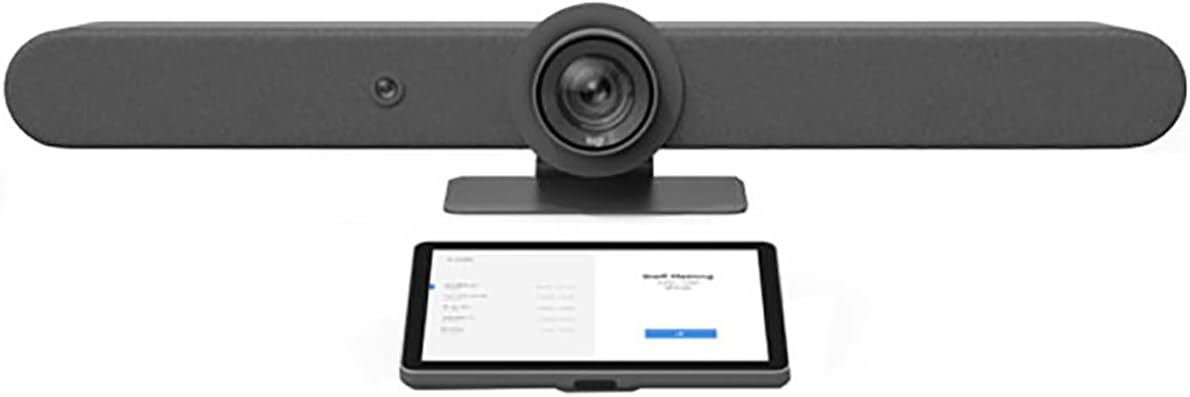
ചിത്രം 1: ബണ്ടിലിന്റെ ലോജിടെക് റാലി ബാർ (മുകളിൽ) ടാപ്പ് ഐപി (താഴെ) ഘടകങ്ങൾ.
2. പാക്കേജ് ഉള്ളടക്കം
നിങ്ങളുടെ പാക്കേജിൽ എല്ലാ ഇനങ്ങളും ഉണ്ടെന്ന് ഉറപ്പാക്കുക:
- ലോജിടെക് റാലി ബാർ
- ലോജിടെക് ഐപി ടാപ്പ് ചെയ്യുക
- റാലി ബാറിനുള്ള വൈദ്യുതി വിതരണം
- ടാപ്പ് ഐപിക്കുള്ള പവർ സപ്ലൈ
- യുഎസ്ബി കേബിൾ (ടൈപ്പ് എ മുതൽ ടൈപ്പ് സി വരെ)
- ഇഥർനെറ്റ് കേബിൾ
- ഡോക്യുമെന്റേഷൻ (ക്വിക്ക് സ്റ്റാർട്ട് ഗൈഡ്, സുരക്ഷാ വിവരങ്ങൾ)
3. സജ്ജീകരണം
3.1 ഫിസിക്കൽ പ്ലേസ്മെന്റ്
ലോജിടെക് റാലി ബാർ: റാലി ബാർ ഒരു ഡിസ്പ്ലേയിലോ, മേശയിലോ, അല്ലെങ്കിൽ ചുമരിൽ ഘടിപ്പിച്ചോ സ്ഥാപിക്കുക. മീറ്റിംഗ് പങ്കെടുക്കുന്നവർക്ക് അത് വ്യക്തമായ കാഴ്ച നൽകുന്നുണ്ടെന്ന് ഉറപ്പാക്കുക. സംയോജിത ക്യാമറ, സ്പീക്കറുകൾ, മൈക്രോഫോണുകൾ എന്നിവ ഇടത്തരം മുറികൾക്കായി ഒപ്റ്റിമൈസ് ചെയ്തിരിക്കുന്നു.

ചിത്രം 2: ക്യാമറ, സ്പീക്കറുകൾ, മൈക്രോഫോണുകൾ എന്നിവയുള്ള ഓൾ-ഇൻ-വൺ വീഡിയോ ബാറായ ലോജിടെക് റാലി ബാർ.
ലോജിടെക് ടാപ്പ് ഐപി: പങ്കെടുക്കുന്നവർക്ക് എളുപ്പത്തിൽ എത്തിച്ചേരാവുന്ന വിധത്തിൽ ഒരു കോൺഫറൻസ് ടേബിളിൽ ടാപ്പ് ഐപി സ്ഥാപിക്കുക. അത് സ്ഥിരതയുള്ളതാണെന്നും അതിന്റെ സ്ക്രീൻ ദൃശ്യമാണെന്നും ഉറപ്പാക്കുക.

ചിത്രം 3: മീറ്റിംഗ് റൂം സിസ്റ്റങ്ങൾക്കായുള്ള ഒരു ടച്ച് കൺട്രോളറായ ലോജിടെക് ടാപ്പ് ഐപി.
3.2 കണക്റ്റിവിറ്റി
- ശക്തി: പവർ അഡാപ്റ്ററുകൾ റാലി ബാറിലേക്കും ടാപ്പ് ഐപിയിലേക്കും ബന്ധിപ്പിക്കുക, തുടർന്ന് അവയെ ഒരു പവർ ഔട്ട്ലെറ്റിലേക്ക് പ്ലഗ് ചെയ്യുക.
- നെറ്റ്വർക്ക്: നൽകിയിരിക്കുന്ന ഇതർനെറ്റ് കേബിളുകൾ ഉപയോഗിച്ച് റാലി ബാറും ടാപ്പ് ഐപിയും നിങ്ങളുടെ നെറ്റ്വർക്കിലേക്ക് ബന്ധിപ്പിക്കുക. ഐപി അധിഷ്ഠിത ആശയവിനിമയത്തിനും പ്ലാറ്റ്ഫോം സംയോജനത്തിനും ഇത് അത്യാവശ്യമാണ്.
- USB (ഉപകരണം കമ്പ്യൂട്ട് ചെയ്യുന്നതിനുള്ള റാലി ബാർ): യുഎസ്ബി മോഡിൽ റാലി ബാർ ഉപയോഗിക്കുകയാണെങ്കിൽ (ഉദാഹരണത്തിന്, ഒരു പ്രത്യേക മീറ്റിംഗ് റൂം പിസി ഉപയോഗിച്ച്), റാലി ബാറിൽ നിന്ന് യുഎസ്ബി കേബിൾ കമ്പ്യൂട്ട് ഉപകരണവുമായി ബന്ധിപ്പിക്കുക.
- ബ്ലൂടൂത്ത്: അനുയോജ്യമായ ആക്സസറികൾ ബന്ധിപ്പിക്കുന്നതിന് റാലി ബാർ ബ്ലൂടൂത്തിനെ പിന്തുണയ്ക്കുന്നു. ജോടിയാക്കൽ നിർദ്ദേശങ്ങൾക്കായി റാലി ബാറിന്റെ ഓൺ-സ്ക്രീൻ മെനു കാണുക.
3.3 സോഫ്റ്റ്വെയർ കോൺഫിഗറേഷൻ
പ്രാരംഭ പവർ-അപ്പ് ചെയ്യുമ്പോൾ, ടാപ്പ് ഐപി നിങ്ങളെ സജ്ജീകരണ പ്രക്രിയയിലൂടെ നയിക്കും. നിങ്ങളുടെ ഇഷ്ടപ്പെട്ട വീഡിയോ കോൺഫറൻസിംഗ് പ്ലാറ്റ്ഫോം (മൈക്രോസോഫ്റ്റ് ടീമുകൾ, സൂം റൂമുകൾ, അല്ലെങ്കിൽ റിംഗ് സെൻട്രൽ റൂമുകൾ) തിരഞ്ഞെടുത്ത്, ടാപ്പ് ഐപി റാലി ബാറുമായി ജോടിയാക്കുന്നതിനും നിങ്ങളുടെ മീറ്റിംഗ് റൂം സിസ്റ്റം കോൺഫിഗർ ചെയ്യുന്നതിനും ഓൺ-സ്ക്രീൻ നിർദ്ദേശങ്ങൾ പാലിക്കുക.
4. പ്രവർത്തന നിർദ്ദേശങ്ങൾ
4.1 അടിസ്ഥാന മീറ്റിംഗ് നിയന്ത്രണം (ടാപ്പ് ഐപി വഴി)
- മീറ്റിംഗിൽ ചേരുക: ഷെഡ്യൂൾ ചെയ്ത മീറ്റിംഗുകൾക്കായി ടാപ്പ് ഐപി സ്ക്രീനിലെ 'ചേരുക' ബട്ടൺ ടാപ്പ് ചെയ്യുക.
- പുതിയ മീറ്റിംഗ് ആരംഭിക്കുക: ഒരു അഡ്-ഹോക് മീറ്റിംഗ് ആരംഭിക്കാൻ 'ഇപ്പോൾ കണ്ടുമുട്ടുക' ഓപ്ഷൻ തിരഞ്ഞെടുക്കുക.
- ക്യാമറ നിയന്ത്രണം: റാലി ബാറിന്റെ ക്യാമറ പാൻ ചെയ്യാനും ടിൽറ്റ് ചെയ്യാനും സൂം ചെയ്യാനും ഓൺ-സ്ക്രീൻ നിയന്ത്രണങ്ങൾ ഉപയോഗിക്കുക.
- ഓഡിയോ നിയന്ത്രണം: ടാപ്പ് ഐപിയിൽ നിന്ന് നേരിട്ട് സ്പീക്കർ വോളിയം ക്രമീകരിക്കുകയും മൈക്രോഫോണുകൾ മ്യൂട്ട്/അൺമ്യൂട്ട് ചെയ്യുകയും ചെയ്യുക.
- ഉള്ളടക്കം പങ്കിടുക: നിങ്ങളുടെ ഉപകരണത്തിൽ നിന്നുള്ള ഉള്ളടക്കം പങ്കിടാൻ ടാപ്പ് ഐപിയിലെ നിർദ്ദേശങ്ങൾ പാലിക്കുക.
4.2 വിപുലമായ സവിശേഷതകൾ (റാലി ബാർ)
- റൈറ്റ്സൈറ്റ്™ ഓട്ടോ-ഫ്രെയിമിംഗ്: റാലി ബാർ മനുഷ്യരൂപങ്ങളെ സ്വയമേവ കണ്ടെത്തുകയും പങ്കെടുക്കുന്നവരെ ഒപ്റ്റിമൽ ആയി ഫ്രെയിം ചെയ്യുന്നതിനായി ക്യാമറ ക്രമീകരിക്കുകയും ചെയ്യുന്നു. ഈ സവിശേഷത സ്ഥിരമായ മുറി അവബോധം നിലനിർത്തുന്നു.
- റൈറ്റ്സൗണ്ട്™ ഓഡിയോ: വിപുലമായ ഓഡിയോ പ്രോസസ്സിംഗ് വ്യക്തമായ ശബ്ദ പിക്കപ്പ് ഉറപ്പാക്കുകയും പശ്ചാത്തല ശബ്ദം കുറയ്ക്കുകയും ചെയ്യുന്നു.
- മോട്ടോറൈസ്ഡ് PTZ ക്യാമറ: മുറിയുടെ പ്രത്യേക ഭാഗങ്ങളിൽ ശ്രദ്ധ കേന്ദ്രീകരിക്കുന്നതിന് 15x PTZ ക്യാമറ കൃത്യമായ നിയന്ത്രണം വാഗ്ദാനം ചെയ്യുന്നു.
5. പരിപാലനം
5.1 വൃത്തിയാക്കൽ
റാലി ബാറും ടാപ്പ് ഐപിയും വൃത്തിയാക്കാൻ, മൃദുവായതോ, ഉണങ്ങിയതോ, അല്ലെങ്കിൽ ചെറുതായി ഡി-ക്ലിപ്പർ ഉപയോഗിക്കുക.amp തുണി. അബ്രാസീവ് ക്ലീനറുകൾ, ലായകങ്ങൾ, എയറോസോൾ സ്പ്രേകൾ എന്നിവ ഒഴിവാക്കുക, കാരണം ഇവ പ്രതലങ്ങൾക്ക് കേടുവരുത്തും.
5.2 സോഫ്റ്റ്വെയർ അപ്ഡേറ്റുകൾ
പ്രകടനം മെച്ചപ്പെടുത്തുന്നതിനും പുതിയ സവിശേഷതകൾ ചേർക്കുന്നതിനുമായി ലോജിടെക് പതിവായി ഫേംവെയർ അപ്ഡേറ്റുകൾ പുറത്തിറക്കുന്നു. ഈ അപ്ഡേറ്റുകൾ സ്വയമേവ സ്വീകരിക്കുന്നതിന് നിങ്ങളുടെ റാലി ബാറും ടാപ്പ് ഐപിയും ഇന്റർനെറ്റുമായി ബന്ധിപ്പിച്ചിട്ടുണ്ടെന്ന് ഉറപ്പാക്കുക അല്ലെങ്കിൽ ലോജിടെക് സമന്വയ സോഫ്റ്റ്വെയർ വഴി അവ കൈകാര്യം ചെയ്യുക.
6. പ്രശ്നപരിഹാരം
6.1 വീഡിയോ ഔട്ട്പുട്ട് ഇല്ല
- റാലി ബാറിലേക്കുള്ള എല്ലാ പവർ കണക്ഷനുകളും പരിശോധിച്ച് പ്രദർശിപ്പിക്കുക.
- റാലി ബാറുമായി ബന്ധിപ്പിച്ചിരിക്കുന്ന ശരിയായ ഉറവിടത്തിലേക്ക് ഡിസ്പ്ലേ ഇൻപുട്ട് സജ്ജീകരിച്ചിട്ടുണ്ടെന്ന് ഉറപ്പാക്കുക.
- യുഎസ്ബി കേബിൾ (യുഎസ്ബി മോഡിൽ ഉപയോഗിക്കുകയാണെങ്കിൽ) കമ്പ്യൂട്ട് ഉപകരണവുമായി സുരക്ഷിതമായി ബന്ധിപ്പിച്ചിട്ടുണ്ടെന്ന് ഉറപ്പാക്കുക.
6.2 ഓഡിയോ ഇല്ല
- ടാപ്പ് ഐപിയിലും കണക്റ്റുചെയ്ത ഡിസ്പ്ലേയിലും വോളിയം ലെവൽ പരിശോധിക്കുക.
- ടാപ്പ് ഐപിയിൽ മൈക്രോഫോണുകൾ നിശബ്ദമാക്കിയിട്ടില്ലെന്ന് ഉറപ്പാക്കുക.
- നിങ്ങളുടെ കോൺഫറൻസിംഗ് പ്ലാറ്റ്ഫോം ക്രമീകരണങ്ങളിൽ ഓഡിയോ ഇൻപുട്ട്/ഔട്ട്പുട്ട് ഉപകരണമായി റാലി ബാർ തിരഞ്ഞെടുത്തിട്ടുണ്ടെന്ന് ഉറപ്പാക്കുക.
6.3 കണക്റ്റിവിറ്റി പ്രശ്നങ്ങൾ (നെറ്റ്വർക്ക്/USB)
- ഉപകരണങ്ങളിലേക്കും നെറ്റ്വർക്കിലേക്കും ഇതർനെറ്റ് കേബിളുകൾ സുരക്ഷിതമായി ബന്ധിപ്പിച്ചിട്ടുണ്ടെന്ന് സ്ഥിരീകരിക്കുക.
- റാലി ബാർ പുനരാരംഭിച്ച് IP ടാപ്പ് ചെയ്യുക.
- യുഎസ്ബി മോഡ് ഉപയോഗിക്കുകയാണെങ്കിൽ, കമ്പ്യൂട്ട് ഉപകരണത്തിൽ മറ്റൊരു യുഎസ്ബി പോർട്ട് അല്ലെങ്കിൽ മറ്റൊരു യുഎസ്ബി കേബിൾ പരീക്ഷിക്കുക.
7 സ്പെസിഫിക്കേഷനുകൾ
| ഉൽപ്പന്ന അളവുകൾ | 30 x 8 x 6 ഇഞ്ച് |
| ഇനത്തിൻ്റെ ഭാരം | 28.6 പൗണ്ട് |
| മോഡൽ നമ്പർ | 991-000419 |
| ASIN | B0B1DSKGLX |
| ഫോട്ടോ സെൻസർ ടെക്നോളജി | CMOS |
| വീഡിയോ ക്യാപ്ചർ റെസല്യൂഷൻ | 1080p |
| ഫ്ലാഷ് മെമ്മറി തരം | ആന്തരിക ഫ്ലാഷ് മെമ്മറി |
| വീഡിയോ ക്യാപ്ചർ ഫോർമാറ്റ് | MP4 |
| പിന്തുണയ്ക്കുന്ന ഓഡിയോ ഫോർമാറ്റ് | പിസിഎം, എഎസി |
| കണക്റ്റിവിറ്റി ടെക്നോളജി | ബ്ലൂടൂത്ത്, ഇതർനെറ്റ്, യുഎസ്ബി |
| കാംകോർഡർ തരം | വീഡിയോ ക്യാമറ |
| ലെൻസ് തരം | സൂം ചെയ്യുക |
8. വാറൻ്റിയും പിന്തുണയും
വിശദമായ വാറന്റി വിവരങ്ങൾക്കും സാങ്കേതിക പിന്തുണയ്ക്കും, ദയവായി ഔദ്യോഗിക ലോജിടെക് വെബ്സൈറ്റ് കാണുക. webലോജിടെക് ഉപഭോക്തൃ സേവനവുമായി ബന്ധപ്പെടുക അല്ലെങ്കിൽ വെബ്സൈറ്റിൽ ബന്ധപ്പെടുക. വാറന്റി ക്ലെയിമുകൾക്കായി നിങ്ങളുടെ വാങ്ങലിന്റെ തെളിവ് സൂക്ഷിക്കുക.