ആമുഖം
This manual provides detailed instructions for the installation, operation, and maintenance of your Fodsports F2 Motorcycle Helmet Intercom Headset. The F2 system is designed to enhance your riding experience with Bluetooth 5.0 connectivity, enabling two-rider intercom communication, hands-free calls, and high-quality audio for music and GPS navigation.
ഉൽപ്പന്ന സവിശേഷതകൾ
- ബ്ലൂടൂത്ത് 5.0 സാങ്കേതികവിദ്യ: Equipped with advanced Bluetooth 5.0 for high compatibility and stable connections with all Bluetooth-enabled smart devices.
- 2-Rider Intercom System: Supports communication between two riders with an intercom distance of up to 1000 meters.
- CVC Noise Reduction: Advanced CVC noise reduction technology and a professional wind-proof microphone ensure clear call quality.
- ഹാൻഡ്സ്-ഫ്രീ ആശയവിനിമയം: Automatically answers incoming calls within 10 seconds. Supports rejecting calls, hanging up, and last number redial.
- വോയ്സ് കമാൻഡ്: Activate intelligent voice commands (e.g., Siri, Google Assistant) for hands-free control of calls, music, and GPS navigation.
- ഉയർന്ന നിലവാരമുള്ള ഓഡിയോ: Features 40mm high-power stereo speakers for clear and loud sound quality.
- ഈടുനിൽക്കുന്ന ബാറ്ററി ലൈഫ്: Integrated 400mAh rechargeable Li-ion battery provides up to 10 hours of intercom time, 12 hours of talk/music playback, and 300 hours of standby time. Charging time is approximately 3 hours.
- വാട്ടർപ്രൂഫ് ഡിസൈൻ: IP67 dustproof and waterproof rating with Nano coating technology protects the headset in outdoor conditions.
- Charge While Working: The device can be used while charging, though it is recommended to charge fully before initial use.
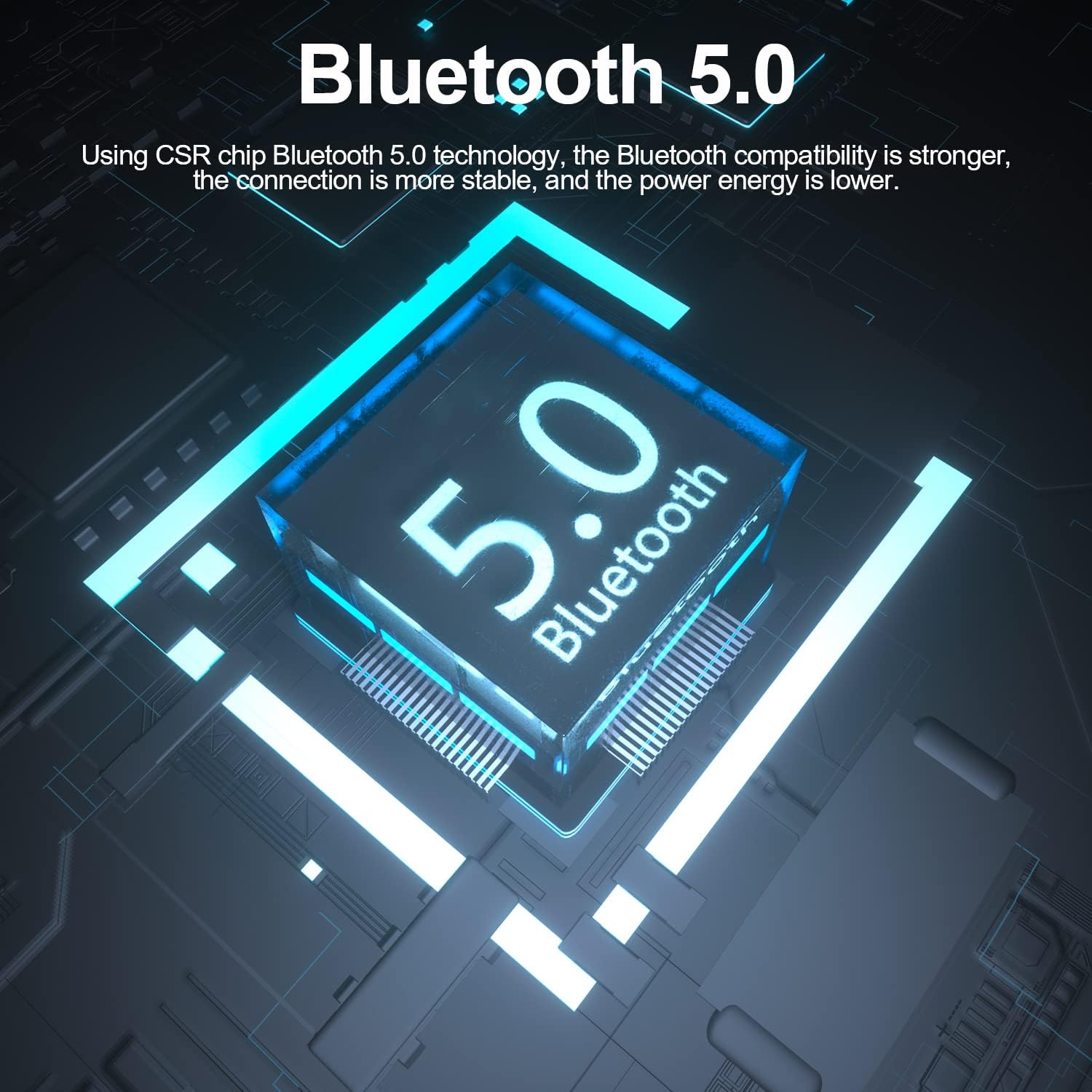
Image: The Fodsports F2 utilizes a Bluetooth 5.0 chip for stable and efficient wireless connections.

Image: Illustration of the CVC noise reduction technology in the Fodsports F2, showing how it clarifies call audio by reducing ambient noise.

ചിത്രം: പൊട്ടിത്തെറിച്ചു view of the Fodsports F2 speaker, highlighting its components for HiFi stereo sound quality.
പാക്കേജ് ഉള്ളടക്കം
Upon opening your Fodsports F2 package, please ensure all items are present:
- Fodsports F2 Intercom Unit
- Microphone (suitable for full-face and half-face helmets)
- 40mm Stereo Speakers
- യുഎസ്ബി ചാർജിംഗ് കേബിൾ
- Helmet Mounting Bracket (with detachable Velcro)
- ഉപയോക്തൃ മാനുവൽ (ഈ പ്രമാണം)
സജ്ജീകരണവും ഇൻസ്റ്റാളേഷനും
1 ഉപകരണം ചാർജ് ചെയ്യുന്നു
Before first use, fully charge the Fodsports F2 unit. Connect the provided USB charging cable to the device's charging port and to a standard USB power source. The charging indicator will show the charging status. A full charge takes approximately 3 hours.

Image: The Fodsports F2 unit connected to a power bank via USB cable, illustrating that the device can be charged while in use.
2. Installing into Helmet
The F2 is designed for easy installation in most full-face, open-face, and half-helmets using its detachable Velcro design.
- Attach the Intercom Unit: Secure the F2 intercom unit to the side of your helmet using the provided mounting bracket and Velcro. Ensure it is firmly attached and does not obstruct your vision or helmet functionality.
- സ്ഥാനം സ്പീക്കർമാർ: Place the 40mm stereo speakers inside the helmet's ear pockets. Ensure they are aligned with your ears for optimal sound quality.
- Mount Microphone: Attach the microphone to a suitable position inside the helmet, ensuring it is close to your mouth but not directly in front to avoid wind noise. The flexible microphone arm allows for adjustment.
- കേബിളുകൾ ബന്ധിപ്പിക്കുക: Connect the speaker and microphone cables to the corresponding ports on the F2 intercom unit. Route the cables neatly within the helmet padding to avoid discomfort or interference.
പ്രവർത്തന നിർദ്ദേശങ്ങൾ
1. പവർ ഓൺ/ഓഫ്
- പവർ ഓൺ: Press and hold the Power button for approximately 3 seconds until the indicator light illuminates and you hear a voice prompt.
- പവർ ഓഫ്: Press and hold the Power button for approximately 3 seconds until the indicator light turns off and you hear a voice prompt.
2. മൊബൈൽ ഫോണുമായി ബ്ലൂടൂത്ത് ജോടിയാക്കൽ
- Ensure the F2 unit is powered off.
- Press and hold the Power button for about 5-7 seconds until the indicator light flashes red and blue alternately, indicating pairing mode.
- നിങ്ങളുടെ മൊബൈൽ ഫോണിൽ, ബ്ലൂടൂത്ത് പ്രവർത്തനക്ഷമമാക്കി ലഭ്യമായ ഉപകരണങ്ങൾക്കായി തിരയുക.
- Select "Fodsports F2" from the list of devices.
- ജോടിയാക്കിക്കഴിഞ്ഞാൽ, ഇൻഡിക്കേറ്റർ ലൈറ്റ് നീല നിറത്തിൽ സാവധാനം മിന്നിമറയും, നിങ്ങൾ ഒരു സ്ഥിരീകരണ ടോൺ കേൾക്കും.
3. Intercom Pairing (2 Riders)
To establish a 2-rider intercom connection:
- Ensure both F2 units are powered off.
- On both units, press and hold the Power button for about 5-7 seconds until the indicator lights flash red and blue alternately, entering pairing mode.
- Briefly press the Intercom button on one of the units. It will search for the other unit.
- Once connected, both units will show a slow blue light, and you will hear a confirmation tone.
4. ഫോൺ കോൾ പ്രവർത്തനങ്ങൾ
- മറുപടി കോൾ: Incoming calls will be automatically answered within 10 seconds if no action is taken. Alternatively, briefly press the Phone button to answer.
- കോൾ നിരസിക്കുക: Press and hold the Phone button for 2 seconds to reject an incoming call.
- മാറ്റിവയ്ക്കുക: Briefly press the Phone button during a call to end it.
- അവസാന നമ്പർ റീഡിയൽ: Double-press the Phone button to redial the last dialed number.
5. സംഗീതം പ്ലേബാക്ക്
- പ്ലേ/താൽക്കാലികമായി നിർത്തുക: Briefly press the Play/Pause button to play or pause music.
- വോളിയം ക്രമീകരണം: Use the Volume Up (+) and Volume Down (-) buttons to adjust the audio level.
- അടുത്ത ട്രാക്ക്: Press and hold the Volume Up (+) button for 2 seconds to skip to the next song.
- മുമ്പത്തെ ട്രാക്ക്: Press and hold the Volume Down (-) button for 2 seconds to go to the previous song.
6. Voice Command Activation
To activate your phone's voice assistant (e.g., Siri, Google Assistant), double-tap the 'A' key on the F2 unit.

Image: Diagram showing how to double-tap the 'A' key on the Fodsports F2 unit to activate voice commands like "Hey Siri" or "Hi Galaxy" for phone control.
മെയിൻ്റനൻസ്
- വൃത്തിയാക്കൽ: മൃദുവായ, ഡി ഉപയോഗിച്ച് യൂണിറ്റ് തുടയ്ക്കുകamp തുണി. കഠിനമായ രാസവസ്തുക്കളോ ഉരച്ചിലുകളുള്ള ക്ലീനറുകളോ ഉപയോഗിക്കരുത്.
- ജല പ്രതിരോധം: The F2 unit is IP67 waterproof. While it can withstand rain and splashes, avoid submerging it in water for extended periods. Ensure the charging port cover is securely closed when not charging.
- സംഭരണം: ഉപയോഗത്തിലില്ലാത്തപ്പോൾ ഉപകരണം തണുത്തതും വരണ്ടതുമായ സ്ഥലത്ത് സൂക്ഷിക്കുക. കടുത്ത താപനില ഒഴിവാക്കുക.
- ബാറ്ററി കെയർ: To prolong battery life, avoid fully discharging the battery frequently. Charge the device regularly, even if not in use for long periods.
ട്രബിൾഷൂട്ടിംഗ്
- ഉപകരണം പവർ ഓൺ ചെയ്യുന്നില്ല:
- Ensure the battery is charged. Connect the device to a charger and try powering it on after a few minutes.
- Cannot pair with phone/intercom:
- Ensure the device is in pairing mode (red and blue flashing light). Make sure other Bluetooth devices are not interfering. Try restarting both the F2 unit and your phone/second F2 unit.
- ശബ്ദമില്ല അല്ലെങ്കിൽ കുറഞ്ഞ ശബ്ദം:
- Check the volume settings on both the F2 unit and your connected phone. Ensure speakers are correctly positioned and connected. Verify that the cables are securely plugged in.
- ഇന്റർകോം കണക്ഷൻ ഇടയ്ക്കിടെ കുറയുന്നു:
- Ensure both units are within the 1000m range and have a clear line of sight. Obstacles can reduce range. Check for low battery on either unit.
- Poor call quality/excessive wind noise:
- Ensure the microphone is positioned correctly, close to your mouth but not directly exposed to strong airflow. The CVC noise reduction works best when the microphone is optimally placed.
സ്പെസിഫിക്കേഷനുകൾ
| ഫീച്ചർ | വിശദാംശങ്ങൾ |
|---|---|
| മോഡൽ | F2 |
| ബ്ലൂടൂത്ത് പതിപ്പ് | 5.0 |
| ഇന്റർകോം റേഞ്ച് | 1000 മീറ്റർ വരെ (2 റൈഡർമാർ) |
| ബാറ്ററി ശേഷി | 400mAh |
| ഇൻ്റർകോം സമയം | 10 മണിക്കൂർ |
| സംസാര/സംഗീത പ്ലേബാക്ക് സമയം | 12 മണിക്കൂർ വരെ |
| സ്റ്റാൻഡ്ബൈ സമയം | 300 മണിക്കൂർ |
| ചാർജിംഗ് സമയം | 3 മണിക്കൂർ |
| നോയ്സ് റിഡക്ഷൻ ടെക്നോളജി | സി.വി.സി |
| ജല പ്രതിരോധ നില | IP67 |
| സ്പീക്കർ വ്യാസം | 40 മി.മീ |
| നിയന്ത്രണ രീതി | ശബ്ദം, ബട്ടണുകൾ |
| മെറ്റീരിയൽ | പ്ലാസ്റ്റിക് |
| ഇനത്തിൻ്റെ ഭാരം | 170 ഗ്രാം |
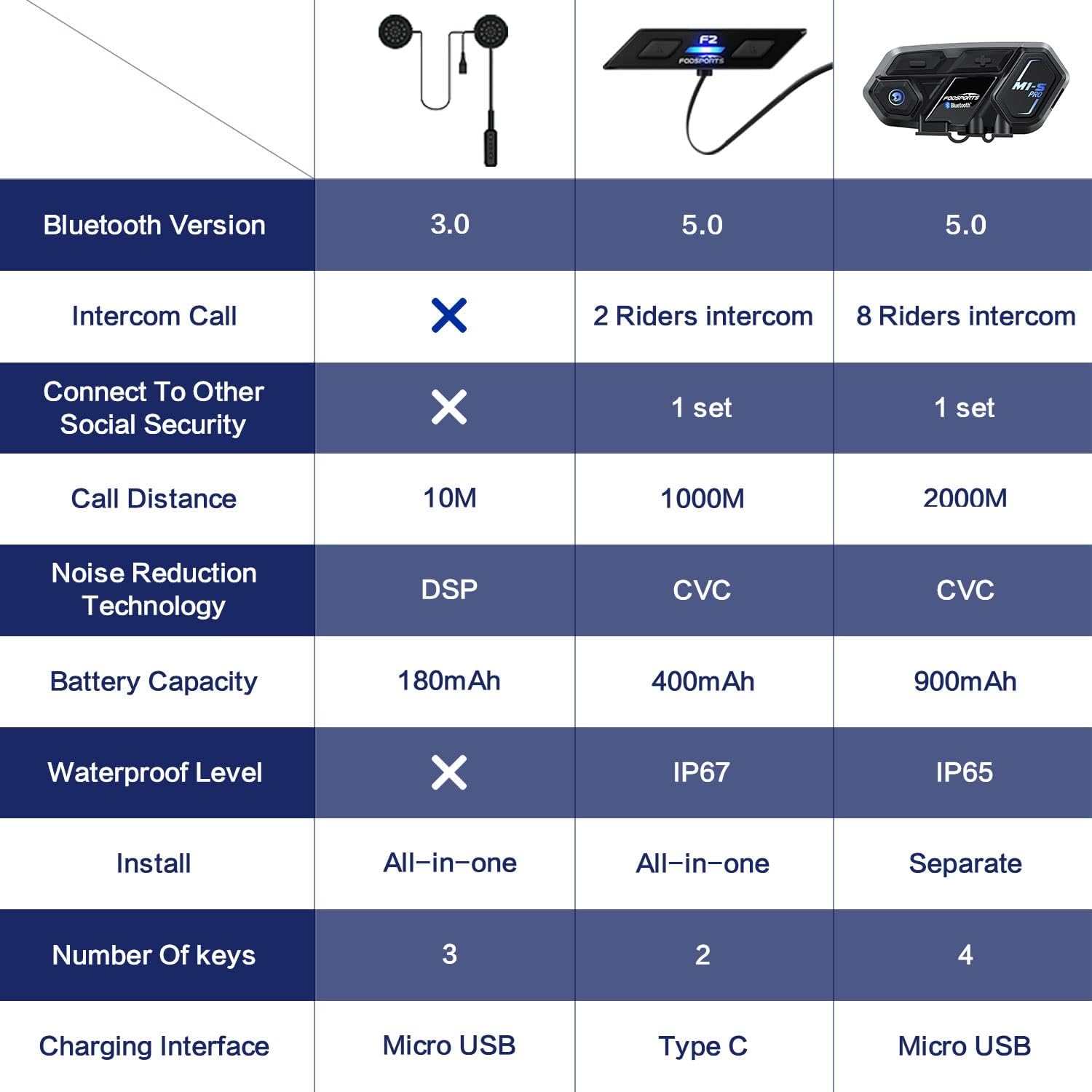
Image: A comparison table highlighting key specifications of the Fodsports F2 alongside other models, detailing Bluetooth version, intercom capabilities, battery, noise reduction, and waterproof level.
വാറൻ്റിയും പിന്തുണയും
For warranty information, technical support, or any inquiries regarding your Fodsports F2 Motorcycle Helmet Intercom Headset, please contact Fodsports customer service through their official website or the retailer from whom you purchased the product. Please have your purchase receipt and product model number (F2) ready when contacting support.
കുറിപ്പ്: പ്രദേശത്തെയും റീട്ടെയിലറെയും ആശ്രയിച്ച് നിർദ്ദിഷ്ട വാറന്റി നിബന്ധനകൾ വ്യത്യാസപ്പെടാം.


