1. ആമുഖം
This user manual provides detailed instructions for the Cisco Catalyst 1000 Series C1000-8T-2G-L Network Switch. Designed for small and medium-sized businesses, this compact, fanless switch offers essential Layer 2 capabilities with enhanced security and management features. Please read this manual thoroughly before operating the device to ensure proper installation and functionality.
2. ഉൽപ്പന്നം കഴിഞ്ഞുview
The Cisco Catalyst 1000 Series C1000-8T-2G-L is an 8-port Gigabit Ethernet switch with two SFP/RJ-45 combo uplink ports. It is engineered for reliable network connectivity and ease of management.

ചിത്രം 2.1: മുൻഭാഗം view of the Cisco Catalyst 1000 Series C1000-8T-2G-L Network Switch, showing the 8 Ethernet ports and 2 SFP/RJ-45 combo ports on the right.

ചിത്രം 2.2: വിശദമായ മുൻഭാഗം view of the switch, illustrating the 8 10/100/1000 Gigabit Ethernet (GbE) data ports and the 2 SFP/RJ-45 combo ports. Key features include its compact form factor, fanless operation, and Enterprise Class Security.
പ്രധാന സവിശേഷതകൾ:
- 8 x 10/100/1000 Gigabit Ethernet (GbE) Data ports
- 2 x SFP/RJ-45 combo uplink ports
- Compact form factor for flexible deployment
- Fanless operation for silent deployment in open workspaces
- Enterprise Class Security features
- അവബോധജന്യമായ WebUI for ease of access and configuration
3. സജ്ജീകരണം
3.1 അൺപാക്കിംഗും പരിശോധനയും
Carefully unpack the switch and its accessories. Verify that all components listed below are present and undamaged. If any items are missing or damaged, contact your vendor immediately.
- Cisco Catalyst C1000-8T-2G-L Switch
- ആക്സസറി കിറ്റ്
- 1 printed document (Quick Start Guide or Safety Information)
3.2 ഫിസിക്കൽ പ്ലേസ്മെന്റ്
Choose a suitable location for the switch that meets the following criteria:
- വെൻ്റിലേഷൻ: Although fanless, ensure adequate airflow around the device.
- താപനില: Operate within the specified temperature range (refer to Specifications).
- സ്ഥിരത: Place on a flat, stable surface or mount securely.
- ഊർജ്ജ സ്രോതസ്സ്: Proximity to a reliable power outlet.
3.3 സ്വിച്ച് ബന്ധിപ്പിക്കുന്നു
- പവർ കോർഡ് സ്വിച്ചിന്റെ പവർ ഇൻപുട്ടിലേക്കും തുടർന്ന് ഗ്രൗണ്ടഡ് ഇലക്ട്രിക്കൽ ഔട്ട്ലെറ്റിലേക്കും ബന്ധിപ്പിക്കുക.
- Connect your network devices (computers, servers, other switches) to the 10/100/1000BASE-T Ethernet ports using standard Ethernet cables.
- For uplink connections to a core network or other switches, use the SFP/RJ-45 combo ports with appropriate transceivers or Ethernet cables.
4. സ്വിച്ച് പ്രവർത്തിപ്പിക്കൽ
4.1 പവർ ചെയ്യുന്നു
Once connected to a power source, the switch will automatically power on. Observe the system LED indicators for status. A solid green system LED typically indicates normal operation.
4.2 പ്രാരംഭ കോൺഫിഗറേഷൻ
The Cisco Catalyst 1000 Series switches offer an intuitive interface for configuration and management. You can access the switch via:
- Web ഉപയോക്തൃ ഇന്റർഫേസ് (WebUI): Access the switch's management interface through a web browser. This provides a graphical interface for configuring settings, monitoring network status, and performing troubleshooting.
- കമാൻഡ് ലൈൻ ഇന്റർഫേസ് (CLI): For advanced users, the CLI offers granular control over the switch's functions.

ചിത്രം 4.1: ഉദാample of the intuitive WebUI, demonstrating ease of access, ability to build configurations, network monitoring, and troubleshooting capabilities.
Refer to the detailed Cisco documentation (often available online) for specific steps on initial IP address configuration and accessing the WebUI അല്ലെങ്കിൽ CLI.
5. പരിപാലനം
The Cisco Catalyst 1000 Series C1000-8T-2G-L switch is designed for low maintenance due to its fanless operation and robust metal casing.
5.1 പൊതു പരിചരണം
- Keep the switch clean and free of dust. Use a soft, dry cloth for cleaning.
- Ensure proper ventilation by not obstructing the air vents.
- തീവ്രമായ താപനിലയിലേക്കോ ഈർപ്പത്തിലേക്കോ മാറുന്നത് ഒഴിവാക്കുക.
5.2 ഫേംവെയർ അപ്ഡേറ്റുകൾ
ഇടയ്ക്കിടെ സിസ്കോ പിന്തുണ പരിശോധിക്കുക webഫേംവെയർ അപ്ഡേറ്റുകൾക്കായുള്ള സൈറ്റ്. ഫേംവെയർ കാലികമായി നിലനിർത്തുന്നത് ഒപ്റ്റിമൽ പ്രകടനം, സുരക്ഷ, പുതിയ സവിശേഷതകളിലേക്കുള്ള ആക്സസ് എന്നിവ ഉറപ്പാക്കുന്നു.
6. പ്രശ്നപരിഹാരം
This section provides basic troubleshooting steps for common issues. For more complex problems, refer to the comprehensive Cisco documentation or contact support.
6.1 വൈദ്യുതി പ്രശ്നങ്ങൾ
- ശക്തിയില്ല: Verify the power cord is securely connected to both the switch and the power outlet. Check the power outlet with another device.
- സിസ്റ്റം LED ഓഫ്: If the system LED is off after connecting power, ensure the power source is active.
6.2 കണക്റ്റിവിറ്റി പ്രശ്നങ്ങൾ
- ലിങ്ക് ഇല്ല: Check the Ethernet cables connecting devices to the switch ports. Ensure they are securely plugged in and undamaged.
- Port LED Status: Observe the port LEDs. A solid green LED typically indicates a good link, while a blinking LED indicates activity. No light may indicate a cable issue or a problem with the connected device.
- നെറ്റ്വർക്ക് ആക്സസ്: If devices are connected but cannot access the network, verify IP configurations and VLAN settings (if applicable) through the WebUI അല്ലെങ്കിൽ CLI.
6.3 WebUI/CLI Access Issues
- ആക്സസ് ചെയ്യാൻ കഴിയില്ല WebUI: Ensure your computer is on the same network segment as the switch and that you are using the correct IP address. Clear browser cache or try a different browser.
- പാസ്വേഡ് മറന്നോ: Refer to Cisco's official documentation for password recovery procedures.
7 സ്പെസിഫിക്കേഷനുകൾ
The following table outlines the key technical specifications for the Cisco Catalyst C1000-8T-2G-L Network Switch:
| ഫീച്ചർ | വിവരണം |
|---|---|
| മോഡൽ നമ്പർ | C1000-8T-2G-L |
| തുറമുഖങ്ങളുടെ എണ്ണം | 8 x 10/100/1000 ഗിഗാബിറ്റ് ഇതർനെറ്റ് |
| അപ്ലിങ്ക് പോർട്ടുകൾ | 2 x SFP/RJ-45 Combo |
| സ്വിച്ച് തരം | പാളി 2 |
| അളവുകൾ (H x W x D) | 1.73 x 10.56 x 7.28 ഇഞ്ച് (4.39 x 26.82 x 18.49 സെ.മീ) |
| ഇനത്തിൻ്റെ ഭാരം | 5.5 പൗണ്ട് (2.49 കി.ഗ്രാം) |
| വാല്യംtage | 48 വോൾട്ട് |
| നിലവിലെ റേറ്റിംഗ് | 1 Amps |
| കേസ് മെറ്റീരിയൽ | ലോഹം |
| പ്രവർത്തന താപനില (ഉയർന്ന) | 1 Degrees Celsius (Note: Consult official Cisco documentation for full operating temperature range) |
| തണുപ്പിക്കൽ | ഫാനില്ലാത്തത് |
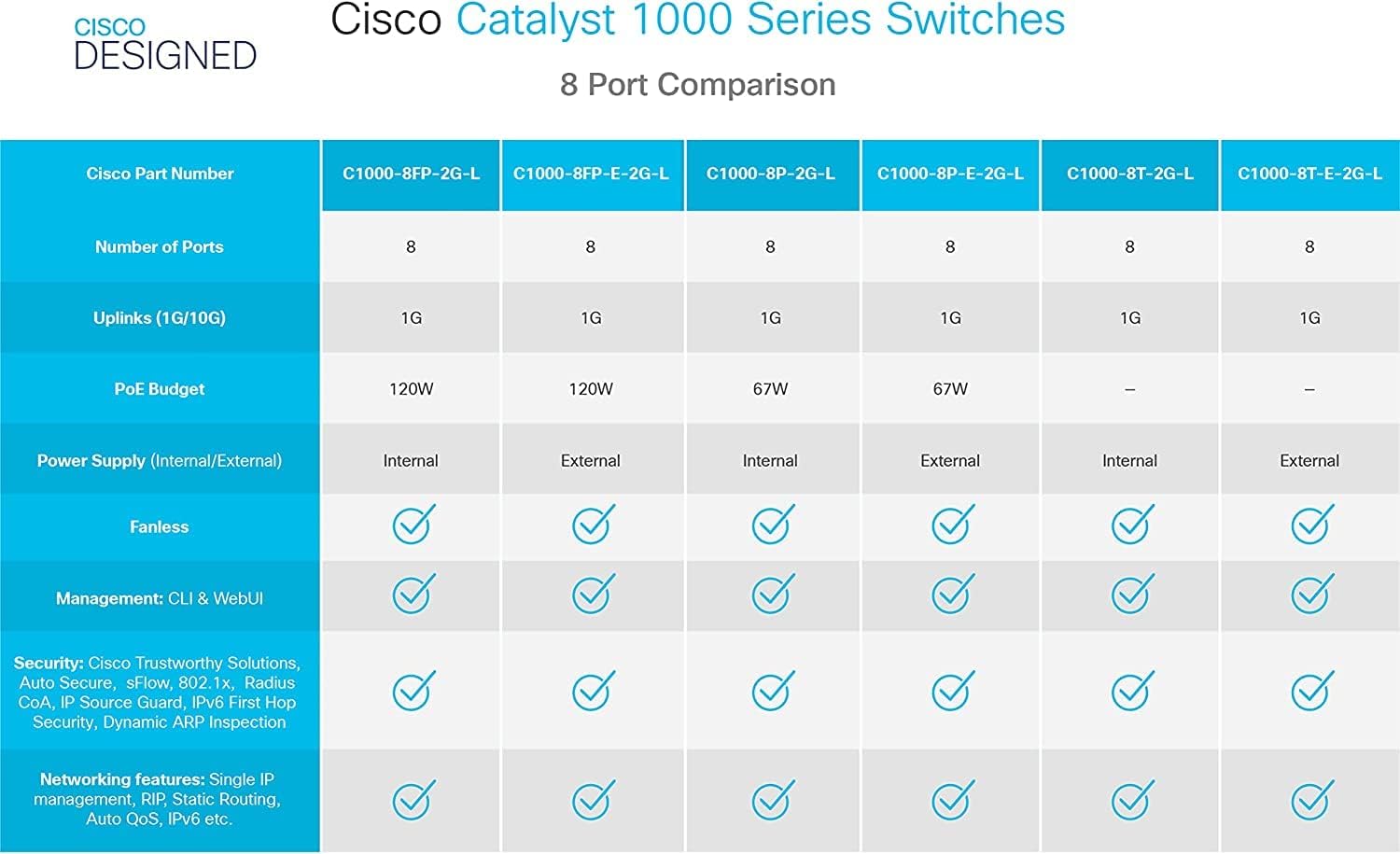
Figure 7.1: Comparison table highlighting various 8-port models within the Cisco Catalyst 1000 Series, showing differences in uplinks, PoE budget, power supply, and management features.
8. വാറൻ്റിയും പിന്തുണയും
This Cisco Catalyst 1000 Series C1000-8T-2G-L switch is a renewed product. As such, it is backed by the Amazon Renewed Guarantee.
8.1 ആമസോൺ പുതുക്കിയ ഗ്യാരണ്ടി
This product has been professionally inspected and tested to work and look like new. If you are not satisfied with your purchase, renewed products are eligible for replacement or refund under the Amazon Renewed Guarantee. Please refer to the Amazon Renewed program terms and conditions for full details on eligibility and process.
8.2 സാങ്കേതിക പിന്തുണ
For technical assistance, troubleshooting beyond this manual, or inquiries regarding the Amazon Renewed Guarantee, please contact Amazon Renewed customer support or the original seller (ATHQ - CR) through the Amazon platform.


