1. ആമുഖം
This manual provides essential instructions for the setup, operation, maintenance, and troubleshooting of your Noise ColorFit Icon 2 Smartwatch. Please read this manual thoroughly before using your device to ensure proper function and longevity.
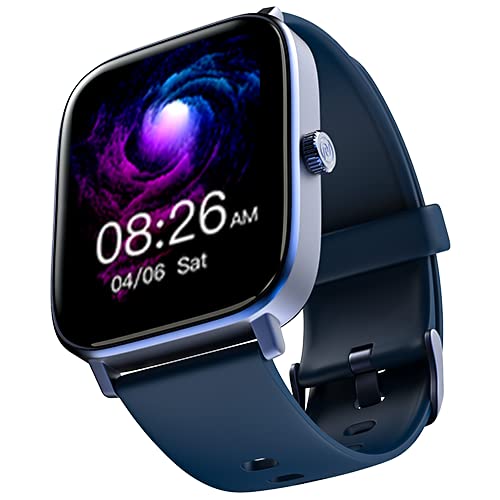
ചിത്രം: മുൻഭാഗം view of the Noise ColorFit Icon 2 Smartwatch, displaying its rectangular screen and strap.
2. ബോക്സിൽ എന്താണുള്ളത്?
Verify that all the following items are present in your product packaging:
- Noise ColorFit Icon 2 Smartwatch
- മാഗ്നെറ്റിക് ചാർജർ
- ഉപയോക്തൃ മാനുവൽ (ഈ പ്രമാണം)
- വാറൻ്റി കാർഡ്
3. സജ്ജീകരണം
3.1 സ്മാർട്ട് വാച്ച് ചാർജ് ചെയ്യുന്നു
Before initial use, fully charge your smartwatch. Connect the magnetic charger to the charging points on the back of the smartwatch and plug the USB end into a compatible power adapter (not included) or a computer's USB port. The watch display will indicate charging status.
3.2 പവർ ഓൺ/ഓഫ്
- പവർ ഓണാക്കാൻ: Press and hold the side button until the Noise logo appears.
- പവർ ഓഫ് ചെയ്യാൻ: Navigate to the settings menu on the smartwatch, select "Power Off," and confirm. Alternatively, press and hold the side button and select "Power Off" from the options.
3.3 നിങ്ങളുടെ സ്മാർട്ട്ഫോണുമായി ജോടിയാക്കൽ
- Download the official NoiseFit application from your smartphone's app store.
- നിങ്ങളുടെ സ്മാർട്ട്ഫോണിൽ ബ്ലൂടൂത്ത് പ്രവർത്തനക്ഷമമാക്കിയിട്ടുണ്ടെന്ന് ഉറപ്പാക്കുക.
- Open the NoiseFit app and follow the on-screen instructions to create an account or log in.
- Select "Add Device" or a similar option within the app and choose "ColorFit Icon 2" from the list of available devices.
- നിങ്ങളുടെ സ്മാർട്ട്ഫോണിലും സ്മാർട്ട് വാച്ചിലും പെയറിംഗ് അഭ്യർത്ഥന സ്ഥിരീകരിക്കുക.
- Your smartwatch is compatible with devices running iOS 8 & + or Android 4.4 & +.
4. പ്രവർത്തന നിർദ്ദേശങ്ങൾ
4.1 അടിസ്ഥാന നാവിഗേഷൻ
- മുകളിലേക്കും താഴേക്കും സ്വൈപ്പ് ചെയ്യുക: മെനുകളിലൂടെയും അറിയിപ്പുകളിലൂടെയും സ്ക്രോൾ ചെയ്യുക.
- ഇടത്തേക്ക്/വലത്തേക്ക് സ്വൈപ്പ് ചെയ്യുക: Access quick widgets or different screens.
- ടാപ്പ് ചെയ്യുക: ഒരു ഇനം തിരഞ്ഞെടുക്കുക അല്ലെങ്കിൽ ഒരു പ്രവർത്തനം സ്ഥിരീകരിക്കുക.
- സൈഡ് ബട്ടൺ: ഹോം സ്ക്രീനിലേക്ക് മടങ്ങാൻ അമർത്തുക അല്ലെങ്കിൽ ഉപകരണം ഉണർത്തുക.
4.2 പ്രധാന സവിശേഷതകൾ
The Noise ColorFit Icon 2 Smartwatch offers various features accessible through its interface and the connected NoiseFit app. These include:
- Activity Tracking (steps, distance, calories)
- ഹൃദയമിടിപ്പ് നിരീക്ഷണം
- സ്ലീപ്പ് ട്രാക്കിംഗ്
- Notification Alerts (calls, messages, app notifications)
- സംഗീത നിയന്ത്രണം
- കാലാവസ്ഥ വിവരം
For detailed instructions on specific features, refer to the NoiseFit application's help section.
5. പരിപാലനം
5.1 വൃത്തിയാക്കൽ
Regularly clean your smartwatch and strap to prevent skin irritation and maintain device performance. Use a soft, lint-free cloth. If necessary, slightly dampen the cloth with water. Avoid using harsh chemicals, abrasive materials, or strong detergents.
5.2 ചാർജിംഗ് മികച്ച രീതികൾ
- Use only the provided magnetic charger.
- Avoid exposing the charging contacts to water or sweat. Ensure they are dry before charging.
- Do not leave the smartwatch charging for extended periods after it is fully charged.
5.3 സംഭരണം
When not in use for an extended period, store the smartwatch in a cool, dry place away from direct sunlight and extreme temperatures. Ensure it has a partial charge to prevent battery degradation.
6. പ്രശ്നപരിഹാരം
| പ്രശ്നം | സാധ്യമായ പരിഹാരം |
|---|---|
| Smartwatch does not power on. | Ensure the device is fully charged. Connect to the magnetic charger and wait a few minutes before attempting to power on again. |
| സ്മാർട്ട്ഫോണുമായി ജോടിയാക്കാൻ കഴിയില്ല. |
|
| Inaccurate activity tracking. | Ensure the smartwatch is worn snugly on your wrist, about one finger's width above your wrist bone. Calibrate the device through the NoiseFit app if available. |
| അറിയിപ്പുകൾ ലഭിച്ചില്ല. |
|
If you encounter issues not listed here, please refer to the support section of the NoiseFit application or contact customer support.
7 സ്പെസിഫിക്കേഷനുകൾ
| ഫീച്ചർ | വിശദാംശങ്ങൾ |
|---|---|
| ബ്രാൻഡ് | ശബ്ദം |
| മോഡൽ സീരീസ് | കളർഫിറ്റ് ഐക്കൺ 2 |
| ഇനം മോഡൽ നമ്പർ | wrb-sw-colorfiticon2-std-blu_blu |
| ഉൽപ്പന്ന അളവുകൾ | 4.7 x 3.9 x 1.2 സെ.മീ |
| ഇനത്തിൻ്റെ ഭാരം | 45 ഗ്രാം |
| കണക്റ്റിവിറ്റി തരം | ബ്ലൂടൂത്ത് |
| വയർലെസ് തരം | ബ്ലൂടൂത്ത് |
| ഓപ്പറേറ്റിംഗ് സിസ്റ്റം അനുയോജ്യത | iOS 8 & + or Android 4.4 & + |
| ഉൾപ്പെടുത്തിയ ഘടകങ്ങൾ | Smartwatch, Magnetic Charger, User Manual, Warranty Card |
| ജിപിഎസ് | GPS ഇല്ല |
| ആകൃതി | ദീർഘചതുരം |
8. വാറൻ്റിയും പിന്തുണയും
Your Noise ColorFit Icon 2 Smartwatch comes with a 1-year assured warranty from Noise, covering manufacturing defects from the date of purchase. Please retain your purchase receipt and warranty card for any warranty claims.
For technical support, warranty claims, or further assistance, please contact Noise customer service. Manufacturer and Importer details:
Nexxbase Marketing Pvt. Ltd.Khasra No-146/25/2/1, Jail Road Badshahpur,
Gurugram Haryana-122101, India
ഫോൺ: 8882-132-132
You can also visit the official Noise webകൂടുതൽ വിവരങ്ങൾക്കും പിന്തുണാ ഉറവിടങ്ങൾക്കുമുള്ള സൈറ്റ്.