ആമുഖം
This manual provides detailed instructions for the setup, operation, and maintenance of your leQuiven Wireless Charging Station (Model XF-C01). This 3-in-1 charging station is designed to simultaneously charge compatible Samsung Galaxy phones, Galaxy Watches, and Galaxy Buds, offering a streamlined charging experience.
പാക്കേജ് ഉള്ളടക്കം
താഴെ ലിസ്റ്റ് ചെയ്തിരിക്കുന്ന എല്ലാ ഇനങ്ങളും നിങ്ങളുടെ പാക്കേജിൽ ഉൾപ്പെടുത്തിയിട്ടുണ്ടെന്ന് ദയവായി പരിശോധിക്കുക:
- 1 x leQuiven Wireless Charging Station
- 1 x Charging Brick (Power Adapter)
- 1 x USB-C കേബിൾ
- 1 x ഉപയോക്തൃ മാനുവൽ (ഈ പ്രമാണം)

Figure 1: Contents of the leQuiven Wireless Charging Station package.
ഉൽപ്പന്നം കഴിഞ്ഞുview
The leQuiven XF-C01 is a compact and efficient charging solution. It features dedicated charging areas for a smartphone, a smartwatch, and wireless earbuds, along with an integrated digital clock.

ചിത്രം 2: മുൻഭാഗം view of the leQuiven Wireless Charging Station with devices.
പ്രധാന സവിശേഷതകൾ:
- 3-in-1 Wireless Charging: Simultaneously charges a compatible smartphone, Galaxy Watch, and Galaxy Buds.
- Adjustable Digital Clock: Features a digital time display with adjustable brightness levels, including an off option.
- കേസ്-സൗഹൃദ ഡിസൈൻ: Supports charging through phone cases up to 5mm (0.2 inches) thick.
- മൾട്ടി-പ്രൊട്ടക്ഷൻ സിസ്റ്റം: ഓവർവോൾ ഉൾപ്പെടുന്നുtage, overload, undervoltage, static, over-temperature, foreign object detection, and overcurrent protection.
- Horizontal and Vertical Charging: The phone charging pad supports both horizontal and vertical device placement.
സജ്ജീകരണ നിർദ്ദേശങ്ങൾ
- പവർ അഡാപ്റ്റർ ബന്ധിപ്പിക്കുക: Insert the USB-C end of the provided cable into the charging station's input port. Connect the USB-A end to the included charging brick.
- പവറിൽ പ്ലഗ് ഇൻ ചെയ്യുക: Plug the charging brick into a standard wall outlet. The digital clock on the charging station will illuminate, indicating it is powered on.
- പ്ലേസ്മെൻ്റ്: Place the charging station on a flat, stable surface, such as a desk or nightstand.
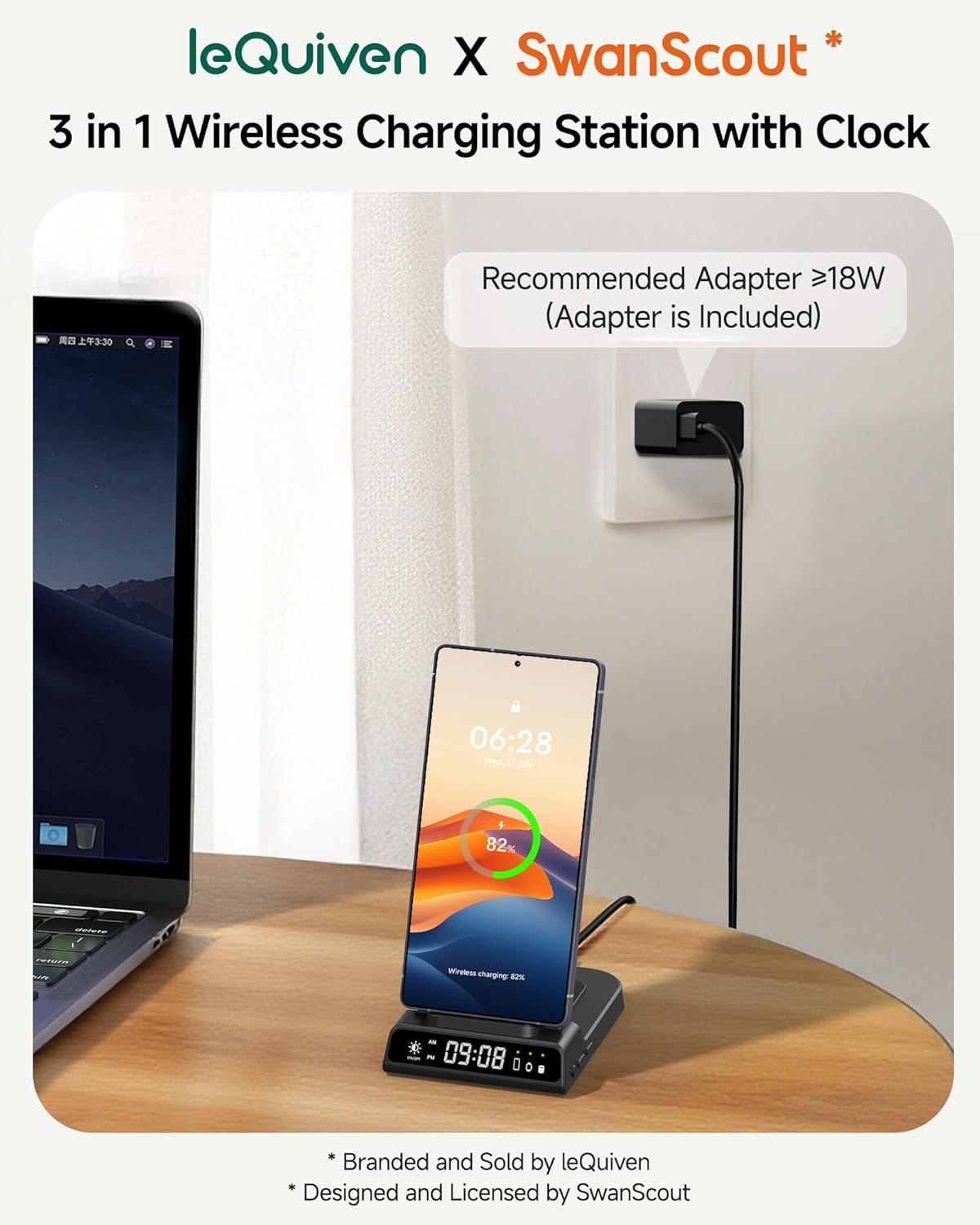
Figure 3: Connecting the charging station to power.
പ്രവർത്തന നിർദ്ദേശങ്ങൾ
1. ചാർജിംഗ് ഉപകരണങ്ങൾ
The charging station features three distinct wireless charging areas:
- Smartphone Charging Pad: Located on the upright stand. Place your compatible smartphone vertically or horizontally on this pad.
- Smartwatch Charging Pad: Located on the top arm of the stand. Place your compatible Galaxy Watch onto this magnetic pad.
- ഇയർബഡ്സ് ചാർജിംഗ് പാഡ്: Located on the base of the station, behind the phone charging pad. Place your compatible wireless earbuds case on this flat pad.
A small green LED indicator on the station's base will light up next to the corresponding device icon when a device is successfully charging.
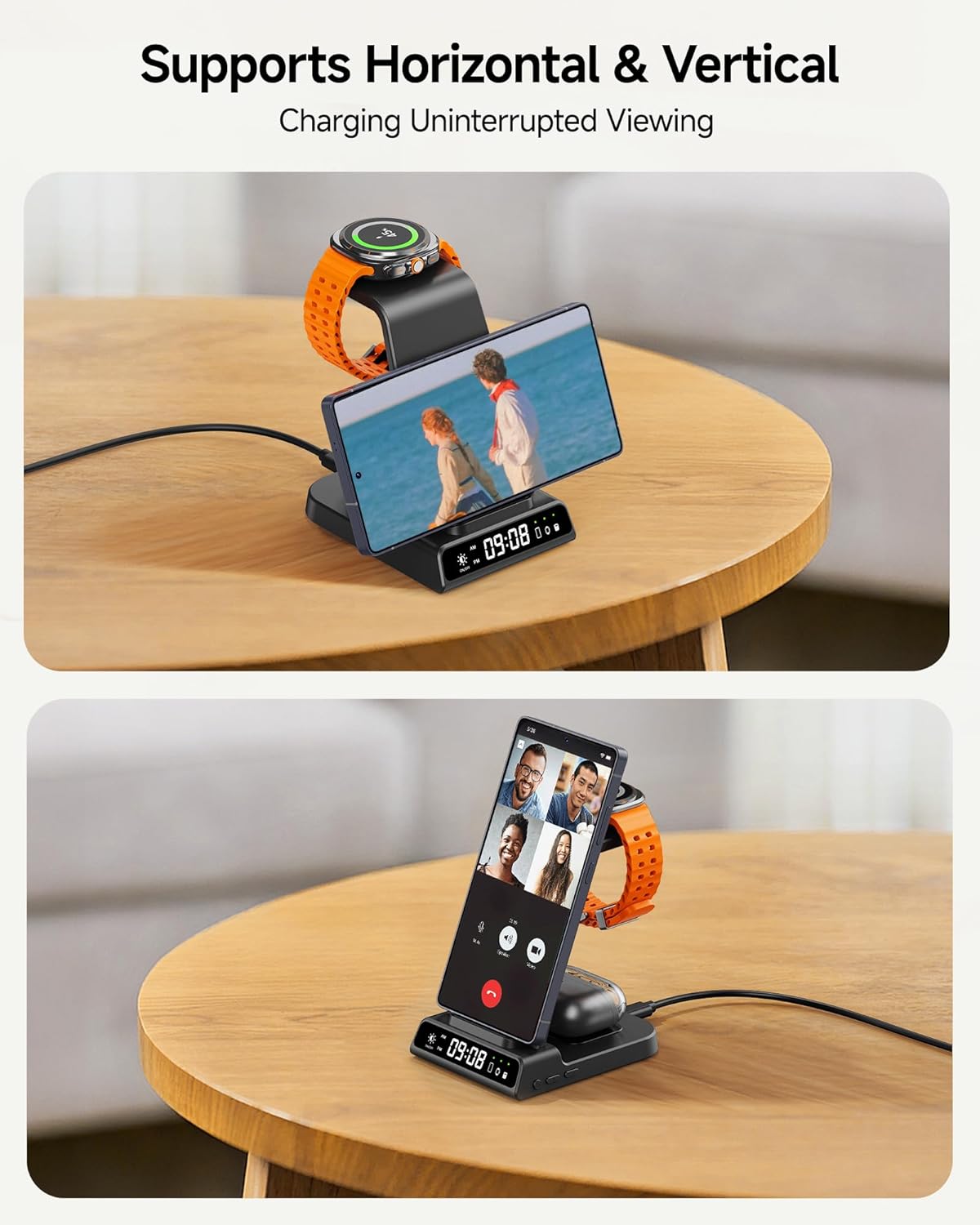
Figure 4: Supports both horizontal and vertical phone charging.
2. ഡിജിറ്റൽ ക്ലോക്ക് സജ്ജീകരിക്കുന്നു
The digital clock on the charging station can be adjusted using the buttons on the side of the unit.
- 12/24H സിസ്റ്റം സ്വിച്ച്: Short press the designated button once to toggle between 12-hour and 24-hour time formats.
- സമയ ക്രമീകരണം നൽകുക: Long press the time setting button (usually marked with a clock icon or similar) for 3 seconds to enter the hour adjustment mode.
- Adjust Hours/Minutes: While in time setting mode, short press the '+' or '-' buttons to adjust the hour. Short press the time setting button again to switch to minute adjustment, then use '+' or '-' to set minutes.
- Exit Time Setting: Long press the time setting button for 3 seconds to save and exit the time setting mode.

Figure 5: Clock setting buttons and functions.
3. ക്ലോക്കിന്റെ തെളിച്ചം ക്രമീകരിക്കൽ
The digital clock's brightness can be adjusted to suit your environment, especially for nighttime use.
- Brightness Touch Button: Locate the touch-sensitive button on the front of the charging station, typically near the digital clock display.
- സൈക്കിൾ തെളിച്ചം: Tap this button to cycle through different brightness levels (100%, 50%, 20%) and an 'Off' setting.
കുറിപ്പ്: The charging station does not include an alarm clock function; it is for time display only.

Figure 6: Adjusting the digital clock brightness.
അനുയോജ്യത
The leQuiven Wireless Charging Station is compatible with a wide range of devices. Ensure your device supports wireless charging (Qi standard) for optimal performance.
അനുയോജ്യമായ ഫോണുകൾ:
- സാംസങ് ഗാലക്സി: Z Flip7/6/5/4/3, Z Fold6/5/4/3, S25 Ultra/+/S25/Edge, S24 Ultra/+/S24/FE, S23 Ultra/+/S23/FE, S22 Ultra/+/S22, S21 Ultra/+/S21/FE, S20 Ultra/+/S20, S10/+/e, Note 20/10/9/8.
- iPhone: 16/15/14/13/12/11 Series, SE, XS MAX/X/XR, 8/8 Plus.
- ഗൂഗിൾ പിക്സൽ: 8 Pro/8, 7 Pro/7, 6 Pro/6, 5, 4/3 (XL).
- Other Qi-enabled smartphones.
കുറിപ്പ്: Not compatible with Samsung Galaxy A/M/J/Tab Series or phones without wireless charging capability.
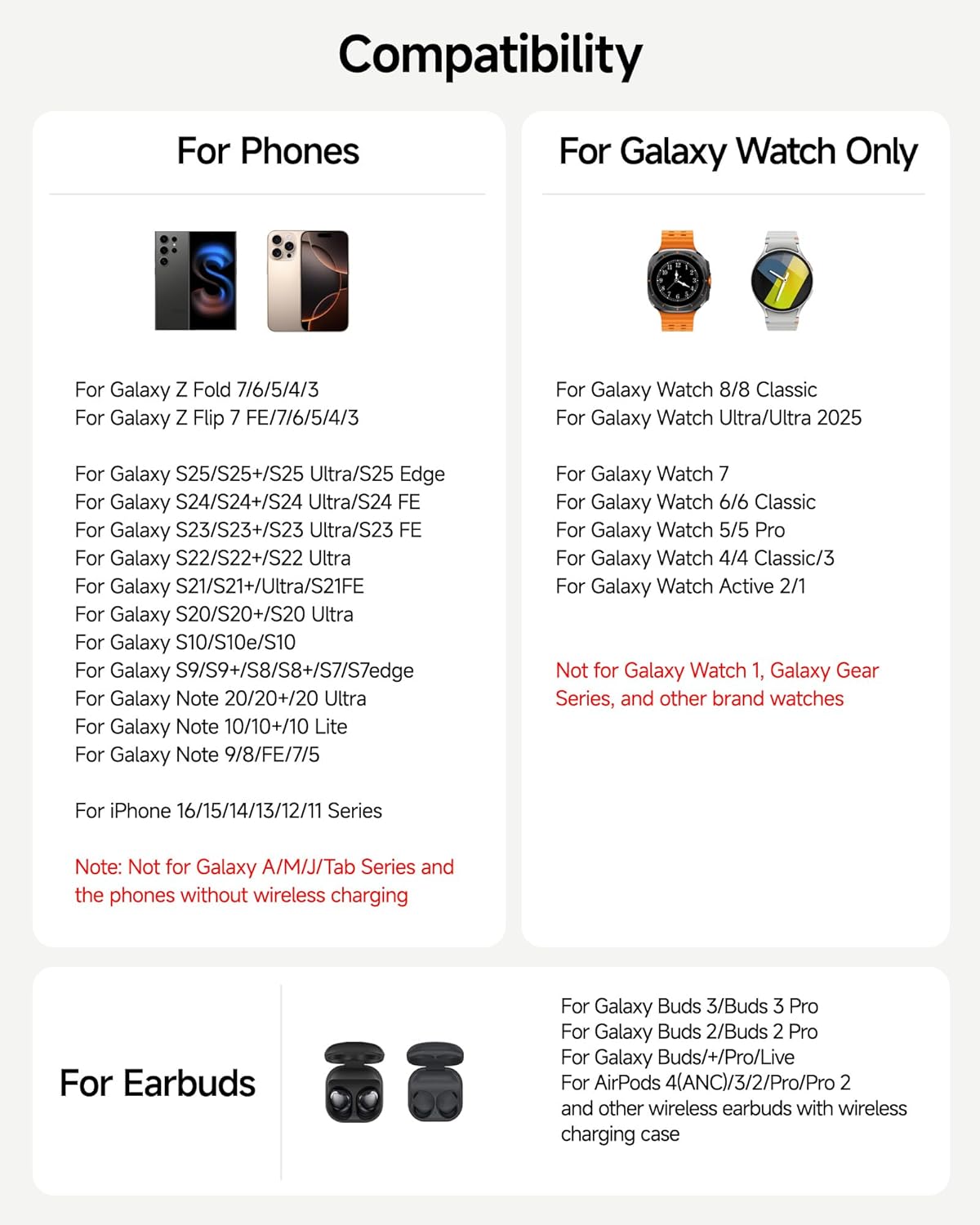
Figure 7: Phone compatibility list.
Compatible Smartwatches:
- Samsung Galaxy Watch: 8 Classic/8, 7, Ultra/Ultra 2025, 6 Classic/6, 5 Pro/5, 4 Classic/4, 3, Active 2/1.
കുറിപ്പ്: Not compatible with Galaxy Watch 1, Galaxy Gear series, or other brand watches.
Compatible Earbuds:
- Samsung Galaxy Buds: 3 Pro/3, 2 Pro/2, Pro, Buds/+, Live.
- Apple AirPods: Pro 2, 3rd generation, 2, Pro.
- Other wireless earbuds with wireless charging cases.
കേസ് അനുയോജ്യത:
The charging station supports phone cases with a thickness of less than 5mm (0.2 inches). Remove any magnetic pads, metal cases, credit cards, or metal rings from your phone case before charging, as these can interfere with wireless charging.

Figure 8: Phone case compatibility guidelines.
മെയിൻ്റനൻസ്
To ensure the longevity and optimal performance of your charging station, follow these maintenance guidelines:
- വൃത്തിയാക്കൽ: Disconnect the power before cleaning. Use a soft, dry cloth to wipe the surface of the charging station. Avoid using abrasive cleaners, solvents, or harsh chemicals.
- സംഭരണം: ദീർഘനേരം ഉപയോഗിക്കാത്തപ്പോൾ, ചാർജിംഗ് സ്റ്റേഷൻ നേരിട്ട് സൂര്യപ്രകാശത്തിൽ നിന്നും കടുത്ത താപനിലയിൽ നിന്നും അകന്ന് തണുത്തതും വരണ്ടതുമായ സ്ഥലത്ത് സൂക്ഷിക്കുക.
- കൈകാര്യം ചെയ്യൽ: ഉപകരണം ശ്രദ്ധയോടെ കൈകാര്യം ചെയ്യുക. താഴെ വീഴുകയോ ശക്തമായ ആഘാതങ്ങൾക്ക് വിധേയമാക്കുകയോ ചെയ്യരുത്.
ട്രബിൾഷൂട്ടിംഗ്
If you encounter issues with your leQuiven Wireless Charging Station, refer to the following common problems and solutions:
| പ്രശ്നം | സാധ്യമായ കാരണം | പരിഹാരം |
|---|---|---|
| ഉപകരണം ചാർജ് ചെയ്യുന്നില്ല | 1. ഉപകരണം ശരിയായി വിന്യസിച്ചിട്ടില്ല. 2. Phone case too thick or contains metal. 3. Device not compatible. 4. Power adapter not connected or faulty. | 1. Re-position the device on the charging pad. 2. Remove the phone case or use a thinner, non-metallic case. 3. Verify device compatibility (refer to 'Compatibility' section). 4. Ensure the power adapter is securely connected and functioning. Try a different outlet. |
| ചാർജിംഗ് മന്ദഗതിയിലാണ് | 1. Using a non-recommended power adapter. 2. Multiple devices charging simultaneously. 3. Device misalignment. | 1. Use the provided 18W (or higher) charging brick. 2. Charging speed may be reduced when charging multiple devices. 3. Ensure devices are centered on their respective charging pads. |
| Digital clock not displaying or incorrect | 1. Clock brightness set to 'Off'. 2. Time not set correctly. | 1. Tap the brightness touch button to increase brightness. 2. Follow the 'Setting the Digital Clock' instructions to adjust the time. |
| LED ഇൻഡിക്കേറ്റർ മിന്നുന്നു | Foreign object detected (FOD). | Remove any metal objects, keys, coins, or cards from the charging area. |
ഈ പരിഹാരങ്ങൾ പരീക്ഷിച്ചതിനുശേഷവും പ്രശ്നം നിലനിൽക്കുകയാണെങ്കിൽ, ദയവായി ഉപഭോക്തൃ പിന്തുണയുമായി ബന്ധപ്പെടുക.
സ്പെസിഫിക്കേഷനുകൾ
| ഫീച്ചർ | വിശദാംശങ്ങൾ |
|---|---|
| മോഡൽ നമ്പർ | XF-C01 |
| ബ്രാൻഡ് | leQuiven |
| ഉൽപ്പന്ന അളവുകൾ | 3.94 x 1.97 x 3.94 ഇഞ്ച് |
| ഇൻപുട്ട് വോളിയംtage | 9 വോൾട്ട് |
| ഇൻപുട്ട് Ampഉന്മേഷം | 2.1 Amps |
| കണക്റ്റർ തരം | യുഎസ്ബി ടൈപ്പ് സി |
| മൊത്തം USB പോർട്ടുകൾ | 1 (for power input) |
| വയർലെസ് ചാർജിംഗ് putട്ട്പുട്ട് | Up to 18W total (requires >18W adapter) |
| പ്രത്യേക സവിശേഷതകൾ | Built-in Digital Clock, Short Circuit Protection, Foreign Object Detection, Temperature Control, Overvoltage Protection, Overload Protection, Undervoltage Protection, Static Protection, Overcurrent Protection. |
| നിർമ്മാതാവ് | Shenzhen Xuanfeng Innovations Technology Co., Ltd. |
വാറൻ്റിയും പിന്തുണയും
The leQuiven Wireless Charging Station comes with a standard manufacturer's warranty. Please refer to the warranty card included in your package for specific terms and conditions.
For technical support, troubleshooting assistance, or warranty claims, please contact leQuiven customer service through the retailer where the product was purchased or visit the official leQuiven webസൈറ്റ്.
കുറിപ്പ്: No official product videos were provided with relevant seller information for embedding in this manual.


