1. ആമുഖം
Thank you for choosing the HXSJ X50 Wireless Game Mouse. This manual provides detailed instructions for setting up, operating, and maintaining your new wireless mouse. Please read this manual thoroughly before use to ensure optimal performance and longevity of your device.
പാക്കേജ് ഉള്ളടക്കം:
- HXSJ X50 Wireless Game Mouse
- USB റിസീവർ

Image 1.1: The HXSJ X50 Wireless Game Mouse and its USB receiver.
2 സുരക്ഷാ വിവരങ്ങൾ
- മൗസിനെ വെള്ളത്തിലോ അമിതമായ ഈർപ്പത്തിലോ തുറന്നുകാട്ടരുത്.
- ശക്തമായ ആഘാതങ്ങൾക്ക് മൗസ് വീഴ്ത്തുകയോ വിധേയമാക്കുകയോ ചെയ്യരുത്.
- ഉയർന്ന താപനിലയിൽ നിന്ന് ഉപകരണം അകറ്റി നിർത്തുക.
- Do not attempt to disassemble or repair the mouse yourself. Contact qualified service personnel if needed.
- പ്രാദേശിക നിയന്ത്രണങ്ങൾ അനുസരിച്ച് ബാറ്ററികൾ നീക്കം ചെയ്യുക.
3. സജ്ജീകരണം
3.1 ബാറ്ററി ഇൻസ്റ്റാളേഷൻ
The HXSJ X50 Wireless Game Mouse requires batteries for operation. Please ensure you have the necessary batteries (typically 1x AA battery, not included) before proceeding.
- മൗസിന്റെ അടിഭാഗത്ത് ബാറ്ററി കമ്പാർട്ട്മെന്റ് കണ്ടെത്തുക.
- ബാറ്ററി കമ്പാർട്ട്മെൻ്റ് കവർ തുറക്കുക.
- Insert the battery, ensuring correct polarity (+/-).
- ബാറ്ററി കമ്പാർട്ട്മെൻ്റ് കവർ സുരക്ഷിതമായി അടയ്ക്കുക.
3.2 USB റിസീവർ ബന്ധിപ്പിക്കുന്നു
- നിങ്ങളുടെ കമ്പ്യൂട്ടറിൽ ലഭ്യമായ USB പോർട്ട് കണ്ടെത്തുക.
- Insert the USB receiver into the USB port. Your computer should automatically detect and install the necessary drivers.
3.3 പവർ ചെയ്യുന്നു
Slide the power switch, located on the underside of the mouse, to the 'ON' position. The mouse is now ready for use.
4. പ്രവർത്തന നിർദ്ദേശങ്ങൾ
4.1 ബട്ടൺ പ്രവർത്തനങ്ങൾ
The HXSJ X50 mouse features 6 buttons for enhanced functionality:
- ഇടത് ക്ലിക്ക് ബട്ടൺ: പ്രാഥമിക പ്രവർത്തനം, തിരഞ്ഞെടുപ്പ്.
- റൈറ്റ് ക്ലിക്ക് ബട്ടൺ: സെക്കൻഡറി ഫംഗ്ഷൻ, സന്ദർഭ മെനുകൾ.
- സ്ക്രോൾ വീൽ: മുകളിലേക്കും/താഴേക്കും സ്ക്രോൾ ചെയ്യുക, മധ്യത്തിൽ ക്ലിക്ക് ചെയ്യുക.
- DPI ക്രമീകരണ ബട്ടൺ: DPI ക്രമീകരണങ്ങളിലൂടെ കടന്നുപോകുന്നു.
- Page Forward Button: മുന്നോട്ട് നാവിഗേറ്റ് ചെയ്യുന്നു web ബ്രൗസറുകൾ അല്ലെങ്കിൽ file പര്യവേക്ഷകർ.
- Page Backward Button: പിന്നിലേക്ക് നാവിഗേറ്റ് ചെയ്യുന്നു web ബ്രൗസറുകൾ അല്ലെങ്കിൽ file പര്യവേക്ഷകർ.

ചിത്രം 4.1: വശം view showing the ergonomic design and side buttons.
4.2 ഡിപിഐ അഡ്ജസ്റ്റ്മെന്റ്
Press the DPI adjustment button (located behind the scroll wheel) to cycle through the available sensitivity settings: 1000DPI, 1200DPI, 1600DPI, and 2400DPI. Select the DPI that best suits your preference and task.
4.3 പവർ സേവിംഗ്
The mouse features a power switch on its underside. To conserve battery life, slide the switch to the 'OFF' position when the mouse is not in use for extended periods.
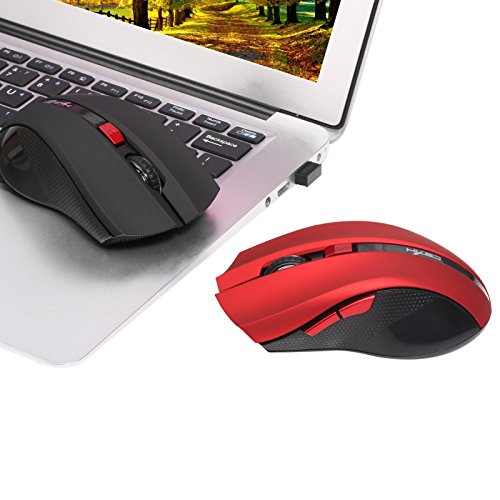
Image 4.2: The HXSJ X50 mouse in use with a laptop.
5. പരിപാലനം
5.1 വൃത്തിയാക്കൽ
To clean the mouse, gently wipe its surface with a soft, dry cloth. For stubborn dirt, slightly dampതുണിയിൽ വെള്ളം ഒഴിക്കുക. കഠിനമായ രാസവസ്തുക്കളോ അബ്രസീവ് ക്ലീനറുകളോ ഉപയോഗിക്കുന്നത് ഒഴിവാക്കുക.
5.2 സംഭരണം
When not in use, store the mouse and USB receiver in a dry, cool place, away from direct sunlight and extreme temperatures. If storing for an extended period, it is recommended to remove the battery.
6. പ്രശ്നപരിഹാരം
- മൗസ് പ്രതികരിക്കുന്നില്ല:
Ensure the mouse is powered on. Check if the USB receiver is securely plugged into a working USB port. Replace the battery if it is low or depleted. - ക്രമരഹിതമായ കഴ്സർ ചലനം:
Clean the optical sensor on the underside of the mouse. Ensure the surface you are using the mouse on is clean and non-reflective. - കണക്ഷൻ പ്രശ്നങ്ങൾ:
Try plugging the USB receiver into a different USB port. Move the mouse closer to the receiver to rule out interference. - Side buttons not working:
Ensure your operating system and applications support the forward/backward functions. Some software may require specific drivers or settings.
7 സ്പെസിഫിക്കേഷനുകൾ
| ഫീച്ചർ | വിശദാംശങ്ങൾ |
|---|---|
| ബ്രാൻഡ് | HXSJ |
| മോഡൽ | X50 |
| കണക്റ്റിവിറ്റി | വയർലെസ് (USB റിസീവർ) |
| വയർലെസ് ശ്രേണി | 10-15 മീറ്റർ വരെ |
| ചലനം കണ്ടെത്തൽ | ഒപ്റ്റിക്കൽ |
| ഡിപിഐ ക്രമീകരണങ്ങൾ | 1000, 1200, 1600, 2400 (ക്രമീകരിക്കാവുന്നത്) |
| ബട്ടണുകളുടെ എണ്ണം | 6 (ഇടത്, വലത്, സ്ക്രോൾ വീൽ, DPI, മുന്നോട്ട്, പിന്നിലേക്ക്) |
| പവർ ഉറവിടം | ബാറ്ററി (1x AA, ഉൾപ്പെടുത്തിയിട്ടില്ല) |
| ബാറ്ററി ലൈഫ് (ശരാശരി) | 6 മാസം |
| കൈ ഓറിയൻ്റേഷൻ | ഉഭയകക്ഷി |
| മെറ്റീരിയൽ | പ്ലാസ്റ്റിക് |
| ഇനത്തിൻ്റെ ഭാരം | 80 ഗ്രാം |
| അനുയോജ്യമായ OS | Windows 98/ME/2000/XP/Vista/7/8, Linux |
8. വാറൻ്റിയും പിന്തുണയും
For warranty information or technical support, please refer to the documentation provided with your purchase or contact the retailer/manufacturer directly. Keep your proof of purchase for warranty claims.


