1. ആമുഖം
This manual provides essential information for the installation, operation, and maintenance of your Axis Communications M2035-LE HDTV 1080P Surveillance Camera. Please read this manual thoroughly before using the product to ensure proper setup and functionality. Keep this manual for future reference.
2 സുരക്ഷാ വിവരങ്ങൾ
ഉൽപ്പന്നത്തിന് കേടുപാടുകൾ സംഭവിക്കാതിരിക്കാനോ നിങ്ങൾക്കും മറ്റുള്ളവർക്കും പരിക്കേൽക്കാതിരിക്കാനോ ഇനിപ്പറയുന്ന സുരക്ഷാ മുൻകരുതലുകൾ പാലിക്കുക:
- Ensure the power source matches the camera's requirements (28 Volts, 4.2 watts).
- Do not expose the camera to extreme temperatures or humidity beyond its operating specifications.
- ഇമേജ് സെൻസറിന് കേടുപാടുകൾ സംഭവിച്ചേക്കാവുന്ന ശക്തമായ പ്രകാശ സ്രോതസ്സുകളിലേക്ക് നേരിട്ട് എക്സ്പോഷർ ചെയ്യുന്നത് ഒഴിവാക്കുക.
- ക്യാമറ വേർപെടുത്താനോ പരിഷ്കരിക്കാനോ ശ്രമിക്കരുത്. എല്ലാ സേവനങ്ങളും യോഗ്യതയുള്ള ഉദ്യോഗസ്ഥരെ ഏൽപ്പിക്കുക.
- ക്യാമറ വീഴാതിരിക്കാൻ സുരക്ഷിതമായി ഇൻസ്റ്റാൾ ചെയ്യുക.
- Keep the camera away from water and moisture, despite its water-resistant rating (IP54).
3. പാക്കേജ് ഉള്ളടക്കം
പാക്കേജിൽ എല്ലാ ഇനങ്ങളും ഉണ്ടെന്ന് ഉറപ്പാക്കുക:
- Axis M2035-LE Camera Unit
- മൗണ്ടിംഗ് സ്റ്റാൻഡ്/ബ്രാക്കറ്റ്
- ഇൻസ്റ്റലേഷൻ ഗൈഡ് (ഈ പ്രമാണം)
- മൗണ്ടിംഗ് ഹാർഡ്വെയർ (സ്ക്രൂകൾ, ആങ്കറുകൾ)
കുറിപ്പ്: പ്രദേശം അല്ലെങ്കിൽ പാക്കേജ് അനുസരിച്ച് നിർദ്ദിഷ്ട ഉള്ളടക്കങ്ങൾ അല്പം വ്യത്യാസപ്പെടാം.
4. ഉൽപ്പന്നം കഴിഞ്ഞുview
The Axis M2035-LE is a compact, outdoor-ready dome surveillance camera designed for high-definition video monitoring. It features 1080p resolution, a wide viewing angle, and infrared night vision for reliable performance in various lighting conditions.
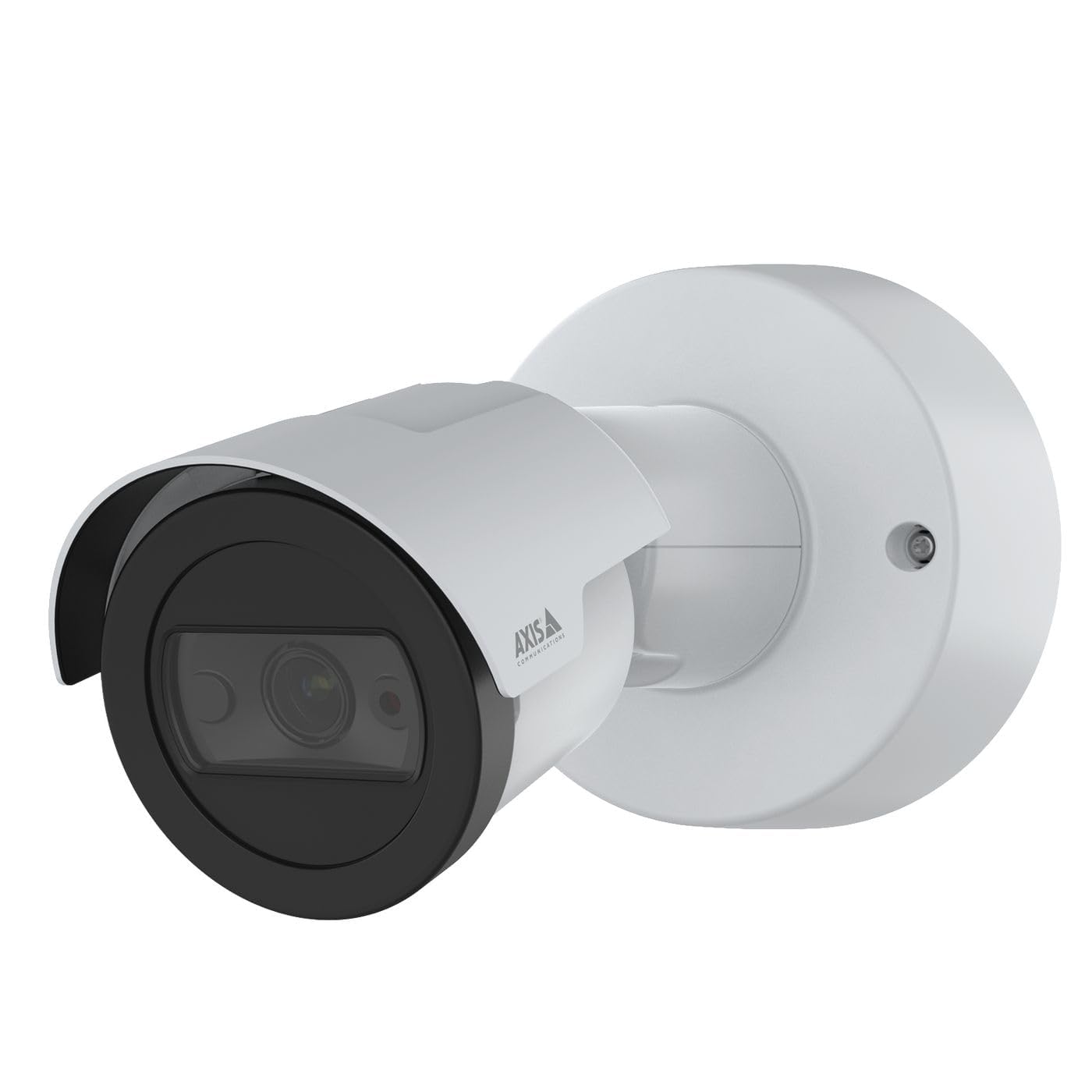
ചിത്രം 1: ഫ്രണ്ട് view of the Axis M2035-LE HDTV 1080P Surveillance Camera. This image shows the compact dome design suitable for outdoor installation.
5. സജ്ജീകരണവും ഇൻസ്റ്റാളേഷനും
The Axis M2035-LE camera supports various mounting options, including table mount and recessed installation. Ensure the chosen location provides a clear field of view സ്ഥിരതയുള്ള മൗണ്ടിംഗ് പ്രതലവും.
5.1. വർദ്ധിച്ചുവരുന്ന പരിഗണനകൾ
- ഔട്ട്ഡോർ ഉപയോഗം: The camera is designed for outdoor environments.
- ശക്തി: The camera requires a 28V power supply. Ensure proper wiring and power delivery.
- കണക്റ്റിവിറ്റി: The camera supports Wi-Fi and Ethernet connectivity. Plan your network connection accordingly.
5.2. Table Mount Installation
- Attach the mounting stand to the camera unit using the provided screws.
- ക്യാമറ ഒരു സ്ഥിരതയുള്ളതും പരന്നതുമായ പ്രതലത്തിൽ സ്ഥാപിക്കുക.
- ക്യാമറകൾ ക്രമീകരിക്കുക viewആവശ്യാനുസരണം ആംഗിൾ.
5.3. Recessed Mount Installation (Soffit Exampലെ)
For recessed mounting, particularly in soffits, careful planning is required to ensure sufficient depth and avoid obstructions.
- Verify Depth: Before cutting, confirm the soffit has adequate depth for the recessed mount. You can use a small pilot hole and a wire to measure the available space.
- Mark and Cut: Mark the desired location and carefully cut the opening in the soffit according to the template provided with the recessed mount kit (sold separately).
- മൗണ്ട് ഇൻസ്റ്റാൾ ചെയ്യുക: Secure the recessed mount bracket into the opening.
- Connect and Secure: Connect the necessary cables (power, Ethernet) and then secure the camera unit into the recessed mount.
- ആംഗിൾ ക്രമീകരിക്കുക: Adjust the camera lens to achieve the desired field of view.
6. പ്രവർത്തന നിർദ്ദേശങ്ങൾ
6.1. പ്രാരംഭ പവർ-അപ്പ്, നെറ്റ്വർക്ക് കണക്ഷൻ
- പവർ സപ്ലൈയിലേക്ക് ക്യാമറ ബന്ധിപ്പിക്കുക.
- For initial setup, it is recommended to connect via Ethernet to your network router or switch.
- Use the Axis IP Utility or a web browser to discover the camera on your network and configure its settings.
- For Wi-Fi connectivity, configure the wireless settings through the camera's web ഇൻ്റർഫേസ്.
6.2. വീഡിയോ മോണിറ്ററിംഗും റെക്കോർഡിംഗും
- The camera provides 1080p video resolution at 30 frames per second.
- തത്സമയം ആക്സസ് ചെയ്യുക view and recording features through the camera's web ഇന്റർഫേസ് അല്ലെങ്കിൽ അനുയോജ്യമായ വീഡിയോ മാനേജ്മെന്റ് സോഫ്റ്റ്വെയർ (VMS).
- The camera is compatible with Digital Video Recorders (DVRs).
- Video capture format is MPEG-4.
6.3. Low Light and Night Vision
The M2035-LE features "Night Color" low light technology and an infrared (IR) light source for clear imaging in dark conditions.
- The camera automatically switches to night mode when ambient light is low.
- Ensure the IR illuminator is not obstructed for optimal night vision performance.
6.4. മോഷൻ ഡിറ്റക്ഷനും അലേർട്ടുകളും
The camera supports motion-only alert types.
- Configure motion detection zones and sensitivity settings via the camera's web ഇൻ്റർഫേസ്.
- Set up alert actions such as email notifications or recording triggers.
6.5. റിമോട്ട് കൺട്രോൾ
The camera can be controlled remotely through its web interface or compatible VMS, allowing for adjustments to settings and viewലൈവ് ഫീഡുകൾ അപ്ലോഡ് ചെയ്യുന്നു.
7. പരിപാലനം
- വൃത്തിയാക്കൽ: ക്യാമറ ലെൻസും ബോഡിയും മൃദുവായ, d തുണി ഉപയോഗിച്ച് സൌമ്യമായി തുടയ്ക്കുക.amp തുണി. കഠിനമായ രാസവസ്തുക്കളോ ഉരച്ചിലുകളുള്ള ക്ലീനറുകളോ ഉപയോഗിക്കരുത്.
- ഫേംവെയർ അപ്ഡേറ്റുകൾ: Regularly check the Axis Communications website for firmware updates to ensure optimal performance and security. Follow the instructions provided with the firmware update.
- കേബിൾ പരിശോധന: പ്രത്യേകിച്ച് ഔട്ട്ഡോർ ഇൻസ്റ്റാളേഷനുകളിൽ, എല്ലാ കേബിളുകളിലും തേയ്മാനമോ കേടുപാടുകളോ ഉണ്ടോ എന്ന് ഇടയ്ക്കിടെ പരിശോധിക്കുക.
8. പ്രശ്നപരിഹാരം
| പ്രശ്നം | സാധ്യമായ കാരണം | പരിഹാരം |
|---|---|---|
| പവർ ഇല്ല/ക്യാമറ ഓണാകുന്നില്ല | Incorrect power supply; Loose connection; Power outage | Verify power adapter and connections; Check power outlet; Ensure correct voltagഇ (28V). |
| Cannot connect to camera via network | Incorrect IP address; Network cable issue; Wi-Fi configuration error; Firewall blocking connection | Use Axis IP Utility to find camera; Check Ethernet cable; Reconfigure Wi-Fi settings; Temporarily disable firewall for testing. |
| മോശം ചിത്ര നിലവാരം | Dirty lens; Insufficient lighting; Incorrect focus/settings; Network bandwidth issues | Clean the lens; Ensure adequate lighting or proper night vision settings; Adjust focus/image settings; Check network speed. |
| മോഷൻ ഡിറ്റക്ഷൻ പ്രവർത്തിക്കുന്നില്ല | Incorrect sensitivity settings; Detection zones not configured; Obstructions in view | Adjust motion detection sensitivity; Define detection zones in settings; Clear any obstructions. |
9 സ്പെസിഫിക്കേഷനുകൾ
| ഫീച്ചർ | വിശദാംശങ്ങൾ |
|---|---|
| മോഡൽ നമ്പർ | M2035-LE |
| ഇൻഡോർ/ഔട്ട്ഡോർ ഉപയോഗം | ഔട്ട്ഡോർ |
| കണക്റ്റിവിറ്റി ടെക്നോളജി | ഇഥർനെറ്റ്, വൈ-ഫൈ |
| വീഡിയോ ക്യാപ്ചർ റെസല്യൂഷൻ | 1080p |
| ഫ്രെയിം റേറ്റ് | സെക്കൻഡിൽ 30 ഫ്രെയിമുകൾ |
| Viewing ആംഗിൾ | 110 ഡിഗ്രി |
| ലോ ലൈറ്റ് ടെക്നോളജി | രാത്രി നിറം |
| പ്രകാശ സ്രോതസ്സ് തരം | ഇൻഫ്രാറെഡ് |
| അലേർട്ട് തരം | ചലനം മാത്രം |
| നിയന്ത്രണ രീതി | റിമോട്ട് |
| പവർ ഉറവിടം | Information Not Available (Note: Requires 28V, 4.2W) |
| വാല്യംtage | 28 വോൾട്ട് |
| വാട്ട്tage | 4.2 വാട്ട്സ് |
| മെറ്റീരിയൽ | ലോഹം |
| നിറം | വെള്ള |
| അളവുകൾ (L x W x H) | 1.1 x 9.7 x 6.5 ഇഞ്ച് |
| ഇനത്തിൻ്റെ ഭാരം | 0.634 ഔൺസ് |
| അന്താരാഷ്ട്ര സംരക്ഷണ റേറ്റിംഗ് | IP54 (ജല പ്രതിരോധം) |
| അനുയോജ്യമായ ഉപകരണങ്ങൾ | ഡിജിറ്റൽ വീഡിയോ റെക്കോർഡർ |
| ഫോട്ടോ സെൻസർ ടെക്നോളജി | CMOS |
| വീഡിയോ ക്യാപ്ചർ ഫോർമാറ്റ് | MPEG-4 |
10. വാറൻ്റിയും പിന്തുണയും
For detailed warranty information, please refer to the official Axis Communications website or contact your local distributor. Technical support and additional resources can also be found on the Axis Communications support portal.
നിർമ്മാതാവ്: ആക്സിസ്
Webസൈറ്റ്: www.axis.com


