1. ആമുഖം
The Axis Communications P3268-LVE is an advanced dome surveillance camera designed for high-quality indoor security monitoring. Featuring Forensic WDR, LIGHTFINDER 2.0, and OPTIMIZE technologies, it delivers clear images even in challenging light conditions. This camera is built for reliable performance and ease of integration into existing surveillance systems.

ചിത്രം 1: വശം view of the Axis P3268-LVE dome camera with its integrated sun shield.
2. ബോക്സിൽ എന്താണുള്ളത്?
ഇൻസ്റ്റാളേഷനുമായി മുന്നോട്ടുപോകുന്നതിനുമുമ്പ് എല്ലാ ഘടകങ്ങളും നിലവിലുണ്ടെന്ന് ഉറപ്പാക്കുക:
- Axis Communications P3268-LVE Security Camera
- ഇൻസ്റ്റലേഷൻ ഗൈഡ്
- മൌണ്ടിംഗ് ഹാർഡ്വെയർ
3 സാങ്കേതിക സവിശേഷതകൾ
Key technical details for the Axis P3268-LVE camera:
| ഫീച്ചർ | സ്പെസിഫിക്കേഷൻ |
|---|---|
| മോഡൽ നമ്പർ | 02332-001 |
| ഇൻഡോർ/ഔട്ട്ഡോർ ഉപയോഗം | ഇൻഡോർ |
| കണക്റ്റിവിറ്റി ടെക്നോളജി | Wired (Wi-Fi for certain functions) |
| മൗണ്ടിംഗ് തരം | സീലിംഗ് മൗണ്ട് |
| വീഡിയോ ക്യാപ്ചർ റെസല്യൂഷൻ | 8K |
| വീഡിയോ എൻകോഡിംഗ് | H.264 അല്ലെങ്കിൽ H.265 |
| ലോ ലൈറ്റ് ടെക്നോളജി | Night Color, LIGHTFINDER 2.0 |
| പ്രത്യേക ഫീച്ചർ | Forensic WDR, Low Light |
| അലേർട്ട് തരം | ചലനം മാത്രം |
| അന്താരാഷ്ട്ര സംരക്ഷണ റേറ്റിംഗ് | IP67 |
| പവർ ഉറവിടം | 12 Volts (DC), 14.4 Watts |
| അളവുകൾ (L x W x H) | 50 x 19.69 x 11.02 ഇഞ്ച് |
| ഇനത്തിൻ്റെ ഭാരം | 1.19 പൗണ്ട് |
| ഫ്ലാഷ് മെമ്മറി തരം | SD |
| മെറ്റീരിയൽ | ലോഹം |

ചിത്രം 2: താഴെ view of the Axis P3268-LVE camera, highlighting the brand logo and dome structure.
4. സജ്ജീകരണവും ഇൻസ്റ്റാളേഷനും
Follow these general steps for setting up your Axis P3268-LVE camera. Refer to the detailed installation guide included in the box for specific instructions and safety warnings.
- അൺപാക്ക് ചെയ്ത് പരിശോധിക്കുക: Carefully remove the camera and all accessories from the packaging. Inspect for any signs of damage.
- മൗണ്ടിംഗ്: Choose a suitable ceiling location for installation. Use the provided mounting template and hardware to securely attach the camera base. Ensure the mounting surface can support the camera's weight.
- കേബിൾ കണക്ഷനുകൾ: Connect the network cable (Ethernet) to the camera's port. If using a separate power supply, connect the 12V DC power adapter. For Power over Ethernet (PoE), a separate power adapter is not required.
- പ്രാരംഭ പവർ-അപ്പ്: Once connected, power on the camera. The camera will perform a self-test.
- നെറ്റ്വർക്ക് കോൺഫിഗറേഷൻ: ക്യാമറകൾ ആക്സസ് ചെയ്യുക web interface via a network browser. Use the Axis IP Utility or similar tool to discover the camera's IP address. Follow the on-screen prompts to set up a strong password and configure network settings.
- ചിത്ര ക്രമീകരണം: Adjust the camera's pan, tilt, and zoom (PTZ) as needed to achieve the desired field of view. Fine-tune image settings such as brightness, contrast, and WDR for optimal video quality.
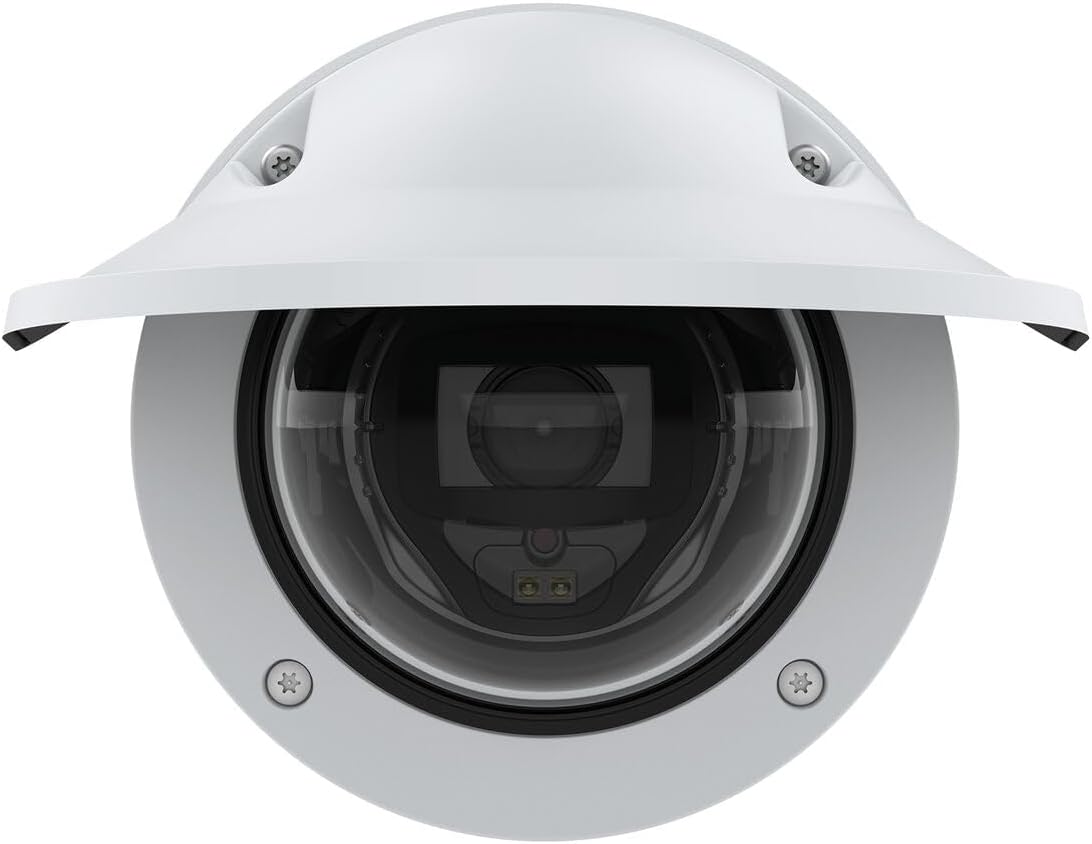
ചിത്രം 3: മുൻഭാഗം view of the Axis P3268-LVE camera, showing the lens and sun shield.
5. പ്രവർത്തന നിർദ്ദേശങ്ങൾ
The Axis P3268-LVE camera is designed for continuous surveillance. Here are general operating principles:
- തത്സമയം View: ക്യാമറയുടെ തത്സമയ വീഡിയോ ഫീഡ് അതിന്റെ web interface or a compatible video management system (VMS).
- റെക്കോർഡിംഗ്: Configure recording settings, including continuous recording, event-triggered recording (e.g., motion detection), and schedule-based recording. Recordings can be stored on an SD card (if installed) or a network-attached storage (NAS).
- ചലനം കണ്ടെത്തൽ: Utilize the camera's motion detection capabilities to trigger alerts or recordings when movement is detected within specified areas of the frame.
- വിദൂര ആക്സസ്: Set up remote access to view live feeds and recordings from anywhere using a secure connection and appropriate network configuration.
- ഫേംവെയർ അപ്ഡേറ്റുകൾ: Regularly check for and install firmware updates from the Axis Communications webമികച്ച പ്രകടനം, സുരക്ഷ, പുതിയ സവിശേഷതകളിലേക്കുള്ള ആക്സസ് എന്നിവ ഉറപ്പാക്കുന്ന സൈറ്റ്.

ചിത്രം 4: മറ്റൊരു വശം view of the Axis P3268-LVE camera, showcasing അതിന്റെ കരുത്തുറ്റ ഡിസൈൻ.
6. പരിപാലനം
ശരിയായ അറ്റകുറ്റപ്പണി നിങ്ങളുടെ ക്യാമറയുടെ ദീർഘായുസ്സും മികച്ച പ്രകടനവും ഉറപ്പാക്കുന്നു:
- വൃത്തിയാക്കൽ: Gently clean the camera's dome and lens with a soft, lint-free cloth. For stubborn dirt, use a mild cleaning solution specifically designed for optical surfaces. Avoid abrasive materials or harsh chemicals.
- ഫേംവെയർ: Keep the camera's firmware updated to the latest version. This provides security enhancements, bug fixes, and new functionalities.
- കേബിൾ പരിശോധന: Periodically check all cables for wear, damage, or loose connections.
- പരിസ്ഥിതി പരിശോധന: Ensure the camera's operating environment remains within specified temperature and humidity ranges.
7. പ്രശ്നപരിഹാരം
If you encounter issues with your Axis P3268-LVE camera, consider the following:
- ശക്തിയില്ല: Verify that the power supply is connected correctly and that the power outlet is functional. If using PoE, ensure the network switch or injector is providing power.
- വീഡിയോ ഇല്ല: Check network cable connections. Ensure the camera has a valid IP address and is accessible on the network. Restart the camera and the network device (router/switch).
- മോശം ചിത്രത്തിന്റെ ഗുണനിലവാരം: Clean the camera lens and dome. Adjust focus and image settings in the camera's web interface. Ensure sufficient lighting in the surveillance area.
- നെറ്റ്വർക്ക് കണക്റ്റിവിറ്റി പ്രശ്നങ്ങൾ: Confirm network cable integrity. Check router/switch settings. Ensure no IP address conflicts.
- ക്യാമറ പ്രതികരിക്കുന്നില്ല: Try power cycling the camera. If the issue persists, a factory reset might be necessary (refer to the full manual for reset procedures).
For more complex issues, consult the comprehensive support documentation available on the Axis Communications webസൈറ്റ് അല്ലെങ്കിൽ അവരുടെ സാങ്കേതിക പിന്തുണയുമായി ബന്ധപ്പെടുക.
8. വാറൻ്റിയും പിന്തുണയും
Your Axis Communications P3268-LVE camera is covered by a manufacturer's warranty. For detailed information regarding warranty terms, duration, and conditions, please refer to the warranty card included with your product or visit the official Axis Communications webസൈറ്റ്.
For technical support, product documentation, software downloads, and frequently asked questions, please visit the Axis Communications support portal:
Always ensure you have your product model number (02332-001) and serial number ready when contacting support.


