ആമുഖം
The Denon PMA-900HNE is an integrated network amplifier designed to deliver high-fidelity audio performance from both analog and digital sources. It features advanced high current (AHC) circuitry, built-in HEOS technology for multi-room audio streaming, and compatibility with various voice assistants. This manual provides essential information for setting up, operating, and maintaining your PMA-900HNE ampജീവൻ.

ചിത്രം 1: മുൻഭാഗം view of the Denon PMA-900HNE Integrated Stereo Ampജീവൻ.
സുരക്ഷാ വിവരങ്ങൾ
Please read these safety instructions carefully before using the unit. Keep this manual for future reference.
- ഊർജ്ജ സ്രോതസ്സ്: Connect the unit only to an AC power source of the type indicated on the unit.
- വെൻ്റിലേഷൻ: മതിയായ വായുസഞ്ചാരം ഉറപ്പാക്കുക. വെന്റിലേഷൻ തുറസ്സുകൾ തടയരുത്. ശരിയായ വായുസഞ്ചാരം അനുവദിക്കുന്ന സ്ഥലത്ത് യൂണിറ്റ് സ്ഥാപിക്കുക.
- ജലവും ഈർപ്പവും: യൂണിറ്റ് മഴയിലോ ഈർപ്പത്തിലോ തുറന്നുകാട്ടരുത്. പാത്രങ്ങൾ പോലുള്ള ദ്രാവകങ്ങൾ നിറച്ച വസ്തുക്കൾ യൂണിറ്റിൽ വയ്ക്കരുത്.
- ചൂട്: റേഡിയേറ്ററുകൾ, ഹീറ്റ് രജിസ്റ്ററുകൾ, സ്റ്റൗകൾ അല്ലെങ്കിൽ മറ്റ് ഉപകരണങ്ങൾ (ഉൾപ്പെടെ) പോലുള്ള താപ സ്രോതസ്സുകൾക്ക് സമീപം യൂണിറ്റ് സ്ഥാപിക്കരുത്. ampലൈഫയറുകൾ) ചൂട് ഉത്പാദിപ്പിക്കുന്നത്.
- വൃത്തിയാക്കൽ: ഉണങ്ങിയ തുണി ഉപയോഗിച്ച് മാത്രം വൃത്തിയാക്കുക.
- സേവനം: യൂണിറ്റ് സ്വയം സർവീസ് ചെയ്യാൻ ശ്രമിക്കരുത്. എല്ലാ സർവീസിംഗും യോഗ്യതയുള്ള സർവീസ് ഉദ്യോഗസ്ഥരെ ഏൽപ്പിക്കുക.
ബോക്സിൽ എന്താണുള്ളത്
താഴെ ലിസ്റ്റ് ചെയ്തിരിക്കുന്ന എല്ലാ ഇനങ്ങളും പാക്കേജിൽ ഉൾപ്പെടുത്തിയിട്ടുണ്ടെന്ന് ഉറപ്പാക്കുക:
- Denon PMA-900HNE Integrated Stereo Ampജീവപര്യന്തം
- ദ്രുത ആരംഭ ഗൈഡ്
- റിമോട്ട് കൺട്രോളർ
- 2 x External Antennas (for Bluetooth/Wi-Fi)
- പവർ കോർഡ്
- 2 x AAA Batteries (for remote controller)
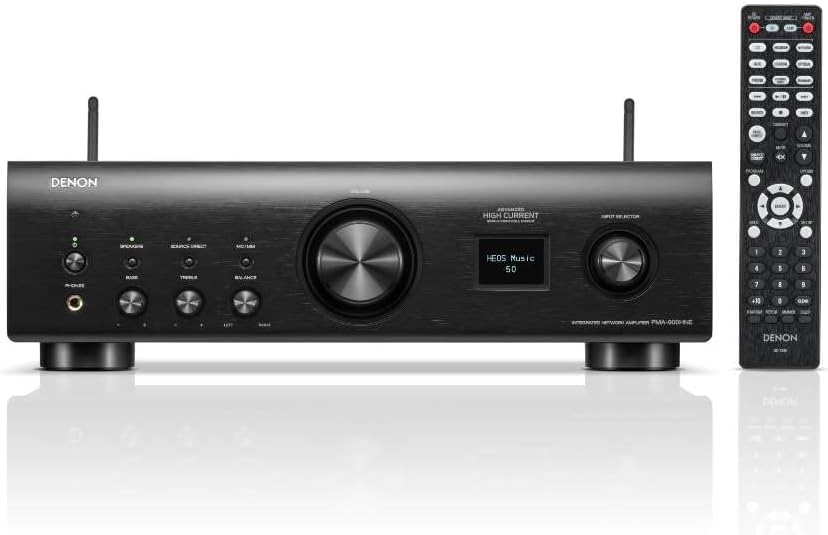
Figure 2: Denon PMA-900HNE amplifier shown with its remote control.
സജ്ജമാക്കുക
1. പായ്ക്ക് ചെയ്യലും പ്ലേസ്മെന്റും
ശ്രദ്ധാപൂർവ്വം നീക്കം ചെയ്യുക amplifier from its packaging. Place the unit on a stable, flat surface with adequate space around it for ventilation. Avoid placing it in direct sunlight or near heat sources.
2. Connecting Antennas
Attach the two external antennas to the corresponding terminals on the rear panel of the amplifier. These antennas are essential for stable Bluetooth and Wi-Fi connectivity.
3. സ്പീക്കറുകൾ ബന്ധിപ്പിക്കുന്നു
Connect your passive speakers to the speaker terminals on the rear panel. Ensure correct polarity (+ to + and - to -) for each speaker. The PMA-900HNE supports two pairs of speakers (A and B).
- സ്പീക്കർ എയ്ക്ക്, ഇടത് സ്പീക്കർ "L" ടെർമിനലുകളുമായും വലത് സ്പീക്കർ "R" ടെർമിനലുകളുമായും ബന്ധിപ്പിക്കുക.
- For Speaker B, connect the left speaker to the "L" terminals and the right speaker to the "R" terminals.
- If connecting a subwoofer, use the dedicated "PRE OUT SUBWOOFER" output.
4. ഓഡിയോ ഉറവിടങ്ങൾ ബന്ധിപ്പിക്കുന്നു
The PMA-900HNE offers a variety of input options:
- അനലോഗ് ഇൻപുട്ടുകൾ: Use RCA cables to connect devices like CD players, tape decks, or other audio components to the "CD", "AUX", or "RECORDER" inputs.
- ഫോണോ ഇൻപുട്ട്: Connect a turntable to the "PHONO" input. The PMA-900HNE includes a built-in MM/MC phono equalizer, eliminating the need for an external phono pre-amplifier for most turntables. Ensure the ground wire from your turntable is connected to the "SIGNAL GND" terminal.
- ഡിജിറ്റൽ ഇൻപുട്ടുകൾ: Connect digital audio sources such as TVs, Blu-ray players, or game consoles using optical or coaxial digital cables. The unit has 2 optical inputs and 1 coaxial input.
- USB-A ഇൻപുട്ട്: ഓഡിയോ പ്ലേ ചെയ്യുന്നതിന് fileഒരു USB സ്റ്റോറേജ് ഉപകരണത്തിൽ നിന്ന് s.

Figure 3: Rear panel connections of the Denon PMA-900HNE, including speaker outputs, analog, digital, and phono inputs.

ചിത്രം 4: വിശദമായി view of the digital audio input section on the rear panel.
5. നെറ്റ്വർക്ക് കണക്ഷൻ
The PMA-900HNE supports both wired and wireless network connections for HEOS streaming and other network features.
- വയർഡ് (ഇഥർനെറ്റ്): Connect an Ethernet cable from your router to the "NETWORK" port on the rear panel.
- വയർലെസ് (വൈ-ഫൈ): Ensure antennas are connected. Follow the on-screen instructions or use the HEOS app to connect the amplifier to your Wi-Fi network.
6. പവർ കണക്ഷൻ
Once all audio and network connections are made, connect the supplied power cord to the AC IN terminal on the rear panel and then to a wall outlet.
പ്രവർത്തിക്കുന്നു
1. അടിസ്ഥാന പ്രവർത്തനം
- പവർ ഓൺ/ഓഫ്: Press the POWER button on the front panel or the remote control to turn the unit on or off.
- വോളിയം നിയന്ത്രണം: Rotate the large VOLUME knob on the front panel or use the VOLUME +/- buttons on the remote control to adjust the sound level.
- ഇൻപുട്ട് തിരഞ്ഞെടുക്കൽ: Use the INPUT SELECTOR knob on the front panel or the input buttons on the remote control (e.g., CD, Phono, Optical) to switch between connected audio sources.
2. Network Features (HEOS, Streaming, Bluetooth, AirPlay 2)
The PMA-900HNE integrates HEOS Built-in technology for seamless music streaming and multi-room audio.
- HEOS App: Download the HEOS app on your smartphone or tablet. Use the app to set up and control your amplifier, access streaming services (Spotify, Pandora, TIDAL, TuneIn, etc.), and manage multi-room audio with other HEOS-enabled devices.
- ബ്ലൂടൂത്ത്: To pair a Bluetooth device, press the Bluetooth button on the remote or front panel, then select "PMA-900HNE" from your device's Bluetooth settings.
- എയർപ്ലേ 2: For Apple devices, select the PMA-900HNE from the AirPlay audio output options on your iPhone, iPad, or Mac to stream audio.

Figure 5: The PMA-900HNE supports various streaming services and voice control platforms.

Figure 6: The HEOS Built-in feature enables multi-room audio experiences.
3. ശബ്ദ നിയന്ത്രണം
The PMA-900HNE is compatible with Amazon Alexa, Google Assistant, and Apple Siri. Enable the Denon HEOS skill/action in your respective voice assistant app to control playback, volume, and input selection using voice commands.
4. ശബ്ദ ക്രമീകരണങ്ങൾ
- ബാസ്/ട്രെബിൾ: Use the BASS and TREBLE knobs on the front panel to adjust the low and high frequency response.
- ബാലൻസ്: Adjust the BALANCE knob to fine-tune the left/right speaker output.
- ഉറവിടം നേരിട്ട്: Press the SOURCE DIRECT button to bypass tone controls for the purest audio signal.
മെയിൻ്റനൻസ്
Proper care ensures the longevity and performance of your ampജീവൻ.
- വൃത്തിയാക്കൽ: മൃദുവായതും ഉണങ്ങിയതുമായ തുണി ഉപയോഗിച്ച് യൂണിറ്റ് തുടയ്ക്കുക. അബ്രാസീവ് ക്ലീനറുകൾ, മെഴുക് അല്ലെങ്കിൽ ലായകങ്ങൾ ഉപയോഗിക്കരുത്.
- വെൻ്റിലേഷൻ: വെന്റിലേഷൻ ഓപ്പണിംഗുകളിൽ പൊടിയോ അവശിഷ്ടങ്ങളോ തടസ്സപ്പെടുന്നില്ലെന്ന് ഇടയ്ക്കിടെ പരിശോധിക്കുക.
- പവർ കോർഡ്: Inspect the power cord regularly for any damage. If damaged, discontinue use and contact Denon service.
ട്രബിൾഷൂട്ടിംഗ്
If you experience issues with your PMA-900HNE, refer to the following common problems and solutions:
| പ്രശ്നം | സാധ്യമായ കാരണം | പരിഹാരം |
|---|---|---|
| ശക്തിയില്ല | പവർ കോർഡ് സുരക്ഷിതമായി ബന്ധിപ്പിച്ചിട്ടില്ല. | പവർ കോർഡ് യൂണിറ്റിലേക്കും വാൾ ഔട്ട്ലെറ്റിലേക്കും ദൃഢമായി പ്ലഗ് ചെയ്തിട്ടുണ്ടെന്ന് ഉറപ്പാക്കുക. |
| ശബ്ദമില്ല | Incorrect input selected; speakers not connected properly; volume too low. | Select the correct input source. Check speaker wire connections and polarity. Increase volume. |
| മോശം ശബ്ദ നിലവാരം | Loose connections; incorrect speaker impedance; poor audio source quality. | Check all cable connections. Ensure speaker impedance matches amplifier specifications. Try a different audio source. |
| Cannot connect to Wi-Fi/HEOS | Antennas not connected; incorrect Wi-Fi password; router issues. | Ensure antennas are securely attached. Re-enter Wi-Fi password. Restart your router. |
| റിമോട്ട് കൺട്രോൾ പ്രവർത്തിക്കുന്നില്ല | ബാറ്ററികൾ തീർന്നു; റിമോട്ടിനും യൂണിറ്റിനും ഇടയിലുള്ള തടസ്സം; റിമോട്ട് സെൻസർ അടഞ്ഞുപോയി. | Replace batteries. Remove any obstructions. Ensure remote sensor on unit is clear. |
If the problem persists after trying these solutions, please contact Denon customer support.
സ്പെസിഫിക്കേഷനുകൾ
Key technical specifications for the Denon PMA-900HNE Integrated Stereo Ampജീവപര്യന്തം:
- പവർ ഔട്ട്പുട്ട്: 85W per channel (8 ohms, 20Hz-20kHz, 0.07% THD)
- അളവുകൾ (W x D x H): 17.1 x 14.8 x 5.1 ഇഞ്ച് (434 x 376 x 130 മിമി)
- ഭാരം: 8.3 പൗണ്ട് (3.76 കി.ഗ്രാം)
- ഇൻപുട്ടുകൾ:
- Analog Audio: CD, AUX, Recorder, Phono (MM/MC)
- Digital Audio: 2 x Optical, 1 x Coaxial
- USB-A: 1
- ഔട്ട്പുട്ടുകൾ:
- സ്പീക്കർ എ/ബി
- Subwoofer Pre-out
- ഹെഡ്ഫോൺ ഔട്ട്പുട്ട്
- നെറ്റ്വർക്ക് കണക്റ്റിവിറ്റി: Ethernet, Wi-Fi (2.4GHz/5GHz), Bluetooth, AirPlay 2, HEOS Built-in
- ശബ്ദ നിയന്ത്രണ അനുയോജ്യത: ആമസോൺ അലക്സ, ഗൂഗിൾ അസിസ്റ്റന്റ്, ആപ്പിൾ സിരി
- പിന്തുണയ്ക്കുന്ന ഓഡിയോ ഫോർമാറ്റുകൾ: MP3, ALAC, WAV, FLAC HD, DSD

Figure 7: Internal components of the PMA-900HNE, highlighting its advanced circuitry.
വാറൻ്റിയും പിന്തുണയും
Denon products are designed for reliability and performance. For warranty information and technical support, please refer to the official Denon website or contact your local authorized Denon dealer.
ഓൺലൈൻ ഉറവിടങ്ങൾ: സന്ദർശിക്കുക www.denon.com for product registration, FAQs, and software updates.
കസ്റ്റമർ സർവീസ്: Contact information for customer support can typically be found on the Denon web"പിന്തുണ" അല്ലെങ്കിൽ "ഞങ്ങളെ ബന്ധപ്പെടുക" വിഭാഗത്തിന് കീഴിലുള്ള സൈറ്റ്.


