1. ആമുഖം
This manual provides comprehensive instructions for the setup, operation, and maintenance of your m-e Bell-510 RX Wireless Doorbell Receiver. Please read this manual carefully before using the device to ensure proper function and safety.
The Bell-510 RX is a durable and robust wireless doorbell receiver designed for versatile use, offering both stationary and mobile operation with its integrated rechargeable battery and foldable plug.
2 സുരക്ഷാ വിവരങ്ങൾ
- Ensure the receiver is used with a compatible power outlet (230 Volts).
- ഉപകരണം വെള്ളത്തിലോ അമിതമായ ഈർപ്പത്തിലോ തുറന്നുകാട്ടരുത്.
- ഉപകരണം സ്വയം തുറക്കാനോ നന്നാക്കാനോ ശ്രമിക്കരുത്. സേവനത്തിനായി യോഗ്യതയുള്ള ഉദ്യോഗസ്ഥരെ സമീപിക്കുക.
- നേരിട്ടുള്ള സൂര്യപ്രകാശത്തിൽ നിന്നും ഉയർന്ന താപനിലയിൽ നിന്നും ഉപകരണം അകറ്റി നിർത്തുക.
- ഈ ഉപകരണം ഇൻഡോർ ഉപയോഗത്തിന് മാത്രമുള്ളതാണ്.
3. പാക്കേജ് ഉള്ളടക്കം
പാക്കേജിൽ ഇനിപ്പറയുന്ന ഇനങ്ങൾ ഉണ്ടോ എന്ന് പരിശോധിക്കുക:
- 1 x m-e Bell-510 RX Wireless Doorbell Receiver
- 1 x ഉപയോക്തൃ മാനുവൽ (ഈ പ്രമാണം)
- (Note: Transmitter/doorbell button sold separately, if not part of a kit.)
4. ഉൽപ്പന്നം കഴിഞ്ഞുview
Familiarize yourself with the components of your Bell-510 RX receiver:

ചിത്രം 4.1: മുൻഭാഗം View of Receiver. This image shows the Bell-510 RX receiver from the front, highlighting its central "m-e" logo and the illuminated ring, which is shown in blue. The side panel with control buttons is also visible.
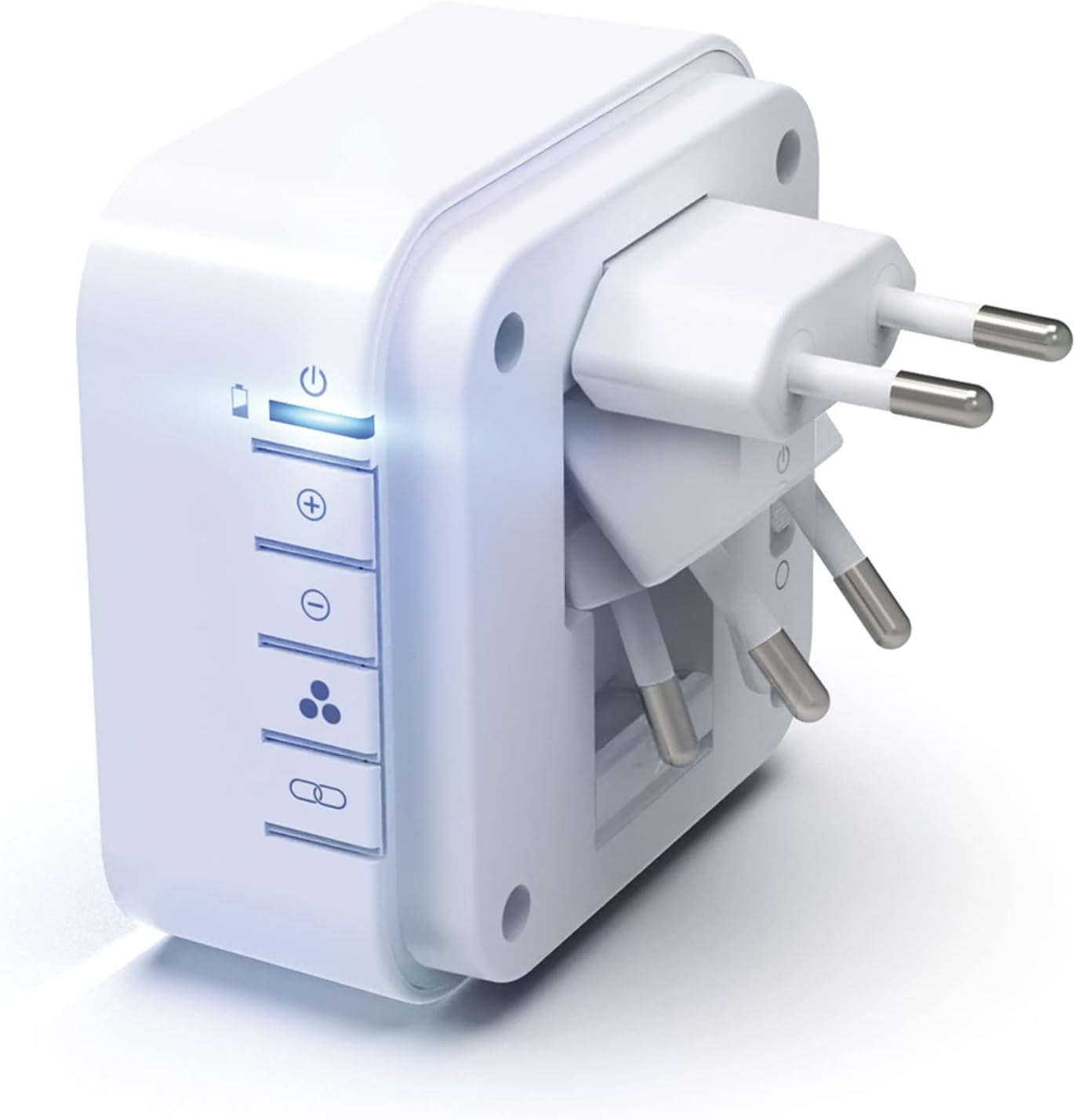
Figure 4.2: Foldable Plug. This image displays the rear of the Bell-510 RX receiver, clearly showing its integrated foldable Europlug. This design allows for compact storage and versatile placement, either plugged into an outlet or used as a stand for mobile operation.

Figure 4.3: Mobile and Stationary Use. This illustration demonstrates the flexibility of the Bell-510 RX receiver. The top part shows the receiver placed on a table next to a laptop, indicating its mobile use. The bottom part shows the receiver plugged directly into a wall outlet, illustrating its stationary use.
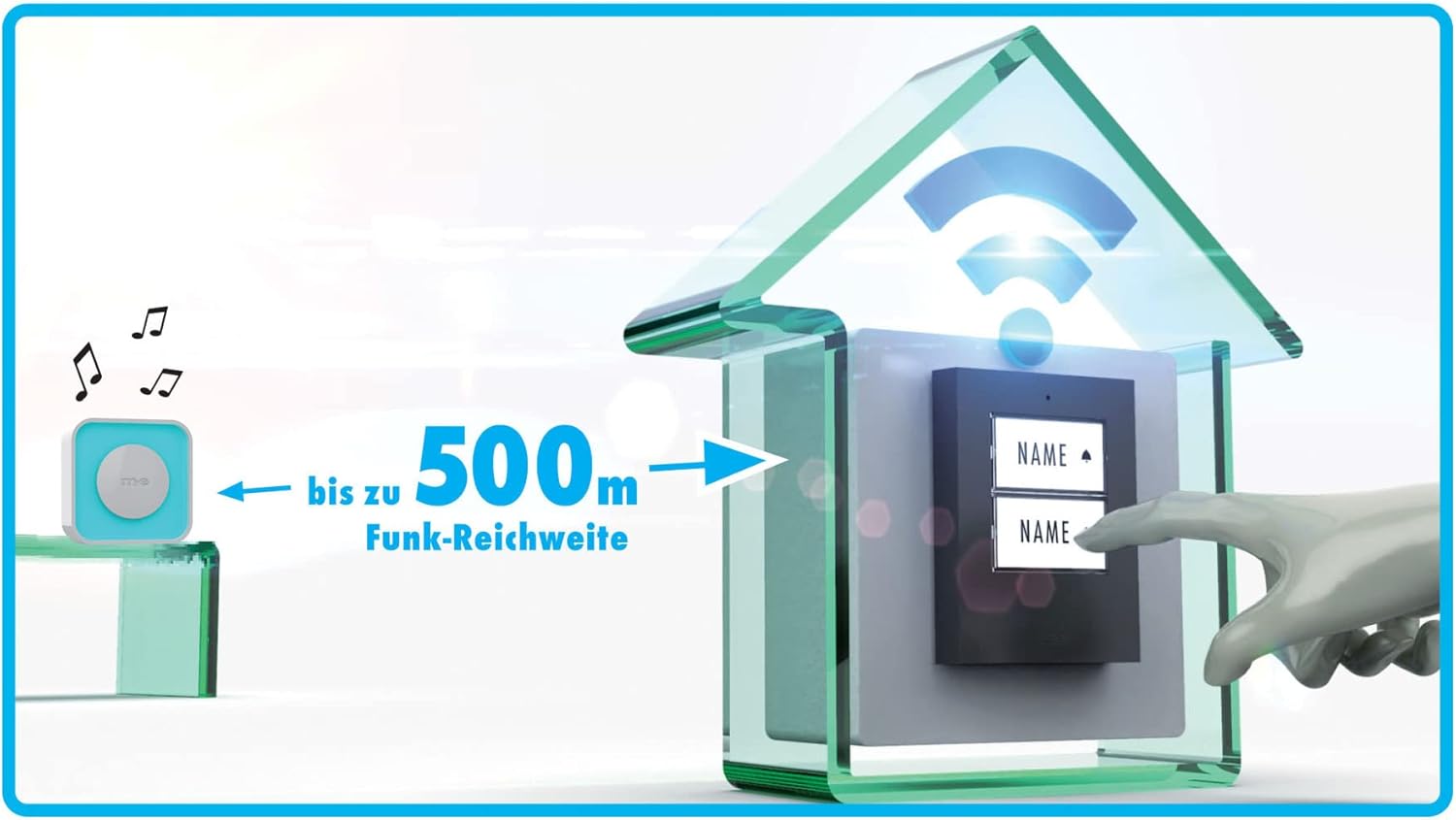
Figure 4.4: Wireless Range. This diagram visually represents the impressive wireless range of the Bell-510 RX system, showing a distance of "bis zu 500m" (up to 500 meters) between the doorbell button and the receiver in an open field environment.
സൈഡ് പാനൽ നിയന്ത്രണങ്ങൾ:
- പവർ/ബാറ്ററി സൂചകം: Shows device status and battery level.
- വോളിയം കൂട്ടുക (+): ശബ്ദത്തിൻ്റെ അളവ് വർദ്ധിപ്പിക്കുന്നു.
- വോളിയം ഡൗൺ (-): ശബ്ദത്തിന്റെ അളവ് കുറയ്ക്കുന്നു.
- ഫംഗ്ഷൻ സെലക്ടർ: Toggles between Sound + Light, Sound Only, and Light Only modes.
- ജോടിയാക്കൽ ബട്ടൺ: Used to pair the receiver with a compatible doorbell transmitter.
5. സജ്ജീകരണം
5.1 പ്രാരംഭ ചാർജിംഗ്
Before first use, fully charge the receiver's internal battery. Fold out the integrated plug and insert the receiver into a standard 230V wall outlet. The battery indicator light will show charging status. A full charge can last up to 4 weeks.
5.2 ഒരു ട്രാൻസ്മിറ്ററുമായി ജോടിയാക്കൽ
To pair your Bell-510 RX receiver with a compatible m-e doorbell transmitter (e.g., m-e Micro Funk-Konverter BELL-556 TX), follow these steps:
- Ensure both the receiver and transmitter are powered on and within close proximity.
- അമർത്തിപ്പിടിക്കുക ജോടിയാക്കൽ ബട്ടൺ on the side of the Bell-510 RX receiver until the indicator light starts flashing.
- Within a few seconds, activate your doorbell transmitter (e.g., press the doorbell button).
- The receiver will emit a confirmation sound or light flash, indicating successful pairing.
- Test the connection by pressing the doorbell transmitter button again.
Note: The pairing process is typically automatic upon first activation if both devices are new and compatible.
6. പ്രവർത്തന നിർദ്ദേശങ്ങൾ
6.1 പവർ ഓൺ/ഓഫ്
The receiver automatically powers on when plugged into an outlet or when the battery has sufficient charge for mobile use. To conserve battery, unplug the device or ensure it is in a low-power mode if available.
6.2 വോളിയം ക്രമീകരിക്കൽ
ഉപയോഗിക്കുക വോളിയം കൂട്ടുക (+) ഒപ്പം വോളിയം താഴേക്ക് (-) buttons on the side panel to adjust the sound level of the doorbell chime. There are multiple volume levels available.
6.3 Selecting Chime and Light Color
The Bell-510 RX offers 16 selectable ringtones and 6 optical display colors. The selection of the chime is typically done on the transmitter unit, while the light color is controlled by the receiver.

Figure 6.1: Pink Light Display. This image shows the Bell-510 RX receiver with its illuminated ring glowing in a vibrant pink color, demonstrating one of the available optical display options.

Figure 6.2: Green Light Display. This image shows the Bell-510 RX receiver with its illuminated ring glowing in a bright green color, showcasing another optical display option.

Figure 6.3: Multiple Color Options. This image displays several Bell-510 RX receivers arranged vertically, each plugged into a power strip and illuminating in a different color (blue, red, green, teal, magenta, white, yellow), demonstrating the variety of 6 optical display colors available.
6.4 Function Selector (Sound/Light Modes)
ഉപയോഗിക്കുക ഫംഗ്ഷൻ സെലക്ടർ button on the side panel to cycle through the following modes:
- Sound + Light: The receiver will chime and illuminate when the doorbell is pressed.
- ശബ്ദം മാത്രം: The receiver will only chime when the doorbell is pressed, without illumination.
- വെളിച്ചം മാത്രം: The receiver will only illuminate when the doorbell is pressed, without a chime. This mode is useful for quiet environments or for individuals with hearing impairments.
7. പരിപാലനം
- വൃത്തിയാക്കൽ: Wipe the receiver with a soft, dry cloth. Do not use abrasive cleaners or solvents.
- ബാറ്ററി കെയർ: To prolong battery life, avoid fully discharging the battery frequently. Recharge when the battery indicator shows low power.
- സംഭരണം: If storing the device for an extended period, ensure it is fully charged and store it in a cool, dry place.
8. പ്രശ്നപരിഹാരം
| പ്രശ്നം | സാധ്യമായ കാരണം | പരിഹാരം |
|---|---|---|
| Receiver does not chime/light up. |
|
|
| Sound is too low or too high. | വോളിയം ക്രമീകരണം തെറ്റാണ്. | Adjust volume using the (+) and (-) buttons. |
| Light display is not working. | Function selector set to "Sound Only" or "Off". | Change function selector to "Sound + Light" or "Light Only". |
| ചെറിയ ബാറ്ററി ലൈഫ്. | പതിവ് ഉപയോഗം അല്ലെങ്കിൽ ബാറ്ററി പഴക്കം ചെന്നത്. | Ensure full charge before mobile use. Consider replacing the unit if battery degradation is significant after warranty period. |
9 സ്പെസിഫിക്കേഷനുകൾ
| ഫീച്ചർ | വിശദാംശങ്ങൾ |
|---|---|
| മോഡൽ നമ്പർ | ബെൽ-510 RX |
| ബ്രാൻഡ് | m-e modern-electronics |
| വൈദ്യുതി വിതരണം | 230 Volts AC (via integrated foldable Europlug) |
| Battery Life (Mobile) | ഫുൾ ചാർജിൽ 4 ആഴ്ച വരെ |
| വയർലെസ് ശ്രേണി | 500 മീറ്റർ വരെ (തുറന്ന സ്ഥലം) |
| റിംഗ്ടോണുകൾ | തിരഞ്ഞെടുക്കാവുന്ന 16 മെലഡികൾ |
| Optical Display Colors | 6 selectable colors |
| ഫംഗ്ഷൻ മോഡുകൾ | Sound + Light, Sound Only, Light Only |
| പ്രത്യേക സവിശേഷതകൾ | Foldable plug for mobile/stationary use, integrated repeater |
| ഉദ്ദേശിച്ച ഉപയോഗം | Indoor electronic devices, small appliances, doorbell systems |
10. വാറൻ്റിയും പിന്തുണയും
The m-e Bell-510 RX Wireless Doorbell Receiver comes with a 1-year spare parts availability guarantee from the manufacturer, m-e modern-electronics.
For technical support, warranty claims, or further inquiries, please contact your retailer or the manufacturer directly. Refer to the contact information provided with your purchase documentation.
വാറന്റി ആവശ്യങ്ങൾക്കായി നിങ്ങളുടെ വാങ്ങിയതിന്റെ തെളിവ് സൂക്ഷിക്കുക.


