1. ഉൽപ്പന്നം കഴിഞ്ഞുview
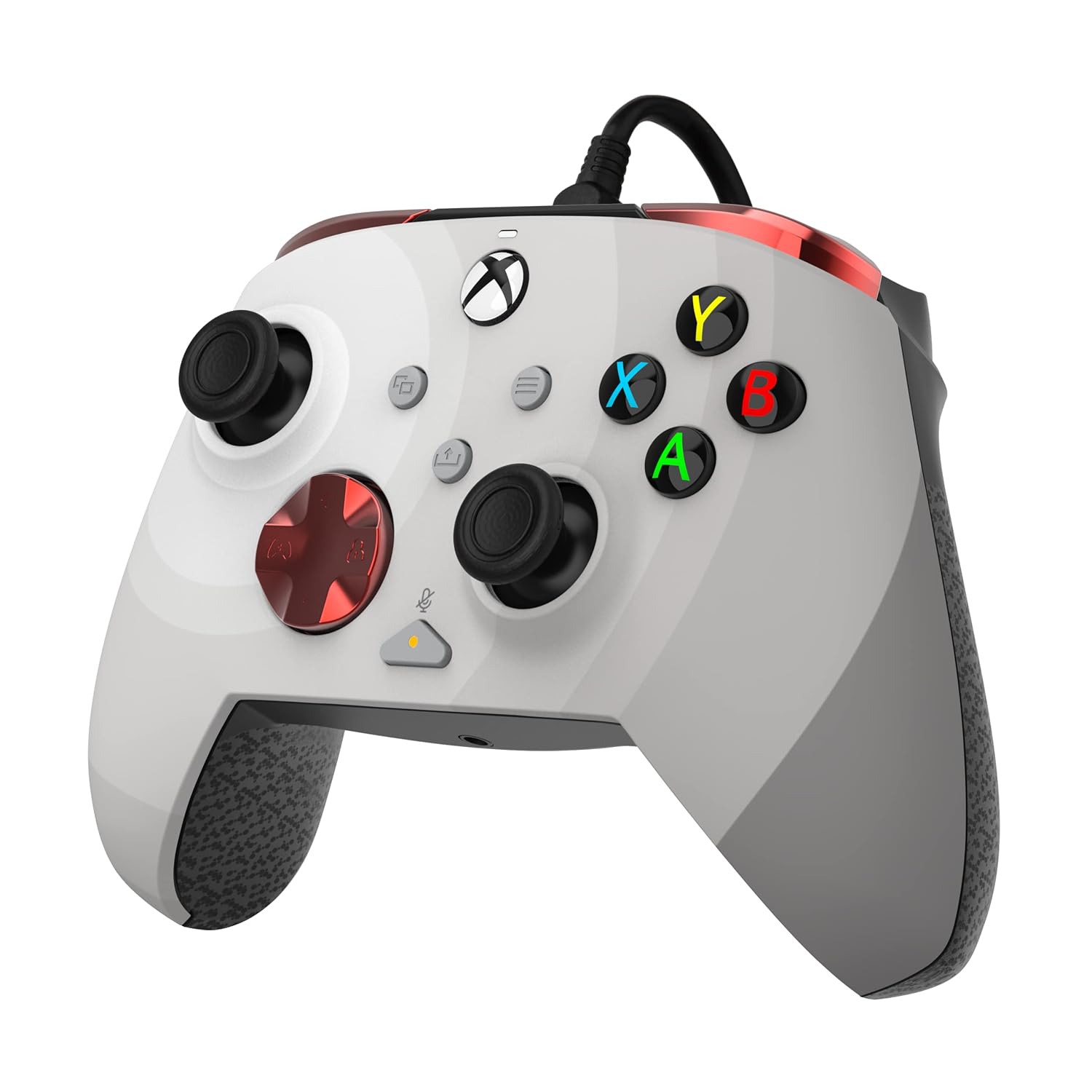
The PDP Gaming REMATCH Enhanced Wired Controller is officially licensed for Xbox Series X|S, Xbox One, and PC/Windows. This controller is designed to provide enhanced features and customizability for an optimized gaming experience. It includes mappable back buttons, advanced customization options via the PDP Control Hub app, textured grips, and integrated audio controls for efficient gameplay and communication.
The controller connects via an 8-foot USB-C cable, ensuring a lag-free experience without the need for batteries.
2 പ്രധാന സവിശേഷതകൾ
- ഇഷ്ടാനുസൃതമാക്കാവുന്ന ക്രമീകരണങ്ങൾ: Utilize the free PDP Control Hub App to re-map buttons, re-configure triggers, adjust dead zones, and update controller firmware.
- Integrated Audio Controls: Link your headset using the 3.5mm audio jack. Mute your microphone by double-tapping the "Function" button. Adjust game and chat audio on-the-fly using the controls located on the D-pad.
- പ്രോഗ്രാം ചെയ്യാവുന്ന ബാക്ക് ബട്ടണുകൾ: Two programmable back buttons allow for mapping of controller functions for quicker responses and improved efficiency.
- വയർഡ് അനുയോജ്യത: Features an 8-foot detachable USB-C cable for unlimited playtime without batteries and broad compatibility with Xbox Series X|S, Xbox One, and Windows 10/11.
- സമർപ്പിത പങ്കിടൽ ബട്ടൺ: Easily share captured images and videos with the dedicated share button located in the center of the controller.
3. സജ്ജീകരണ ഗൈഡ്
3.1 കൺട്രോളർ ബന്ധിപ്പിക്കുന്നു
- Connect the included 8-foot USB-C cable to the USB-C port on the top of the controller.
- Plug the other end of the USB-C cable into an available USB port on your Xbox console (Xbox Series X|S, Xbox One) or PC (Windows 10/11).
- The controller will automatically power on and connect to your device.
3.2 Installing the PDP Control Hub App
To unlock the full customization potential of your controller, download the free PDP Control Hub App from the Microsoft Store on your Xbox console or Windows PC. This app allows for button re-mapping, trigger configuration, dead zone adjustments, and firmware updates.
4. പ്രവർത്തന നിർദ്ദേശങ്ങൾ
4.1 അടിസ്ഥാന നിയന്ത്രണങ്ങൾ
The controller features standard Xbox button layouts including A, B, X, Y buttons, D-pad, left and right analog sticks, View button, Menu button, and Share button. It also includes left and right bumpers (LB, RB) and triggers (LT, RT).
4.2 Customizing Back Buttons
The two programmable back buttons (located on the underside of the controller) can be mapped to any standard controller function using the PDP Control Hub App. This allows for quick access to frequently used actions without removing your thumbs from the analog sticks.
4.3 ഓഡിയോ നിയന്ത്രണങ്ങൾ
- ഹെഡ്സെറ്റ് കണക്ഷൻ: Plug your 3.5mm compatible headset into the audio jack at the bottom of the controller.
- മൈക്ക് മ്യൂട്ട്: Double-tap the "Function" button (located below the right analog stick) to quickly mute or unmute your microphone.
- വോളിയം ക്രമീകരണം: Use the D-pad in conjunction with the "Function" button to adjust game and chat audio levels.
4.4 ഉള്ളടക്കം പങ്കിടൽ
Press the dedicated Share button (located in the center of the controller, below the Xbox button) to capture screenshots or record game clips, depending on your console or PC settings.
5. പരിപാലനം
5.1 പൊതു പരിചരണം
Keep the controller clean by wiping it with a dry, soft cloth. Avoid using harsh chemicals or abrasive materials. Store the controller in a cool, dry place when not in use to prevent damage.
5.2 ഫേംവെയർ അപ്ഡേറ്റുകൾ
Regularly check for firmware updates via the PDP Control Hub App to ensure optimal performance and access to the latest features. Follow the on-screen instructions within the app to perform any available updates.
6. പ്രശ്നപരിഹാരം
If you encounter any issues with your PDP Gaming REMATCH controller, please consider the following:
- കൺട്രോളർ പ്രതികരിക്കുന്നില്ല: Ensure the USB-C cable is securely connected to both the controller and your console/PC. Try plugging the cable into a different USB port.
- ഓഡിയോ പ്രശ്നങ്ങൾ: Verify your headset is fully plugged into the 3.5mm jack. Check the in-game and console/PC audio settings. Ensure the mic is not muted via the controller's function button.
- Customization Problems: Make sure the PDP Control Hub App is up to date. Restart the app and reconnect the controller.
- ഫേംവെയർ അപ്ഡേറ്റ് പരാജയം: Ensure a stable internet connection during updates. Do not disconnect the controller during the update process.
For further assistance, refer to the official PDP support webസൈറ്റ് അല്ലെങ്കിൽ ഉപഭോക്തൃ സേവനവുമായി ബന്ധപ്പെടുക.
7 സ്പെസിഫിക്കേഷനുകൾ
| ഫീച്ചർ | വിശദാംശങ്ങൾ |
|---|---|
| മോഡൽ നമ്പർ | 049-023-RW |
| അനുയോജ്യത | Xbox Series X|S, Xbox One, PC (Windows 10/11) |
| കണക്റ്റിവിറ്റി | വയേർഡ് (8-അടി വേർപെടുത്താവുന്ന USB-C കേബിൾ) |
| ഓഡിയോ ജാക്ക് | 3.5 മി.മീ |
| അളവുകൾ | 3.23 x 6.89 x 6.89 ഇഞ്ച് |
| ഭാരം | 10.56 ഔൺസ് (ഏകദേശം 299 ഗ്രാം) |
| നിർമ്മാതാവ് | പി.ഡി.പി |
| റിലീസ് തീയതി | ഒക്ടോബർ 12, 2022 |
8. ഔദ്യോഗിക ഉൽപ്പന്ന വീഡിയോകൾ
Introducing the all new REMATCH Controller for Xbox
This video provides an official introduction to the PDP REMATCH Controller for Xbox, highlighting its design and key features.
PDP Licensed Gaming Accessories Xbox Nintendo Playstation
ഒരു ഓവർview വീഡിയോ ഷോasing various PDP licensed gaming accessories, including the REMATCH controller, across different platforms.
9. ഉൽപ്പന്ന ചിത്രങ്ങൾ



10. വാറൻ്റിയും പിന്തുണയും
For information regarding product warranty, technical support, or replacement parts, please visit the official PDP support webസൈറ്റിൽ ബന്ധപ്പെടുകയോ അവരുടെ ഉപഭോക്തൃ സേവന വിഭാഗവുമായി ബന്ധപ്പെടുകയോ ചെയ്യുക. ഏതെങ്കിലും വാറന്റി ക്ലെയിമുകൾക്ക് വാങ്ങിയതിന്റെ തെളിവായി നിങ്ങളുടെ വാങ്ങൽ രസീത് സൂക്ഷിക്കുക.


