
1. ഉൽപ്പന്നം കഴിഞ്ഞുview
The ARES iSmart-2 Full Body Massage Chair is designed to provide a comprehensive massage experience using advanced 4D SL-Track technology and AI integration. It features 12 automatic programs, full-body airbags, zero-wall design, and built-in heating therapy for enhanced relaxation.

Image: The ARES iSmart-2 Full Body Massage Chair in black and gray, showcasinഅതിന്റെ എർഗണോമിക് ഡിസൈൻ.
2 പ്രധാനപ്പെട്ട സുരക്ഷാ വിവരങ്ങൾ
Please read and follow all instructions before use. This chair is designed for adults and may not be suitable for users under 160 cm tall or weighing over 136 kg. Always use the 'Zero Gravity Position' feature with caution and ensure the chair is stable before use.
- പവർ കോർഡിന് കേടുപാടുകൾ സംഭവിച്ചിട്ടില്ലെന്നും ഗ്രൗണ്ടഡ് ഔട്ട്ലെറ്റിലേക്ക് ശരിയായി ബന്ധിപ്പിച്ചിട്ടുണ്ടെന്നും ഉറപ്പാക്കുക.
- ഡിയിൽ കസേര ഉപയോഗിക്കരുത്amp അല്ലെങ്കിൽ ആർദ്ര ചുറ്റുപാടുകൾ.
- ജോലി സമയത്ത് കുട്ടികളെയും വളർത്തുമൃഗങ്ങളെയും കസേരയിൽ നിന്ന് അകറ്റി നിർത്തുക.
- നിങ്ങൾക്ക് എന്തെങ്കിലും ആരോഗ്യപ്രശ്നങ്ങൾ ഉണ്ടെങ്കിൽ, ഗർഭിണിയാണെങ്കിൽ, അല്ലെങ്കിൽ പേസ്മേക്കർ ഉണ്ടെങ്കിൽ, ഉപയോഗിക്കുന്നതിന് മുമ്പ് ഒരു ഡോക്ടറെ സമീപിക്കുക.
- Do not attempt to disassemble or repair the chair yourself. Contact customer support for assistance.
3. സജ്ജീകരണ ഗൈഡ്
3.1 അൺപാക്കിംഗും പ്ലേസ്മെന്റും
Carefully remove the massage chair from its packaging. Ensure all components are present. Place the chair on a flat, stable surface. Allow sufficient space around the chair for recline and movement.
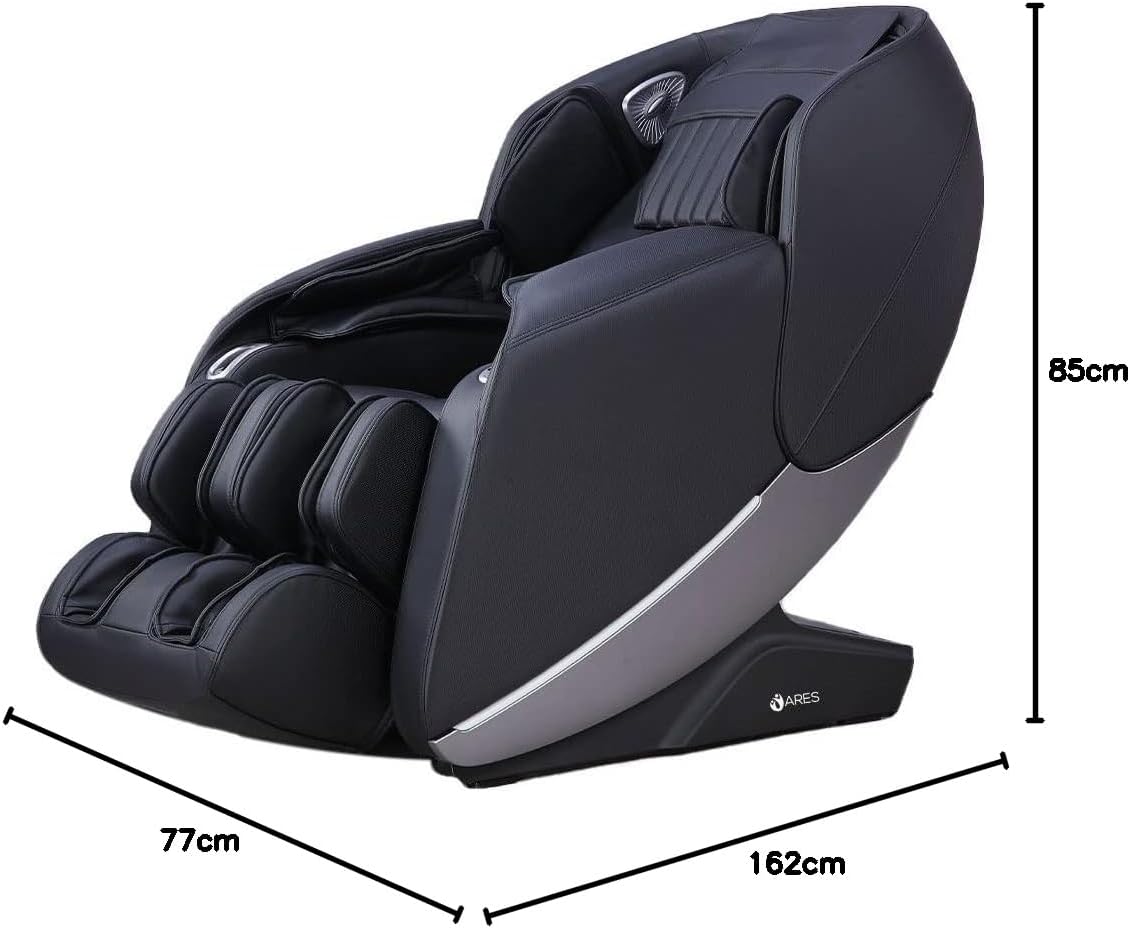
Image: Dimensions of the ARES iSmart-2 massage chair, showing a length of 162cm, width of 77cm, and height of 85cm.
3.2 Zero Wall Design
The iSmart-2 features a Zero Wall Design, requiring only 5 cm of space from the wall. When reclining, the chair slides forward, saving significant room compared to traditional massage chairs.

Image: Illustration of the Zero Space design, showing the chair requiring only 5cm from the wall when reclining.
4. Operating Your Massage Chair
4.1 കൺട്രോൾ പാനലും റിമോട്ടും
The massage chair can be operated using the integrated control panel or the wireless remote control. Familiarize yourself with the buttons and their functions for optimal use.

Image: The remote control for the ARES iSmart-2 massage chair, displaying various program and adjustment buttons.
4.2 ഇന്റലിജന്റ് വോയ്സ് കൺട്രോൾ
The iSmart-2 features an intelligent voice recognition system, allowing hands-free control of various massage functions. Simply speak commands to adjust settings or select programs.

Image: The massage chair with an overlay indicating voice control commands for functions like stretch massage, back and waist massage, open air pressure, and relax massage.
4.3 ഓട്ടോമാറ്റിക് പ്രോഗ്രാമുകൾ
The chair offers 12 pre-programmed automatic massage routines designed for various needs, including full-body, back and waist, shoulder and neck, relaxation, and fatigue recovery.

Image: Icons representing the 12 automatic massage programs, including Back and Waist Massage, Relaxing Massage, Shoulder and Neck Massage, Full-Body Massage, Traction Massage, Protection of Vertebral Massage, Comfortable Massage, Full Air Pressure, Fatigue Recovery, Beautiful Buttock Shaping, Soothing Sleep, and Stretching Muscles and Activating Collaterals.
4.4 Specialized Massage Functions
- സീറോ ഗ്രാവിറ്റി സ്ഥാനം: Elevates the legs and torso to approximately 118 degrees, distributing body weight evenly and reducing pressure on the spine.

Image: Diagram illustrating the SL Shape Curved Rail, Zero Gravity position (118-degree elevation), and Leg Stretch function.
- Heating Therapy: Carbon fiber far infrared heating elements provide warmth to the back (40°C-50°C), which can help relieve coldness and muscle pain.
- Rollers Foot Massage: Features specialized sole raised dots for a professional scraping massage, targeting the Yongquan acupoint on the feet.
- ഫുൾ ബോഡി എയർബാഗ് മസാജ്: Equipped with 24 airbags for comprehensive air pressure massage on the upper arms, under arms, legs, and feet. The air pressure intensity is adjustable.

Image: Diagram showing the distribution of 24 airbags for upper arm, under arm, leg, and foot massage, along with the back heating function and foot rolling massage.
- AI Intelligent 4D Core Massage Manipulator: Mechanical massage hands collect back curve data and mimic professional masseur skills for multi-dimensional and stereo massage.
- 4D Motion SL-Track Massage Mechanism: A 135cm super long SL-shaped curved rail provides massage from the head to the legs, maintaining the body's natural S-shaped curve.
- Backrest Scanning: Upon activation, the chair performs an auto body scan to measure key back areas and height, ensuring a customized and effective massage.
4.5 കണക്റ്റിവിറ്റി
- യുഎസ്ബി ചാർജിംഗ് പോർട്ട്: Conveniently located USB port for charging mobile devices during your massage.

Image: Close-up of the USB charging port integrated into the massage chair's armrest.
- ബ്ലൂടൂത്ത് സ്പീക്കർ: Built-in Bluetooth speakers allow you to connect your device and enjoy music or audio during your massage.

Image: Close-up of the Bluetooth speaker located near the headrest of the massage chair.
- കുറുക്കുവഴി ബട്ടണുകൾ: Easily accessible shortcut buttons for quick adjustments to recline and other common functions.

Image: Close-up of the shortcut buttons on the side of the massage chair for quick adjustments.
5. പരിചരണവും പരിപാലനവും
Regular maintenance ensures the longevity and optimal performance of your massage chair.
- വൃത്തിയാക്കൽ: കസേരയുടെ പ്രതലം മൃദുവായ, ഡി തുണി ഉപയോഗിച്ച് തുടയ്ക്കുക.amp cloth. For faux leather, use a mild, non-abrasive cleaner. Avoid harsh chemicals or solvents.
- സംഭരണം: ദീർഘനേരം ഉപയോഗിക്കാത്തപ്പോൾ, കസേര അഴിച്ച് നേരിട്ട് സൂര്യപ്രകാശം ഏൽക്കാത്ത തണുത്തതും വരണ്ടതുമായ സ്ഥലത്ത് സൂക്ഷിക്കുക.
- പരിശോധന: Periodically check the power cord and connections for any signs of wear or damage.
- കസേര നീക്കൽ: If relocating the chair, ensure it is unplugged and use proper lifting techniques or assistance to prevent injury or damage.
6. ട്രബിൾഷൂട്ടിംഗ് ഗൈഡ്
Refer to this guide for common issues. If the problem persists, contact customer support.
| പ്രശ്നം | സാധ്യമായ കാരണം | പരിഹാരം |
|---|---|---|
| കസേര ഓണാക്കുന്നില്ല. | പവർ കോർഡ് ഊരിവച്ചു; പവർ ഔട്ട്ലെറ്റ് തകരാറ്; മെയിൻ പവർ സ്വിച്ച് ഓഫ്. | Ensure power cord is securely plugged in. Test outlet with another device. Check the main power switch on the chair. |
| മസാജ് തീവ്രത വളരെ ദുർബലമാണ്/ശക്തമാണ്. | തെറ്റായ പ്രോഗ്രാം തിരഞ്ഞെടുത്തു; സ്വമേധയാലുള്ള ക്രമീകരണം ആവശ്യമാണ്. | Adjust intensity settings using the remote control. Try a different automatic program. |
| ശബ്ദ നിയന്ത്രണം പ്രതികരിക്കുന്നില്ല. | Microphone obstructed; voice commands unclear; feature disabled. | Ensure no obstructions near the microphone. Speak clearly and at a normal volume. Check if voice control is enabled in settings. |
| പ്രവർത്തന സമയത്ത് അസാധാരണമായ ശബ്ദങ്ങൾ. | Loose component; normal operational sound. | Some operational sounds are normal. If the noise is loud or unusual, discontinue use and contact customer support. |
7 സാങ്കേതിക സവിശേഷതകൾ
| ബ്രാൻഡ് | ARES |
| മോഡൽ നമ്പർ | RS-K902-BL |
| നിറം | കറുപ്പ്/ചാരനിറം |
| ഉൽപ്പന്ന അളവുകൾ (L x W x H) | 162 x 77 x 85 സെ.മീ |
| ഇനത്തിൻ്റെ ഭാരം | 92 കിലോഗ്രാം |
| മെറ്റീരിയൽ | വ്യാജമായത് |
| പ്രത്യേക സവിശേഷതകൾ | Space Saving (Zero Wall Design) |
| മസാജ് ടെക്നോളജി | 4D SL-Track, AI Intelligent Manipulator |
| യാന്ത്രിക പ്രോഗ്രാമുകൾ | 12 |
| എയർബാഗുകൾ | Full Body Airbags (24 PCS) |
| ചൂടാക്കൽ പ്രവർത്തനം | Carbon fiber far infrared (40°C-50°C) |
| നിയന്ത്രണം | Intelligent Voice Control, Remote Control |
| കണക്റ്റിവിറ്റി | USB, Bluetooth Speaker |
8. വാറണ്ടിയും ഉപഭോക്തൃ പിന്തുണയും
8.1 വാറൻ്റി വിവരങ്ങൾ
The ARES iSmart-2 Massage Chair comes with a 3 വർഷത്തെ വാറൻ്റി, ensuring reliability and protection against manufacturing defects. This warranty can be extended up to 7 years. Each chair undergoes 100% performance testing before shipping to ensure quality.
8.2 ഉപഭോക്തൃ പിന്തുണ
For any questions, technical assistance, or warranty claims, please contact ARES customer support. Our team is dedicated to providing exceptional after-sales support to ensure your satisfaction.
Please refer to your purchase documentation for specific contact details or visit the official ARES webസൈറ്റ്.


