1 പ്രധാനപ്പെട്ട സുരക്ഷാ വിവരങ്ങൾ
Before operating your SportPlus Walking Pad, please read and understand all safety instructions. Keep this manual for future reference.
- വാക്കിംഗ് പാഡ് പരന്നതും സ്ഥിരതയുള്ളതുമായ ഒരു പ്രതലത്തിൽ സ്ഥാപിച്ചിട്ടുണ്ടെന്ന് ഉറപ്പാക്കുക.
- Maintain a clear area of at least 0.5 meters around the walking pad during use.
- The maximum user weight capacity is 120 kg. Do not exceed this limit.
- പ്രവർത്തന സമയത്ത് കുട്ടികളെയും വളർത്തുമൃഗങ്ങളെയും വാക്കിംഗ് പാഡിൽ നിന്ന് അകറ്റി നിർത്തുക.
- Always wear appropriate athletic footwear when using the device.
- തലകറക്കം, ഓക്കാനം, നെഞ്ചുവേദന, അല്ലെങ്കിൽ മറ്റ് അസാധാരണ ലക്ഷണങ്ങൾ എന്നിവ അനുഭവപ്പെടുകയാണെങ്കിൽ, ഉടൻ തന്നെ വ്യായാമം നിർത്തി ഒരു ഡോക്ടറെ സമീപിക്കുക.
- Unplug the walking pad from the power outlet when not in use or before cleaning and maintenance.
2. ഉൽപ്പന്നം കഴിഞ്ഞുview
The SportPlus Walking Pad SP-TM-1100-iE is designed for effective walking and light jogging at home or in an office environment. It features a quiet motor, compact design, and app connectivity for an enhanced user experience.

Image: The SportPlus Walking Pad SP-TM-1100-iE in a home setting, demonstrating its sleek design and user-friendly operation.
പ്രധാന സവിശേഷതകൾ:
- നിശബ്ദ ഡിസി മോട്ടോർ: 0.5 HP motor with low noise levels (40-60 dB).
- വേഗത പരിധി: Adjustable from 0.8 to 6 km/h in 0.1 km/h increments.
- LED ഡിസ്പ്ലേ: Shows training time, speed, distance, calorie consumption, and step count.
- ആപ്പ് കണക്റ്റിവിറ്റി: Compatible with fitness apps like Kinomap and BitGym.
- കോംപാക്റ്റ് ഡിസൈൻ: Easy to store with transport wheels and a slim profile (12 cm height).
- Anti-slip Tread: Provides a secure walking surface.
- റിമോട്ട് കൺട്രോൾ: For convenient speed adjustments.
3. സജ്ജീകരണവും അസംബ്ലിയും
The SportPlus Walking Pad comes pre-assembled, requiring minimal setup before first use.
- അൺപാക്ക് ചെയ്യുന്നു: വാക്കിംഗ് പാഡ് അതിന്റെ പാക്കേജിംഗിൽ നിന്ന് ശ്രദ്ധാപൂർവ്വം നീക്കം ചെയ്യുക.
- പ്ലേസ്മെൻ്റ്: Place the walking pad on a firm, level surface. Ensure there is adequate space around the device for safe operation.
- പവർ കണക്ഷൻ: Connect the power cord to the walking pad and then to a suitable electrical outlet.
- ലെവലിംഗ്: If the floor is uneven, use the integrated leveling feet to stabilize the walking pad.
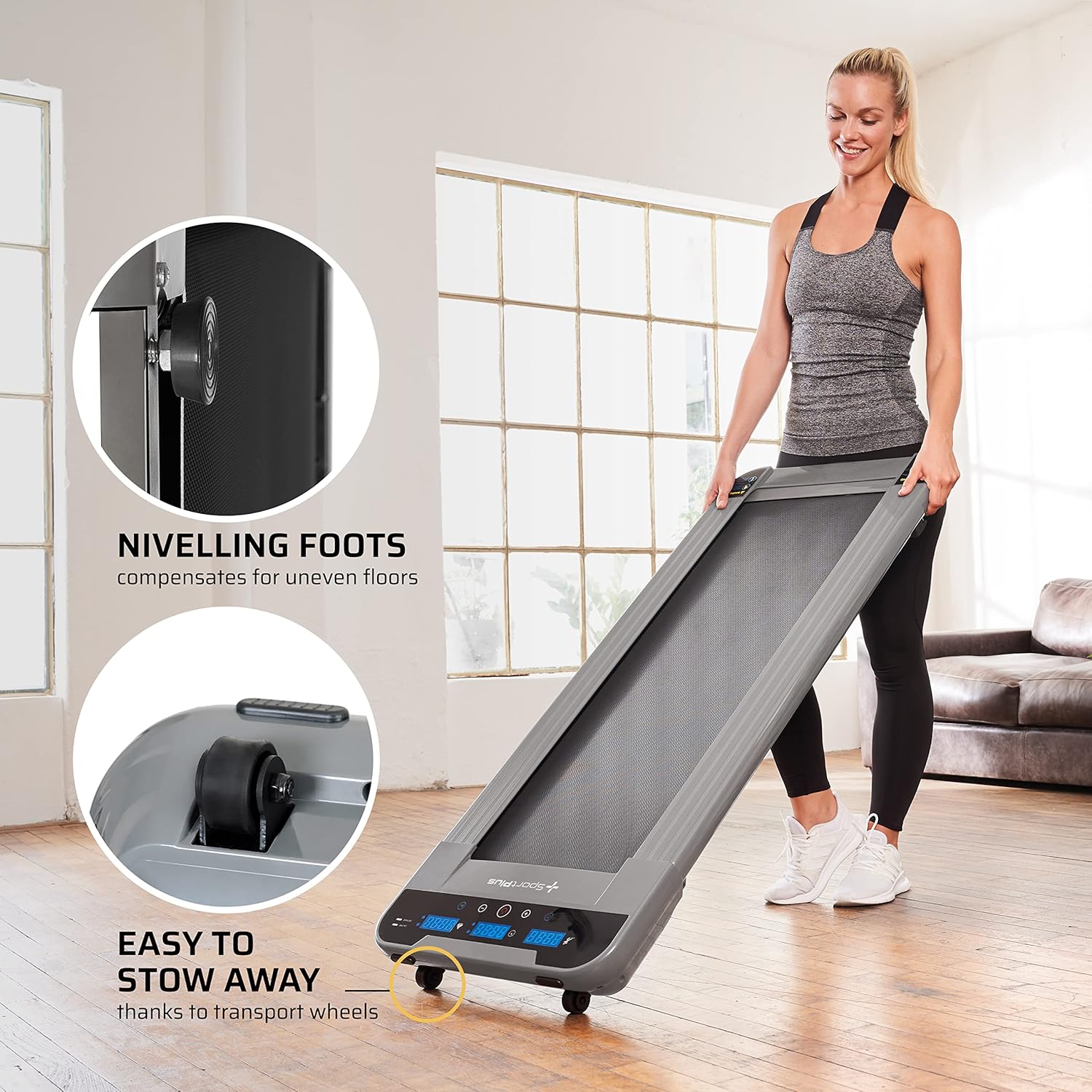
Image: Detail of the leveling feet and transport wheels, designed for easy adjustment and mobility.
- റിമോട്ട് കൺട്രോൾ: Insert the provided battery into the remote control.
സംഭരണം:
The walking pad is designed for compact storage. Utilize the transport wheels to easily move the device. It can be stored upright against a wall or horizontally under furniture.

Image: The walking pad stored vertically, highlighting its ultra-compact design suitable for small spaces.
4. പ്രവർത്തന നിർദ്ദേശങ്ങൾ
Follow these steps to begin your workout with the SportPlus Walking Pad.
- പവർ ഓൺ: Plug in the walking pad and press the power button on the device or remote control. The LED display will illuminate.
- Start Walking: Step onto the walking belt.
- വേഗത ക്രമീകരിക്കുക: Use the remote control to increase or decrease the walking speed. The speed can be adjusted from 0.8 km/h to 6 km/h in 0.1 km/h increments.
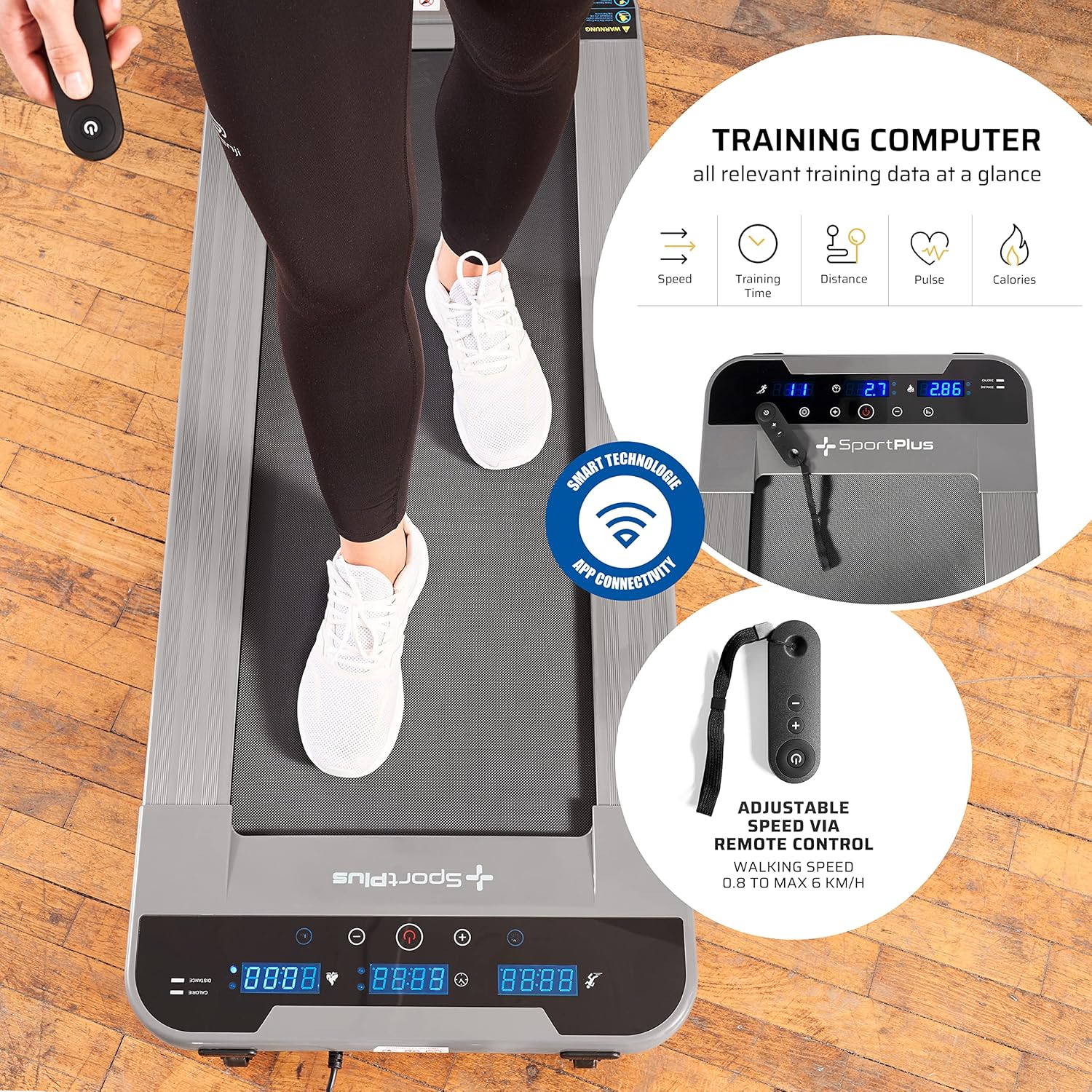
Image: The remote control and LED display in action, showing real-time training data and the app connectivity feature.
- പുരോഗതി നിരീക്ഷിക്കുക: The integrated LED display provides real-time data including:
- പരിശീലന സമയം
- നിലവിലെ വേഗത
- കവർ ചെയ്ത ദൂരം
- Estimated Calorie Consumption
- ഘട്ടങ്ങളുടെ എണ്ണം
- ആപ്പ് കണക്റ്റിവിറ്റി: For extended features and tracking, connect your walking pad to compatible fitness apps such as Kinomap or BitGym via Bluetooth. Refer to the app's instructions for pairing.
- Ending Workout: To stop the walking pad, press the stop button on the remote control or the device. Step off the belt once it has come to a complete stop.
Walking Modes:
The walking pad supports various walking intensities to suit your fitness goals:
- Promenade Mode: 0.8 to 2.5 km/h (up to 6000 steps/hour) - Ideal for light activity.
- Normal Walking Mode: 2.5 to 4.5 km/h (up to 7500 steps/hour) - Suitable for a brisk walk.
- Late Walk Mode: 4.5 to 6 km/h (up to 10000 steps/hour) - For more intense walking or light jogging.

Image: A user demonstrating the walking pad's suitability for home offices, with an overlay explaining the different walking modes and their corresponding speeds and step counts.
5. പരിപാലനം
Regular maintenance ensures the longevity and optimal performance of your SportPlus Walking Pad.
- വൃത്തിയാക്കൽ: പരസ്യം ഉപയോഗിച്ച് വാക്കിംഗ് പാഡ് തുടയ്ക്കുകamp ഓരോ ഉപയോഗത്തിനു ശേഷവും തുണി ഉപയോഗിക്കുക. അബ്രാസീവ് ക്ലീനറുകളോ ലായകങ്ങളോ ഉപയോഗിക്കുന്നത് ഒഴിവാക്കുക.
- ലൂബ്രിക്കേഷൻ: The walking belt requires periodic lubrication to reduce friction and extend its lifespan. Apply silicone oil (provided or recommended by SportPlus) under the walking belt as per the instructions in the separate lubrication guide. Frequency depends on usage, typically every 3-6 months.
- ബെൽറ്റ് വിന്യാസം: If the walking belt starts to drift to one side, it may need adjustment. Use the provided Allen key to turn the adjustment bolts at the rear of the walking pad. Turn the bolt clockwise to move the belt to the right, and counter-clockwise to move it to the left. Make small adjustments (quarter turns) and test the belt after each adjustment until it runs centrally.
- സംഭരണം: When not in use for extended periods, store the walking pad in a clean, dry place, away from direct sunlight and extreme temperatures.
6. പ്രശ്നപരിഹാരം
If you encounter any issues with your SportPlus Walking Pad, refer to the following common solutions.
| പ്രശ്നം | സാധ്യമായ കാരണം | പരിഹാരം |
|---|---|---|
| വാക്കിംഗ് പാഡ് പവർ ഓൺ ചെയ്യുന്നില്ല. | Power cord not properly connected; power outlet issue; remote control battery low. | Check power cord connection. Test the outlet with another device. Replace remote control battery. |
| Walking belt slips or hesitates. | Belt requires lubrication; belt tension is too loose. | Lubricate the walking belt (refer to maintenance section). Adjust belt tension (consult support if unsure). |
| Walking belt drifts to one side. | Belt alignment issue. | Adjust belt alignment using the rear adjustment bolts (refer to maintenance section). |
| പ്രവർത്തന സമയത്ത് അസാധാരണമായ ശബ്ദം. | Loose components; foreign object under the belt; motor issue. | Inspect for loose parts. Carefully check under the belt for obstructions. If noise persists, contact customer support. |
| Remote control unresponsive. | Low battery; interference; remote control malfunction. | Replace remote control battery. Ensure no obstructions between remote and walking pad. If issue persists, contact customer support. |
If the problem persists after attempting these solutions, please contact SportPlus customer support.
7 സ്പെസിഫിക്കേഷനുകൾ
Detailed technical specifications for the SportPlus Walking Pad SP-TM-1100-iE.
| മോഡൽ നമ്പർ | SP-TM-1100-iE |
| ബ്രാൻഡ് | സ്പോർട്ട് പ്ലസ് |
| നിറം | Grey (App-compatible version) |
| മോട്ടോർ പവർ | 0.5 HP DC Motor (350W) |
| വേഗത പരിധി | 0.8 - 6 km/h (adjustable in 0.1 km/h increments) |
| പരമാവധി ഉപയോക്തൃ ഭാരം | 120 കി.ഗ്രാം |
| ഉൽപ്പന്ന അളവുകൾ (L x W x H) | 134 x 54 x 12 സെ.മീ |
| Walking Surface Dimensions (L x W) | 101 x 36 സെ.മീ |
| ഉൽപ്പന്ന ഭാരം | 25 കി.ഗ്രാം |
| ഡിസ്പ്ലേ തരം | LED (10 cm) |
| Display Metrics | Distance, Time, Speed, Calories Burned, Steps |
| കണക്റ്റിവിറ്റി | App compatible (Kinomap, BitGym) |
| പവർ ഉറവിടം | കോർഡഡ് ഇലക്ട്രിക് |
| ഉൾപ്പെടുത്തിയ ഘടകങ്ങൾ | Walking pad, Remote control unit |

Image: Visual representation of the walking pad's dimensions, showing its compact form factor.
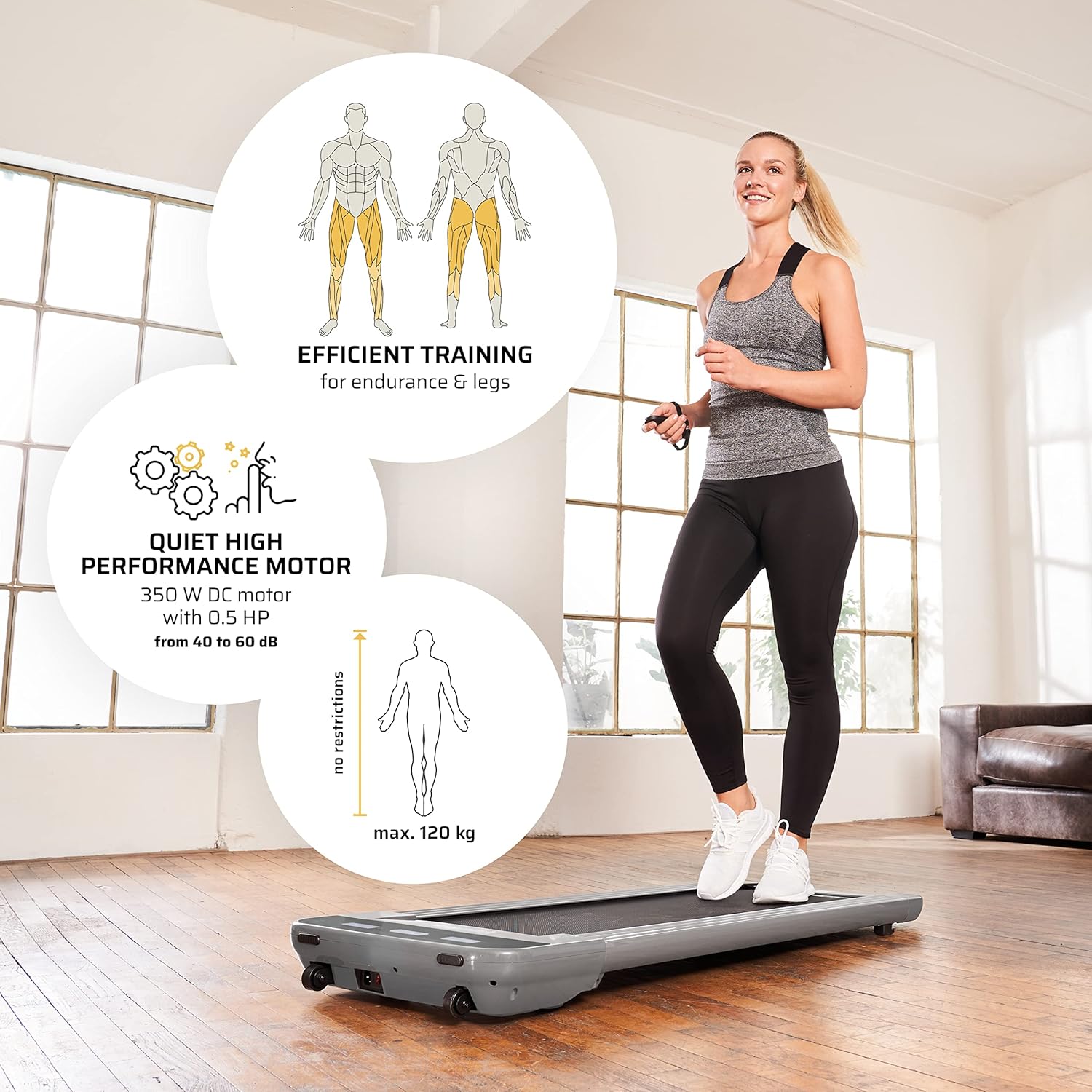
Image: Infographic detailing the quiet high-performance motor (350W DC, 40-60 dB), maximum user weight (120 kg), and benefits for endurance and leg training.
8. വാറൻ്റിയും പിന്തുണയും
SportPlus is committed to providing high-quality and durable sports equipment.
- വാറൻ്റി: For specific warranty details, please refer to the warranty card included with your product or visit the official SportPlus webസൈറ്റ്.
- കസ്റ്റമർ സർവീസ്: Should you have any questions or require assistance, our service team in Hamburg is available to help.
- യന്ത്രഭാഗങ്ങൾ: SportPlus maintains a constant stock of wear and spare parts to ensure the durability and longevity of your device.
Contact information for support can typically be found on the SportPlus webസൈറ്റ് അല്ലെങ്കിൽ ഉൽപ്പന്ന പാക്കേജിംഗിൽ.


