1. ആമുഖം
This manual provides essential information for the installation, setup, operation, and maintenance of your Phillips PCD265 Digital Smart Lock. Designed for enhanced security and convenience, this smart deadbolt is suitable for residential and office environments. Please read these instructions carefully before installation and use to ensure proper function and longevity of the product.
Important Note: The Phillips PCD265 Digital Smart Lock is not resistant to direct sun and rain exposure. It is intended for interior use or on main entrance doors that are protected from direct weather elements.
2. ഉൽപ്പന്നം കഴിഞ്ഞുview
The Phillips PCD265 is a digital smart lock featuring a numeric keypad and traditional key access. It offers a secure and convenient way to manage access to your property.
പ്രധാന സവിശേഷതകൾ:
- കീപാഡ് ആക്സസ്: Supports 4 to 8-digit user codes.
- ഉപയോക്തൃ ശേഷി: Up to 50 unique user codes can be programmed.
- Traditional Key Override: Includes a point key for manual access.
- കുറഞ്ഞ ബാറ്ററി സൂചകം: ബാറ്ററി മാറ്റിസ്ഥാപിക്കൽ ആവശ്യമായി വരുമ്പോൾ മുന്നറിയിപ്പ് നൽകുന്നു.
- വാതിൽ കൈമാറ്റം: Configurable for left or right-hand door opening.
- പ്രകാശ സൂചകം: Provides visual feedback for locking, unlocking, and incorrect code entry.
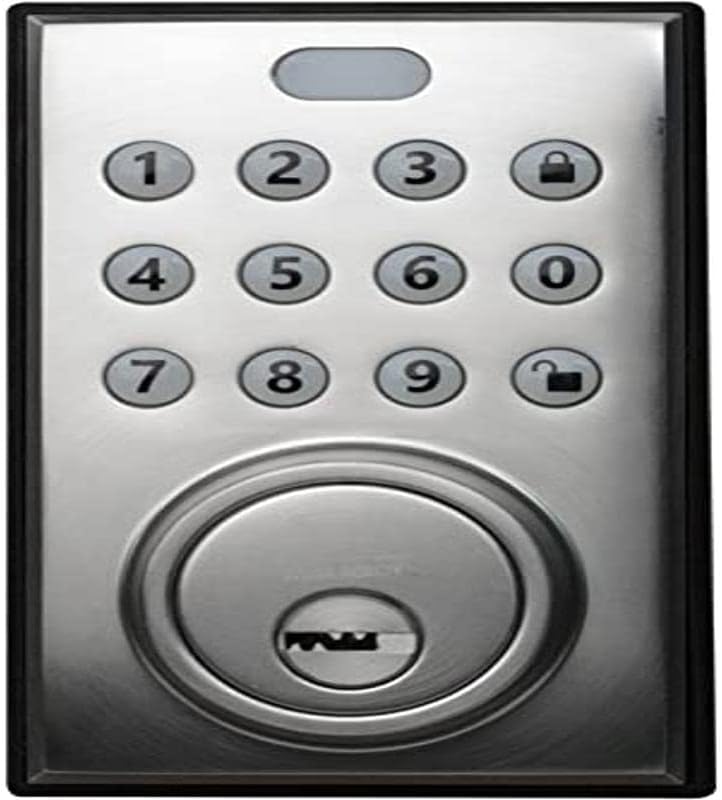
ചിത്രം 2.1: മുൻഭാഗം view of the Phillips PCD265 Digital Smart Lock, showing the numeric keypad and keyhole.

ചിത്രം 2.2: ഇൻ്റീരിയർ view of the Phillips PCD265 Digital Smart Lock, featuring the thumb turn and the area for battery installation.
3. ഇൻസ്റ്റലേഷൻ
The Phillips PCD265 Digital Smart Lock is designed for installation on wooden doors with a thickness between 3.5 cm and 4.5 cm.
3.1 പ്രീ-ഇൻസ്റ്റലേഷൻ പരിശോധനകൾ
- Ensure your door meets the specified thickness requirements (3.5 cm to 4.5 cm).
- Verify that the door frame and existing boreholes are compatible with a standard deadbolt installation.
- Confirm the lock will be installed in a location protected from direct weather exposure (sun and rain).
3.2 Door Handing Configuration
Before final installation, configure the lock for your door's opening direction (left or right). An internal switch within the mechanism allows for this adjustment. Refer to the detailed installation guide provided in the product packaging for specific instructions on setting the door handing.
3.3 ബാറ്ററി ഇൻസ്റ്റാളേഷൻ
The lock requires 4 AA alkaline batteries (not included). Install these into the interior unit's battery compartment. Ensure correct polarity. It is recommended to use new, non-rechargeable alkaline batteries for optimal performance and longevity.
4. സജ്ജീകരണവും പ്രോഗ്രാമിംഗും
After installation, you will need to program user codes for access. The lock supports up to 50 unique 4 to 8-digit codes.
4.1 ഉപയോക്തൃ കോഡുകൾ പ്രോഗ്രാമിംഗ്
- Locate the programming button on the interior unit (refer to the full installation guide for exact location).
- പ്രോഗ്രാമിംഗ് ബട്ടൺ അമർത്തുക. കീപാഡ് പ്രകാശിക്കും.
- Enter your desired 4 to 8-digit user code.
- Press the lock symbol button (🔒) to confirm the code.
- Repeat for additional user codes.
For detailed instructions on adding, deleting, or modifying user codes, consult the comprehensive programming guide included with your product.
5. പ്രവർത്തന നിർദ്ദേശങ്ങൾ
5.1 വാതിൽ അൺലോക്കുചെയ്യുന്നു
- ഒരു കോഡ് ഉപയോഗിക്കുന്നു: Enter a valid 4 to 8-digit user code on the keypad, then press the unlock symbol button (🔓). The light indicator will confirm successful unlocking.
- കീ ഉപയോഗിച്ച്: Insert the provided point key into the keyhole and turn to unlock.
- ഉള്ളിൽ നിന്ന്: Turn the thumb turn on the interior unit to unlock the deadbolt.
5.2 വാതിൽ പൂട്ടുന്നു
- പുറത്തുനിന്നും: Press the lock symbol button (🔒) on the keypad. The light indicator will confirm successful locking.
- ഉള്ളിൽ നിന്ന്: Turn the thumb turn on the interior unit to lock the deadbolt.
5.3 Light Indicator Feedback
- ഗ്രീൻ ലൈറ്റ്: Indicates successful operation (e.g., lock/unlock).
- ചുവന്ന വെളിച്ചം: Indicates an error (e.g., incorrect code entered).
- മിന്നുന്ന വെളിച്ചം: May indicate low battery or a programming mode. Consult the full manual for specific flash patterns.
6. പരിപാലനം
6.1 ബാറ്ററി മാറ്റിസ്ഥാപിക്കൽ
When the low battery indicator activates, replace all four AA batteries promptly. Using fresh alkaline batteries is crucial for reliable performance. Do not mix old and new batteries, or different types of batteries.
6.2 വൃത്തിയാക്കൽ
ലോക്കിന്റെ പുറംഭാഗം മൃദുവായ, ഡി ക്ലീനർ ഉപയോഗിച്ച് വൃത്തിയാക്കുക.amp തുണി. അബ്രാസീവ് ക്ലീനറുകൾ, ലായകങ്ങൾ അല്ലെങ്കിൽ കെമിക്കൽ സ്പ്രേകൾ ഉപയോഗിക്കുന്നത് ഒഴിവാക്കുക, കാരണം ഇവ ഫിനിഷിനും ഇലക്ട്രോണിക് ഘടകങ്ങൾക്കും കേടുവരുത്തും.
6.3 Key Cylinder Maintenance
Periodically, apply a small amount of graphite-based lubricant to the key cylinder to ensure smooth operation. Avoid oil-based lubricants, which can attract dirt.
7. പ്രശ്നപരിഹാരം
| പ്രശ്നം | സാധ്യമായ കാരണം | പരിഹാരം |
|---|---|---|
| കീപാഡ് എൻട്രിയോട് ലോക്ക് പ്രതികരിക്കുന്നില്ല. | ഡെഡ് ബാറ്ററികൾ. | Replace all four AA batteries with new alkaline batteries. |
| Incorrect code entered, but light indicator shows red. | Incorrect code sequence or timing. | Re-enter the code carefully. Ensure the code is correct and within 4-8 digits. |
| Lock is difficult to operate with the key. | Key cylinder needs lubrication. | Apply graphite lubricant to the key cylinder. |
| Lock does not engage/disengage smoothly. | തെറ്റായ ക്രമീകരണം അല്ലെങ്കിൽ തടസ്സം. | Check for any obstructions in the door frame or strike plate. Ensure the lock is properly aligned. |
8 സ്പെസിഫിക്കേഷനുകൾ
| ഫീച്ചർ | വിശദാംശങ്ങൾ |
|---|---|
| മോഡൽ നമ്പർ | PCD-265 |
| നിർമ്മാതാവ് | അസ്സ അബ്ലോയ് |
| നിറം | സാറ്റിൻ നിക്കൽ |
| മെറ്റീരിയൽ | അലോയ് സ്റ്റീൽ |
| വാതിലിന്റെ കനം അനുയോജ്യത | 3.5 സെ.മീ മുതൽ 4.5 സെ.മീ |
| കോഡ് ദൈർഘ്യം | 4 മുതൽ 8 വരെ അക്കങ്ങൾ |
| Max User Codes | 50 |
| പവർ ഉറവിടം | 4 x AA ബാറ്ററികൾ (ഉൾപ്പെടുത്തിയിട്ടില്ല) |
| ഉൽപ്പന്ന അളവുകൾ (L x W x H) | 21.01 x 10.01 x 23.01 സെ.മീ (8.27 x 3.94 x 9.06 ഇഞ്ച്) |
| ഉൽപ്പന്ന ഭാരം | 1.16 കി.ഗ്രാം |
| പ്രത്യേക സവിശേഷതകൾ | Left/Right door opening, Low battery indicator, Key override |
9. വാറൻ്റിയും പിന്തുണയും
For warranty information, technical support, or service inquiries regarding your Phillips PCD265 Digital Smart Lock, please refer to the warranty card included in your product packaging or visit the official Phillips webവാറന്റി ക്ലെയിമുകൾക്കുള്ള വാങ്ങലിന്റെ തെളിവായി നിങ്ങളുടെ വാങ്ങൽ രസീത് സൂക്ഷിക്കുക.
If you encounter issues not covered in this manual, please contact Phillips customer support for assistance.


